
Young makers, let’s get to know a kind of sensor that is "invisible but very important" ☀️!
The sunshine is warm and cozy, but did you know that there is also a kind of invisible energy hidden in sunlight — ultraviolet rays. Too much exposure to it can darken your skin or even cause sunburn.
Today, the module we’re about to unlock is the one that can " sense the intensity of ultraviolet rays " —— the UV ultraviolet sensor module based on GUVA-S12SD ✨ It lets the development board know: 👉 how strong the current sunlight is, and whether you need to take sun protection measures!
1. Module Introduction
We can perceive light and colors with our eyes, but ultraviolet light is invisible to the naked eye — so how do devices measure its intensity?
This is precisely the task of the GUVA-S12SD ultraviolet sensor module.
It is an analog environmental sensor: when the ultraviolet intensity in the environment increases, the module will output a higher voltage signal; the development board can judge "the current ultraviolet level is low / medium / high" by reading this change.
Compared with ordinary "switch-type" modules, it has the following characteristics:
- ☀️ Perceive continuous changes: not a binary "present / absent", but a matter of "degree of intensity";
- ☀️ Close to real environments: Commonly used for weather monitoring and outdoor safety reminders;
- ☀️ suitable for making judgments and sending reminders: such as sun protection prompts and environment display.
In graphical programming, these blocks are commonly used for UV ultraviolet sensors:
- Read the analog input block: Obtain the UV intensity value;
- Variable block: stores the currently detected ultraviolet value;
- Condition judgment block: Judge "whether the safe value is exceeded";
- Display / LED / Buzzer Blocks: Used for prompt feedback.
In practical projects, it is often used for the following purposes:
- Ultraviolet Intensity Detection
- Sun Protection Reminder Device
- Small-scale Environmental Monitoring Experiment
Quick Science: What is Ultraviolet (UV) Light?
Ultraviolet (UV) radiation is a type of light invisible to the human eye, and it is present in sunlight. When UV radiation is too intense, it can cause harm to the skin and eyes, which is why weather forecasts often include a "UV index" alert.
2. Wiring Instructions
To make the development board "sense" the intensity of sunlight, the first step remains —— connect the module correctly!
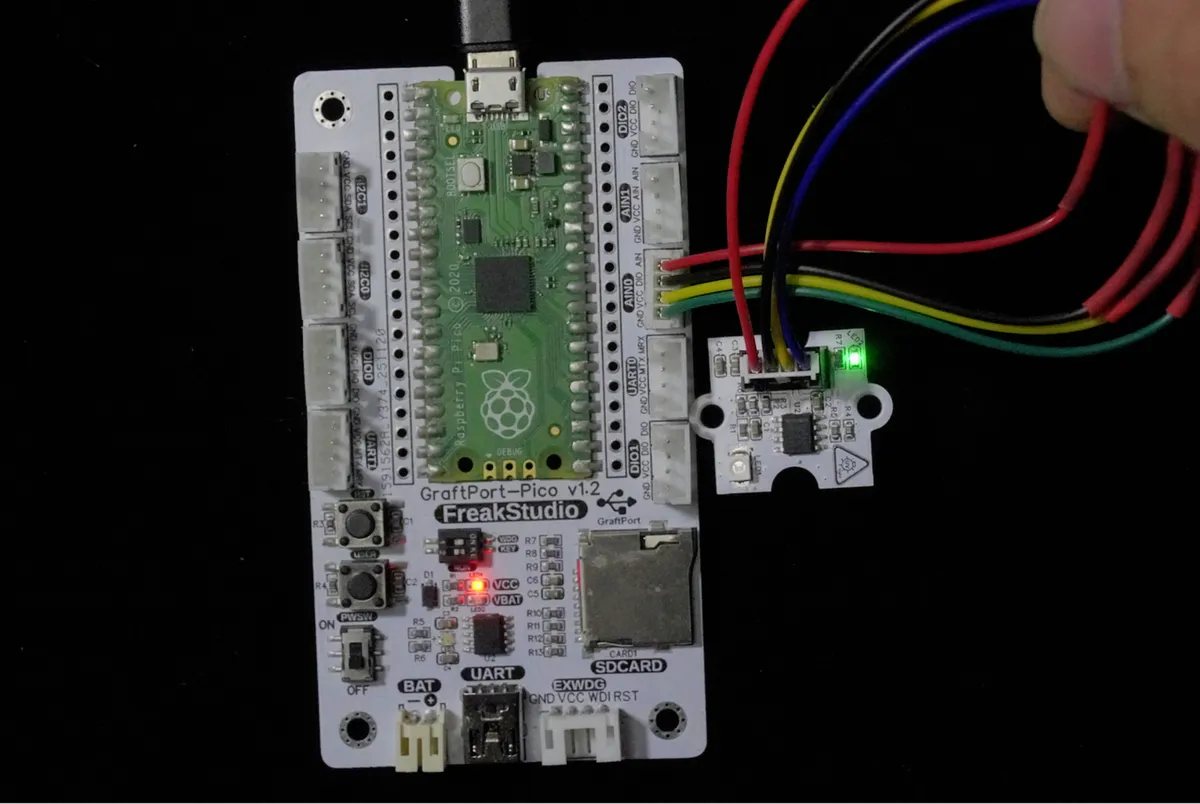
We will connect the GUVA-S12SD ultraviolet sensor module to the analog interface AIN0 of the development board, with the corresponding relationship as follows:
Development Board Pins | Module Pins | Description |
Pin 26 |
| UV ultraviolet sensor analog output pin |
Pin 19 |
| - |
📌 Note
- The stronger the ultraviolet rays, the greater the value output by OUT;
- The development board, via analog reading, can detect the current intensity of ultraviolet radiation.
3. Example: Detecting Ultraviolet Intensity
Experiment Objective: Detect the ultraviolet intensity in the environment in real time and print the current value on the terminal.
Everyday Thought: The "UV Index" displayed in weather apps is essentially measured using sensors similar to this. Now, let's build our very own UV detector!
The graphical program is as follows:
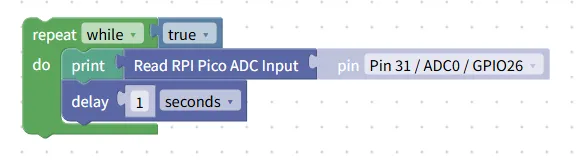
Building Block Assembly Steps:
- infinite loop
- Use the repeat while true block to make the program continuously detect the environment;
- Read UV index
- Use the read analog input block;
- Select the analog pin connected to the UV sensor;
- Save the value
- Store the read value in the variable uv_value;
- Statistics show
- Use the print block to print the current ultraviolet value to the terminal.
Experimental Effect:
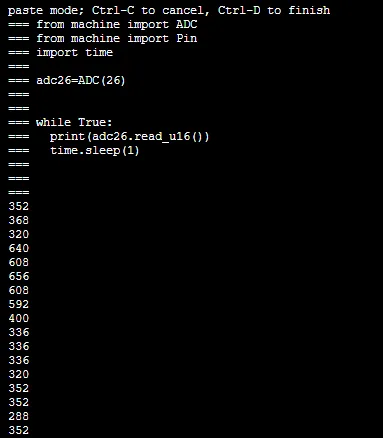
- The value is lower when indoors or in shaded areas;
- Place the module in direct sunlight, and the reading will increase significantly;
- After the sensor is blocked, the value decreases again.
📌 You can try: Compare the value changes in the morning / at noon / in the afternoon!
Graphical blocks will be automatically converted into MicroPython code, and the running results will be displayed:
XML file (can be directly imported into building blocks):
UV ultraviolet sensor module.xml 2 KB
Tips
- If the change in the value is not significant:
- Try placing it directly in sunlight;
- Do not be completely blocked by the transparent casing;
- The ultraviolet sensor is an analog quantity:
- The value will change continuously, which is a normal phenomenon;
- Advanced Gameplay:
- Set a "safety threshold", and the LED will light up as a reminder once the threshold is exceeded.
✨ Interactive Quick Question
- Think about it:
Why can't UV sensors output only "0 or 1" like buttons? - Give it a try:
Set a threshold to display "Pay attention to sun protection" when the UV is too strong, and "Suitable for outdoor activities" when it is weak.
Summary
- The GUVA-S12SD ultraviolet sensor is a environmental analog sensor;
- It can detect the intensity changes of ultraviolet rays in sunlight;
- The stronger the ultraviolet radiation, the higher the reading obtained;
- Intelligent reminder functions can be implemented through conditional judgment.