
Contents
Young makers, today let's unlock three "electronic noses that can smell odors"👃!
The smoke detectors at home can sense smoke, the traffic police's alcohol testers can detect alcohol, and air purifiers can pick up harmful gases—all of which rely on similar gas-sensitive sensors. The MQ series module we’re getting to know today acts like a development board’s "electronic nose", capable of accurately "sniffing out" smoke, alcohol, and harmful gases. It’s incredibly practical ✨!
1. Module Introduction
The MQ series are all semiconductor gas sensors, each featuring a core made of a semiconductor material sensitive to specific gases. When the target gas comes into contact with the sensor surface, the resistance of the semiconductor changes, and the module converts this change into an electrical signal, letting the development board know "whether the target gas is detected at present".
Model | Test Object | Life Scenarios |
|---|---|---|
MQ-2 Smoke Sensor Module | Combustible gases such as smoke, methane, and liquefied petroleum gas | Smoke alarms and gas leak detectors |
MQ-3 Alcohol Sensor Module | Alcohol, Ethanol, Volatile Organic Compounds | Drunk driving detection, breath alcohol test |
MQ-135 Air Quality Sensor Module | Formaldehyde, ammonia, benzene, air quality | Indoor air quality monitoring and harmful gas alarm |
Their common features:
- 👃 Real-time detection: Capable of continuously "sniffing" surrounding gases with a fast response speed;
- 🎯 Dual output modes: supported Digital Output (DO)(triggers high/low level when gas concentration exceeds the threshold) and Analog Output (AO)(outputs continuously varying voltage to reflect concentration level);
- 🧩 Adjustable Sensitivity: The potentiometer on the module can adjust the trigger threshold to adapt to different scenarios.
Two reading modes are available:
- Digital Read (DIN Pin): Only judges "whether the concentration exceeds the limit"(simple and fast, suitable for alarm purposes);
- ADC analog reading (AIN pin): Capable of measuring "how high the concentration is"(the higher the value, the higher the concentration).
In graphical programming, these blocks are commonly used:
- Set pin mode block: Set the pin connected to the sensor to "input mode" before you can read the voltage level;
- Read Number / ADC Input Block: Number reading checks "whether the value exceeds the threshold", while ADC reading measures "concentration level";
- Conditional judgment blocks: for example, "If smoke is detected, trigger the buzzer and LED flashing alarm";
- Delay block: Prevents signal jitter to avoid "repeated alarms triggered by minor smoke".
A Quick Science Note: Why Do We Need to Preheat?
Before using the MQ series sensors for the first time, please power them on and preheat for 2 to 3 minutes! The gas-sensitive element needs to reach a stable state to ensure accurate detection results, just like we need to warm up before exercising~
2. Wiring Instructions
To make a sensor "sniff" gas or smoke, first connect the wires correctly!
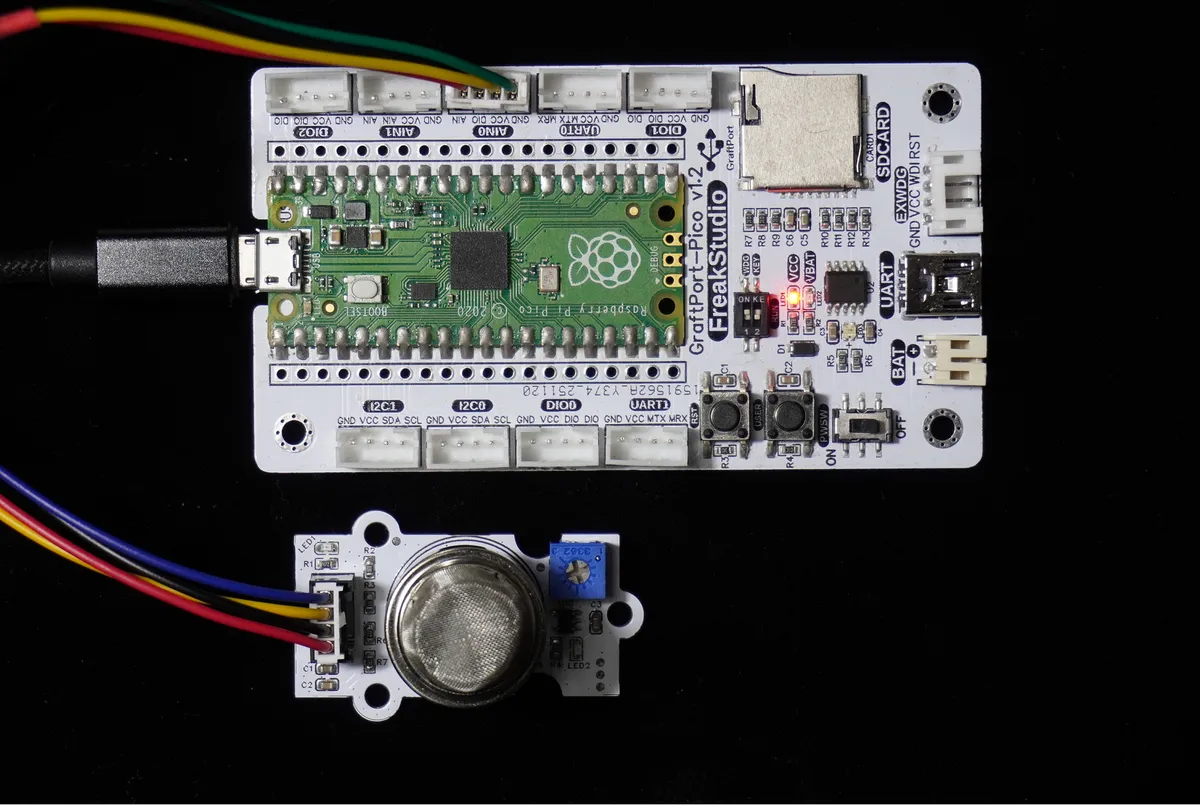
Connect the MQ2 module to the AIN0 interface on the development board, and make sure to memorize the specific pin correspondence:
Development Board Pins | Module Pins | Description |
Pin 26 |
| Sensor analog signal input pin |
Pin 19 |
| Digital signal input pin after digital comparison of sensor analog signals |
📌 Note
- The potentiometer on the module can adjust the trigger threshold: rotate clockwise → the threshold becomes higher (a higher gas concentration is required to trigger); rotate counterclockwise → the threshold becomes lower (more sensitive to gas);
- When using the device for the first time, it is recommended to power it on and preheat it for 2-3 minutes to allow the sensor to work stably.
3. Power-on preheating
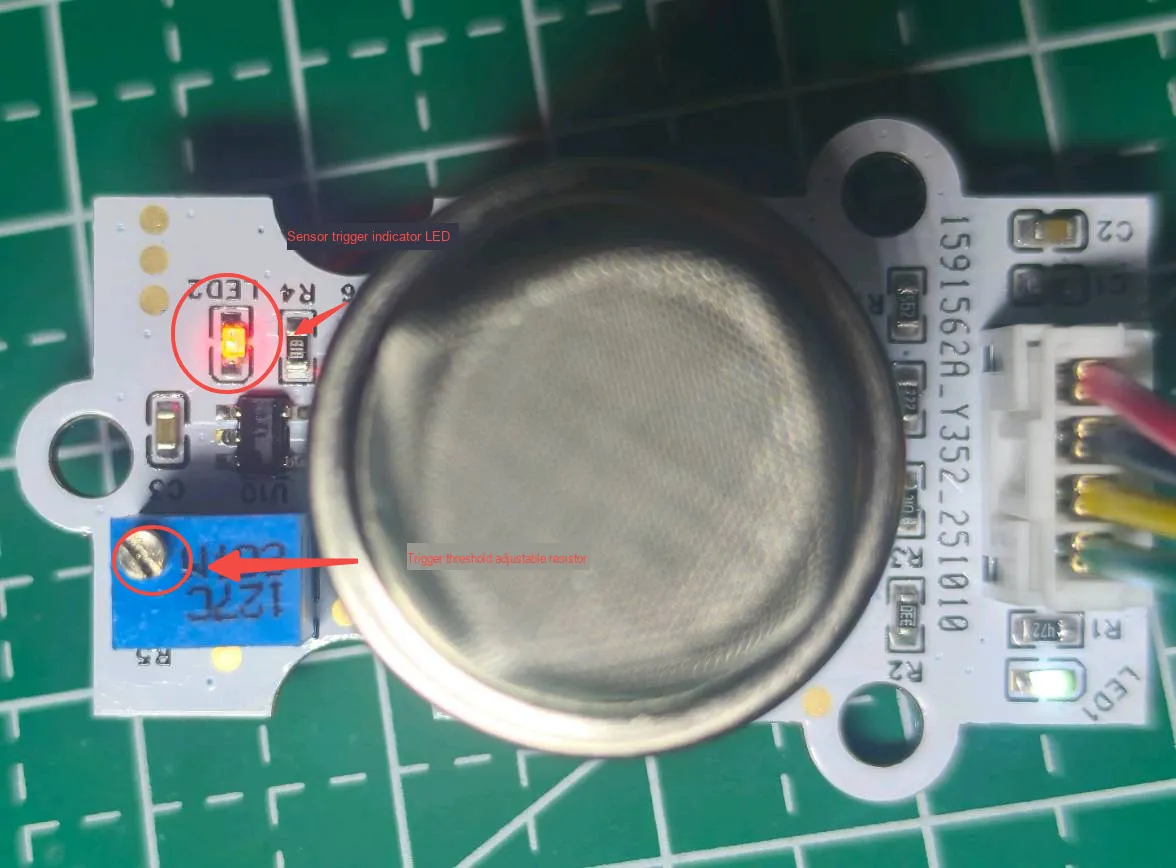
Before burning the code, we first need to adjust the MQ series electrochemical gas sensor module the digital output threshold:
- Ensure the sensor is in normal air and has been fully warmed up, then locate the "threshold adjustment variable resistor
R5"(marked with a red circle in the figure) on the module; - Turn this counterclockwise while observing
LED2(sensor trigger indicator); - When
LED2is just fully lit, stop the operation and slightly adjust it back to the position where it goes out; at this point, the sensor has been calibrated to a reasonable threshold in an air environment.
4. Example: Smoke Detection Triggers Alarm
Experimental Objective: Continuously monitor the surrounding gases. When the target gas is detected (for example, MQ-2 detects smoke, MQ-3 detects alcohol, and MQ-135 detects formaldehyde), print "MQ sensor triggered" on the terminal to intuitively experience the sensitivity of the "electronic nose".
Everyday Life Insight: The smoke alarm in your home beeps when it detects smoke, and this works on a similar principle. Now let's make a "mini gas detector" ourselves!
Taking MQ2 as an example, the core characteristics of this sensor are as follows:
- When no smoke is detected, the sensor outputs a high level;
- When the smoke concentration is detected to exceed the threshold, a low level is output; therefore, by using the
not(inversion) operation, the state of "low level = smoke detected" can be identified.
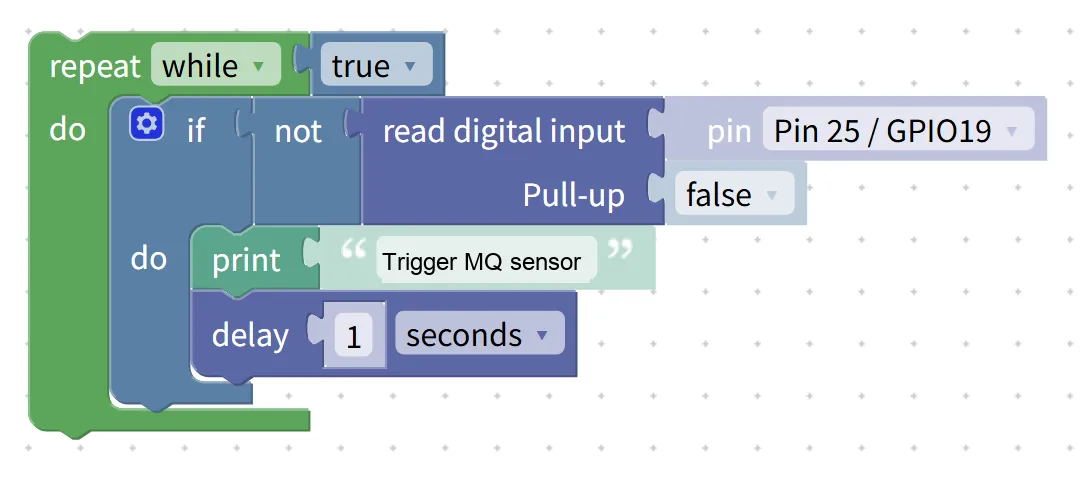
The graphical program is as follows:
Building Block Assembly Detection (Step-by-Step Assembly Guide):
- Infinite Loop Monitoring
- Drag in the
repeat while trueblock to keep the program running continuously.
- Drag in the
- Read digital output status
- Drag in the
if not read digital inputblock; - Selected Pin:
Pin 25 / GPIO19; - Set
Pull-uptofalse(since the DO outputs a low level when the gas exceeds the threshold, andnotis used to identify the trigger state).
- Drag in the
- Trigger an alarm prompt
- When the condition is satisfied, add the
print "Trigger MQ sensor"block; - Add the
delayblock and set it to1second → to avoid frequent printing.
- When the condition is satisfied, add the
Experimental results (taking MQ-2 as an example):
- In normal air, the terminal has no output, and the LED2 of the module is off;
- Bring a small amount of smoke from a lighter close to the sensor (or spray a small amount of alcohol mist), the terminal will immediately print "Smoke sensor triggered", and the LED2 of the module will light up;
- Remove the smoke source, the system will prompt to stop printing, LED2 will turn off, and no repeated alarm will be triggered~
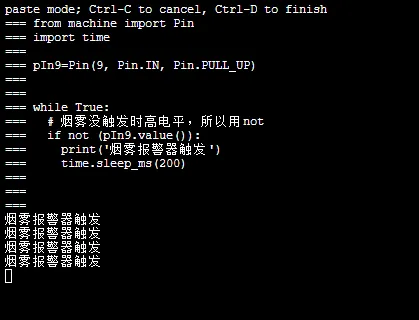
Graphical blocks will be automatically converted into MicroPython code, and the running result will be displayed:
XML files can be directly imported into the building blocks:
MQ2.xml 2 KB
Tips
- Is false triggering still occurring after calibration? Turn the adjustable resistor slightly clockwise (to raise the threshold) to reduce sensitivity to environmental interference.
- Want to test the concentration level? Replace "read digital input" with "read ADC input (AIN pin required)", and the terminal will print the specific value — the smaller the value, the higher the concentration;
- Want to upgrade the audible and visual alarm? Simply replace the
printblock with "continuous buzzer tone + fast LED flashing" for a more eye-catching early warning~
✨ Interactive Quick Question
- Think about it: Why do MQ series sensors require preheating? Will the detection results be more stable after preheating?
- Try it: Gently exhale a breath (containing a small amount of alcohol) toward the MQ-3 sensor to see if it triggers an alarm. Then use the MQ-135 to test the air in a newly renovated room to experience the difference in sensitivity.
Summary
- The MQ series sensors are semiconductor gas-sensitive modules that can accurately detect smoke, alcohol and harmful gases, serving as the "electronic nose" for development boards.
- Several modules feature completely identical wiring and programming, and only differ in the detection target, making them suitable for projects such as fire early warning, drunk driving detection, and air quality monitoring.
- The basic usage is to trigger an alarm via "digital output + loop detection", while the advanced usage is to read the analog value to display the gas concentration;
- Please pay attention to safety during use. Be sure to preheat the device before the first use to ensure stable test results.