
Contents
- 1. Why do we need functions
- 2. What is a function
- 3. Basic Components of a Function
- 3.1 Function Name —— Attaching a "Name Tag" to the Toolkit
- 3.2 Function Operation Blocks —— The "Core Tools" in the Toolkit
- 3.3 Input Parameters (Optional) — Providing Materials to the Toolkit
- 3.4 Return Value (Optional) — the "deliverable" produced by the toolkit after execution
- 4. Core Building Blocks of Function
- 4.1 Definition and Calling Blocks for Void-returning function —— function that only performs tasks without "handing in assignments"
- 4.2 Available return value function definition and call blocks —— functions that "hand in their assignments" after completing tasks
- 4.3 Conditional Return Block (if… return…) —— A function that "hands in its homework" after completing a task
Hello, young creators! By now, you have learned about loop blocks, logic blocks, and math blocks, which can make your programs run, make decisions, and perform calculations. However, as programs get longer and longer, you may notice that certain actions keep repeating: displaying greetings, measuring and judging temperature, turning on LED lights. .. If you have to rewrite all of these every single time, it's not only tedious but also error-prone.
At this point, we need a magical tool — function!
- It can package a sequence of operations just like putting building blocks into a toolbox.
- When you need to use it, just call its name and you're good to go, no need to drag the block repeatedly
- It enables programs to be shorter, clearer and easier to modify
✨ Quick Interaction
If you have to do "brush teeth, wash face, have breakfast" every day, would you rather re-learn the process every time, or have a "morning routine" button that gets everything done with one press?
(Hint: A function is just like this "morning routine button"~)
In this chapter, you will learn:
- Why is it inevitable to use functions in programs
- What exactly is a function and how does it work
- What components does a function consist of: name, operation blocks, input parameters, return value
- How to Use Function Blocks: Void Functions, Functions with Return Values, and Conditional Returns
📌 Brief Summary
Just remember one thing: A function = store a block of code and reuse it by its name
Next, let's start with why programs definitely need functions and uncover the secrets of function step by step.
1. Why do we need functions
Young makers, as you follow our step-by-step tutorials, aren’t you already able to build longer and longer programs?
But have you noticed a small hassle? There are certain actions you have to repeat over and over — like calculating "100 points minus the points deducted for wrong answers" every time, or making your character "walk three steps forward before speaking" every time. If you drag and assemble a bunch of code blocks from scratch each time to do this, it's not just a waste of time, your program will also end up a total mess — just like piling all your toys on the floor, making it such a pain to find anything you need!
Let's take an example from daily life: before you head to school every day, you always do a few fixed things — sling your schoolbag on, tie your shoelaces, put on your red scarf, and check if you’ve brought your water bottle. Wouldn’t it be such a hassle if you had to rack your brain to remember "what steps do I need to take" all over again every single day?
But if you organize these steps into a "back-to-school prep checklist" and follow it every day, wouldn't that be efficient and help you avoid forgetting anything?
In programming, function is exactly the same as this "back-to-school prep checklist"!
It can bring together and save those operations that we often need to perform repeatedly, then give them an easy-to-remember name, such as "calculate final score" or "character greeting".
When you want to perform these operations later, you don't need to piece the blocks together again. Just call out the name of the function (this is called "calling a function"), and the program will automatically execute this sequence of operations!
For example, if you want to calculate the "score after deducting points for wrong answers" three times:
- Without using a function: you have to drag the block "100 - number of wrong answers × 5" and piece it together three times every time. If you later want to change the point deduction rule to "number of wrong answers × 3", you have to make the change three times, which makes it extremely easy to miss one!
- Using a function: Put together the formula "100 - number of wrong answers × 5" and save it as a function named "Calculate Final Score". When you need to calculate the score, you only need to call this function 3 times. If you want to modify the point deduction rule, you only need to adjust the blocks inside the function, and it's done in one go!
Simply put, a function is our little programming template:
✅ Simplified program: No need to repeatedly assemble identical blocks, making the whole structure neat and tidy
✅ Super easy to modify: when you make a change in one place, all instances where this action is used will update automatically
✅ Clearer structure: Whether it's other people reading your code or you revisiting it later, anyone can tell at a glance what this section is for.
A Little Encouragement
Learning to use functions is like "tidying up your room" for your program — you sort and put away all the messy building blocks, so you can grab them right away whenever you need them, and your programming efficiency will double!
✨ Interactive Quick Question
- Think about it: Are there any "fixed repeated steps" in your daily life? For example, the steps of folding an origami crane, or the steps of making a glass of milk, try to talk about it~
- Quick response quiz: If you want the action "the sprite jumps 3 times then spins around" in the program to repeat 5 times, which is more convenient, doing it with a function or without a function? (Answer: With a function!)
- Judge: If you modify the blocks in a function, will all places that call this function change accordingly? (Answer: Yes! That's the best part of a function~)
2. What is a function
In the previous section, we learned that function can help us avoid the trouble of repeatedly stacking building blocks, so what exactly is a function?
Actually, a function is a piece of pre-prepared program code!
For example, it is just like our "little programming toolkit".
When we create a function, we just piece together in order the building blocks needed to accomplish a certain task, then give this combination an easy-to-remember name — such as "make the character greet someone" or "calculate the average score", and this process is called defining a function.
When you define a function, the program does not execute these blocks immediately. It just neatly "stores" this set of blocks into the toolbox, just like when we put scissors and glue into a toolbox — they don't start working on their own the moment you put them in, nor do they affect the operation of other programs. Whether there are 10 blocks or 20 blocks in this toolbox, everything stays perfectly still and quiet while they are being put away.
So when will these building blocks get to work?
When the program runs to the point where this operation is required, we just need to call the name of the function and let the program "fetch the toolkit" — this action is called calling a function.
It's just like when we need to cut paper, we will take out the scissors from the toolbox to use. Only when a function is called, will the blocks in the tool package actually start working and complete the preset operations step by step.
And the best part is, a toolkit can be reused over and over again! Once we define a function, we can simply call it whenever we want the program to perform that task, instead of piecing together the blocks repeatedly — it saves effort and reduces the chance of errors.
To sum up:
- Define a function = prepare the tools and put the assembled building blocks away for later use
- call a function = use a tool to make the assembled block set start working
- Core benefit: A function can be called repeatedly, which makes the program concise and easy to modify
A little encouragement
Once you understand the difference between definition and invocation, you’ll grasp the core secret of functions! After that, we can create our own functions by hand, which is incredibly rewarding!
✨ Interactive Quick Question
- Think about it: If we create a function for "the character jumps 5 times", will the character actually jump when we define the function? (Answer: No! It only jumps when the function is called~)
- Quick Quiz: Between "defining a function" and "calling a function", which one counts as "preparing the tool" and which one counts as "using the tool"? (Answer: Defining a function is preparing the tool, and calling a function is using the tool!)
- Judge: Is the statement "A function can only be called once and cannot be used again after that" correct? (Answer: No! A function can be called repeatedly~)
3. Basic Components of a Function
Young creators, we already know that a function is a "programming toolkit", so what exactly does a complete toolkit consist of? In fact, a function usually has four basic components, just like a craft kit — it can be inconvenient if any one of them is missing. These four components are: function name, operation blocks, input, output.
3.1 Function Name —— Attaching a "Name Tag" to the Toolkit
A function name is like the "name tag" we stick on a tool kit — for example, "colored paper cutting kit" or "clay bear-shaping kit" — you can tell what this tool kit is for just by looking at its name!
The same goes for function names in programming: they are the unique "labels" for functions, telling us what a given piece of program can do — for instance, if a function is named "calculate average score", we know it is for computing grades; if it is named "display grades", we know it is used to present scores.
When we create a function, the first step is to give it a name, which is just like labeling a tool kit. The name should be clear and easy to understand; never use meaningless names like "Function 1" or "aaa", otherwise in a few days even you yourself will forget what this function is for!
3.2 Function Operation Blocks —— The "Core Tools" in the Toolkit
The function operation block is the "main body" of a function, just like core tools such as scissors, glue, and markers in a tool kit — what the tool kit can do entirely depends on these items!
This part refers to the actual operations that the function needs to perform, which may include solving mathematical problems (such as adding up several scores and dividing the sum by the number of subjects), displaying text (such as outputting "Your score is 90" on the screen), controlling character movement (such as making the kitten move forward 10 steps), and even turning on small lights and playing music.
When we define a function, we drag the blocks to be executed into the function in order, just like putting scissors and glue into a tool kit. Only after these "core tools" are properly placed can the function complete the task as planned when it is called~
3.3 Input Parameters (Optional) — Providing Materials to the Toolkit
Some toolkits require us to provide certain materials before they start working. For example, the "colored paper cutting kit" needs a sheet of colored paper from us, otherwise it can't cut anything; the "input parameters" in a function are exactly the "materials" you need to provide before it gets to work, and this part is optional — not every function requires them!
For example, if you create a function for "calculating the average score", you have to input the scores of each subject (such as 90 for Chinese, 85 for Math, and 95 for English); without these scores, the function cannot compute the average. With input parameters, the function becomes flexible: this time you pass 90,85,95, and it can calculate the average of this set of scores; next time you pass 88,92,90, it can calculate the average of another set, and there is no need to rewrite the function~
When we define a function, we only need to add a few input variables, and when calling the function, just pass in specific numbers or variables — it's as simple as handing materials to a tool kit!
3.4 Return Value (Optional) — the "deliverable" produced by the toolkit after execution
After a tool package finishes running, it sometimes produces a finished product — for example, the "clay bear-making kit" will yield a little bear once you finish molding; after a function completes its operation, it may also generate a "result", which is called a "return value", and this part is optional as well~
For example, the function of "calculating the average score" will output a specific score (e. g., 88 points) after execution, and this score is the return value; however, functions like "playing music" and "turning on the indicator light" only perform corresponding actions without producing a specific "output result", so they have no return value.
If a function has a return value, we can store this result in a variable when calling it (for example, store it in the variable "my average score"), and when we need to use this result later, we can just use the variable directly!
4. Core Building Blocks of Function
Young creators, now that you've grasped the components of a function, it's time to unlock the truly usable "function tools"! In block-based programming, the core function blocks are the "dedicated components" for creating and setting up functions. With these, we can build our own functions, call them flexibly, and make them return results based on conditions — it's super practical~
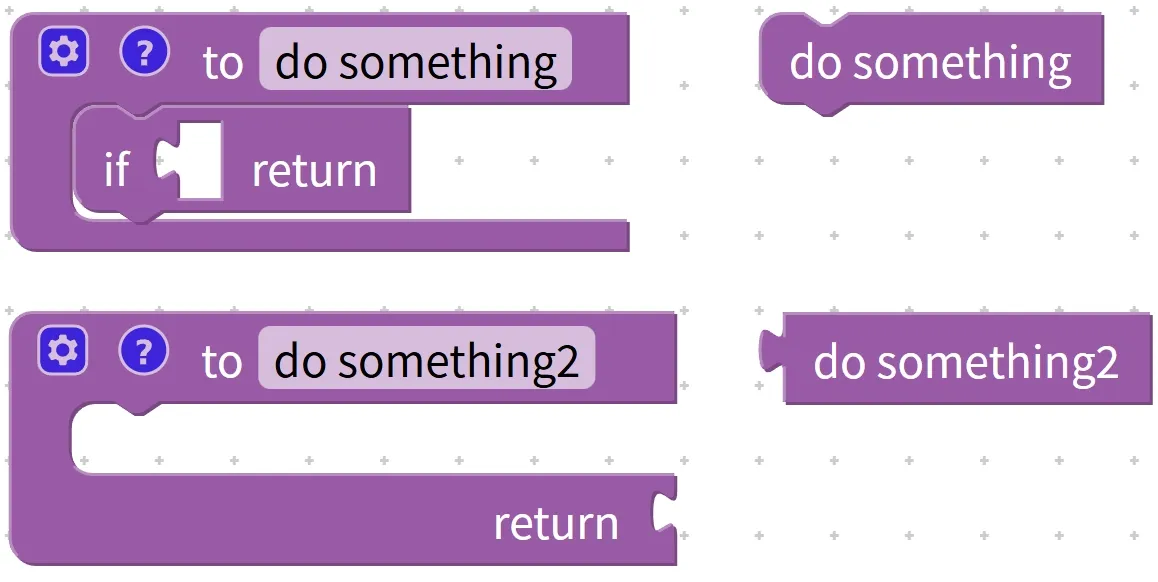
4.1 Definition and Calling Blocks for Void-returning function —— function that only performs tasks without "handing in assignments"
Young creators, let's start by unlocking the simplest function first — the void function! It's like a little helper around us that "only works and doesn't take the finished product": for example, it helps you tidy up your room, plays a children's song for you, or types a sentence on the screen, and it finishes once these tasks are done, without giving you any "result"(such as numbers or text). We call it a function that "only does things and doesn't hand in homework"~
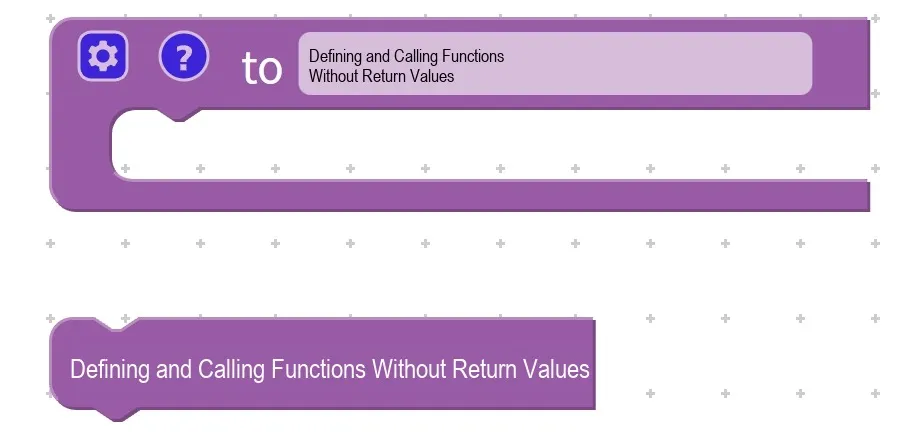
First, let's figure out: What is a "void return value function"? You can understand it right away with an example from daily life:
- When your mom asks you to "turn on the living room light", you walk to the living room, press the switch, and the light turns on — you have completed the action of "turning on the light", but you don't need to give your mom any "result"(for example, you don't have to tell her "the brightness of the light is 50"), and this is what a "void return value" task is like.
- The void function in programming works the same way: it only performs specified actions (such as displaying text, controlling character movement, and playing music), ends immediately after execution, and does not return any "finished products" like numbers, text, or lists to the program.
The most common functions with no return value are:
- Display "Welcome to the World of Programming"
- Make the kitten sprite move forward 10 steps
- Play a "ding-dong" notification sound
These are all typical examples of "just doing the work without ever turning in the assignment".
Chinese meaning: define a custom function to perform a series of operations (to do something…), and this function itself does not return a value.
The blocks for a function with no return value are extremely simple, with just two core components: the define function block (to prepare your little helper) and the call function block (to tell the little helper to get to work).
- Define function blocks: Assign a "task list" to the helper
Defining a function is just like writing a "to-do list" for your little helper, telling it what to do — but the helper won't act right away, it just jots the list down. There are only 3 super simple steps to do this:
- Step 1: Name your helper First, enter a clear name in the function definition block, such as "show greeting", "cat jump", or "play beep".
- Step 2: Assign specific actions to the helper Drag the blocks to be executed into the function box — for example, if you want the function to display "Hello", drag in the "say" block and fill in "Hello" inside it; if you want the function to control the cat to move, drag in the "move 10 steps" block. These dragged-in blocks are the "action blocks" of the function, which form the core of the function and determine what the helper will do.
- Step 3: Save the task list Once you've put together the name and the actions, the function is fully defined! At this point, the program won't perform any actions — it's just like the little helper putting the list away, waiting for us to call it before getting to work.
- Call function block: Tell the helper to "start working"
After you define a function, you have to "call" it so that the little helper will follow the checklist to get things done~ There's only one step for the operation:
- Drag in the "call function" block, then select the function name we just defined (such as "display greeting") from it. When the program runs to this step, the blocks inside the function will be executed immediately!
For example: define a function "display_greeting", whose content is to display the text "Hello". The greeting message will only be displayed on the screen when this function is called.
定义函数 显示问候
    显示 "Hello"

调用函数 显示问候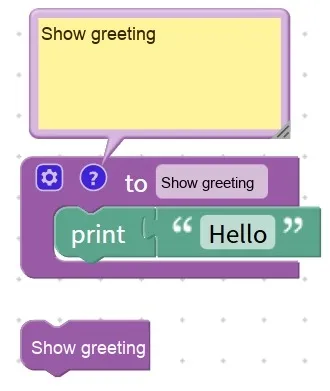
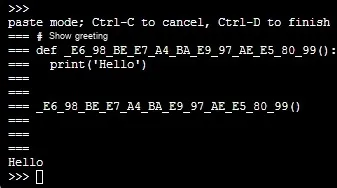
Execution result: "Hello" will pop up on the screen~
This function only performs the action of "displaying text" and does not return any results such as numbers or text, so it is a function with no return value!
Pro Tips
- Arrange actions in order: Drag the blocks in the function in the order of "what to do first, what to do next". For example, if you want the kitten to "jump first then speak", you should drag the "move block" first, then the "say text block"; otherwise, the kitten will speak first then jump.
- Do not add the "return" block: A function with no return value only performs actions and does not need to return a result, so never add the "return" block when defining it — adding it would be redundant instead;
- Reusable call: A predefined function with no return value that can be called any number of times in a program — take the "display greeting" function for example; if you want the screen to show "Hello" 10 times, you just call this function 10 times instead of piecing together the "display" block every single time, which is super convenient!
✨ Interactive Quick Question
- Think about it: Is the function that "turns on a small light and turns it off after 5 seconds" a function with no return value? Why? (Answer: Yes! Because it only performs the actions of "turning on the light and turning off the light", and does not return any result at all~)
- Quick Quiz: After you define a function with no return value, if you don't call it, will the blocks inside the function run? (Answer: No! Only when you call the function will the helper follow the list to get things done~)
- True or False: You can name a void function arbitrarily, for example, call it "123", as long as you know what it means yourself. (Answer: False! The name should be clear and easy to understand, otherwise you will forget what the function does after some time~)
- Try it: Define a function named "Display My Name" that has no return value by yourself, and make the screen display your name (e. g. "Xiaoming") after calling it.
4.2 Available return value function definition and call blocks —— functions that "hand in their assignments" after completing tasks
Young creators, in the last section we learned about the void function that "does the work but doesn't give you the finished product", and in this section we're going to unlock something even more powerful — the value-returning function! It's like an incredibly thoughtful little helper: not only can it get the job done as required, but it will also hand you the "finished product" from its work, and this "finished product" is the return value ~
First, let's figure out: What exactly is a "function with a return value"? It's super easy to understand with real-life examples:
- Void function = Mom tells you "clean the table", and you just finish the task without giving Mom any "result";
- A function with a return value is like when your mom asks you to "count how many apples there are at home", and after you finish counting, you have to tell her "there are 5". This "5" is the "assignment" you hand in, which is exactly the return value of the function.
The same principle applies to programming:
- Void function: It only performs actions (such as displaying text, playing music, and moving a character) and produces no specific "result";
- Function with return value: In addition to performing actions, it will also generate a specific result (such as a number, text, list) that can be passed to the program for further use.
The most common functions with return values are various "computation-oriented" functions — for example, those that calculate the average score, the area of a rectangle, or the sum of two numbers. After completing the calculation, the result must be returned to the program, otherwise all the computation goes to waste!
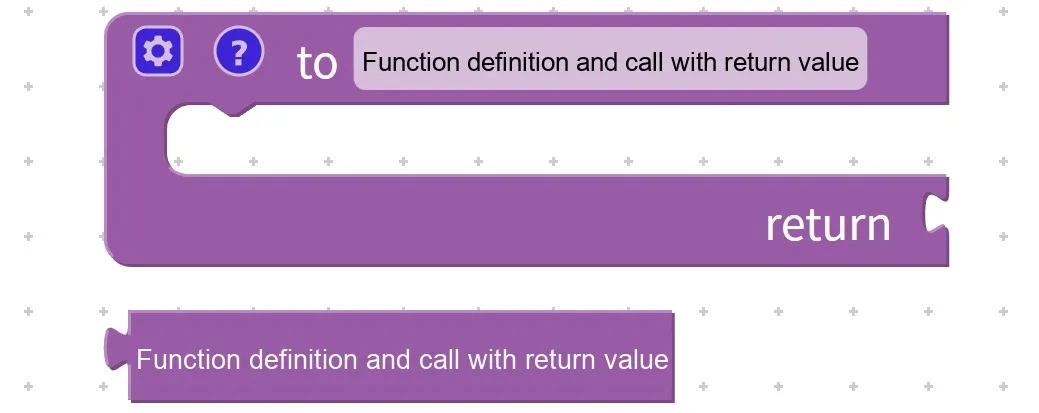
Chinese meaning: define a custom function to perform a series of operations (to do something…), after the function finishes executing return the specified result. .. When calling the function, you can save the return value to a variable for subsequent use by the program.
Compared with functions that have no return value, functions with return values come with two key extra "components" in their blocks, and we will explain each of them one by one:
- Blocks for defining a function (preparing the "assignment submission helper")
Defining a function with a return value involves 4 steps, just like assigning an "assignment with homework" to a little assistant:
- Step 1: Name your assistant First, enter a name for the function, such as "Calculate average score" or "Calculate rectangle area". The name must be clear at a glance; for example, don't name it "Function A", instead name it "Calculate the average score of Chinese, mathematics and English", otherwise you will forget it later!
- Step 2: Provide "materials" to the assistant (add input parameters) For the assistant to work, you first need to provide it with the necessary materials — for example, to calculate the average score, you have to tell it the score of each subject, and these are the "input parameters". We add input variables in the function definition block, such as "Score 1, Score 2, Score 3", which is just like telling the assistant: "If you want to calculate the average score, you have to tell me the scores of Chinese (Score 1), Math (Score 2), and English (Score 3) first!"
- Step 3: Assign tasks to the assistant (place operation blocks) Drag the blocks to be executed into the function box. For example, to calculate the average score, drag:
Average =(Score 1 + Score 2 + Score 3) / 3This step is to let the assistant complete the calculation step by step, which is the same as the operation blocks of a function with no return value~ - Step 4: Have the helper "submit its work"(add a return block) This is the most critical step! Be sure to drag in a "return" block and fill in the calculated result (for example, the variable "average") inside it. This is just like telling the helper: "After you calculate the average score, be sure to tell me the result!" Without this step, the helper will stay silent even after finishing the calculation, and the program will not be able to get the result.
- Block for calling a function (trigger the assistant to start working + collect assignments)
After defining a function, you still need to "ask the assistant to get to work", and remember to "collect the assignment" — the biggest difference between calling a function with a return value and a function without a return value is that you have to store the return value in a variable, otherwise the "assignment" will be lost!
The invocation consists of 2 steps:
- Step 1: Call the function and collect the results Drag in the "call function" block, select the name of the function we defined (e. g., "calculate average score"), then fill in the specific "parameters"(e. g., 80,90,70) in the parentheses, and use "->" to store the result in a variable (e. g., "average score"). This is just like telling your assistant: "Now calculate the average of these three scores 80,90, and 70, and put the result into the little box labeled 'average score' once you're done!"
- Step 2: Use the "Job Result" After saving the return value, we can use this variable for anything — for example, drag in the "Show" block, select the variable "Average Score", and the calculated result will pop up on the screen.
For example: Define function calculate_average_score (score_1, score_2, score_3)
定义函数 计算平均分(分数1, 分数2, 分数3)
    平均 = (分数1 + 分数2 + 分数3) / 3
    返回 平均

调用函数 计算平均分(80, 90, 70) -> 平均分
显示 平均分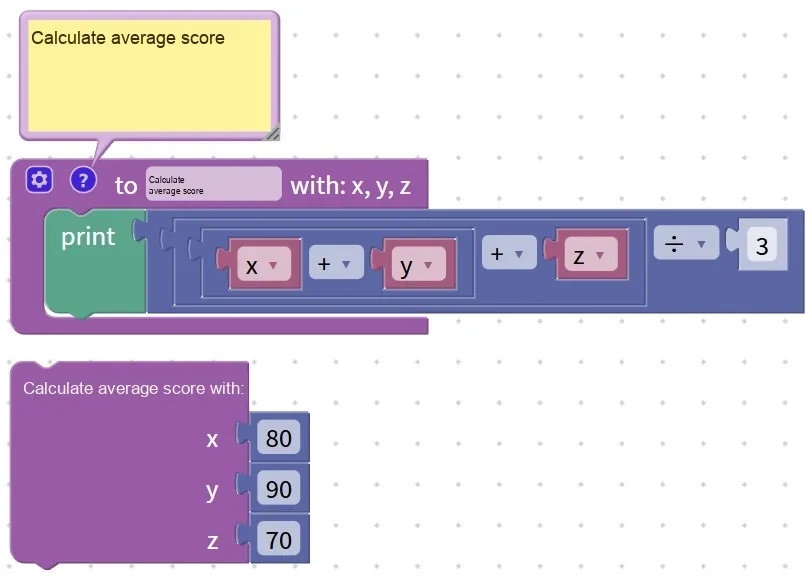
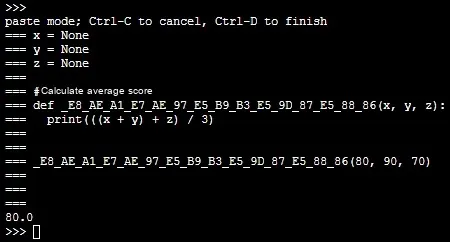
Execution result: The screen displays "80"(since (80+ 90+ 70)÷3= 80) ~
This function not only performs the calculation but also "passes" the calculated average score to the "average_score" variable, so it is a function with a return value!
Tip: A Quick Reminder for Using Functions with Return Values Properly
- The return value must "correspond": for a function that calculates numbers, fill in a numeric variable for the return value; for a function that judges text, fill in a text variable for the return value. For example, don't let the function for "calculating the average score" return "apple", otherwise the program will go wrong!
- Don't omit parameters: When calling a function, the number of parameters in the parentheses must match the number in the definition — for example, if the definition requires 3 scores, you must provide exactly 3 when calling; if you leave one out, the little helper won't know how to calculate it.
- Always store the return value: when calling a function with a return value, remember to use "-> variable name" to save the result; otherwise, even if the function computes a result, the program cannot obtain it, which means the computation is completely wasted!
✨ Interactive Quick Question
- Think about it: If you want to create a value-returning function for "calculating the area of a rectangle", what should the input parameters be? (Hint: Area of a rectangle = length × width, Answer: length and width!)
- Quick Quiz: What is the biggest difference between a function with a return value and a function without a return value? (Answer: A function with a return value will return a result, while a function without a return value only performs actions and outputs no result~)
- Judge: When defining a function with a return value, if you forget to add the "return" block, can the program still get the calculation result? (Answer: No! The "return" block is the key to submitting your work; without it, you won't get the result~)
- Try it: Try to define a value-returning function that "calculates the sum of two numbers" on your own, and display the result after calling it (for example, input 5 and 3, and 8 will be displayed).
4.3 Conditional Return Block (if… return…) —— A function that "hands in its homework" after completing a task
Young creators, earlier we learned about void functions that only perform tasks without returning any value, and value-returning functions that "hand in their homework" after finishing tasks. Now we are going to unlock a smarter function — the conditional return function that can "act according to circumstances"! It is just like a little assistant with "judgment": it will make different choices when encountering different situations, and can also end the task early and hand in the corresponding "homework", which is super flexible~
Let's understand this with a real-life example: your mom asks you to "check if there's a Chinese textbook in your schoolbag". If there is one, you just tell her "yes" and don't need to check anything else; if there isn't, you tell her "no". You won't foolishly go through every single item in the bag, instead you give the result "depending on the situation" — that's exactly the idea of "conditional return"!
In programming, the conditional return block (if… return…) is what adds "judgment" to a function: you add an "if… then…" conditional statement inside the function, and when the condition is met, the function will immediately stop all operations and return the specified result; if the condition is not met, it will continue to execute the subsequent blocks until it encounters another return statement or the function ends.
This function can reduce unnecessary computations and make the program more efficient — for example, when judging whether a score is passing, if the score is lower than 60, it directly returns "fail" without any further operations, which is extremely hassle-free!
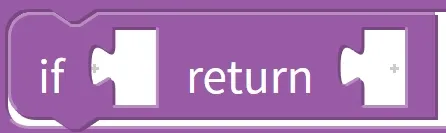
Chinese meaning: Inside a function, when the specified condition (if…) is met, immediately return (return…) a result and terminate the remaining operations of the function. A function can return different results according to different situations, making it more flexible.
The conditional return block must be used in conjunction with a function that has a return value (since it needs to return a result), and its core logic consists of only 3 points:
- Add judgment conditions: Drag the "If. .. then. .." block into the function and set the judgment rule (e. g., "score < 60");
- Return + End when the condition is met: Drag the "return" block into the "if" block and fill in the result to be returned (for example, "0" means failing). As soon as the condition is satisfied, the function will return this result immediately, and all subsequent blocks will not be executed;
- Continue execution if not satisfied: If the condition is not met, the function will skip the return block in the "if" statement and continue to execute the subsequent operations (for example, returning "1" means passing).
For example: define a function named "judge whether a student passes the exam", which takes a score as input, returns "0"(fail) if the score is lower than 60, and returns "1"(pass) otherwise
定义函数 判断成绩(分数)
    如果 分数 < 60
        返回 "0"
    返回 "1"

调用函数 判断成绩(55) -> 结果
显示 结果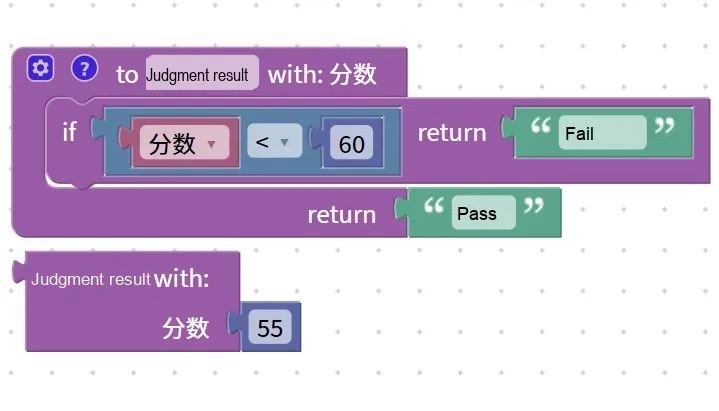
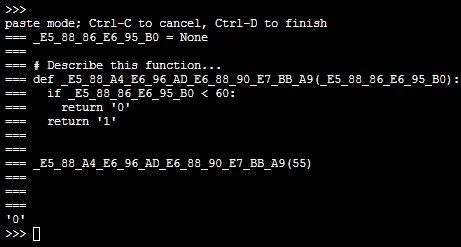
Execution Result: The screen displays "0"~
Since the input score is 55 (which is less than 60), the function immediately returns "0" once the condition is met, so the subsequent "return '1'" will not be executed. Isn't that super smart?
Tip: A quick reminder on using conditional return blocks effectively
- Early termination is crucial: Once the condition is met, the function will end immediately, so you should put the "higher priority" conditions first — for example, check if "score < 60" before checking if "score < 80", otherwise errors will occur;
- Must be paired with a return value: The conditional return block can only be used in functions with a return value; there is no need to add this block to void functions, and adding it will have no effect~
✨ Interactive Quick Question
- Think about it: Define a function called "check if a person is an adult"(return "adult" if age ≥ 18, return "minor" if age < 18), how should you write the conditional return? (Answer: Define function check_adult(age) if age < 18 return "minor" return "adult")
- Quick Quiz: When using a conditional return block, will the blocks after the function still execute once the condition is met? (Answer: No! The function ends immediately and returns the result~)
- True or False: A conditional return block can be used in a function that has no return value. (Answer: Incorrect! A conditional return requires a return result, so it can only be used in a function that has a return value~)
- Try it: define a "judge the weather" function by yourself, which returns "go out to play" when the input is "sunny", and returns "read at home" for other inputs (such as "rain", "overcast").