
Contents
Young creators, when we learned about lists before, didn't we always store the created lists in a named "container", like "number list" or "fruit list"? Actually, that "container" is a simple type of variable! Today, let's officially get to know variables — this little programming tool that lets you "name" your data~
In programming, a program is like a tiny robot that works extremely fast but has absolutely no memory at all. If we don't teach it to "remember things", it will forget everything entirely the second it finishes a task.
For example, we want the program to remember things like: what the temperature just measured was, how many times the button has been pressed, and what the current score is. At this point, we need a tool that can help the program "store information", and this tool is called — variable.
A variable can be understood as a "small box" in a program. This box has a name, you can put things into it, and you can also take the things inside out to use at any time.
Why do we need variables? Let's say we're working on a small project to calculate academic scores, and we need to use data like "number of students in the class" and "average score" repeatedly. If we type out the actual numbers every single time, it's not just tedious — when we need to make changes later, we have to hunt down every instance to edit them one by one, which makes it super easy to make mistakes. Variables change this entirely: we just assign clear names to these data points and store them, so later on whether we need to use the values or update them, we only have to reference the variable name. It's far more efficient and way less error-prone!
🧠 Now that you've read this, take a moment to reflect
If you're playing a game and the program needs to keep track of your score, do you think it's stored in a "variable" or recalculated from scratch every time?
The correct answer is: it exists in the variables.
Simply put, the core function of a variable is to "store data and assign a name to it", which allows a program to remember information, reuse it repeatedly, and modify it flexibly. Now, let's explore how to use variables together!
A Quick Nudge: Variables are like the "data organizers" in the programming world — they help us keep all our important data neatly sorted and easy to access! Once you’ve got a solid grasp of how to use variables, you can pair them with other building blocks like lists and loops to tackle even complex little projects with total ease.
✨ Interactive Quick Question
1. Think: If we want to store "Xiao Ming's height is 145cm" and "Xiao Hong's height is 142cm" in variables, what names should we give these two variables to make them easy to remember?
Answer: Example: "XiaoMingHeight" and "XiaoHongHeight" — this way we can directly tell whose data each variable corresponds to, and it's not easy to mix them up.
2. Quick response: Besides "naming data", what is another core function of variables? (Hint: The "storing data" mentioned earlier!)
3. True or false: "When naming variables, using 'abc' is better than 'myAge'", is this statement correct?Why?
Answer: That's incorrect! Because "myAge" clearly indicates what data is stored in the variable, whereas "abc" is meaningless — it’s easy to forget what content is stored in it, which makes subsequent use and modification inconvenient.
1. Variable Creation Block (Create variables …)
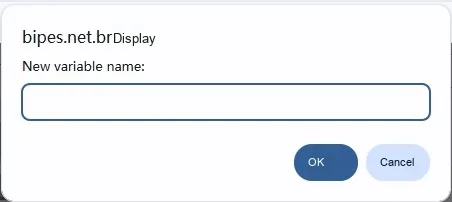
Before using a variable, the first step is not to store data, but to —— create the variable. Creating a variable is like preparing a box in advance in the program and labeling a name on its surface.
When the program runs to the "create variable" block, the system will generate a new variable in the background and allocate a memory location for it to store data. At this point, the variable already exists, but it may not yet contain any specific content.
This step is extremely important, because without boxes, there would be nowhere to store items.
Chinese meaning: create a variable for storing data so that it can be read, modified or manipulated in the program.

🎯 Mini Task: Give it a try
Please create a variable in the programming interface, and you can name it: my_number or score.
Do not set any value for it for now; just create it.
Think about it: Is this variable an "empty box" or a "box that already contains content" right now?
"If I create a variable but never assign a value to it, can the program use it? "
Tip: It exists, but there may not be the data we need in it.
2. Variable Assignment Block (set … to …)
Once a variable is created, we can store content in it, and the "set variable to" block is used for this step.
When the program runs to this block, the content on the right will be directly assigned to the specified variable. If the variable already contains data, the new content will directly overwrite the old content.
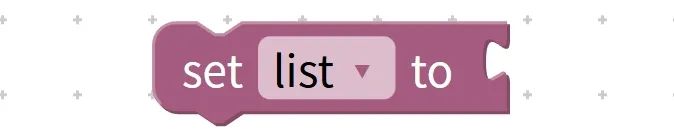
Chinese meaning:(set) a certain variable. .. to (to) a specified value. ..
🎯 Quick Task: Do this right now
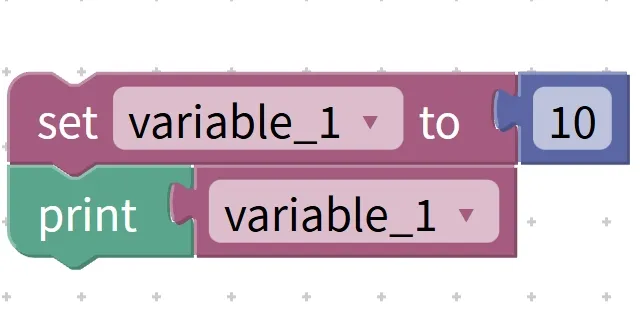
Use the variable assignment block to set the variable you just created to: 10
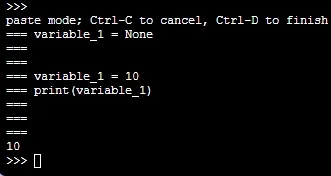
Then, display this variable.
What number do you see?
👉 It's 10, not any other number.
Quick Fire Questions
Q: If I run "set variable to 3" again, what will happen?
A: The original value 10 will be gone, and only 3 will remain in the variable.
3. Variable increment/decrement block (change … by …)
Sometimes, we don't want to directly turn a variable into a brand-new number; instead, we expect it to change gradually on its original basis. For example: add 1 to the score, subtract 1 from the time, or increment the value by 1 each time a button is pressed.
In this case, you will need to use the "change variable by" block.
The features of this building block are as follows: It will not ignore the original value, but continues to change based on the original value.

Chinese meaning: On the basis of the original value, change (change) the value of a variable..., according to ( by ) the specified value.... When the specified value is positive, the value of the variable increases; when the specified value is negative, the value of the variable decreases, and the final result will be saved back to the variable.
Quick Task: Guess the Result
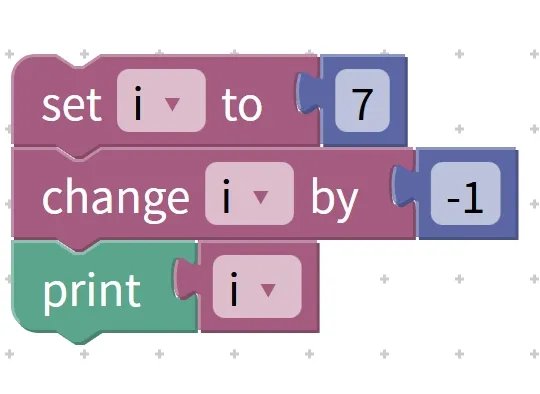
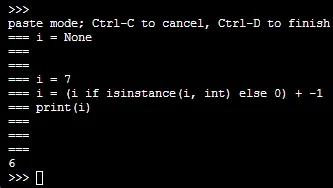
Now assume that the variable i = 7.
If the program executes once: change i by -1
Guess, what value will the variable i become?
The correct answer is: 6.
Just think about it
If I change -1 to + 1, then what will i be?
The answer is: 8.
4. System Preset Variable Management Block
In a graphical programming environment, there are some variables that already exist when you create a new program. These variables are pre-prepared by the system and can be used directly. For example: a, i, score, text, etc.
They have no essential difference from the variables we create ourselves; the only difference is that you don't have to create them manually.
Chinese meaning: Use, rename (rename) or delete (delete) the variables that have been pre-created in the graphical programming system to meet the needs of program writing.
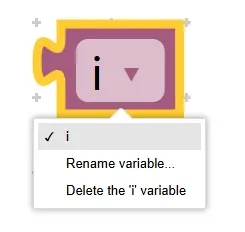
Common system preset variables include: 1, score, item, a, i, j, k, list, m, n, o, p, text, etc.
When you reach this point, take a moment to reflect
If you only temporarily need a variable for calculation, is it better to create a new one yourself, or use the system preset variable directly for more convenience?
Generally speaking: using it directly is faster.