
Contents
- 1. Create a list block (create list)
- 2. List block for creating repeated elements (create list with item … repeated … times)
- 3. Get the list length block (length of…)
- 4. Block to check if a list is empty (… is empty?)
- 5. List Element Position Finding Block (in list… find first/last occurrence of item…)
- 6. List Element Retrieval and Removal Blocks (in list … get/remove/get and remove first/last…)
- 7. List Element Setting and Insertion Blocks (in list … set/insert at first/last … as …)
- 8. List Snippet Block (in list … get sub-list from … to …)
- 9. Text-List Conversion Block (make text/list from list/text … with delimiter …)
- 10. List Sort Block (sort numeric/alphabetic ascending/descending)
Young creators, earlier we learned to use variables to store individual pieces of data — for example, using the variable "name" to store "Xiaohong", and the variable "age" to store 10. But if you need to store the names of 30 students in a class, or the scores of 10 subjects, storing them one by one with separate variables would be such a hassle: you’d have to create 30 variables like "name1", "name2". .."name30", which would be messy to manage and prone to errors! That’s when we need a tool that can "store data in batches" — a list (Lists).
✨ Pre-class Mini Interaction: Think About It
- If you want to record the birthdays of 5 good friends and store them using the variables you learned earlier, how many variables do you need to create?
(Answer: You need to create 5 variables, such as "birthday1", "birthday2"..."birthday5", and each variable corresponds to the birthday of one good friend.) - Besides recording birthdays, what other scenarios can you think of where you need to "store a large amount of data in batches"? (For example, recording the weather for a week, or keeping a list of fruits at home.)
(Answers: Example 1: Recording the Chinese language scores of all students in a class; Example 2: Compiling the names of all items in a supermarket shopping cart; Example 3: Recording the highest temperature each day for a month; Example 4: Collecting the hobbies and interests of classmates.) - What are the inconveniences of storing multiple pieces of data in a single variable?
(Answer: First, you need to create a large number of variables, which leads to chaotic management and makes it easy to mix up which variable corresponds to which data; second, when you need to find or modify the data later, you have to check the variables one by one, which is very cumbersome and inefficient.) - If we use "drawers" as a metaphor for a list, what does each item inside a drawer correspond to in a list?
(Answer: It corresponds to the "elements" in a list; a list is essentially a "data drawer" used to store these "elements" (data).) - What information do you need to quickly find a specific piece of data in a list?
(Answer: You need to know the "position number" (i. e., the index) of this data in the list, just as you need to know which compartment an item is in to quickly find it in a drawer.)
A list is like a drawer that can hold many items: you can put pencils, erasers, and rulers (corresponding to different types of data) in the drawer in order, and we can clearly tell that the first one is a pencil and the second one is an eraser; similarly, a list can hold data such as text and numerical values in sequence, and each piece of data has its own "position number", which makes it easy for us to quickly locate and use them. Simply put, the core function of a list is to "store a batch of data and manage them in an orderly manner".
In programming, when you need to store and process multiple pieces of data, using a list is more convenient and efficient than using individual variables. For example, when counting the exam scores of classmates in a class (which requires storing multiple numerical values), displaying the product list in a shopping cart (which requires storing multiple text entries), or recording the daily temperature (which requires storing multiple numerical values), managing these data with a list can not only reduce the number of variables to be created, but also quickly implement operations such as "adding data, deleting data, and searching for data" through dedicated list blocks, making the program more concise and easier to maintain.
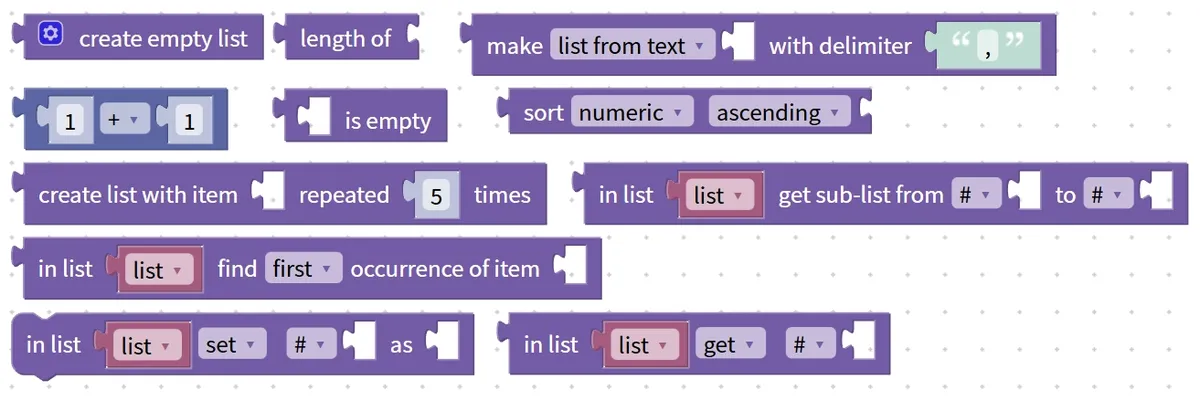
Next, let's get to know the basic concepts of lists, unlock the core building blocks related to lists, and learn to efficiently manage batches of data with lists, this "data drawer"!
Teaser
After learning about lists in this lesson, we'll be able to solve the big problem of "storing data in batches"! Later, we'll combine lists with the text blocks and loop blocks we've learned before to make a "class grade statistics tool" — just input all the students' scores, and it will automatically calculate the average score, find the highest score, and display a complete score leaderboard. It' s super practical!
1. Create a list block (create list)
To use a list, the first step is to create it! Creating a list block is like building a dedicated "data box" for you — this box can be left empty at first (an empty list), or you can put the required data such as numbers and text into it right from the start. Once created, the list can be reused repeatedly for Statistical Data, iterating through contents, or retrieving the elements inside it later.
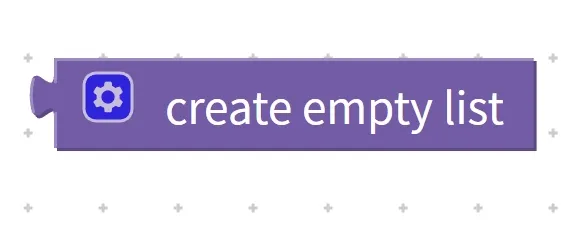

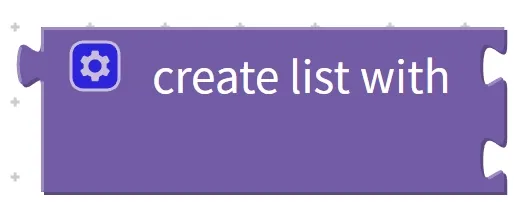
Chinese meaning: Create (create) a list (list), which can be an empty list (empty) or a list containing multiple elements (with…).
First, understand the core features and components of the list creation block:
- Core Features: Two creation modes — supports creating an empty list, and also allows adding multiple elements directly during creation; Flexible element types — can store different types of data such as numbers and text; Reusable — once created and stored in a variable, it can be called multiple times later;
- Component: An "element input area": if the list is empty, no content will be entered; if you need to add initial elements, you can place the specified data in the input area in sequence.
Practical Programming Example: Create a list containing 1,3, 5,7 and display it
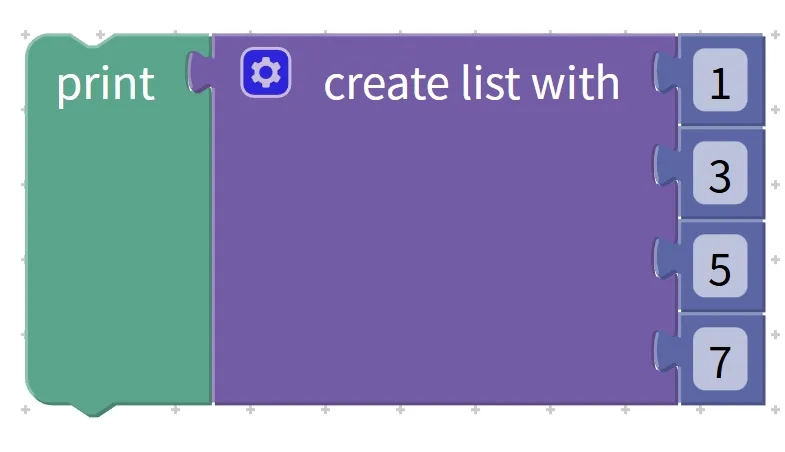
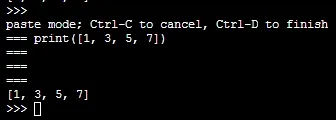
- Requirement: Use the "create list" block to create a list containing 1,3, 5,7, and display the creation result;
- Step 1: Find the create list block in the Blocks area;
- Step 2: Place the numbers 1,3, 5, and 7 in sequence in the "Element Input Area";
- Step 3: Place the create list block into the content area of the "show" block;
Execution logic: The program runs the block for creating a list, generates a list containing the specified elements, and the display screen finally shows [1,3, 5,7].
Tip: A quick reminder for creating list blocks
- Associate with a variable after creation: It is recommended to store the created list in a designated variable (e. g., "number list", "name list") to facilitate subsequent lookup and operations, and prevent the list from being unreusable after creation;
- Note the order of elements: the order in which you input elements during creation is the final order of the elements in the list, and subsequent index allocation will also follow this order, so do not confuse them;
- Uses of an empty list: An empty list is suitable for scenarios where data needs to be added dynamically later. For example, you can first create an empty "shopping cart list" and then gradually add products according to the user's selections.
✨ Quick Interaction: Take a moment to think
- If you want to create a list that stores the names of three classmates (Xiaohong, Xiaoming, Xiaolan), which mode of the list creation block should you use?
(Answer: Use the creation mode that contains multiple elements, and put "Xiaohong", "Xiaoming", "Xiaolan" in sequence in the element input area.) - What is the core difference between creating an empty list and creating a list with elements?
(Answer: When creating an empty list, there is no content in the element input area, so it has no initial elements; when creating a list with elements, the specified data has already been added, so it comes with elements from the start.)
2. List block for creating repeated elements (create list with item … repeated … times)
If you need a list filled with identical data, such as five 1s or three "apples", do you have to enter them one by one? No need to trouble yourself! The block for creating a list with repeated elements can help you get this done quickly: simply specify the content to be repeated and the number of repetitions, and it will automatically generate the corresponding list. It is commonly used in scenarios such as data initialization, generating default value lists, or batch testing.

Chinese meaning: Create (create) a list (list), put the specified content (item). .. repeated (repeated). .. times (times) into the list, and finally get a new list as the result.
First, get familiar with the core features and components of this building block:
- Core Features: Rapid Batch Generation: Automatically generate content by specifying parameters without entering identical elements one by one; Fully Identical Elements: All elements in the list are the set repeated content; Flexible Parameter Adjustment: Freely modify the repeated content and repetition count;
- Components: Two input areas — the "Repeated Content Input Area"(for entering numbers, text, etc. that need to be repeated) and the "Repetition Count Input Area"(for entering the specified number of repetitions, which must be a numerical value).
Practical Programming Example: Create a list containing five 1s and display it
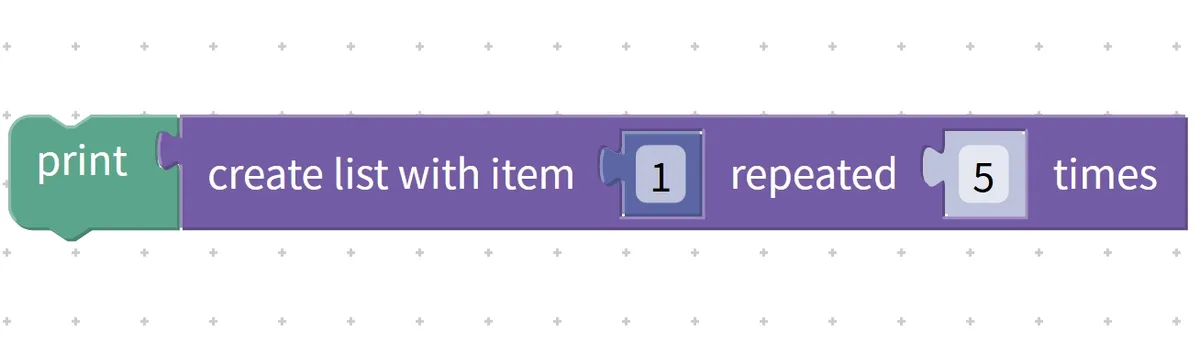
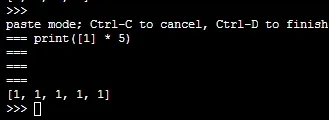
- Requirement: Use the block for creating a list of repeated elements to generate a list containing five 1s, and display the result;
- Step 1: Find the list block for creating repeating elements in the block area;
- Step 2: Enter the number 1 in the "Duplicate Content Input Area";
- Step 3: Enter the number 5 in the "Repeat Count Input Area";
- Step 4: Place this block into the content area of the "show" block;
Operation logic: The program first sets the repeated content to 1 and the repetition count to 5, automatically generates a list containing five 1s, and the display finally shows [1,1, 1,1, 1].
Tip: A quick reminder for using the list block to create repeating elements
- The number of repetitions must be a positive integer: it has to be an integer greater than 0, such as 1,5, or 10, and cannot be 0 or a negative number; otherwise, a valid list cannot be generated.
- Repeated content can be diverse: in addition to numbers, texts, variables, etc. can also be repeated. For example, repeating "apple" 3 times will generate ["apple", "apple", "apple"];
- Adaptation for batch scenarios: Suitable for cases where multiple identical default values need to be initialized. For example, to mark 5 empty seats as "unoccupied", you can directly generate a list of 5 "unoccupied" entries.
✨ Quick Interaction: Take a moment to think
- Want to quickly generate a list containing 3 instances of "Programming is really fun", what should be filled in for the repeated content and the number of repetitions respectively?
Answer: Fill in "Programming is really fun" for the repeated content, and fill in 3 for the number of repetitions. - Generate a list of ten 0s. Compared with using the ordinary list creation block, what is the advantage of using the list block for creating repeated elements?
Answer: The advantage is that there is no need to input ten 0s one by one; you only need to set two parameters to generate the list quickly, which saves operation time.
3. Get the list length block (length of…)
Once you've created a list, how do you find out how many elements it contains in total? That's when you need the block for getting the list length! It can quickly count the number of elements in the list, and this count is exactly the length of the list. The obtained length is commonly used for loop control, statistical calculation, or determining whether a list is empty.

Chinese meaning: Get a list ( list ) of the length, that is, the number of elements ( length of ), and return this number as the result.
First, understand the core features and components of the block for getting the length of a list:
- Core features: Returns a numerical result — the result is the number of elements in the list, which is an integer; does not modify the original list — it only counts the quantity and will not change the elements in the list; applicable to all lists — both empty lists and lists with elements can be counted, and the length of an empty list is 0;
- Components: A "list input area", which is used to place the list whose length needs to be counted (you can directly place the created list, or associate it with the variable that stores the list).
Practical Programming Example: Get the length of the list [2,4, 6,8, 10] and display it
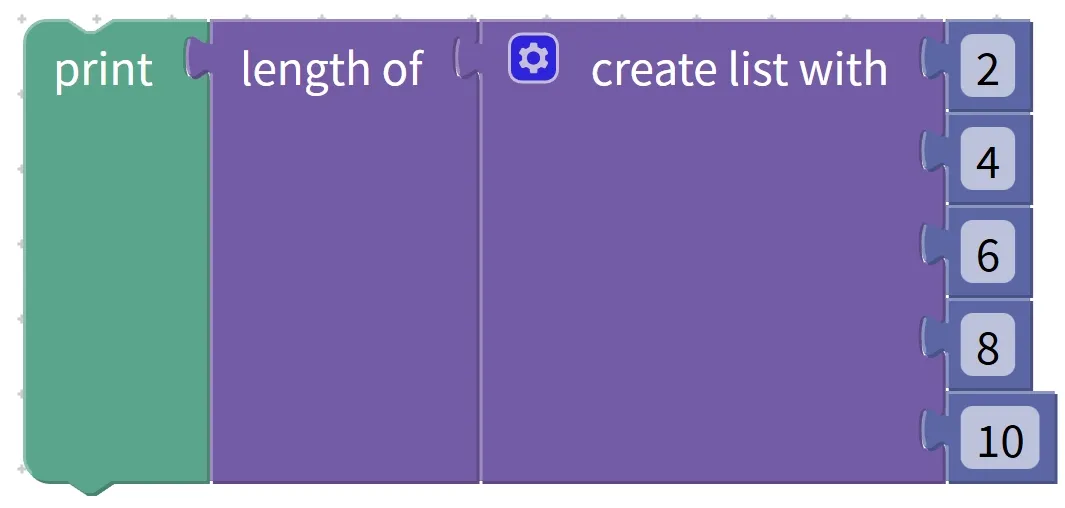
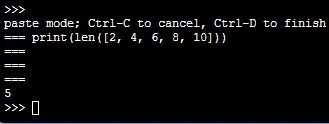
- Requirement: First create a list containing 2,4, 6,8, 10, then use the "get list length" block to count its length, and display the result;
- Step 1: Use the create list block to create a list containing 2,4, 6,8, 10, and store it in the variable "even list";
- Step 2: Find the block for getting the length of a list (length of. ..) in the block area;
- Step 3: Place the variable "even number list" in the "list input area";
- Step 4: Place the "get length" block into the content area of the "show" block;
Operation logic: The program first reads the elements in the "even number list", counts that the number of elements is 5, and the display finally shows "5".
Tip: A quick reminder on using the block to get list length
- An empty list has a length of 0: if you count the length of an empty list, it will return 0, which is one of the indirect ways to determine whether a list is empty;
- Use in conjunction with loops: It is often paired with loop blocks. For example, setting "loop count = list length" enables the loop to iterate over every element in the list;
- Real-time statistics: If you subsequently perform operations such as adding or deleting elements to the list, the length obtained again will be the updated number of elements.
✨ Quick Interaction: Take a moment to think
1. What is the length of an empty list? Will there be an error when counting the length of an empty list?
Answer: The length of an empty list is 0, and no error will occur when counting.
2. A list originally has a length of 3. After adding 2 elements, use the block for getting the list length to count again. What is the result?
Answer: The result is 5, because the number of elements in the list becomes 3+ 2= 5 after adding the elements.
4. Block to check if a list is empty (… is empty?)
Before operating a list, we often need to confirm whether there are elements in it, for example, to avoid program errors caused by fetching values from an empty list. The block for checking if a list is empty acts like an "empty box detector", which can quickly determine whether there are elements in the list and return a result of "Yes (True)" or "No (False)".
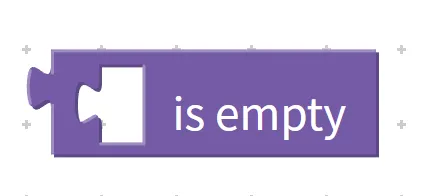
Chinese meaning: determine whether a list is empty (is empty?); if there are no elements in the list, return " Yes (True)"; if the list already contains elements, return " No (False)".
First, understand the core features and components of the block for judging whether a list is empty:
- Core features: Returns a Boolean value — the result only has two options: "Yes (
True)" or "No (False)"; only judges whether it is empty — it does not care about the content of the elements, only whether there are elements; does not modify the original list — it only makes a judgment and does not change the content of the list; - Components: A "list input area" for placing the list to be judged (you can place a created list or an associated list variable here).
Practical Programming Example: Determine whether an empty list is empty and display the result
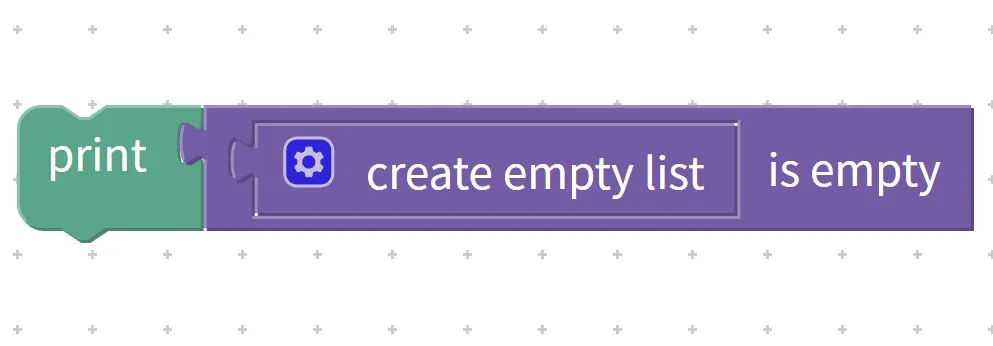
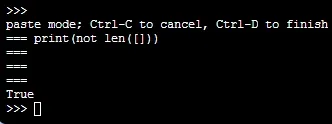
- Requirement: Use the "create list" block to create an empty list, then use the "check if list is empty" block to determine whether it is empty, and display the result;
- Step 1: Use the create list block to create an empty list and store it in the variable "empty list test";
- Step 2: Find the block for checking whether a list is empty from the block area (
… is empty ?); - Step 3: Place the variable "Empty List Test" in the "List Input Area";
- Step 4: Place the judgment block into the content area of the "show" block;
Operation logic: The program detects that there are no elements in the "empty list test", the judgment result is "Yes (True)", and the final display on the screen is " True ".
Tip: Reminder on using the block to check if a list is empty
- Used with conditional blocks: It is often paired with "if. .. then. .." blocks, for example, "if the list is empty, display 'No data in the list'; otherwise iterate through the list" to prevent program errors;
- Difference from the length block: The length block returns the number of elements, while this block directly returns the judgment result of whether it is empty or not; choose to use as needed.
- Dynamic judgment: After elements are added to or removed from a list, the subsequent judgment will yield an updated result. For example, when an element is added to an empty list, the judgment result will change to "False".
✨ Quick Interaction: Take a moment to think
1. A list contains one space character. If you use the "is list empty" block to judge it, will the result be True or False?
Answer: False. Because a space character is also an element, and a list that contains elements is not an empty list.
2. Why should we check whether a list is empty before operating on it?
Answer: To avoid program errors caused by operations such as fetching values or traversing on an empty list. For example, if you try to fetch an element from an empty list, the program will not be able to find the corresponding content.
5. List Element Position Finding Block (in list… find first/last occurrence of item…)
If a list contains a large number of elements, just like a box full of toys, how do you quickly find where a specific toy is located? This list element position finding block acts like a "treasure-hunting locator" that can quickly help you find the position of the first or last occurrence of a specified element! With it, we can not only know which index position the element is at in the list, but also determine whether the element exists in the list at all~

Chinese meaning: In a list (in list), find the position of the first (find) or last (item) occurrence of the specified element (first) or last (last), and return the position number as the result.
Let's first get familiar with the key features and components of this "positioner":
- Core features: Two search modes — it can find the first occurrence position of an element, and also the last occurrence position; Returns the position number — once found, it will tell us which index (position number) the element is at in the list; Returns null if not found — if the element does not exist in the list, it will return a null value, so we can know that "this element is not in the list";
- Components: three small blocks — the "list block"(for placing the list of elements to search, or the variable associated with the list), the "search type block"(to select first/last, meaning searching for the first occurrence or the last occurrence), and the "target element block"(for placing the specific item to find, such as the number 3 or the string "apple").
Hands-on Coding Exercise: Find and display the first and last occurrence positions of the number 3 in the list
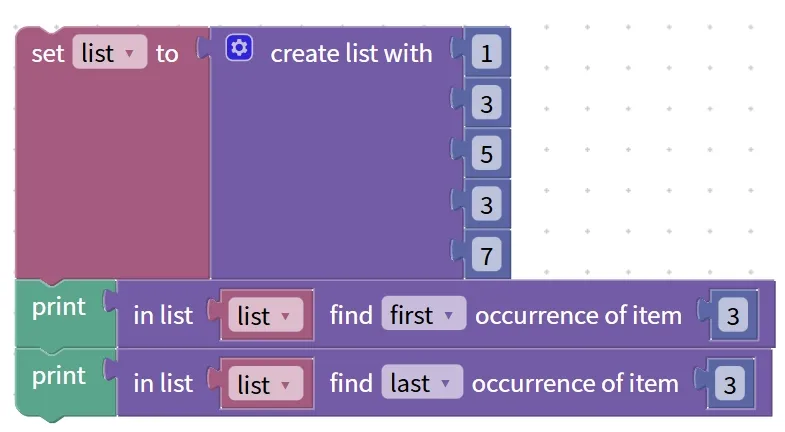
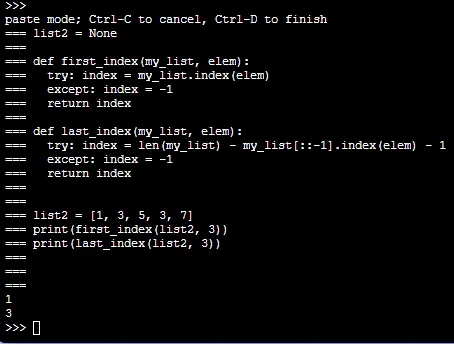
Small Task: First create a "number list" containing 1,3, 5,3, 7, then find the positions of the first occurrence and the last occurrence of the number 3 respectively, and finally display these two positions;
- Step 1: Use the create list block to make a list containing 1,3, 5,3, 7, and name it "Number List"(store it in a variable);
- Step 2: Locate the block for finding the position of a list element, put the "number list" into the "list slot", select "first" in the "lookup type slot", put the number 3 into the "target element slot", and store this result in the variable "first position";
- Step 3: Change the search type to "last"(the last occurrence), leave all other settings unchanged, and store the result in the "Last Position" variable;
- Step 4: Put the "first position" and "last position" into the display block respectively, and check the result;
Operation logic: The program first searches for the number 3 in the "number list" starting from the first element. When it finds 3 at position 1, it stores 1 in the "first occurrence position". Then it searches for 3 backward from the last element, finds 3 at position 3, and stores 3 in the "last occurrence position". Finally, the screen will display "1" and "3" in sequence.
Tip: A Quick Reminder for Using the "Treasure Locator"
- Note the numbering rule: The position numbering may vary across different programming software; some start counting from 1, while others start from 0. Here we all start counting from 1, so don’t mix them up.
- Finding the right target matters a lot: the element you're looking for must be exactly identical to the one in the list. For example, the number 3 is not the same as the text that says "3" — if you pick the wrong one, you won't be able to find it.
- To check whether an element exists: if the search returns a null value, it means the element is not in the list. We can combine conditional blocks to create a small function that "displays the position if the element is found, and shows 'Not found, oops' if it is not found".
✨ Quick Interaction: Take a moment to think
- Given the existing list ["apple", "banana", "apple", "orange"], find the position of the last occurrence of "apple". What is the result? (Positions are counted starting from 1)
Answer: 3! Because "apple" first appears at position 1, and its last occurrence is at position 3. - When you use this lookup block to find an element and get a null value in return, what does that mean?
Answer: It means the element is not in the list, just like the toy you're looking for isn't in the toy box~
6. List Element Retrieval and Removal Blocks (in list … get/remove/get and remove first/last…)
After a list contains elements, we often need to check the elements or remove the unwanted ones. This block for getting and removing list elements acts like a "little hand manager" that can help us do three things: only take out an element to check it (without deleting it), only delete an element (without taking it out), or take out an element to check it while deleting it at the same time. It is often used to process elements in a list step by step, for example, taking out the scores in a list one by one for calculation, or deleting useless data in a list.

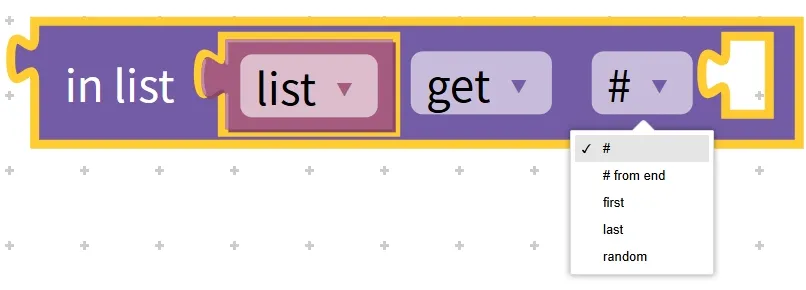
Chinese meaning: In a list ( in list ), take out ( get ) elements, remove ( remove ) elements, or take out and delete ( get and remove ) at the same time; you can choose to operate the first, last, or specified position of the list element, and finally return the corresponding result.
First, get familiar with the core features and components of this building block:
- Core Features: Three operation modes — fetch (only reads the value without modifying the list), remove (only deletes the element without returning a value), and fetch-and-remove (reads the value while deleting the element, reducing the list length); flexible operation targets — you can select the first element, the last element, or an element at a specified position; fetch-type operations return element values — both fetch and fetch-and-remove operations return the processed element value, which can be stored in a variable for use;
- Components: Three input areas — the "List Input Area"(for placing the list or associated list variable to be operated on), the "Operation Type Selection Area"(to select get/remove/get and remove), and the "Operation Target Selection Area"(to select first/last/specified position).
Practical Programming Example 1: Get the first element in the list (without deleting it) and display it
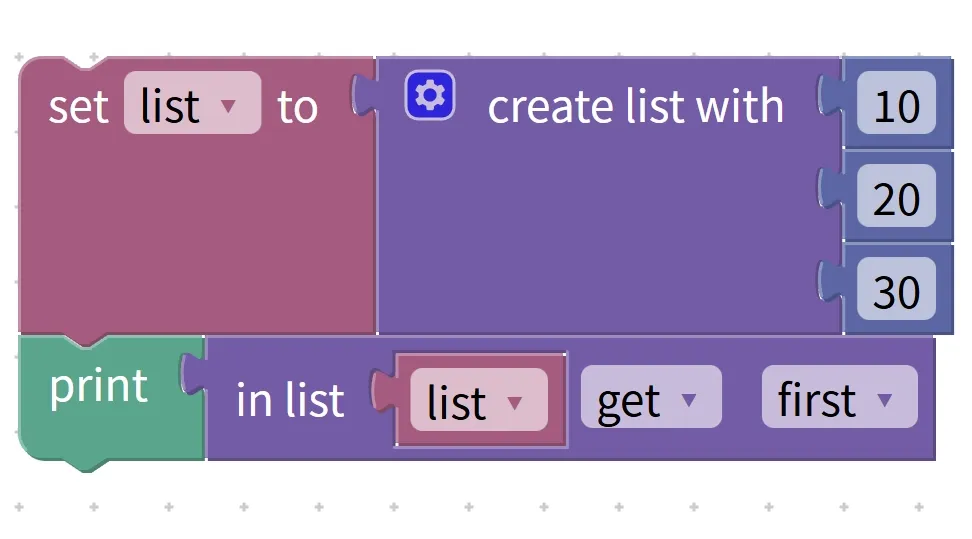
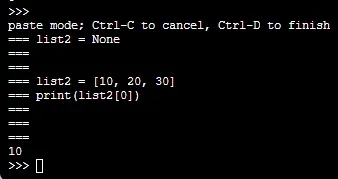
Requirement: Create a "number list" containing 10,20, and 30, retrieve the first element in the list (without deleting it), and display the value of the retrieved element;
- Step 1: Use the "create list" block to create a list containing 10,20, and 30, and store it in the variable "number list";
- Step 2: Locate the blocks for getting and removing list elements in the block area, place the variable "number list" in the "list input area", select "get" in the "operation type selection area", and choose "first" in the "operation object selection area";
- Step 3: Store this block in the variable "first value", then drag the "first value" block into the "show" block;
Operation logic: The program reads the first element in the "number list"(element 10 at index 1), stores 10 in the "first value", and the display finally shows "10"; at this point, the "number list" remains [10,20,30], and no elements are deleted.
Practical Programming Example 2: Remove the Last Element from a List
Requirement: Based on the above "numeric list", remove the last element, then display the modified list;
- Step 1: Use the previously created "number list" [10,20,30];
- Step 2: Adjust the parameters of the block for list element acquisition and removal: select "remove" as the operation type, select "last" as the operation object, and keep the list input area as "number list";
- Step 3: Put the "Number List" block into the "Show" block to display the modified list;
Operation logic: The program deletes the last element (30) in the "number list", the modified list is [10,20], and the display screen shows [10,20].
Tip: A quick reminder on using blocks to get and remove list elements
- Avoid operating on an empty list: performing operations such as retrieval or removal on an empty list will cause program errors. It is recommended to use the "check if list is empty block" to verify the list status before operation;
- Distinguish between the three operation modes: select "get" if you only need to read the element, select "remove" if you only need to delete the element, and select "get and remove" if you need to both read and delete the element; choose as needed to avoid misoperation.
- Note on index for specified position operation: If you select the "specified position" operation, please ensure that the entered position number (index) is valid (within the range of the list length); otherwise, the element cannot be found, resulting in an error.
✨ Quick Interaction: Take a moment to think
1. Given the existing list [5,6,7,8], after performing the "get and remove first" operation, what value will be obtained, and what will the list look like?
Answer: The obtained value is 5; the list will have its first element 5 removed and become [6,7,8].
2. If you want to read the element at index 2 in the list without deleting it, which operation type and operation object should you select?
Answer: Select "get" as the operation type, select "specified position" as the operation object, and enter index 2.
7. List Element Setting and Insertion Blocks (in list … set/insert at first/last … as …)
What if you want to add a new element to a list or replace an existing element in the list with a new one? This list element setting and insertion block acts like an "element magician" — it can not only add new elements to the start or end of a list, but also directly modify the content of elements at existing positions, making it extremely convenient whether you are updating Tabular Data or adding new data!

Chinese meaning: In a list (in list ), either set ( set ) the element at a certain position as the specified content, or insert ( insert ) new elements in the first position ( first ) and last position ( last ) of the list, and set the content of these positions to ( as ) the value we specify.
Let's first get to know the small features and components of this "Elemental Magician":
- Core Features: Two operation modes — insert a new element (add new content to the list) and set an existing element (modify the old content in the list); flexible operation positions — when inserting or setting, you can choose the start, the end of the list, or a specified position; modify the original list directly — both insertion and setting will directly alter the content of the original list;
- Components: four small blocks — the "List Block"(for placing the variable of the list to be operated on or the associated list), the "Operation Type Block"(select set/insert, i. e., modify/insert), the "Position Block"(select first/last/specified position, i. e., start/end/specified index position), and the "New Content Block"(for placing the new element to be inserted or replaced, such as the number 4, "grape").
Hands-on Programming Exercise: Insert an element at the end of a list and display it
Small task: First create a "number list" containing 1,2, and 3, then insert the element 4 at the end of the list, and finally display the modified list;
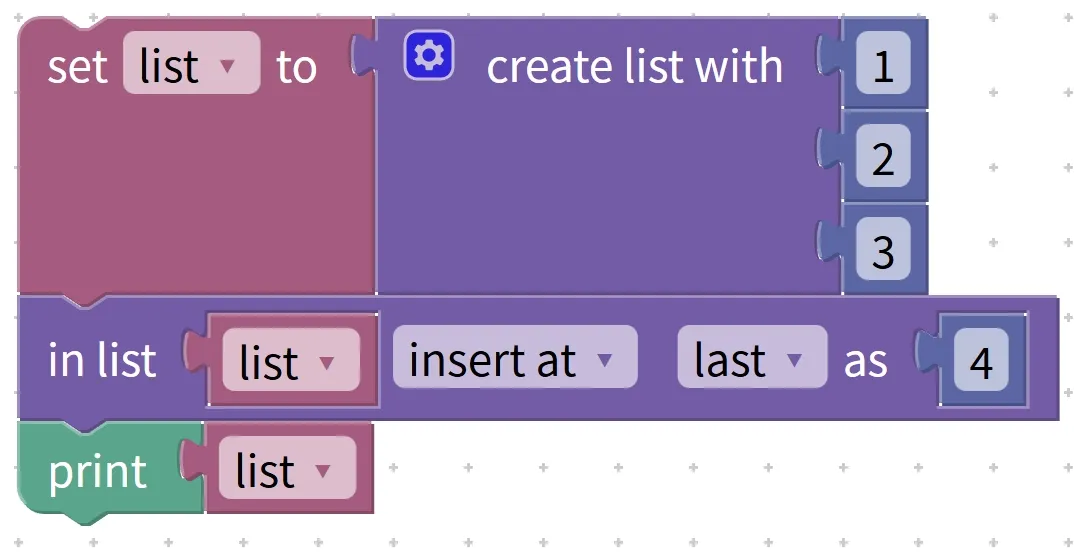
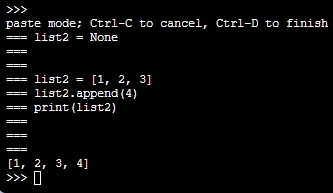
- Step 1: Use the "create list" block to make a list containing 1,2, 3, name it "Number List" and store it in a variable;
- Step 2: Locate the list element setting and insertion block, place the "number list" into the "list slot", select "insert" for the "operation type slot", choose "last" for the "position slot", and put the number 4 into the "new content slot";
- Step 3: Put the "number list" into the display block and check the modified appearance;
Execution logic: When the program receives the "insert" command, it adds the element 4 to the last position of the "number list"; the original list changes from [1,2,3] to [1,2,3,4], and [1,2,3,4] will be displayed on the screen.
Tip: A Quick Reminder for Using "Elemental Mage"
- Distinguish the operation modes clearly: select "insert" when you want to add a new element, and select "set" when you want to modify an existing element, and don't mix them up! For example, if you choose "set" to modify the element at position 2, there must already be an element at position 2 in the list, otherwise an error will occur;
- Insert without deleting old elements: When inserting a new element, the original elements will be shifted backward instead of being deleted; for example, if you insert 0 at the beginning of the list [1,2,3], it will become [0,1,2,3];
- Setting will overwrite the old element: when you select "set" to modify, the old element at the original position will be overwritten by the new element. For example, if you set the 2nd position of the list [1,2,3] to 5, it will become [1,5,3].
✨ Quick Interaction: Take a moment to think
- Given the existing list ["apple", "banana"], if you want to add "grape" to the beginning of the list, what should be selected for the operation type and position respectively?
Answer: Select"insert"(insert) for the operation type, and select "first"(the first position) for the position! - Set the 3rd position of the list [5,6,7] to 8. What will the modified list look like?
Answer: It becomes [5,6,8]! Because the old element 7 at the 3rd position is overwritten by the new element 8.
8. List Snippet Block (in list … get sub-list from … to …)
If there are many elements in a list and we only want to take a small segment of them for use — for example, extracting the scores of the 2nd to 4th places from a grade list — how can we do that? This list slicing block acts like a "segment cutter": it can cut out a small segment of elements from the list according to the start and end positions we specify, form a new list, and will not modify the original list at all!

Chinese meaning: In a list (in list), from the starting position specified by (from) to the ending position specified by (to), perform the operation of (get sub-list) to extract the elements in between and return a new list.
Let's first get to grips with the key features and components of this "clip cutter":
- Core Features: Generates a new list – the result of slicing is a new list without modifying the original one; Slices by range – you need to specify the "start position" and "end position", and elements at both positions are included; Valid positions required – the start position cannot be greater than the end position, nor can it exceed the length range of the list;
- Components: Four small blocks — the "List Block"(for placing the variable of the list or linked list to be sliced), the "Start Position Block"(for entering the start index number of the slice), and the "End Position Block"(for entering the end index number of the slice).
Hands-on Programming Exercise: Extract the 2nd to 4th elements from the list to form a new list and display it
设 数字列表 为 创建列表 10, 20, 30, 40, 50
设 新列表 为 在 数字列表 中 从 第 2 个 到 第 4 个 位置 截取列表
显示 新列表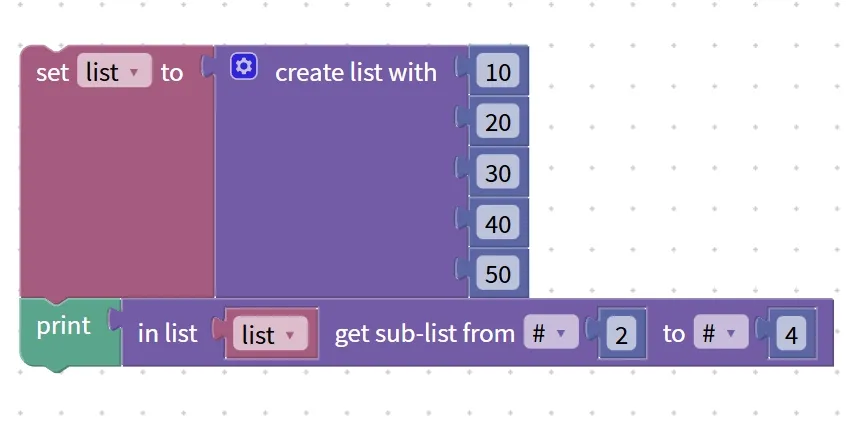
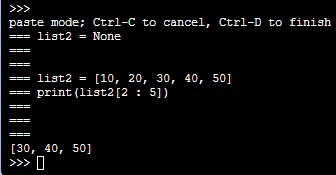
- Small task: First create a "number list" containing 10,20,30,40,50, then extract the 2nd to 4th elements from it to form a new list, and finally display the new list;
- Step 1: Use the create list block to make a list containing 10,20,30,40,50, and name it "Number List"(store it in a variable);
- Step 2: Find the list fragment block, put the "list slot" into "number list", put 2 into the "start position slot", and put 4 into the "end position slot";
- Step 3: Store the intercepted new list in the variable "new list", then put the "new list" into the display block;
How this mini logic works: The program locates the elements from index 2 (value 20) to index 4 (value 40) in the "number list", forms a new list with 20,30 and 40, and displays [20,30,40] on the screen; the original "number list" remains [10,20,30,40,50] unchanged.
Pro Tip: Quick Reminder for Using "Clip Cutter"
- Inclusive of start and end positions: The intercepted range is "from the start position to the end position", and elements at both positions will be included. For example, if the range is from 2 to 4, elements No. 2, No. 3 and No. 4 will be included;
- Do not modify the original list: slicing only copies a segment of elements to form a new list, so the content of the original list will neither be reduced nor altered;
- The positions must be valid: if the start position is larger than the end position (e. g., from 4 to 2), or the positions exceed the length of the list (e. g., the list only has 5 elements but you select up to index 6), the slicing will fail and you will get an empty list.
✨ Quick Interaction: Take a moment to think
1. Given the existing list ["a", "b", "c", "d", "e"], if you slice elements from the 1st to the 3rd, what will the new list be?
Answer: ["a", "b", "c"]! Because it includes the three elements numbered 1, 2 and 3.
2. When slicing a list, why can't the start position be larger than the end position?
Answer: Because the elements of a list are arranged in order, you cannot get a consecutive segment when moving from a larger position to a smaller one, so the slicing will fail.
9. Text-List Conversion Block (make text/list from list/text … with delimiter …)
Sometimes we need to combine the elements in a list into a single piece of text (for example, turning a fruit list into "apple, banana, orange"), and other times we need to split a block of text into a list (for example, splitting "Chinese, Mathematics, English" into a subject list). This text-list conversion block acts like a "shape-shifting tool" that enables mutual conversion between lists and text, which is extremely practical for both data display and batch processing!

Chinese meaning: When converting a list (list) to text (text), you can specify a delimiter (delimiter) to concatenate all elements into a single piece of text; when converting a piece of text (text) to a list (list), you can split the text according to the specified delimiter (delimiter) and generate a new list containing all the split parts.
Let's first get to know the key features and components of this "transformation magic tool":
- Core Features: Bidirectional conversion — supports two modes: "list to text" and "text to list"; Delimiter is the key — a delimiter (e. g., comma) needs to be specified during conversion: it is used to connect elements when converting a list to text, and to split text when converting text to a list; Original data remains unchanged — the conversion generates a new text or list, leaving the original list or text intact;
- Components: three small boxes — the "Conversion Object Box"(for placing the list or text to be converted), the "Conversion Mode Box"(to select list→text/text→list, i. e. list to text / text to list), and the "Delimiter Box"(for entering the specified delimiter, such as ", " "、").
Hands-on Coding Exercise: Convert the fruit list into comma-separated text and display it
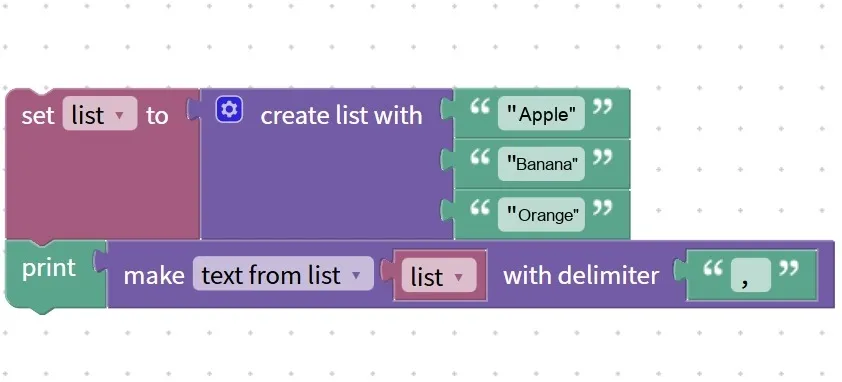
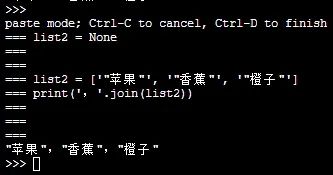
Small task: First create a "fruit list" containing "apple", "banana" and "orange", then convert it into a comma-separated text, and finally display this text;
- Step 1: Use the create list block to make a list containing "apple", "banana", "orange", and store it in the variable "fruit list";
- Step 2: Locate the text list conversion block, put the "fruit list" into the "target slot for conversion", select "list→text"(list to text) in the "conversion mode slot", and place the comma ", " into the "delimiter slot";
- Step 3: Store the converted text in the variable "Fruit Text", then put "Fruit Text" into the display block;
How this little logic works: The program uses commas to connect "apple", "banana" and "orange" in the "fruit list" into the text "apple, banana, orange", which will then be displayed on the screen; the original "fruit list" remains unchanged.
Pro Tip: A Quick Reminder for Using the "Shape-Shifting Artifact"
- Keep delimiters consistent: when converting text to a list, the delimiters in the text must match the set ones. For example, if the text is "Chinese; Mathematics; English", you should use ";" as the delimiter, otherwise the splitting will go wrong;
- Choose the correct conversion mode: select "list→text" if you want to merge a list into text, and select "text→list" if you want to split text into a list; do not choose the wrong mode.
- Separators are customizable: in addition to commas, you can also use E-sports, enumeration commas, spaces, etc. as separators. For example, you can use an enumeration comma to convert a list into "Apple, Banana, Orange".
✨ Quick Interaction: Take a moment to think
- Given the existing text "running, swimming, rope skipping", if we convert it into a list using commas as separators, what will the new list be?
Answer: ["running", "swimming", "rope skipping"]! Because the text will be split into three elements at the commas. - What will be the result if you convert the list [1,2,3] into text using the Chinese enumeration comma "、"?
The answer: "1、2、3"! The Chinese enumeration comma will connect the three numeric elements together.
10. List Sort Block (sort numeric/alphabetic ascending/descending)
The elements in a list are often messy, such as the score list [5,2, 9,1, 7] and the name list ["c", "a", "b"]. What can you do if you want to sort them in order? This list sorting block acts like a "line-up leader" — it can arrange elements from smallest to largest (ascending order) or largest to smallest (descending order) based on numerical value or alphabetical order, making data organization incredibly hassle-free!
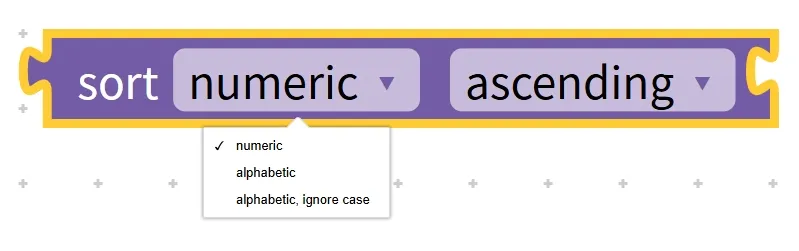
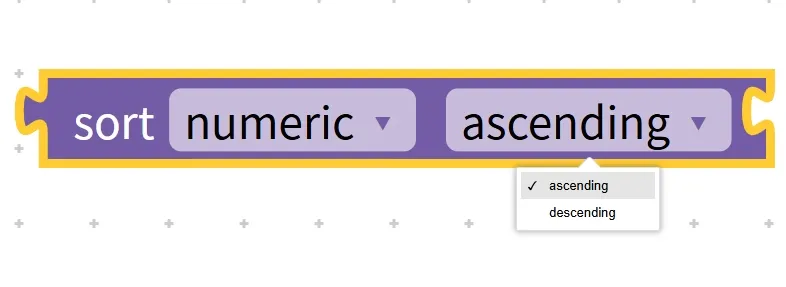
Chinese meaning: Sort the elements in a list (list), arrange them in ascending (sort) order by numeric value (numeric), alphabetical order (alphabetic), or case-insensitive alphabetical order (alphabetic, ignore case), either in ascending (ascending) or descending (descending) order, and return the sorted list.
Let's first figure out the key features and components of this "line leader":
- Core Features: Two sorting rules: sort by numerical value (suitable for numeric lists) and sort alphabetically (suitable for text lists); two sorting directions: ascending (from small to large) and descending (from large to small); supports either modifying the original list directly or generating a new list — rules vary across programming software, with some modifying the original list directly while others generate a new list;
- Components: three small blocks — the "List Block"(for placing the variable of the list or associated list to be sorted), the "Sort Rule Block"(where you select numeric/alphabetic to sort by number/letter order), and the "Sort Direction Block"(where you select ascending/descending for ascending/descending order).
Hands-on Programming Exercise: Sort a list of numbers in ascending order, sort a list of letters in descending order, and display the results
Task 1: Create a "number list" containing 5,2, 9,1, 7, sort it in ascending order and display the result;
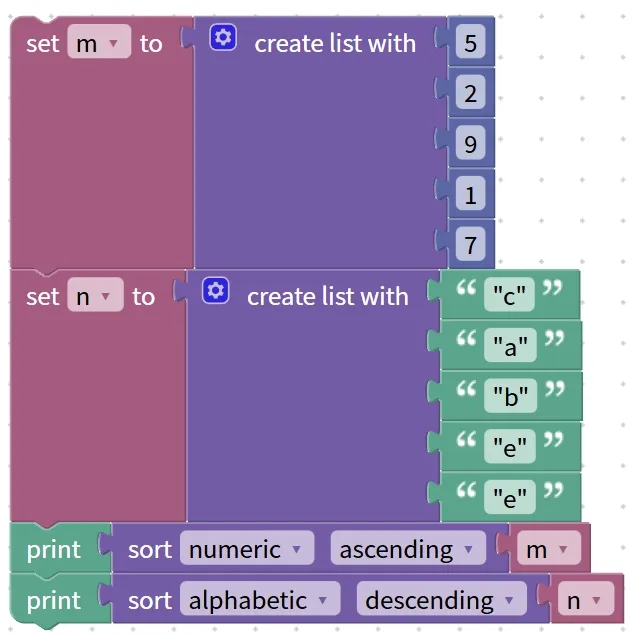
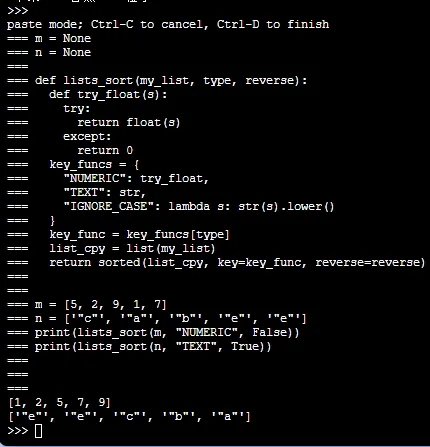
- Step 1: Use the "create list" block to make the "number list" [5,2,9,1,7] and store it in a variable;
- Step 2: Locate the list sorting block, put the "list slot" into the "number list", select "numeric"(sort by number) for the "sorting rule slot", and choose "ascending"(ascending order) for the "sorting direction slot";
- Step 3: Display the sorted "number list";
Execution Logic 1: The program sorts the numbers in ascending order, turning the "number list" into [1,2, 5,7, 9], and displays this list on the screen;
Task 2: Create a "letter list" containing "c", "a", "b", "e", "e", sort it in descending alphabetical order and display the result;
- Step 1: Use the create list block to make a "letter list" ["c", "a", "b", "e", "e"] and store it in a variable;
- Step 2: Adjust the parameters of the sorting block: select "alphabetic" as the sorting rule, and select "descending" as the sorting direction;
- Step 3: Display the sorted "letter list";
Run Mini Logic 2: The program sorts the letters in descending order, turning the "letter list" into ["e", "e", "c", "b", "a"], and displays this list on the screen.
Pro Tip: Quick Reminder for Using the "Queue Leader" Feature
- Choose the correct sorting rule: select "numeric" for number lists and "alphabetic" for letter lists; do not use the numeric rule to sort letter lists, as this will cause errors.
- Note the sorting direction: ascending order means "from small to large"(e. g., 1→9, a→e), while descending order means "from large to small"(e. g., 9→1, e→a); choose as needed.
- Exercise caution when sorting mixed-type lists: If a list contains both numbers and letters (e. g., [1, "a", 2]), sorting may yield unexpected results. It is recommended to sort lists consisting of elements of the same type whenever possible.
✨ Quick Interaction: Take a moment to think
- Sort the list [8,3,6,1,9] in descending numerical order, what will the result be?
Answer: [9,8,6,3,1]! Line up from largest to smallest~ - Sort the letter list ["d" "b" "a" "c"] in ascending alphabetical order, what will be the result?
Answer: ['a', 'b', 'c', 'd']! Line up in alphabetical order from smallest to largest.