
Contents
- 1. Fixed Text Block
- 2. Join Text Blocks (create text with)
- 3. Append Text Block
- 4. Text Length Block (length of…)
- 5. Empty Text Judgment Block (is empty)
- 6. Specific Text Finding Block (in text… find first/last occurrence of text…)
- 7. Text Character Extraction Block (in text item/list… get letter#/last letter…)
- 8. Text Snippet Extraction Block (in text… get substring from… to…)
- 9. Text case conversion block (to UPPER CASE/lower case/Title Case …)
- 10. Text Space Cleaning Block (trim spaces from left both/right side… of…)
- 11. Text Output Block (print…)
- 12. User Input Prompt Block (prompt for text/number with message…)
- 13. Text Conversion Block (to str)
Young creators, so far we have been learning blocks that handle "numbers", such as calculating values, judging number attributes, generating random numbers, etc. , which endow programs with "computing power" and "logical thinking ability". Here's a little preview for you: when text blocks are combined with the math blocks and logic blocks we've learned before, they can realize tons of practical functions! For example, "after calculating the temperature, display 'Current temperature: 25℃' in text", "after confirming a lottery win, show the prompt 'Congratulations on winning the prize!'", and we will gradually unlock these combined usages later~
✨ Pre-class Warm-up Activity
1. Quick Response: What block enables a program to "speak" and convey text messages? (Answer: Text block!)
2. Think about it: What kind of information do you want the program to prompt you with text? For example, "Please start detection" and "Operation completed" — do all these require the help of text blocks? (Hint: Yes! Whenever the program needs to display text, text blocks are indispensable~)
Getting back to the point, a program not only needs to be able to "perform calculations", but also to "communicate effectively" — for example, to inform us of "detection succeeded", "current temperature: 25°C", or "lottery entry failed, thank you for participating", and this is exactly where text blocks come into play!
The text block is the "language expression expert" of a program, dedicated to handling text content. It is like equipping a program with a "mouth" and a "notepad", enabling the program to display information such as running status, calculation results, and operation prompts in text that we can understand, making the originally abstract program running process intuitive and clear.
Simply put, the core function of text blocks is to "process text and convey information", enabling "communication" between programs and us. In daily programming learning and project development, they can be seen everywhere: for example, displaying the detection status of sensors on the screen, prompting "Please press the button" before an operation, and combining calculation results with text to display "Current score: 95 points" — all these are the work of text blocks.
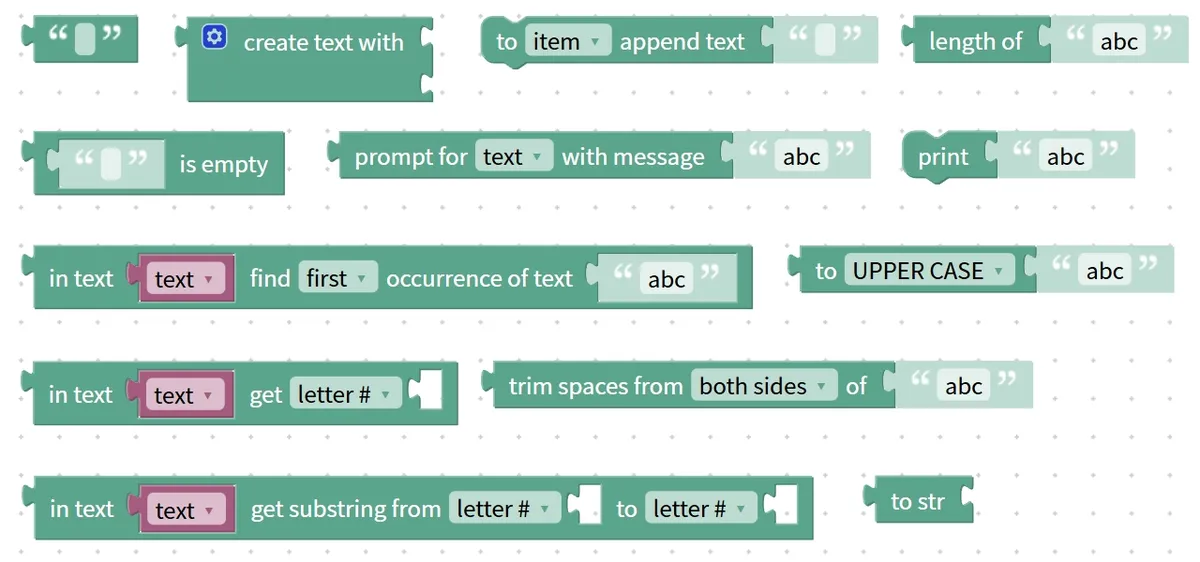
Next, let's step into the world of text blocks together, and explore what types of these blocks that enable programs to "speak" are available, what functions each of them can fulfill, and how to flexibly apply them to our programming projects!
1. Fixed Text Block
If we want the program to output a fixed line such as "Hello, World!" or "Detection successful!", we need to use the "fixed text block", which acts as a "fixed script board". The text content inside it remains constant unless we modify it manually, just like an actor's fixed lines that stay identical in every performance.
Fixed text blocks are the foundation of text processing, and many text-related operations are built on them — for example, subsequent operations like concatenation and display often require fixed text content.
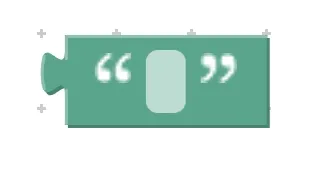
Chinese meaning: It refers to a fixed segment of text or symbols that can be directly used for display, concatenation, comparison or assignment.
First, understand the core features and components of the fixed text block:
- Core features: Fixed content — it will not change automatically during program operation; for example, if you write "Hello, World!", this sentence will always be displayed; Ready to use directly — no need to pair with other blocks, it can be used as text content on its own;
- Components: A "text input field" enclosed in quotation marks. We can directly enter the desired text or symbols inside the quotation marks, such as "hello", "123", "!@#", etc.
Here are a few real-life examples to help you grasp the concept quickly:
- Real-life Example 1: The fixed reminder "Do Not Lean" in elevators, which is visible every time you ride and remains unchanged in content;
- Real-life Example 2: The fixed name "Xiaoming" written on the exercise book remains unchanged unless it is rewritten.
- Example from daily life 3: The fixed slogan "delicious and tasty" printed on snack packaging, which is identical across all packages of the same product.
Practical Programming Example: Display "Hello, World!"
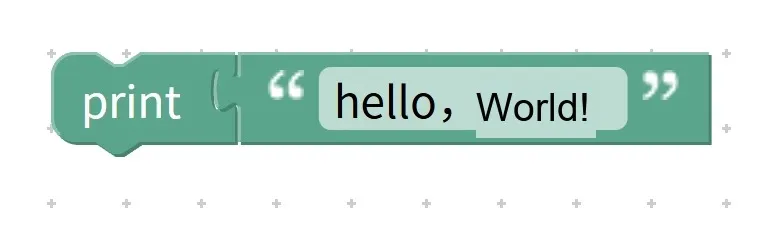
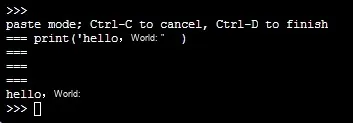
- Requirement: Make the program display the fixed text "hello, world!";
- Step 1: Find the fixed text block in the block area, and enter "hello, world!" inside the quotation marks;
- Step 2: Place the fixed text block into the content area of the "show" block;
Operation logic: After the program runs, it directly reads the content in the fixed text block and displays "Hello, World!" on the display screen, and the running result remains the same every time.
Tip: A Quick Reminder for Using Fixed Text Blocks
- Text must be placed inside quotation marks: All fixed text must be enclosed in the quotation marks of the block, otherwise the program will misinterpret it;
- It can contain various characters: not only Chinese and English, but also numbers, symbols and spaces, such as "2024, come on!" and "Hi, little maker";
- Use with other blocks: Since it only displays simple content on its own, it is often paired with splicing and conditional judgment blocks to achieve more diverse functions.
✨ Mini Interaction: Fixed Text Block Mini Challenge
- Quick Response Quiz: If you want the program to always display "Welcome to the Programming Toolkit", which block should you use? (Answer: The fixed text block!)
- Think about it: Can the content in the fixed text block change automatically? (Answer: No! It can only be modified manually~)
Core Quick Summary: A fixed text block is the "fixed script board" of a program, whose core function is to provide unchanging text content. It features a simple structure — you only need to enter text directly within quotation marks, making it a fundamental building block for text processing.
2. Join Text Blocks (create text with)
If you want to combine several text segments into a complete sentence, for example, combining "puppy" and "hello" into "hello puppy", or combining "current temperature: " and the sensor reading into "current temperature: 25°C", you need the text block "text puzzle board" for concatenation! It can splice multiple text parts in order to form a new complete piece of content.
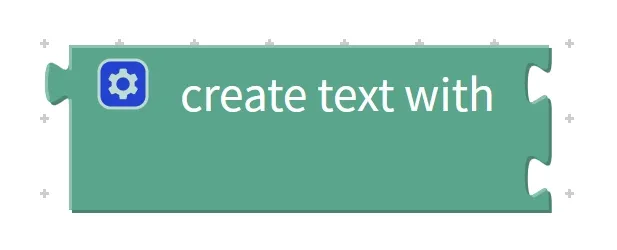
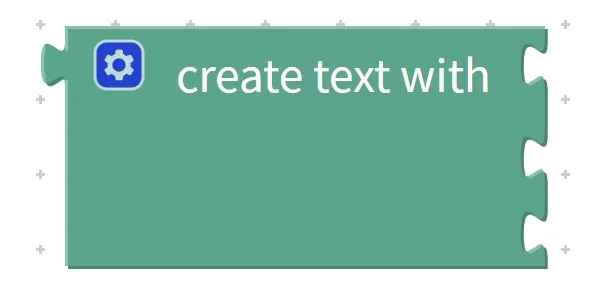
Text block splicing is particularly suitable for generating dynamic content — for example, by combining variables and sensor data to make programs display text prompts that change with the data.
Chinese meaning: Combine multiple characters or symbols in sequence to form a segment of content (create text with …), which can be used for display, concatenation or variable assignment.
First, get a clear understanding of the core features and components of the spliced text building blocks:
- Core Features: Multi-segment combination — capable of splicing two or more segments of text together; Fixed sequence — the splicing order is consistent with the order in which we place the building blocks, and there will be no disorder;
- Components: Multiple "content input slots". Each slot can hold fixed text blocks, variable blocks, sensor data blocks, etc. , which are spliced in left-to-right order once placed.
Here are a few real-life examples to help you quickly grasp the concept:
- Real-life Example 1: Assembling name tags: Combine the two characters "Xiao" and "Ming" to form the name "Xiao Ming";
- Example 2 in daily life: Writing an address — combine "Beijing Municipality", "Chaoyang District", and "XX Subdistrict" to form a complete address;
- Example in daily life 3: Reporting test scores — concatenating "Score for this session: " and "95" to form "Score for this session: 95".
Practical Programming Example: Combine "puppy" and "hello" into complete content and display it
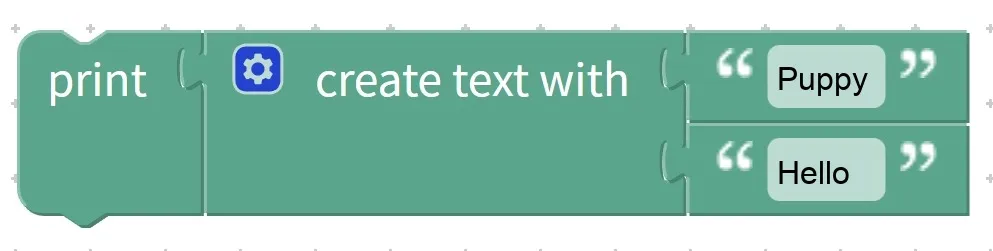
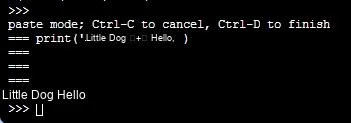
- Requirement: Use text splicing blocks to combine "puppy" and "hello" and display the result on the screen;
- Step 1: Find the "create text with" block in the Blocks area;
- Step 2: Place the fixed text block "puppy" in the first input slot, and the fixed text block "hello" in the second input slot;
- Step 3: Place the assembled blocks into the content area of the "show" block;
Operation logic: The program reads the content of the two input slots from left to right, concatenates "puppy" and "hello" into "puppy hello", and the display finally shows "puppy hello".
Tip: A Quick Reminder for Using Text Building Blocks
- Pay attention to the concatenation order: think clearly about the sequence of the texts. For example, when concatenating "hello" and "puppy", different orders lead to different results ("hello puppy" vs "puppy hello");
- Supports splicing of multiple types of content: it can splice not only fixed text, but also variables and sensor data — for example, you can splice "Distance: " with the data from a distance sensor to form "Distance: 50cm";
- Nestable for concatenation: If you need to concatenate multiple segments of text, you can place another concatenation block directly into the input slot of a concatenation block to achieve multi-segment concatenation.
✨ Mini Interaction: Text Block Assembly Mini Challenge
- Quick Quiz: If you want to combine "Today's weather: " and "sunny" into a complete sentence, which block should you use? (Answer: The text concatenation block!)
- Think about it: If you concatenate the string "My age: " with the variable "age = 10", what will be displayed? (Answer: My age: 10~)
Core Quick Summary: The "Join Text" block acts as the "word puzzle board" for a program, whose core function is to combine multiple segments of content in sequence. Equipped with multiple input slots, it can splice various types of content such as fixed text and variables, making it the core block for generating dynamic text prompts.
3. Append Text Block
Young creators, if you want to "add a sentence" after existing text — for example, add "Hi" after the word "world" in a variable to make it "worldHi" — you’ll need the "append text" block, which acts like a "text continuation pen"! It won’t change the original text content; it only adds new text at the end, just like how we continue writing on a notebook.

Append text blocks are commonly used for dynamically updating content — for instance, when logging records, new entries are continuously appended to the existing log; when modifying variable text, content is supplemented on the original basis.
Chinese meaning: Append text or symbols to the end of the specified content, which includes an append text to, a system preset variable (such as item), the entire list (list), and can be used to modify existing content in variables or lists. 1, i, j, k, a, m, n, o, etc.
First, let’s understand the core features and components of the append text block:
- Key Features: Append without overwriting: content is only added to the end of the original content, and existing text will never be deleted; Clear operation target: the object to be appended (e. g., a certain variable or list item) must be specified explicitly.
- Components: Two input areas — one is the "target input area"(for variables, list items, etc. to which content will be appended), and the other is the "appended content input area"(for the text to be added).
Here are a few real-life examples to help you grasp the concept quickly:
- Life Example 1: When writing a diary in a notebook, append ", because I went out to play with friends" after "I am very happy today" to form the complete sentence "I am very happy today, because I went out to play with friends";
- Example in daily life 2: Append ", oranges" after the shopping list "apples, bananas" to turn it into "apples, bananas, oranges";
- Life Example 3: Append "classmate" after the name tag "Xiao Li" to form "Xiao Li classmate".
Practical Programming Example: Append "Hi" to the text in the variable and display the result
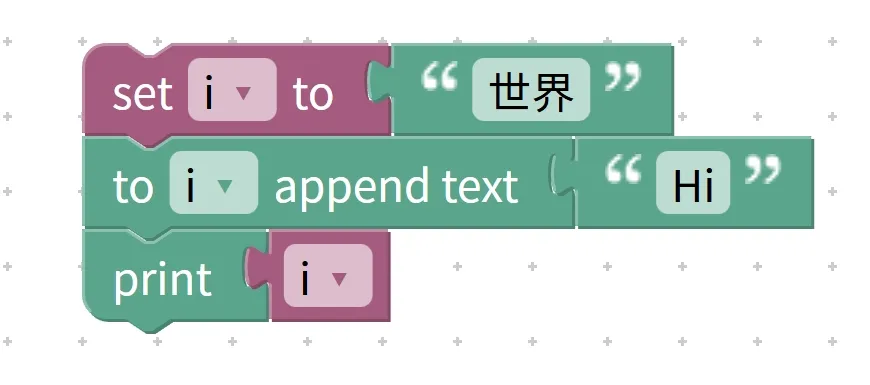
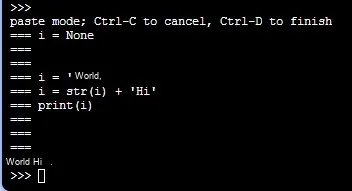
- Requirement: First create a variable named "greeting" with an initial value of "World"; use the append text block to append "Hi" to the "greeting" variable, and finally display the content of the variable;
- Step 1: Use a variable block to create a "greeting" variable, and set its initial value to the fixed text "World";
- Step 2: Locate the append text block in the block area, place the "greeting" variable in the "target input field", and put the fixed text "Hi" in the "append content input field";
- Step 3: Put the "greeting" variable into the content area of the "show" block;
Operation logic: The program first sets the initial value of the "greeting" variable to "World", then appends "Hi" to the end of "World", so the variable value becomes "WorldHi", and the display finally shows "WorldHi".
Tip: A Quick Reminder for Using Append Text Blocks
- First, the target content must exist: the target to be appended (variable, list item) must have initial content in advance and cannot be blank, otherwise there is no space for appending;
- Distinguish between "append" and "splice": appending means continuing to write based on the original content, while splicing means combining multiple pieces of new content; for example, for "world" + "Hi", appending modifies the original variable, whereas splicing generates new content;
- The target type must match: you can only append content to objects that can store text, such as variables and list items, and cannot directly append to fixed text (since fixed text is unmodifiable).
✨ Mini Interaction: Additional Text Block Challenge
- Quick Response Quiz: If you want to append " go to the park to play" after the content "2024.1.1 sunny" of the variable "log", which block should you use? (Answer: The append text block!)
- Think about it: Will appending a text block change the original content? (Answer: It won't delete the existing content — it only adds the new content to the end~)
Core Quick Summary: The Append Text Block acts as the "text continuation pen" for a program, whose core function is to append new text to the end of specified content. It requires specifying a target and the content to be appended, will not overwrite the original content, and is suitable for scenarios such as dynamic text updating and log recording.
4. Text Length Block (length of…)
Young creators, if you want to find out how many characters a piece of text contains — for example, counting how many characters are in "Hi 你好" — or check whether the input text is too long, you’ll need the text length block, which acts as a "text counter". It doesn’t care what the text says; its only job is to count the total number of characters, and each Chinese character, English letter, number, symbol, and space counts as one character.
The text length block is commonly used to limit input length and verify whether text meets requirements. For example, if you want users to enter a name with no more than 10 characters, you can use this block to count the length and make a judgment.
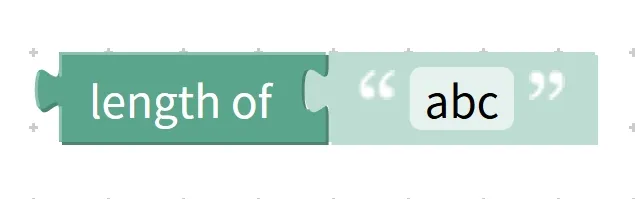
Chinese meaning: Calculate the total number of characters contained in a piece of text.
First, understand the core features and components of the text length block:
- Core Features: It only counts the quantity — it does not analyze the meaning of the text, only counts the number of characters; it has a wide statistical scope — Chinese, English, numbers, symbols and spaces are all counted as one character; the output is a number — the statistical result is an integer, for example, the output of "Hi你好" is 4;
- Component: a "text input area", where content that requires length measurement such as fixed text, variables, and concatenated text can be placed.
Here are a few real-life examples to help you grasp the concept quickly:
- Example in daily life 1: Count the length of a name — "Xiaoming" has 2 characters, while "Zhang San" has 8 characters (including the space);
- Real-life Example 2: Restrict password length — require that the password does not exceed 6 characters; count "123456" as 6 characters (compliant), and "1234567" as 7 characters (non-compliant);
- Example 3 in daily life: Count the length of a message — "I'm so happy today!" contains 6 characters (2 for "I'm so", 3 for "happy", 1 for "!").
Practical Programming Example: Count the length of the text "Hi你好" and display the result
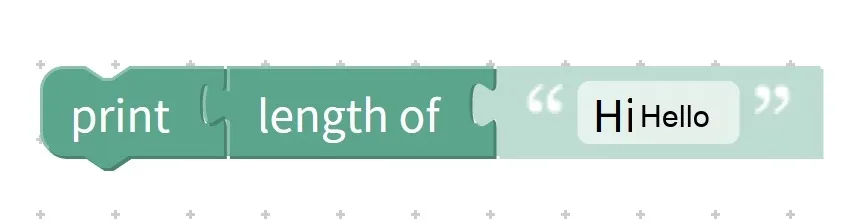
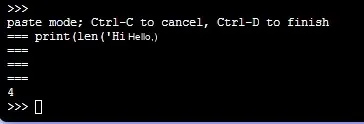
- Requirement: Use the text length block to count the number of characters in "Hi你好" and display the result on the screen;
- Step 1: Find the "length of. .." block in the Blocks area;
- Step 2: Place the fixed text block "Hi there" in the "text input area";
- Step 3: Put the "text length" block into the content area of the "show" block;
Operation logic: The program counts the characters in "Hi你好" one by one — "H", "i", "你", "好", there are 4 characters in total, outputs the number 4, and the display finally shows "4".
Pro Tip: A Quick Reminder on Using the Text Length Block
- Note that spaces count as characters: for example, "Hi 你好"(with a space in between) has a count of 5, not 4;
- Use with conditional blocks: It is often paired with "greater than", "less than", and "equal to" blocks to implement length restrictions, for example, "if the text length > 10, display 'text is too long'".
- Statistical dynamic text: It can also count the length of variables and spliced text, such as counting the length of the variable "name" and the length of the spliced "address".
✨ Mini Interaction: Text Length Block Challenge
- Quick response quiz: Count the number of characters in the phrase "Programming is really fun!", what is the result? (Answer: 6 characters!)
- Think about it: If you want to limit the text input by the user to no more than 8 characters, which block needs to be used together with the text length block? (Answer: The conditional judgment block~)
Core Quick Summary: The text length block acts as the "text counter" of a program, whose core function is to count the total number of characters in a text. It outputs a numerical result, features a wide statistical scope, is often paired with conditional blocks to implement length restrictions, and serves as a critical tool for text validation.
A quick preview: When these four text blocks are combined with the math blocks and logic blocks you learned earlier, they can achieve more flexible functions! For example, "count the length of the entered name and display 'Name is too long' if it is longer than 5 characters", "splice temperature data with fixed text and then append the reminder 'Please keep warm'". We will unlock these combined usages through practical projects later~
5. Empty Text Judgment Block (is empty)
Young creators, when asking users to input text, have you ever encountered the situation where "the user submits without entering anything"? For example, when asking for a name, the user just presses the Enter key. At this time, you need the "empty text detector" – the empty text judgment block to help! It is specially used to judge whether a piece of text is "completely empty". If it is empty, it will return "True (True)"; as long as there is even a little content (even a space), it will return "False (False)".
This block works just like how we check the blank pages of a homework notebook: if the page is completely clean with nothing written on it, it counts as "empty"; as long as even a single character, a single symbol, or even a single stroke of a doodle is drawn on it, it is no longer "empty". It is often used for input validation to prevent programs from encountering errors caused by "empty text".
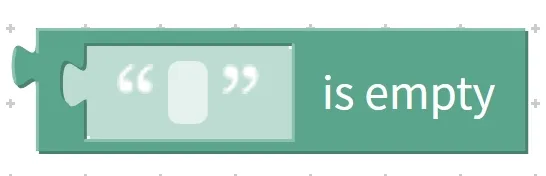
Chinese meaning: Determine whether a piece of text is empty . If the text has no characters, return " True ". If it contains any content (letters, Chinese characters, numbers, spaces, etc.), return " False ".
First, understand the core features and components of the empty text judgment block:
- Core Features: Only judges "empty/non-empty" — it does not care about the text content, only checks whether there are characters; spaces count as non-empty — even if there is only one space in the text, it is not considered empty; returns a Boolean value — the result only has two statuses: "True" or "False";
- Component: A "text input area", where content that needs to be checked for emptiness, such as fixed text, variables, and user-input text, can be placed.
Here are a few real-life examples to help you grasp the concept quickly:
- Real-life Example 1: Check fill-in-the-blank questions: if nothing is written in a blank, it is "empty"; if one character is written, it is "non-empty";
- Real-life Example 2: Check a sticky note: if it is completely blank, it is "empty"; if even a tiny circle is drawn on it, it is "non-empty".
- Real-life Example 3: Check the search box — if nothing is entered in the search box, it is "empty"; if a space is entered, it is "non-empty".
Practical Programming Example: Determine whether "" is empty and display the result
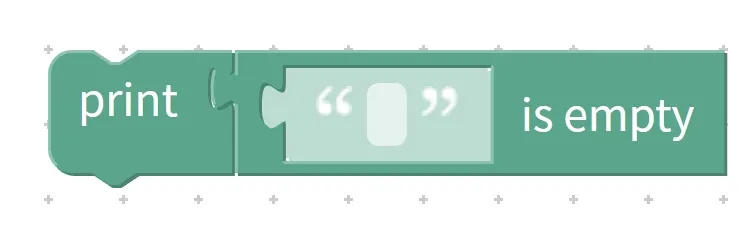
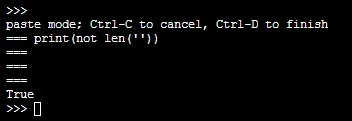
- Requirement: Use the empty text block to determine whether the empty text ""(with nothing inside the quotation marks) is empty, and display the result on the screen;
- Step 1: Find the empty text judgment block (is empty) from the block area;
- Step 2: Place the fixed text block ""(there are no characters inside the quotation marks) in the "text input area";
- Step 3: Place the block for judging empty text into the content area of the "show" block;
Operation logic: The program detects that there are no characters in the input text "", so the judgment result is "true", and the display screen finally shows "True". If the input is changed to " "(there is a space inside the quotation marks), then "False" will be displayed.
Tip: A quick reminder for using the empty text judgment block
- Distinguish between "empty text" and "spaces": empty text means there is nothing inside the quotation marks (""), while a space means there is a space character inside the quotation marks (" "), and the latter does not count as empty;
- Used with conditional blocks: It is often paired with "if. .. then. .." blocks for input validation, e. g., "If the user input is empty, display 'Please enter content'. ";
- For process control: It prevents errors when the program processes empty text, for example, checking whether the text is empty before concatenating or extracting characters.
✨ Mini Interaction: Empty Text Judgment Block Challenge
- Quick Quiz: Is the text " "(containing one space) considered empty? Will the result be True or False? (Answer: False! A space counts as a non-empty value~)
- Think about it: After asking the user to enter their name, you first need to check whether they have entered anything. What block should you use? (Answer: The empty text check block~)
Core Quick Summary: The empty text judgment block acts as the "text null detector" for a program, whose core function is to determine whether a text contains no characters at all. It returns a Boolean value and is often used in conjunction with conditional blocks to perform input checks, so as to prevent the program from errors caused by empty text.
6. Specific Text Finding Block (in text… find first/last occurrence of text…)
If we want to locate a specific piece of content within a string of text, such as finding "0" in "125" or the first occurrence of "W" in "HelloWorld", we need the dedicated text-finding block — this "text detective"! It can search for the "first occurrence" from left to right within the specified text, or the "last occurrence" from right to left; if nothing is found, it returns -1, helping us quickly pinpoint key content.
This block is just like looking for new characters in a text: searching from the beginning to the end gives you the "first occurrence", while searching from the end to the beginning gives you the "last occurrence"; once found, you note down the page number (position), and if not found, you output "not found". It is commonly used for text analysis and to determine whether key content exists.
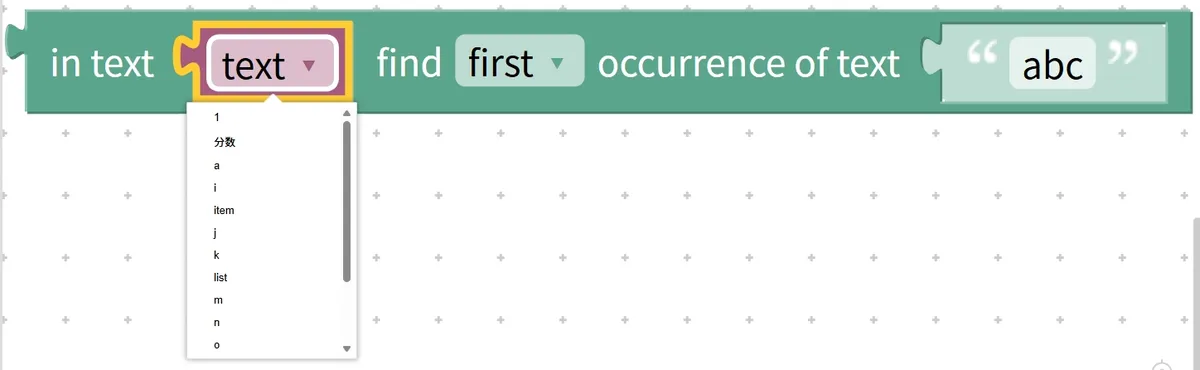
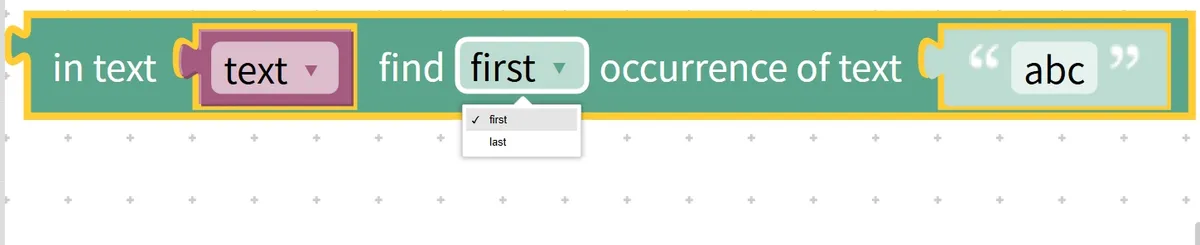
Chinese meaning: Within a specific text content (in text), find (find) the position of the first (first) or last (last) occurrence of the specified text (occurrence of text). This specific text content can be an item of a list (item), the entire list (list), or system preset variables such as text, 1, i, j, k, a, m, n, o, etc. It returns the position number, or -1 if the specified text is not found.
First, understand the core features and components of the specific text lookup block:
- Key Features: Bidirectional search – choose to search for the "first occurrence"(left to right) or "last occurrence"(right to left); returns position / -1 – returns the position number if found, returns -1 if not found; does not modify the original text – only searches without altering the original content;
- Components: three input areas — the "Target Text Input Area"(for placing the large text to be searched, e. g., "125"), the "Search Type Selection Area"(to select
first/last), and the "Content-to-Search Input Area"(for placing the small text to be found, e. g., "0").
Here are a few real-life examples to help you grasp the concept quickly:
- Real-life Example 1: Find the first occurrence of the character "月"(moon) in the poem *Quiet Night Thought* — start reading from the beginning, locate the "月" in the line "Raising my head, I look at the bright moon", and note its line number (position);
- Example 2 in daily life: Find the position of the last occurrence of "apple" in the sentence "I love eating apples, I also love eating bananas, and I love eating apples even more" — search backward from the end to locate the position of the final "apple";
- Example in daily life 3: Find "Xiaohong" in the name list — if found, return her serial number; if not, say "This person does not exist".
Practical Programming Example: Find the first occurrence position of "0" in the text "125"
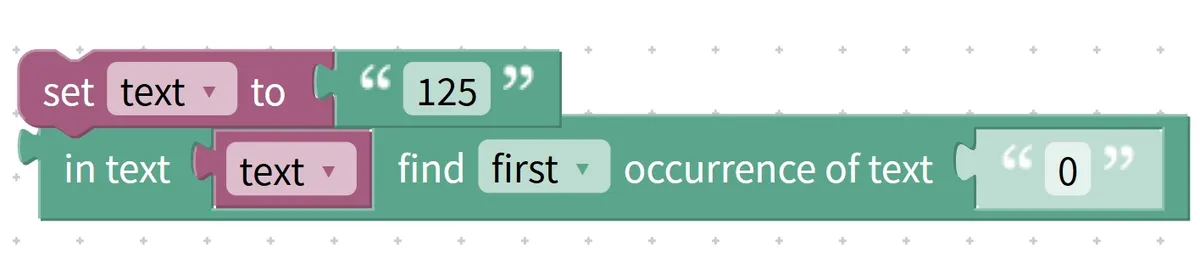
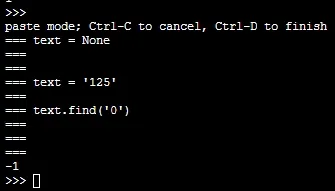
- Requirement: Use the specific text lookup block to find the first occurrence position of "0" in the target text "125" and display the result;
- Step 1: Locate the specific text-finding block in the block area, and set the finding type to "first occurrence";
- Step 2: Enter the fixed text "125" into the "Target Text Input Area", and enter the fixed text "0" into the "Content to be Searched Input Area";
- Step 3: Place the find block into the content area of the "show" block;
Operation logic: The program traverses "125" from left to right, checking "1", "2", and "5" in sequence. None of them is "0", so it is judged that the target is not found, and the display finally shows "-1". If the content to be searched is changed to "2", the position number (the specific number follows the software counting rule, usually starting from 1 or 0) will be found.
Tip: A Quick Reminder for Using the Specific Text Search Block
- Pay attention to the selection of search type: select "first" if you want to find the first occurrence, and select "last" if you want to find the last occurrence; do not choose the wrong direction.
- Distinguish the return value for "not found": return -1 when not found, instead of 0 or any other number; do not confuse them.
- Cooperation condition block: Often used together with the "equal to" block, for example, "If the search result ≠ -1, display 'Found it'", to determine whether the target content exists.
✨ Mini Interaction: Block Challenge for Specific Text Search
- Quick Quiz: In the string "HelloWorld", what will be returned if you look for the first occurrence of "W", and what happens if the character is not found? (Answer: "W" will definitely be found, and its corresponding position will be returned; if you look for "X", -1 will be returned~)
- Think about it: To determine whether the two characters "编程"(programming) are present in the text "我爱编程"(I love programming), what specific block needs to be paired with the dedicated text-finding block? (Answer: A conditional judgment block + a comparison block set to "not equal to -1"~)
Core Quick Summary: The specific text lookup block acts as the "text detective" of a program, whose core function is to locate the first and last occurrence positions of a specific text within the target text. It consists of three input sections: target text, lookup type, and content to be looked up, and returns a position number or -1, making it a critical tool for text analysis and key content judgment.
7. Text Character Extraction Block (in text item/list… get letter#/last letter…)
Young creators, if you want to extract a character at a specific position from a piece of text — for example, pulling the first character "H" and the last character "o" from "Hello", or the third character "zhēn" from "Programming is really fun" — you’ll need the text character extraction block, which acts as a "text extractor"! It can precisely extract the first character, last character, or a character at a specified position, without modifying the original text, and only returns the extracted character.
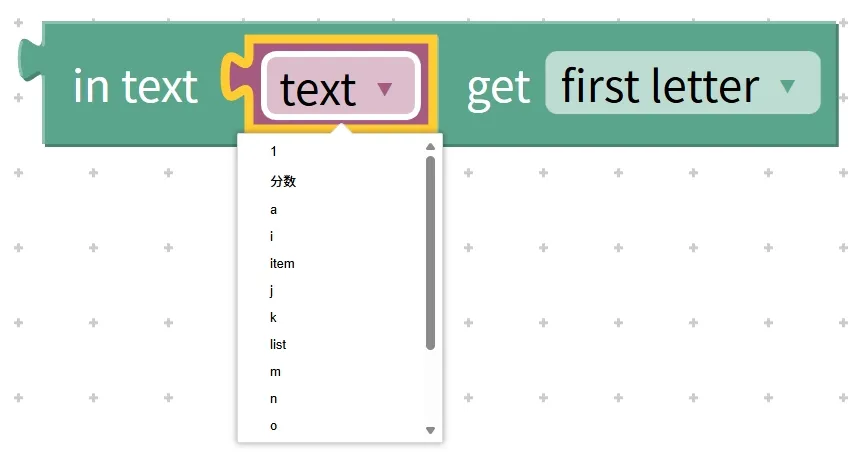
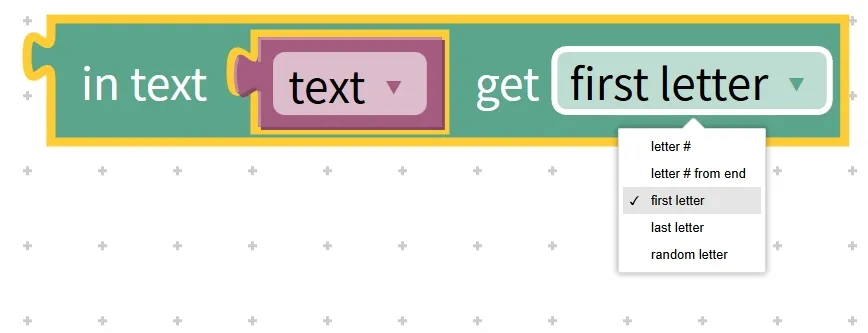
Chinese meaning: Extract from specific text content (in text, which can be a list item, an entire list, or a system preset variable) via the get action: the first character (first letter), the last character (last letter), a random character (random letter), the nth character counting from the start (letter #), or the nth character counting from the end (letter # from end), and return the extracted character.
First, understand the core features and components of the text character extraction block:
- Core Features: Multi-type extraction – supports 5 extraction modes: start, end, random, and specified position (forward/backward); Precise positioning – extracts by position, and the position counting must comply with the software rules (usually starting from 1 or 0); No modification to the original text – only extracts without altering the original content;
- Components: two input areas — the "Target Text Input Area"(for placing the text from which characters are to be extracted, e. g., "Hello") and the "Extraction Type Selection Area"(for selecting options such as first letter/last letter; if a specified position is selected, an additional position number needs to be entered).
Here are a few real-life examples to help you grasp the concept quickly:
- Real-life Example 1: Extract the first character "Zhang" and the last character "San" from the given name "Zhang San";
- Example 2 in real life: Extract the 4th character "qi"(meaning air/gas) from the sentence "The weather is fine today"(forward-specified position);
- Real-life Example 3: Randomly extract a character from the word "Python"(a random character), which could be "P" or "y".
Practical Programming Example: Extract multiple characters from the text "Hello" and display them
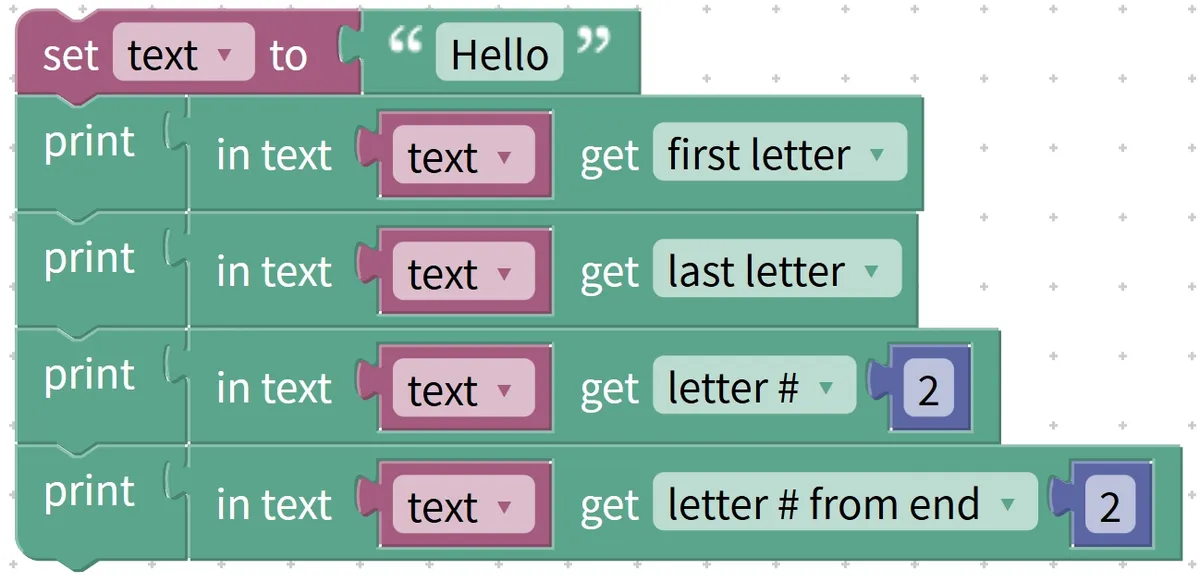
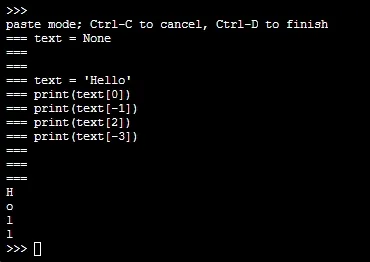
- Requirement: Use text character extraction blocks to extract the first character, the last character, the 2nd character from the start, and the 2nd character from the end from "Hello" respectively, then display the results in sequence;
- Step 1: Locate the text character extraction block in the block library, select "first letter" for the first time, enter "Hello" as the target text, and place it into the "show" block for display;
- Step 2: Change the extraction type to "last letter" and display it again;
- Step 3: Change the extraction type to "letter #", enter the position as "2", and then display it;
- Step 4: Change the extraction type to "letter # from end", enter the position "2", and display it;
Operation logic: Extract the first character to return "H", extract the last character to return "o", extract the 2nd character from the start to return "e", extract the 2nd character from the end to return "l", and the display screen will show "H", "o", "e", "l" in sequence (the specific position counting is subject to the software, and the counting here starts from 1).
Tip: A Quick Reminder for Using the Text Character Extraction Block
- Note the position counting rule: character position counting may vary across different software (starting from either 1 or 0). For example, for the string "Hello", the 2nd character is "e" when counting starts from 1, and also "e" in some software when counting starts from 0; this needs to be confirmed in advance.
- Avoid position out-of-bounds: When extracting a character at a specified position, the position number must not exceed the length of the text. For example, for "Hello"(which has 5 characters), you cannot extract the 6th character, otherwise an error will occur;
- Randomness of random characters: When "random letter" is selected, the characters extracted in each run may vary, which is a normal random effect.
✨ Mini Interaction: Text Character Extraction Block Challenge
- Quick-response Quiz: Extract the first character from the text "Programming is really fun" — what is the result? (Answer: 编!)
- Think about it: To extract the 3rd character from the end of "123456", which extraction type should be selected? (Answer: letter # from end, enter position 3~)
Core Quick Summary: The Text Character Extraction Block acts as the "text extractor" of a program, whose core function is to accurately extract specified types of characters from the target text. It supports 5 extraction methods, and users need to pay attention to the position counting rules to avoid out-of-bounds errors. It is a commonly used tool for text content analysis and key character acquisition.
8. Text Snippet Extraction Block (in text… get substring from… to…)
Young creators, if you want to extract a continuous segment from a piece of text — for example, getting the 2nd to 5th characters "lloW" from "HelloWorld", or pulling the date "October 1,2024" from the sentence "Today is October 1,2024" — you’ll need the text slicing block, which acts like a "text snippet scissors"! It can precisely cut out a continuous text segment based on the specified start and end positions, without modifying the original text, and only returns the extracted content.
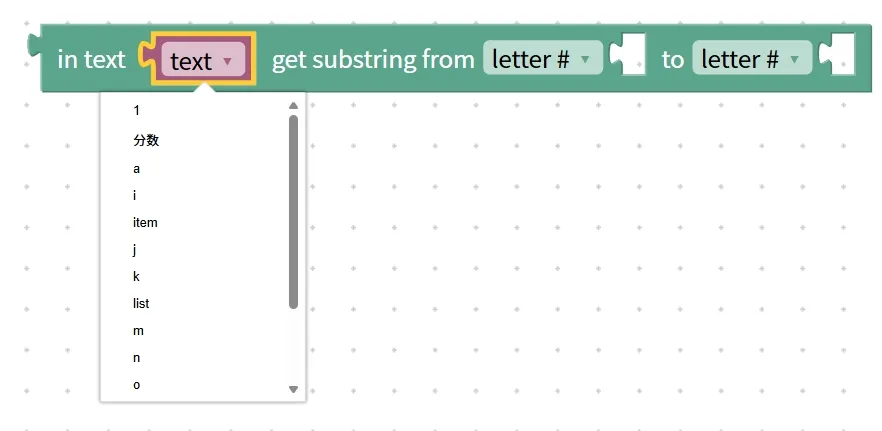
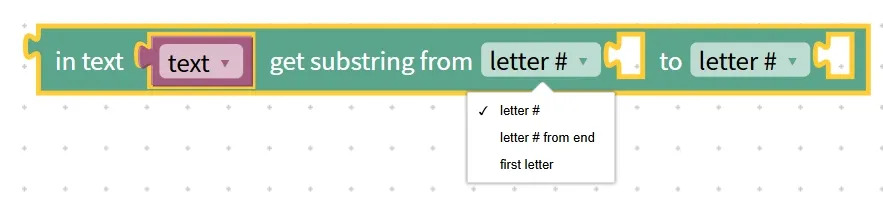
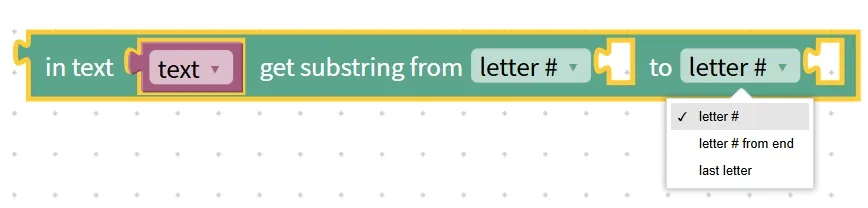
This block works just like cutting a rope with scissors: if you want to snip the segment from the 2nd centimeter to the 5th centimeter (corresponding to the start/end positions), you just line up the scissors with the spot and cut it off directly. It is often used to extract keywords and intercept valid information, such as pulling out names, dates, addresses and the like from a complete text.
Chinese meaning: Within the specified text content (in text, which can be a list item, an entire list, or a system preset variable), perform a get operation to extract the text segment (from letter #) from the specified start position to the end position (to letter #), i. e. the substring, and return this segment.
First, understand the core features and components of the text snippet extraction block:
- Core Features: Extract continuous segments — only continuous characters can be extracted, and scattered characters cannot; Intercept by position — both the start and end positions must be specified; Do not modify the original text — only intercept without altering the original content;
- Components: three input areas — the "Target Text Input Area"(for the text to be truncated, e. g. "HelloWorld"), the "Start Position Input Area"(from letter #, for the position where truncation starts), and the "End Position Input Area"(to letter #, for the position where truncation ends).
Here are a few real-life examples to help you grasp the concept quickly:
- Real-life Example 1: Extract the date segment "2024-10-01" from the note "Wednesday, 2024-10-01" — specify the start position as 1 and the end position as 10, then cut out this section;
- Example 2 in daily life: Extract a specific sentence from a text paragraph — locate the start and end positions of the sentence, then cut out the complete sentence;
- Real-life Example 3: Extract the surname "Zhang" from the full name "Zhang Sanfeng" — start position 1, end position 1; extract the given name "Sanfeng" — start position 2, end position 3.
Practical Programming Example: Extract and display the 2nd to 5th characters from the text "HelloWorld"

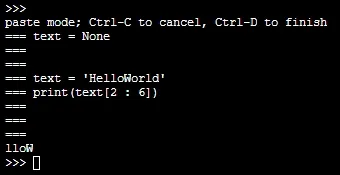
- Requirement: Use the text snippet block to extract the substring from the 2nd character to the 5th character of "HelloWorld", then display the result;
- Step 1: Find the text snippet block in the block area;
- Step 2: Enter the fixed text "HelloWorld" into the "Target Text Input Area", input "2" in the "Start Position Input Area", and input "5" in the "End Position Input Area";
- Step 3: Place the snapped block into the content area of the "show" block;
Operation Logic: The program intercepts a continuous character segment starting from the 2nd character and ending at the 5th character. For "HelloWorld", the 2nd to 5th characters are "lloW", so the display screen will finally show "lloW"(the position count starts from 1).
Tip: A Quick Reminder on Using the Text Snippet Extraction Block
- Note the position counting rule: just like the character extraction block, you need to confirm whether the software's position counting starts from 1 or 0 to avoid interception deviation;
- Start position ≤ End position: It must be ensured that the start position is not greater than the end position. For example, a start position of 2 and an end position of 5 is a valid truncation, while a start position of 5 and an end position of 2 is invalid;
- Use in combination with the find block: If you do not know the specific position of the target segment, you can first use the specific text find block to locate the start/end position of the segment, and then use the truncate block to extract it. For example, first find the position of "2024", then truncate to get the complete date.
✨ Mini Interaction: Text Snippet Block Challenge
- Quick response quiz: Extract the substring "really fun" from the text "Programming is really fun 2024". Given that "really" is the 3rd character and "fun" is the 5th character, what are the start and end positions respectively? (Answer: start 3, end 5~)
- Think about it: If you want to extract "Chaoyang District, Beijing" from the text "Address: XX Street, Chaoyang District, Beijing", which block do you need to use first to determine the position? (Answer: The specific text search block, to find the positions of the character "北(North)" and the character "区(District)"~)
Core Quick Summary: The text snippet extraction block acts as the "text snippet scissors" of a program, whose core function is to extract consecutive snippets from the target text at the specified start and end positions. It consists of three input fields: target text, start position, and end position. Often used in conjunction with the search block, it serves as a core tool for extracting valid information.
9. Text case conversion block (to UPPER CASE/lower case/Title Case …)
Young creators, when working with English text, do you ever need to convert letters to uppercase or lowercase? For example, changing "hello" to "HELLO", "WORLD" to "world", or "python is fun" to "Python Is Fun"(capitalizing the first letter of each word). This is where the "text case converter" — the text case conversion block — comes in handy! It can quickly convert the case format of English text without modifying the original text, only returning the converted result.
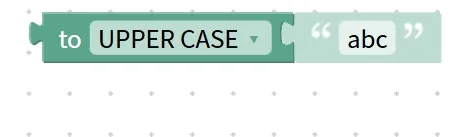
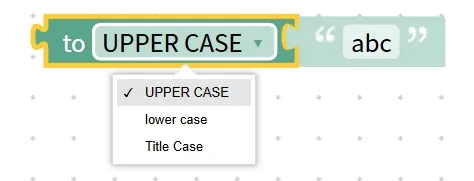
This block is like "changing outfits" for English words: putting on "uppercase clothes" means UPPER CASE, putting on "lowercase clothes" means lower case, and putting on "title-style clothes" means Title Case (capitalizing the first letter of each word). It is often used to standardize text formats, for example, unifying the English names entered by users to have the first letter capitalized, or converting keywords to uppercase for prominent display.
Chinese meaning: Convert the input English text to uppercase (UPPER CASE), lowercase (lower case) or title case (Title Case, capitalize the first letter of each word), and return the converted text; it has no effect on Chinese text.
First, understand the core features and components of the text case conversion block:
- Key Features: Three conversion modes — supports uppercase, lowercase, and title case; affects only English — no conversion effect on Chinese, numbers, or symbols; does not modify the original text — only returns the converted result, leaving the original text unchanged;
- Components: Two input areas: the "Target Text Input Area"(for entering the text to be converted, e. g. "hello") and the "Conversion Type Selection Area"(for selecting UPPER CASE/lower case/Title Case).
Here are a few real-life examples to help you grasp the concept quickly:
Example in daily life 1: Change the English name "alice" to title case, i. e. capitalize the first letter to get "Alice";
Example 2 in daily life: Change the keyword "python" to its uppercase form "PYTHON" to make it easier to locate and highlight in the text;
Example in daily life 3: Convert the sentence "HELLO WORLD" to lowercase "hello world" for better readability.
Practical Programming Example: Convert English Text in Different Formats and Display It
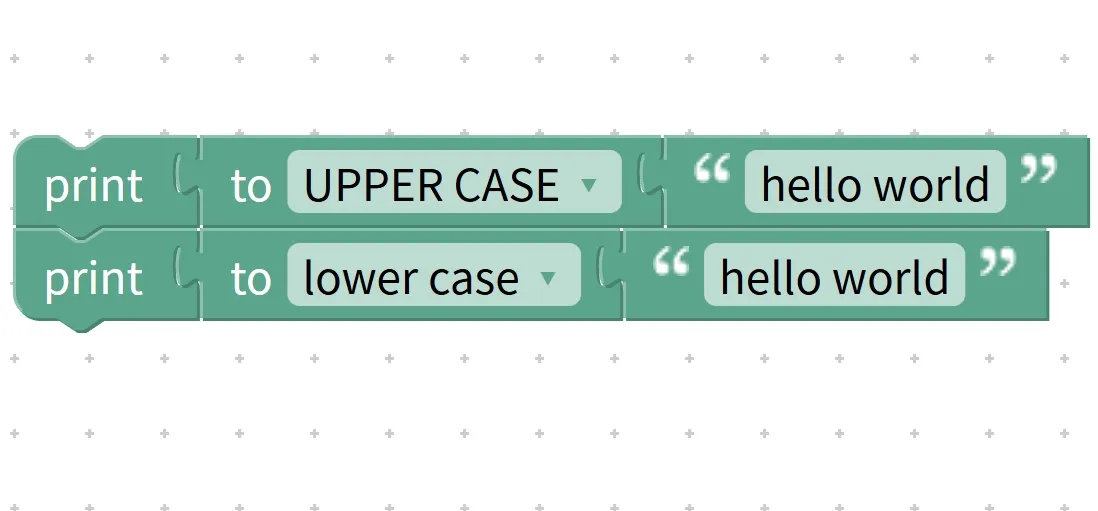
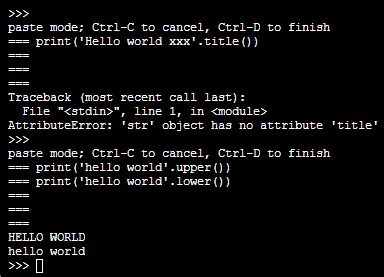
- Requirement: Use the text case conversion block to convert "hello python" to uppercase, lowercase, and title case respectively, and display the results in sequence;
- Step 1: Find the text case conversion block in the block area, select "to UPPER CASE" for the first time, enter "hello python" in the target text, and put it into the "show" block to display;
- Step 2: Change the conversion type to "to lower case", modify the target text to "HELLO PYTHON", and display it again;
- Step 3: Change the conversion type to "to Title Case", modify the target text to "hello python", and then display it;
Operation logic: When converting to uppercase, it displays "HELLO PYTHON"; when converting to lowercase, it displays "hello python"; when converting to title case, it displays "Hello Python"; if the target text contains Chinese characters such as "hello 编程", the Chinese part "编程" remains unchanged after conversion, while the English part is converted normally.
Tips: A Quick Reminder for Using the Text Case Conversion Block
- Distinguish the conversion type: Title Case means "capitalizing the first letter of each word", not just the first letter of the entire text. For example, "hello world" is converted to "Hello World", not "Hello world";
- No impact on Chinese content: There is no need to consider Chinese content during conversion. For example, when "你好 Python" is converted to uppercase, the result is "你好 PYTHON";
- Commonly used for format unification: When processing English text input by users, first convert the case to unify the format, then perform subsequent search and judgment, so as to avoid recognition errors caused by case differences (for example, treating "Alice" and "alice" as two different names).
✨ Mini Challenge: Text Case Conversion Block Challenge
- Quick Quiz: Convert "
i love programming" toTitle Case, what's the result? (Answer:I Love Programming!) - Think about it: Why should we convert all English user input to lowercase or uppercase first when processing it? (Answer: To avoid recognition errors caused by case differences. For example, "
Tom" and "tom" would be treated as two different inputs~)
Core Quick Summary: The Text Case Conversion Block acts as the "text case converter" for programs, whose core function is to convert English text into uppercase, lowercase or title case format. It has no effect on Chinese text, and is often used to unify text formats to avoid recognition errors caused by case differences, making it a common tool for English text processing.
10. Text Space Cleaning Block (trim spaces from left both/right side… of…)
Young creators, when processing text input by users, have you ever encountered the situation where there are extra spaces at the beginning or end of the text? For example, when a user enters a name and accidentally presses the space bar a few times, it becomes " Xiaoming ". At this time, you need the "text space cleaner" — the text space clearing block! It is specially designed to delete spaces at specified positions in the text, and you can choose to clear spaces on the left side, right side, or both sides without changing other characters, making the text format more standardized.
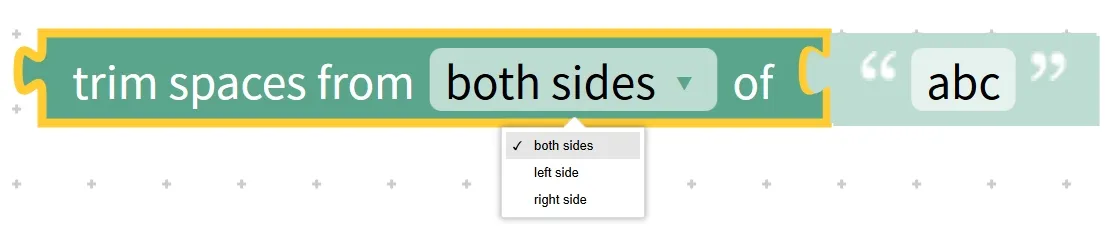
This block works just like how we organize the text on our exercise books: erase the extra blank space in front of a line of text (the left indent), erase the extra blank space after it (the right trailing space), or erase all extra blank spaces on both ends, leaving only the neat text content behind. It is often used to standardize text input and avoid lookup or judgment errors caused by extra spaces.
Chinese meaning: Remove the spaces (from left), right (from right) or both sides (from both side) of the text (spaces)(trim), and return the processed text as the result.
First, understand the core features and components of the text whitespace cleaning block:
- Core Features: Precise space cleaning — only deletes spaces without affecting other characters such as Chinese, English, numbers, etc. ; Multiple position options — can clean the left side, the right side separately, or both sides at the same time; Does not modify the original text — only returns the cleaned text, keeping the original text unchanged;
- Components: two input areas — the "Target Text Input Area"(for placing the text whose spaces are to be cleaned, e. g. " hello world ") and the "Cleanup Type Selection Area"(to select from left/from right/from both side).
Here are a few real-life examples to help you grasp the concept quickly:
Real-life Example 1: Delete the leading spaces in " Nice weather today " to get "Nice weather today "(left trim);
Practical Example 2: Remove the trailing spaces from " The weather is nice today " to get " The weather is nice today"(trim the right side);
Example 3 in daily life: Remove all the spaces before and after " The weather is nice today " to get "The weather is nice today"(trim both sides).
Practical Programming Example: Trim spaces at different positions in the text " hello world " and display the result
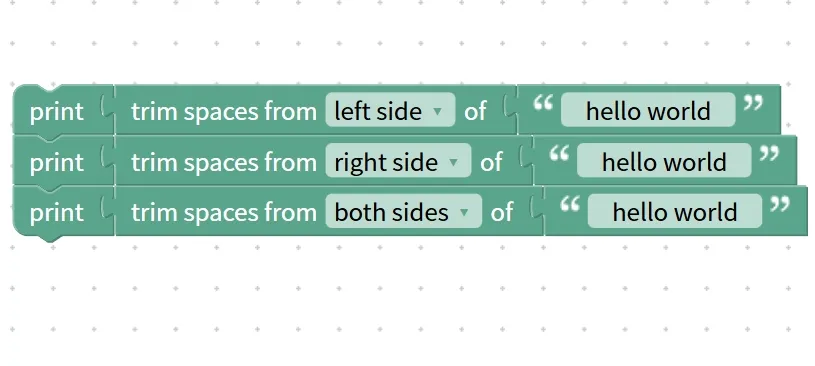
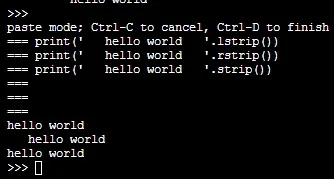
- Requirement: Use the text whitespace clearing block to clear the leading, trailing, and both leading and trailing whitespaces of the string " hello world " respectively, and display the results in sequence;
- Step 1: Find the text whitespace clearing block in the block area, select the clearing type as "from left"(left side) for the first time, enter the target text as " hello world ", and put it into the "display" block to display;
- Step 2: Change the cleanup type to "from right" and display again;
- Step 3: Change the cleanup type to "from both sides" and enable the display;
Operation logic: After clearing the left spaces, it displays "hello world "; after clearing the right spaces, it displays " hello world"; after clearing the spaces on both sides, it displays "hello world".
Tip: A Quick Reminder for Using the Text Space Clearing Block
- Trim spaces only: This setting only works for "spaces" and may be ineffective for other whitespace characters (such as tabs), so please pay attention;
- Does not affect spaces in the middle: only spaces at the beginning (left side) and end (right side) of the text will be cleaned, while spaces in the middle of the text will not be deleted. For example, "he llo" will remain "he llo" after cleaning;
- Use with user input: After the user enters text, clean up the spaces on both sides first before proceeding with subsequent processing, which can avoid errors caused by extra spaces. For example, when searching for "Xiaoming", you won't fail to find it just because the user enters " Xiaoming ".
✨ Mini Interaction: Text Space Clearing Block Challenge
- Quick-response quiz: After trimming the spaces on both sides of the text " Programming is so fun! ", what is the result? (Answer: Programming is so fun!)
- Think about it: Why do we need to trim the spaces on both sides of the name after the user enters it? (Answer: To avoid lookup and judgment errors caused by extra spaces, for example, treating " Xiaohong" and "Xiaohong" as two different names~)
Core Quick Summary: The Text Space Clearing Block acts as the "text space cleaner" of the program, whose core function is to remove spaces from the left side, right side, or both sides of a text. It does not affect other characters or spaces in the middle of the text, and is often used in conjunction with user input to standardize text formatting and prevent formatting errors.
11. Text Output Block (print…)
Young creators, after processing text with all the text blocks we've learned earlier, how can we see the results? That's where the text output block, the "text display window", comes in! It is designed to display the content of texts, numbers or variables on the screen without modifying the original content — it only handles "display", serving as a key bridge between the program and us.
This block works just like when we copy the answers from our exercise notebook onto the blackboard: the answers in the exercise notebook (the original data) stay unchanged, and we just display them so that everyone can see. It is often used for debugging programs (to check whether variable values are correct), displaying calculation results (for example, "Current Score: 95"), or showing prompt messages to users.
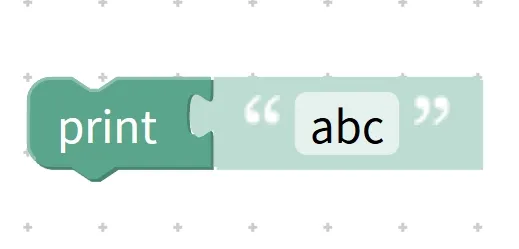
Chinese meaning: Output (print) content without altering the original data.
First, understand the core features and components of the text output block:
- Core Features: Multi-type output – supports outputting text, numerical values, variables, and even concatenated content; display-only without modification – does not alter the original data of the output object; directly visible – the output results can be viewed directly on the screen or in the output area;
- Components: An "output content input area", where content to be displayed such as fixed text, variables, numerical values, and concatenated text can be placed.
Here are a few real-life examples to help you grasp the concept quickly:
- Real-life Example 1: Copy the name "Xiaoming" written on the exercise book onto the blackboard for display (text output);
- Example 2 in daily life: Write the calculated answer "100" of the math problem on the blackboard for display (output a numerical value);
- Example 3 in daily life: Show everyone the record "age = 10" written in the notebook (output variable).
Practical Programming Example: Output the text "Hello world" and the number "333"
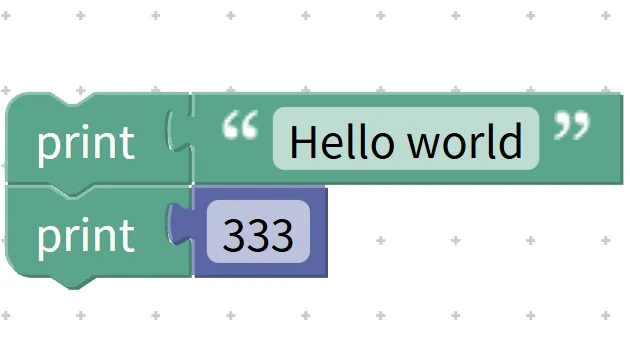
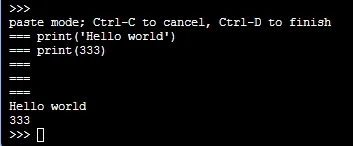
- Requirement: Use text output blocks to output the fixed text "Hello world" and the number "333" respectively, and display the results;
- Step 1: Find the text output block (print. ..) in the block area;
- Step 2: First, put the fixed text "Hello world" into the "Output Content Input Area", then run the program;
- Step 3: Modify the input content to the number "333" and run the program again;
Operation logic: The program reads the input "Hello world" and displays it in the output area; after reading the number "333", it directly displays "333", and the original data of both types of content will not be modified.
Tip: A Quick Reminder for Using the Text Output Block
- Flexible output: It can output a single type of content (text, numerical value, variable) independently, or output spliced content. For example, after splicing "Age: " and the variable "Age= 10", it will output "Age: 10".
- Commonly used for debugging programs: When writing a program, use the output block to check the real-time value of variables, which can quickly identify where the program goes wrong. For example, output the variable i in a loop to check whether the loop is executing properly;
- Note the output location: The output area may vary across different programming software (e. g., the bottom Console, simulation display screen), so you need to confirm that the output location is correct.
✨ Mini Interaction: Text Output Block Challenge
- Quick Quiz: If you want to display the content of the variable "name = Xiaohong", which block should you use? (Answer: Text output block!)
- Think about it: Will the text output block alter the original data to be output? (Answer: No! It only displays the data without modifying it~)
Core Quick Summary: The text output block serves as the "text display window" of a program, whose core function is to display content such as text, numerical values, and variables on the screen. It supports multiple types of output, only displays without modifying the original data, and is a critical tool for program debugging and user interaction.
12. User Input Prompt Block (prompt for text/number with message…)
Young creators, do you want your program to actively request information from us? For example, make the program ask "Please enter your name", then we type in the name, and the program stores it for later use — this is where the "text prompter", the user input prompt block, comes in handy! It can display a prompt message while the program is running, pause the program to wait for us to enter text or a number, and after we finish inputting, save the content into a variable for the subsequent program to use.

This block works just like a teacher asking us a question: the teacher says "Tell me your name"(a prompt message), we respond with our name (user input), and the teacher writes that name down in a notebook (stores it in a variable). It is the core block for interaction between a program and its users, enabling the program to perform different operations based on varying user inputs.
Chinese meaning: For text or number (for text/number) prompt (prompt). .. message, it waits for the user to input text (text) or a numerical value (number), and after the input is completed, stores the user's input content in a specified variable for subsequent operations of the program.
First, let’s understand the core features and components of the user input prompt block:
- Core Features: Actively prompt users — display clear prompt messages to let users know what to input; Pause to wait for input — the program will stop until the user finishes inputting and confirms; Store in variables for later use — the input content will be automatically stored in the specified variable for convenient subsequent use;
- Components: Three input areas: the "Prompt Message Input Area"(for entering the question text, e. g., "Please enter your name"), the "Input Type Selection Area"(to select for text/for number), and the "Variable Selection Area"(to choose the variable to store the input, e. g., "name").
Here are a few real-life examples to help you grasp the concept quickly:
- Real-life Example 1: When the teacher asks "Please enter your student ID (a number)", you say "101", and the teacher writes "101" down in a notebook (stores it in the variable "student ID");
- Example 2 in daily life: A questionnaire asks "Please enter your hobby (text)"; you write "painting", and the staff records "painting"(stores it in the variable "hobby");
- Real-life Example 3: When the self-service ticket kiosk prompts "Please enter your ticket collection code (numbers)", you input "668899", and the machine stores the code for verification (stored in the variable "ticket_collection_code").
Practical Programming Example: Prompt "Please enter your name" and display the entered content
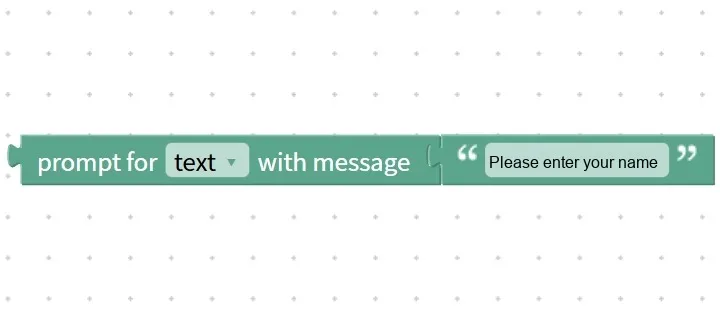
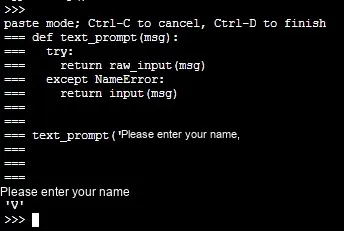
- Requirement: Use the user input prompt block to display "Please enter your name", after the user enters "V", store the input content in the variable "name", then use the output block to display the content of the variable;
- Step 1: Create the variable "Name";
- Step 2: Locate the user input prompt block in the block area, select "for text" as the input type, enter "Please enter your name" in the prompt message field, and choose "Name" as the variable;
- Step 3: Find the text output block in the block area, and select the variable "Name" as the input content;
Operation logic: After the program runs, it first displays "Please enter your name" and pauses to wait for input; after the user enters "V" and confirms, "V" is stored in the variable "name"; the program continues to execute, outputs the value of the variable "name", and the display finally shows "V".
Tip: A quick reminder for using the user input prompt block
- Clear prompt messages: The prompt message should be clear enough to let users know what to input and what the input type is, for example, "Please enter your age (number)" instead of a vague one like "Please enter information";
- Choose the correct input type: select "for text" when text input (e. g., name, hobbies) is required, and select "for number" when numeric input (e. g., age, scores) is required; only by selecting the correct type can the content be properly stored in the variable.
- With empty text judgment: Users may confirm without entering anything. You can subsequently use an empty text judgment block to check whether the input is empty, for example, "If the name is empty, display 'Please enter your name'".
✨ Mini Interaction: User-Prompted Block Building Challenge
- Quick Quiz: If you want users to enter their age (a number), should you choose "for text" or "for number" as the input type? (Answer: for number!)
- Think about it: When the user input prompt block runs, will the program keep executing all the time? (Answer: No! It will pause and wait for the user to finish input before continuing~)
Core Quick Summary: The user input prompt block acts as the "text requester" of a program, whose core function is to prompt users to enter text or numerical values and store them in variables. It enables interaction between the program and users, allows the program to perform different operations based on varying inputs, and serves as the core block for interactive programs.
13. Text Conversion Block (to str)
Young creators, when you learned to concatenate text earlier, did you ever run into the problem that "you cannot directly concatenate numbers and text together"? For example, if you want to combine the number "18" and the text "your age" into "your age 18", a direct combination will cause an error. At this time, you need the "convert to text" block, which acts as a "data format converter"! It can convert data of other types such as numerical values and variables into text format without changing the original data, and after conversion, the data can be concatenated with text and output.
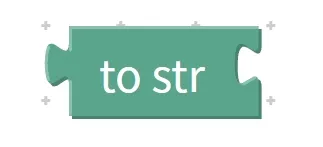
This block works just like when we write the number "18" on a slip of paper and then tape that slip to another slip marked "Your Age": the number itself remains unchanged, but it is converted into a format (text) that can be "attached to other text". It is commonly used to solve the problem that "different types of data cannot be concatenated", making text splicing more flexible.
Chinese meaning: Convert. .. to text format (to str)(string). It can convert other types of data such as numerical values and variables, return the converted text without modifying the original data.
First, understand the core features and components of the text-to-speech block:
- Core features: Format conversion – only changes the display format of data (converting from types such as numerical values to text) without altering the value of the data itself; Concatenable after conversion – the converted text can be concatenated with other texts and fixed texts; No modification to original data – only returns the converted text, leaving the type and value of the original data unchanged;
- Component: A "Conversion Content Input Area", where non-text type data to be converted such as numerical values and variables can be placed, for example, the number "18" and the variable "age= 18".
Here are a few real-life examples to help you grasp the concept quickly:
- Real-life Example 1: Replace the number card "18" with a text card marked "18", then glue it together with the "Your Age" card (concatenate after converting a numeric value to text);
- Real-life Example 2: Convert the digital note that records "height = 150" into a text note with "150" written on it, then combine it with the phrase "your height";
- Example 3 in daily life: Convert the number "333" to the text "333", then concatenate it with "Lucky number: " to form "Lucky number: 333".
Practical Programming Example: Convert the value 18 to text, then concatenate it with the string "Your Age" and output the result
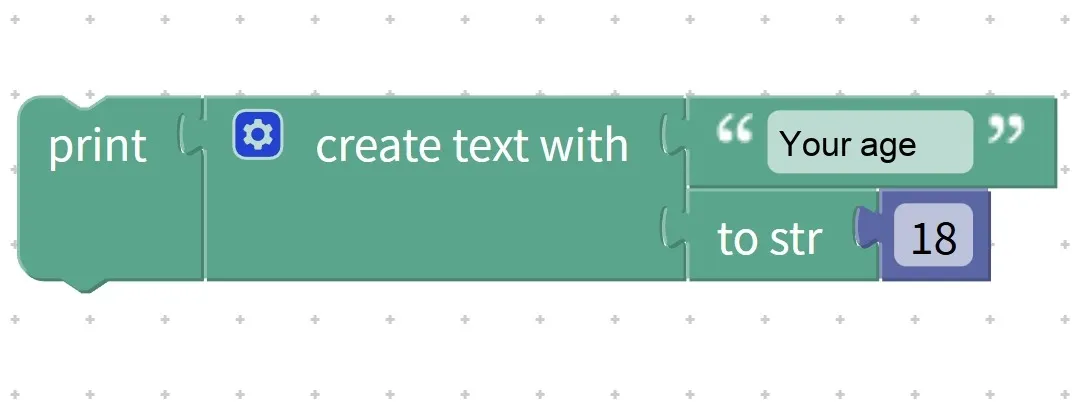
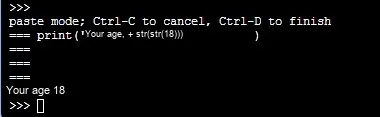
- Requirement: Use the text conversion block to convert the numeric variable "age = 18" into text, then concatenate it with the fixed text "Your age", and finally use the output block to display the result;
- Step 1: Create the variable "age" and set its initial value to 18;
- Step 2: Find the "to string" block (to str) in the block area, and enter the variable "age" as the content to be converted;
- Step 3: Find the join text block, put the fixed text "Your age" into the first input area, and put the result of the convert to text block into the second input area;
- Step 4: Place the block for splicing into the input area of the text output block, then run the program;
Execution logic: The program first converts the variable "age = 18"(numeric type) into the text "18"; then concatenates "Your age" and "18" to form "Your age 18"; finally outputs the concatenated result, which is ultimately displayed as "Your age 18" on the screen; the original value 18 and the numeric type of the variable "age" remain unchanged.
Tip: A quick reminder for using the text conversion block
- Only convert non-text types: Text-type data (e. g., the fixed text "18") does not require conversion; converting it directly will not cause errors, but it is unnecessary.
- The value remains unchanged after conversion: for example, the numeric value "18" converted to the text "18" looks identical but has a different data type, and only after conversion can it be concatenated with text.
- Commonly used in data display: when it is necessary to display non-text data such as numerical values and variables together with text, they must first be converted into text, otherwise normal concatenation and output cannot be achieved.
✨ Mini Interaction: Text Conversion Block Mini Challenge
- Quick Quiz: If you want to concatenate the number "666" and the text "Lucky Number: ", what should you do first? (Answer: Convert the number "666" to text using the "convert to text" block!)
- Think about it: Will the text conversion block change the value of the original data? For example, after converting the number 18 to text, will the value of the variable "age = 18" change? (Answer: No! It only changes the format, and the value remains 18~)
Core Quick Summary: The "Convert to Text" block acts as a "data format converter" for programs. Its core function is to convert non-text data such as numerical values and variables into text format. The converted data can be concatenated with other text without altering the value or type of the original data, making it a key block for solving the problem of concatenating different types of data.
A quick preview: By now, we have introduced all the core members of the text block family! By combining basic text blocks, advanced text blocks with the logic blocks, loop blocks and math blocks you learned earlier, you can create tons of practical interactive programs! For example, "the user enters their name and age, the program cleans up the input spaces, then combines them into the phrase 'Hello, XXX! You are XX years old' and displays it", or "the user enters a password, the program checks whether the password length meets the requirements and then prompts if it is correct". In the next section, we will unlock the hands-on practice of these comprehensive projects~