
Contents
- 1. Fixed-count loop block (repeat [number of times] times, do…)
- 2. Conditional loop block (repeat while/until [condition], do…)
- 2.1 Loop when the condition holds (repeat while [condition], do…) — execute only when the condition is satisfied
- 2.2 The loop stops only when the condition is met (repeat until [condition], do…) — execute the action as long as the condition is not satisfied, and stop once the condition holds
- 3. Counting Loop Block (count with [variable] from [start] to [end] by [step])
- 4. List traversal loop block (for each item x in list)
- 5. Loop Control Blocks (break out/continue with next iteration of loop)
- 5.1 Break out of loop block (break out of loop) —— The "emergency stop button" for loops
- 5.2 Skip Current Loop Block (continue with next iteration of loop) —— The "Skip Instruction" for Loops
Young creators, now that you’ve learned the logic blocks that let programs "think", today we’re going to unlock the magic tool that makes programs "diligent" — the loop blocks!
First, think about the scenarios in daily life: you need to jump rope 10 times in a row, write new Chinese characters 5 times repeatedly, run around the playground 2 laps over and over. .. If you have to write down every single one of these "repetitive tasks" one by one, wouldn't that be a huge hassle? The same logic applies to programs! If you want to make an LED blink 5 times, and there are no loop blocks available, you will have to piece together the "turn on light + turn off light" blocks 5 separate times, which is not only time-consuming but also takes up a lot of space.
A while loop block works just like an "automatic repeater". As long as you tell it "what to repeat" and "how many times to repeat", it will make the program automatically carry out the same operation over and over again, so we don't have to repeatedly piece blocks together! With it, we can accomplish complex repetitive actions using only a small number of blocks, making the program both efficient and concise~
For example, if you want an LED light to blink 5 times, simply use a loop block to set "repeat 5 times", then place the blocks for "turn light on for 2 seconds + turn light off for 1 second" inside the loop, and the program will automatically repeat this sequence 5 times — it’s incredibly hassle-free! Now let’s get to know these loop blocks that "make your program work efficiently" and learn how to use them~
A quick preview: When you combine loop blocks with the logic blocks you’ve learned earlier, you can achieve even cooler functions! For example, "if the button is pressed, make the LED blink 3 times repeatedly" — we’ll learn all about that later step by step~
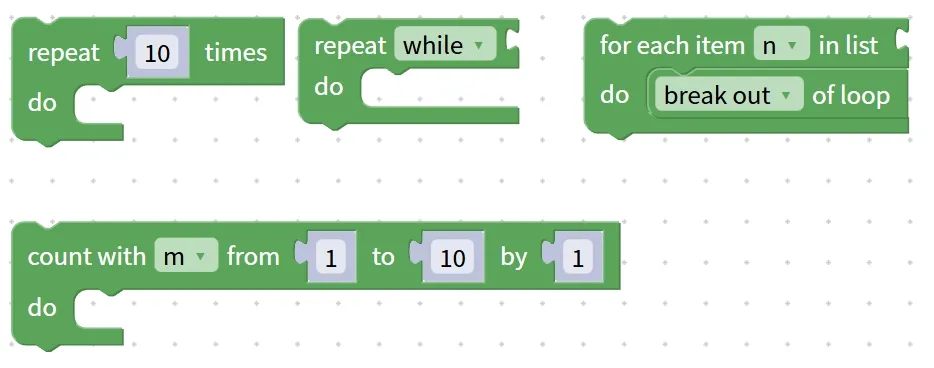
✨ Pre-class Warm-up Activity
- Quick Quiz: What is the block that enables a program to repeatedly perform the same operation called? (Answer: A loop block!)
- Think about it: What other "things that need to be done repeatedly" are there in your life? Which block would you need to help implement it with a program? (Hint: For example, brushing your teeth every day and having PE class every week are both things that require a loop block~)
1. Fixed-count loop block (repeat [number of times] times, do…)
Among all the loop blocks, the fixed-count loop block is the most commonly used and easiest to understand one! It works just like an "automatic repeater" we've pre-set a number of times for — as long as you tell it "how many times to repeat" and "what to repeat", it will complete the task precisely, and automatically stop once the set number of times is reached, never doing more or less than required~
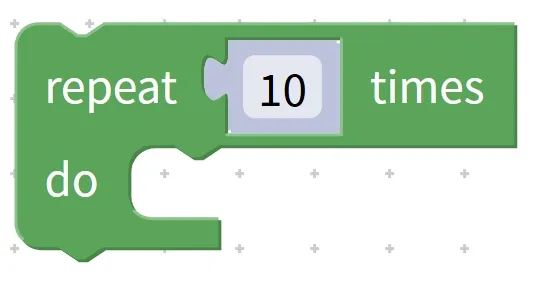
Chinese meaning: Repeat the operations inside the loop for the specified number of times.
First, understand its "two core components" — it’s as simple as setting parameters on a tape recorder.
- Count Setting Area (repeat [count] times): Enter a specific number here, such as 3,5, or 10, which indicates "how many times the action should be repeated";
- Action area (do…): Place the blocks that need to be executed repeatedly here. Whether it is a single block or a combination of multiple blocks, each loop will execute them completely in sequence.
Take this most intuitive hardware practice example to easily master how to use it:
Practical Example 1: Implement "LED Blinking Repeatedly for 5 Times"
- Step 1: Find the fixed-count loop block in the block area and set the count to "5";
- Step 2: Place the two action blocks "light on for 2 seconds" and "light off for 1 second" into the operation area of the loop in sequence;
- Step 3: Place the entire loop block in the appropriate position of the program and click Run.
Breakdown of the operation logic: The program will first execute "turn on the light for 2 seconds", then execute "turn off the light for 1 second", which counts as one cycle; it will then automatically repeat this process, and the entire looping action will stop once 5 cycles are completed. Without the loop block, we would have to manually assemble 5 sets of "light on + light off" blocks, but with it, just 1 set of blocks gets the job done!
Let's look at another example of a multi-action combination to understand the "execution logic of multiple blocks within a loop":
Practical Example 2: Implement "Repeat 3 times: Red light on for 1 second → Green light on for 1 second → All lights off for 1 second"
- Step 1: Set the number of times for the fixed-count loop block to "3";
- Step 2: Place the three blocks "red light on for 1 second", "green light on for 1 second" and "turn off all lights for 1 second" in the operation area in sequence;
- Operation logic: Each cycle is executed in the sequence of "red → green → off", and the process stops after 3 cycles without any manual intervention throughout the whole process.
Quick reminder: The order of blocks inside a loop matters a lot! If you place the "turn off light for 1 second" block before the "turn on light for 2 seconds" block, the sequence will become "turn off the light first, then turn it on", which reverses the blinking effect~ Always arrange the blocks in the exact order of actions you want!
✨ Exclusive Mini Interaction: Fixed-Times Loop Block Challenge
- Quick Response 1: What is the core feature of the fixed-count loop block? (Answer: It precisely repeats for the specified number of times and stops automatically once the count is reached!)
- Quick Response Quiz 2: If you want the buzzer to beep repeatedly for 3 times, in which part of the loop block should you place the "beep for 1 second" block? (Answer: Inside the action block (do…)!)
- Think about it: We want to achieve "repeat 4 times: turn on the light when the button is pressed", which blocks do we need to combine? (Hint: a fixed-count loop block + a "button pressed" condition block + a "turn on light" action block, put the condition and the light-on block into the loop operation area~)
- Scenario Judgment: You have programmed "repeat twice: turn on the light for 1 second + turn off the light for 1 second". How many seconds in total does it take to finish running the program? (Answer:(1+ 1)×2= 4 seconds! Each loop takes 2 seconds, so 2 loops add up to 4 seconds~)
- Hands-on Association: What things in life require "repeating a fixed number of times"? For example, "jump rope 3 times" — translate this into programming logic, and explain what the number of loops and the operation to be repeated are respectively~
2. Conditional loop block (repeat while/until [condition], do…)
In the previous section, we learned about the "fixed-count loop block", which works just like a tape recorder set to repeat a specific number of times, and stops automatically once the count is up. But in many real-life scenarios, we don't know how many times we need to repeat something, and have to decide when to stop based on the "situation" — for example, "keep skipping rope until you get tired", or "keep playing on the playground as long as it's not raining". When we encounter this kind of "situation-based repetition" need in programming, we need the protagonist of today — the conditional loop block — to come to the rescue!
A conditional loop block is just like a "smart repeater that reads signals": instead of having a pre-set number of repetitions, it keeps an eye on a "conditional signal" — it will keep executing the task as long as the signal meets (or fails to meet) the requirement, and automatically stops only when the signal changes. There are two common types of conditional loop blocks: "loop while the condition holds (repeat while)" and "loop until the condition holds (repeat until)". Let's get to know them one by one and figure out their differences and usage.
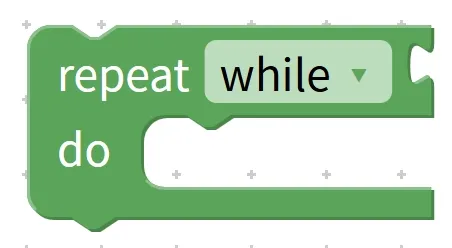
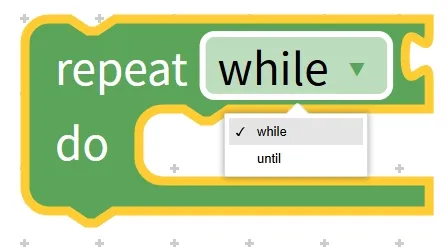
2.1 Loop when the condition holds (repeat while [condition], do…) — execute only when the condition is satisfied
The repeat while block is a rigid yet reliable intelligent repeater: it keeps a constant eye on the preset condition, and repeatedly executes the operations inside the loop as long as the condition holds true; the moment the condition no longer holds, it immediately terminates the loop and stops working entirely. Its core logic is "continue if the condition is met, stop otherwise", making it ideal for scenarios that require "continuous condition monitoring, and action execution whenever the condition is satisfied".
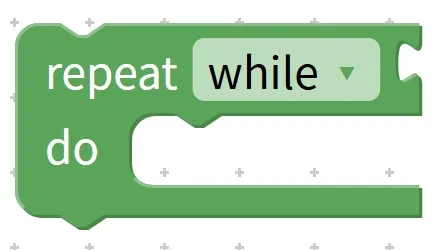
Chinese meaning : When ( while ) ... condition is met, repeat ( repeat ) execution ( do ) ... operation.
First, let’s look at real-life examples to quickly grasp the logic:
Real-life Example 1: As long as it is not raining (the condition holds), we keep playing on the playground (repeated operation); once it starts raining (the condition fails), we stop playing and go home to shelter from the rain.
Real-life Example 2: As long as Mom hasn’t called everyone for dinner (the condition holds), keep watching TV (repeated action); when Mom calls everyone for dinner (the condition no longer holds), stop watching TV.
Let's look at the practical hardware examples in programming, combined with our devices:
Practical Example 1: Implement the function that "when the button is not pressed (the condition is true), repeatedly execute the LED blinking (turn on for 1 second + turn off for 1 second)"
- Step 1: Find the "repeat while" block in the blocks area;
- Step 2: Place the condition block for "the button is not pressed"(a combination of the negation block you learned earlier and the button condition) into the condition area of the "while" loop;
- Step 3: Place the action blocks "LED light on for 1 second" and "LED light off for 1 second" into the loop operation area in sequence;
- Operation logic: After the program starts running, it continuously detects "whether the button is pressed" — as long as the button is not pressed (the condition holds true), the LED keeps flashing; once the button is pressed (the condition no longer holds), the flashing stops immediately. We have no predefined number of flashes here, it all depends on the signal of "whether the button is pressed".
Practical Example 2: Implement the function that "when the temperature is below 30 degrees (the condition is satisfied), repeatedly execute the action of 'reading the temperature and displaying it'"
- Step 1: Place a comparison block with the condition "temperature < 30°C" in the condition area of the repeat while block;
- Step 2: Place the building blocks labeled "Read Temperature" and "Display Temperature" in the operation area;
- Operating logic: As long as the temperature does not exceed 30 degrees Celsius, the current temperature will be displayed in real time continuously; once the temperature is ≥30 degrees Celsius, the display will stop.
2.2 The loop stops only when the condition is met (repeat until [condition], do…) — execute the action as long as the condition is not satisfied, and stop once the condition holds
repeat until block and the repeat while block are perfect counterparts with exactly opposite logic: the former keeps monitoring the condition, repeatedly executing the internal operations as long as the condition is not met, and immediately terminates the loop once the condition holds. Its core logic is "continue if the condition fails, stop when the condition is satisfied", which is suitable for scenarios where you need to "keep going until the condition is met".
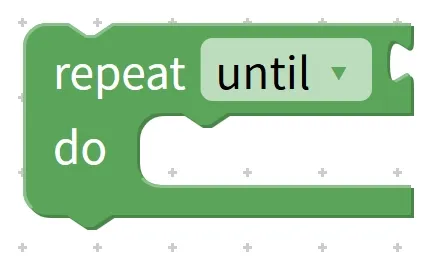
Chinese meaning : Until ( until ) the condition is met, repeat ( repeat ) the execution ( do ) operation; when the condition is met, the loop stops.
Let's start with real-life examples first, as comparison makes understanding clearer:
Real-life Example 1: Keep watching TV (repeated action) until Mom calls you for dinner (the condition is met); the moment Mom calls you for dinner, stop watching TV. (This follows the same logic as the previous real-life Example 2 for the while statement, but is described from a different perspective.)
Real-life Example 2: Keep skipping rope (repeated action) until you complete 100 skips (the condition is met); once you hit 100 skips, stop skipping rope.
Let's look at a practical example of programming hardware:
Practical Example 1: Implement the function of "repeatedly executing the LED blinking until the button is pressed (the condition is satisfied)"
- Step 1: Place the condition block "button is pressed" in the condition area of the "repeat until" block;
- Step 2: Place the block for "LED on for 1 second + off for 1 second" in the operation area;
- Operating logic: As long as the button is not pressed (the condition is not met), the LED keeps blinking; once the button is pressed (the condition is met), the blinking stops immediately. Have you noticed? This effect is exactly the same as that of Example 1 of repeat while earlier, except that the condition is expressed in the opposite way~
Practical Example 2: Implement the function of "repeating the forward operation until the distance between the robot and the obstacle is ≤ 10 cm (the condition is satisfied)"
- Step 1: Place a comparison block with the condition "distance ≤ 10 cm" in the condition area;
- Step 2: Place the "Robot Move Forward" block in the operation area;
- Operation logic: The robot keeps moving forward until it detects that the distance to the obstacle is ≤ 10 cm (almost touching it), then it stops moving forward immediately to avoid colliding with the obstacle.
Pro Tip: How to Distinguish Between while and until? Just Remember These Two Mnemonics!
Many young makers tend to mix the two up. Here are two super easy-to-remember mnemonics that you’ll get the hang of at a glance:
- repeat while: execute as long as the condition holds (execute only when the condition is met, stop otherwise);
- repeat until: keep executing until the condition is met (execute as long as the condition is not satisfied, stop when it is satisfied).
Quick tip: While both while and until blocks can work in some scenarios (like the button-controlled blinking example earlier), picking the right block makes your program more intuitive. Use until when you mean "keep doing something until a specific goal is met"(such as jumping 100 times, or when the distance is ≤ 10 cm) — this aligns better with how we naturally phrase things. Use while when you mean "keep doing something as long as a condition holds true"(like playing outside as long as it doesn’t rain, or displaying a message when the temperature is low) — this flows more naturally in that context~
✨ Exclusive Mini Activity: Conditional Loop Block Challenge
- Quick Response 1: Which conditional loop block "executes only when the condition is true"? (Answer: the repeat while block!)
- Quick Response Quiz 2: "Stop displaying the temperature only when the temperature ≥ 30°C", which block should be used? (Answer: the repeat until block!)
- Think: We want to implement the function "as long as it is not dark (light level > 10), keep the desk lamp on all the time". Which block should we use? What are the condition and the operation respectively? (Hint: use the repeat while block; condition: light level > 10; operation: turn on the desk lamp~)
- Scenario Judgment: You have programmed "repeat until the button is pressed, execute LED flash for 1 second + off for 1 second". Now answer: ① Does the light flash when the button is not pressed? ② Does the light keep flashing after the button is pressed? (Answer: ① Yes, it flashes, because the condition is not met; ② No, it stops flashing, because the condition is satisfied and the loop terminates~)
- Hands-on Association: Try to describe a real-life scenario that uses "repeat until", for example, "stop reading only after finishing homework", then explain what the corresponding condition and the operation to be repeated are respectively~
Quick Core Takeaway: Conditional loop blocks are "smart repeaters that act on signals" — no need to pre-set the number of iterations, as they rely on conditions to decide when to stop. `repeat while` means "execute as long as the condition holds", while `repeat until` means "execute while the condition does not hold, and stop once it is satisfied". You can easily tell them apart by remembering this mnemonic. Paired with the logic blocks and sensor blocks you learned earlier, they enable a wide range of automatic control functions, such as automatic obstacle avoidance, automatic temperature control, and more — they’re incredibly practical!
3. Counting Loop Block (count with [variable] from [start] to [end] by [step])
In the previous section, we learned about the "conditional loop block", which decides when to stop based on a "conditional signal"; even earlier, we also learned about the "fixed-count loop block", which stops according to the "preset number of iterations". The counting loop block we are going to learn about today is an "advanced version" of both — it is just like a "precision repeating machine that counts in order": it can not only repeat operations accurately, but also comes with a "little variable buddy" that changes in a regular pattern, and will not stop until the variable reaches the target value, making it especially suitable for scenarios that require "execution in numerical order"!
Simply put, the core of a counting loop block is "variable changing by a step size + repeated operations": we first set "what number the variable starts from", "what number it ends at", and "how much it changes each time". During the loop, the variable changes step by step according to the rule, and the internal operation is executed once for each change. When the variable reaches or exceeds the end value, the loop stops automatically. For example, counting from 1 to 5 and turning on a light every 2 numbers can be easily achieved with it~
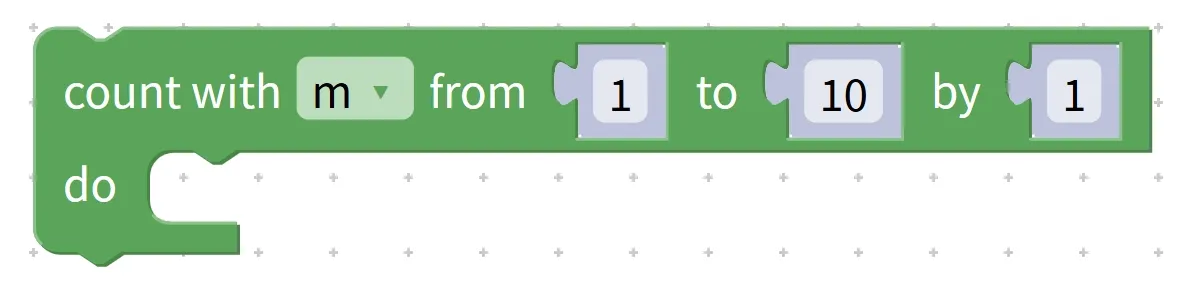
Chinese meaning: Calculate (count with) a variable, starting from the initial value specified in (from), change the variable each time by the step size set in (by), execute the operations inside the loop specified in (do), until the variable reaches the end value specified in (to).
First, get to grips with its "four core components" — it’s as simple as setting the "counting rules" for a tape recorder, and none of them can be omitted!
- Variable section (
count with[variable]): Choose a "variable buddy"(such as i, p, j) — it acts like a "counter" for the loop, changing along with each iteration to keep track of which number the loop has reached; - Start Value Area (
from[start]): the "starting number" of the variable, where the loop officially begins, such as 1,0, 5; - End value area (
to[end]): the "end number" of the variable. When the variable reaches or exceeds this number, the loop will stop, such as 10,8, 20; - Step Zone (
by[step]): The "variation range" of a variable in each loop. A positive value means "increase", while a negative value means "decrease". For example, step 1 = add 1 each time, step 2 = add 2 each time, step -1 = subtract 1 each time.
Let's start with a super intuitive basic example, break down the loop process step by step, and fully understand the logic:
Basic Example: Let the variable i count from 1 to 5, increment by 1 each time, and display the current number.
Building Block Combination:
Count variable i from 1 to 5 with step 1 → execute display i
Detailed description of the execution process (follow the changes of variables, and it will be clear at a glance):
- 1st iteration: Variable i = 1 (starting from the initial value) → execute the operation of "display 1";
- Second loop: Variable i increments by a step size of 1 and becomes 2 → execute the operation of "display 2";
- 3rd iteration: Variable i increments by 1 again and becomes 3 → Execute the operation of "display 3";
- 4th iteration: Variable i becomes 4 → Execute the operation of "display 4";
- 5th iteration: The variable i becomes 5 (which reaches the end value) → execute the operation of "display 5";
- Loop ends: The variable i has reached the end value and will no longer change, so the loop stops officially.
Pro Tip: What's the difference between a counting loop and a fixed-iteration loop? Just remember this one key point!
Many young makers tend to mix the two up. Here’s a simple way to tell them apart that’s super easy to understand at a glance:
- Fixed-count loop: It only focuses on "how many times to repeat", does not have variables to record the loop state, and can only perform repeated operations in a simple manner;
- Count loop: It not only supports "repeating for a specified number of times", but also comes with a built-in "variable counter" whose value changes according to the set step, enabling more flexible operations using the variable value (e. g., displaying numbers, adjusting the action amplitude based on the number of repetitions).
Quick reminder: When setting parameters, make sure the "start value, end value, and step size" are properly matched! For example, if you want to count from 1 to 5, you cannot set the step size to -1 (it will count backwards, so you will never reach 5 and the loop will never stop); if you want to count from 5 to 1, you cannot set the step size to 1 (it will count forwards, so you will never reach 1 either). Be sure to choose the correct positive or negative step size based on whether you are counting "forwards" or "backwards"~
✨ Exclusive Mini Interaction: Counting Loop Block Challenge
- Quick Response 1: What are the four core components of the count loop block? (Answer: variable field, start value field, end value field, step size field~)
- Quick Response Quiz 2: If you want to implement "count down from 10 to 1, subtracting 1 each time", what should the step size be set to? (Answer: -1!)
- Think about it: We want to implement "the variable k ranges from 3 to 9 with a step size of 3, and the LED flashes once in each loop". How many loops will there be in total? What are the values of the variable k in each loop respectively? (Hint: 3 times! They are 3,6, 9 respectively~)
- Scenario Judgment: A program is written as "For the counting variable m from 1 to 4 with a step size of 1, execute 'display m + turn on the light for 1 second'". Question: What number will be displayed during the 3rd loop? (Answer: 3! The variable m = 3 in the 3rd loop~)
- Hands-on Association: Try to describe a real-life scenario that uses a counting loop, such as "count from 1 to 10, and clap your hands once every time you count a number", then explain what the corresponding variable, start value, end value, step size and repeated operation are respectively~
Core Quick Summary: The count loop block is a "precision repeat counter that counts in sequence", with its core logic being "variable changing by step size + repeated operations", consisting of four core parts: variable field, start value field, end value field, and step size field. It is more flexible than fixed-count loops, supporting functions like forward counting, reverse counting, and interval counting. Paired with display blocks and hardware control blocks, it can create highly practical programs such as countdown timers and light activation by specified counts~
4. List traversal loop block (for each item x in list)
Previously, we learned about loop blocks that either repeat a fixed number of times, stop based on a condition, or count in numerical order. The list traversal loop block we are going to learn today is a specialist at handling "a set of data" — it acts like a meticulous list manager, which can "invite out" every element in the list in order, perform the same operation on each one by one, and only stop when all elements in the list have been processed. It is especially suitable for scenarios where multiple pieces of data or objects need to be processed in batches!
First, let's simply understand what "list" and "traversal" mean: a list is like a "data storage box" that can hold multiple items of the same type (such as multiple numbers, multiple LED light IDs, multiple audio files) together; traversal means "checking and processing one by one", just like you take out the toys in the storage box one by one to play with, finish one then take the next, until all toys have been played with. And the list traversal loop block is the tool in the program that helps us "process the data in the storage box one by one"~
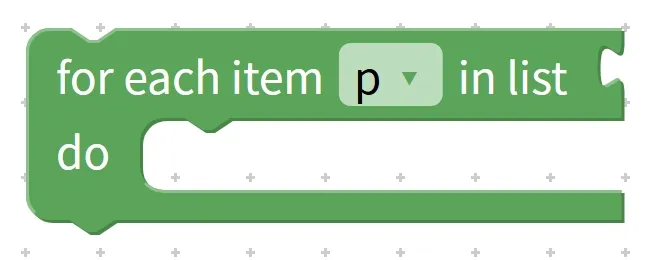
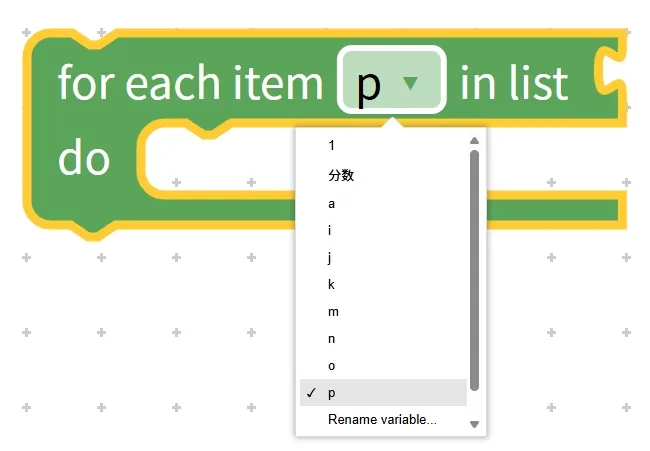
Chinese meaning: For (for) each element (in list) in the list (each item), assign it to a temporary variable (such as x, p) in sequence, and perform the operations inside the loop (do); the loop will end automatically after all elements are processed.
First, get a clear grasp of its "three core components" — it’s as simple as assigning clear work tasks to a little butler!
- Temporary variable area (
each item x): Here, x acts as a "temporary small container". During the loop, elements from the list are placed into this container one by one; after each element is processed, it is replaced with the next one, until all elements have been cycled through. - List Area (
in list): Here you need to select the "data storage box"(i. e., the list) to be processed, and tell the butler which set of data to handle; - Action Area (
do…): Place the operations to be performed on each element here. Whether it's displaying content, turning on lights, or playing sounds, the butler will repeatedly execute this set of operations for every element.
Let's start with a super intuitive basic example, break down the loop process step by step, and fully understand the logic:
Basic example: There is a list [1,3, 5,7], use the list iteration loop block to read each number in sequence and display them.
For each element p in the list
Execute: display p
Description of Execution Process:
Iteration 1: temporary variable p = the 1st element in the list "1" → perform the operation "display 1";
Iteration 2: temporary variable p = the 2nd element in the list "3" → perform the operation "display 3";
Iteration 3: temporary variable p = the 3rd element in the list "5" → perform the operation "display 5";
Iteration 4: temporary variable p = the 4th element in the list "7" → perform the operation "display 7";
The loop ends, all elements in the list have been processed, and the butler officially stops working.
Pro Tip: What's the difference between list traversal loops and count-controlled loops? Just keep these 2 points in mind!
Many young makers tend to mix the two up. Here are two simple ways to tell them apart, super easy to understand at a glance:
- Different core objectives: a counting loop "repeats in numerical order", focusing on the "number of repetitions"; a list traversal loop "processes elements in the order they appear in the list", focusing on "ensuring every element is processed";
- The variables serve different purposes: the variable in a counting loop acts as a "counter"(to record the number of loop iterations), while the variable in a list traversal loop functions as a "temporary container"(to hold the current list element being processed).
Quick reminder: The number of iterations of a list traversal loop is determined by the number of elements in the list! If a list has 5 elements, it loops 5 times; if it has 3 elements, it loops 3 times. We don't need to set the number of times manually, which is especially suitable for scenarios where you don't know the exact number of repetitions but know you need to process all elements~
✨ Exclusive Mini Interaction: List Traversal Loop Block Challenge
- Quick Response Quiz 1: What is the name of the loop block specifically designed to process each element in a list one by one? (Answer: List traversal loop block!)
- Quick Response Quiz 2: What determines the number of iterations of a list traversal loop? (Answer: The number of elements in the list!)
- Think about this: We have a list ['Apple', 'Banana', 'Orange'], and we want to iterate through the list to display each fruit name in sequence. What are the three core components of a list traversal loop that we need to use? (Hint: a temporary variable, the list ['Apple', 'Banana', 'Orange'], and the operation to display the temporary variable~)
- Scenario judgment: A program is written to "for each element p in the list [2,4,6], execute the action of displaying p and turning on the light for 0.5 seconds". Question: How many times will the loop run in total? What number will be displayed in the second loop? (Answer: 3 times! The number displayed in the second loop is 4~)
- Hands-on Association: Try to describe a real-life scenario that uses a list traversal loop, such as "take out and read each textbook [Chinese, Math, English] from your schoolbag one by one", then explain what the corresponding list, temporary variable, and repeated operation are respectively~
Core Quick Summary: The list traversal loop block acts as a "list butler that handles items one by one". Its core function is to process each element in the list in sequence, with the number of loops determined by the total number of elements in the list. It consists of three core components: a temporary variable area, a list area, and an operation area. It is ideal for scenarios that require batch processing of multiple data entries or objects, and is better suited for "batch operation" needs than other loop blocks. When paired with list and logic blocks, it can achieve a huge number of practical functions~
5. Loop Control Blocks (break out/continue with next iteration of loop)
All the loop blocks we have learned so far execute in a step-by-step manner: they either run for a set number of times, stop when a certain condition is met, or process all elements in a list. However, there are always "special cases" in real life — for example, you stop searching once you find what you are looking for, or skip invalid data instead of processing it. When such needs arise in programming, we need the "smart commander" we are going to learn today — the loop control blocks — to help us out!
The core function of loop control blocks is to "proactively alter the process" during loop execution: they can either directly issue a "stop" command to terminate the entire loop prematurely, or send a "skip" instruction to disregard the remaining operations of the current iteration and proceed straight to the next round. They act as an "emergency switch" added to loops, making programs more flexible and efficient when handling complex scenarios.There are two common loop control blocks: the "Exit Loop Block (break out of loop)" and the "Skip Current Loop Block (continue with next iteration of loop)". Let's get to know them one by one~
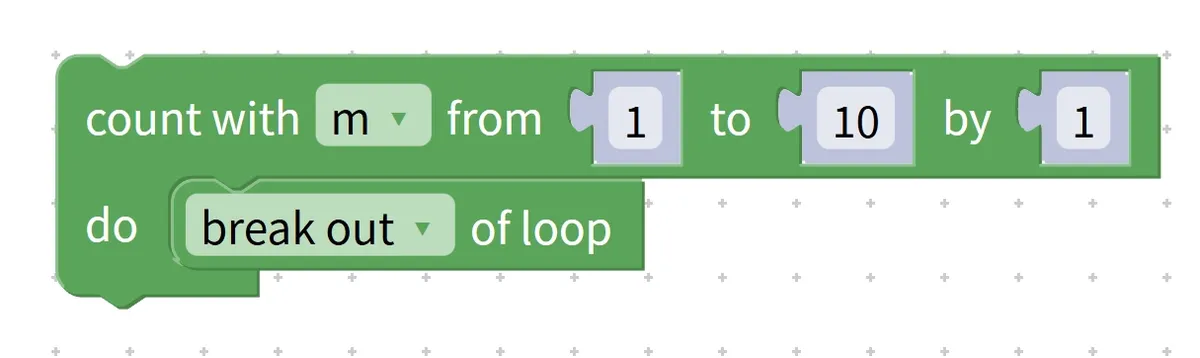
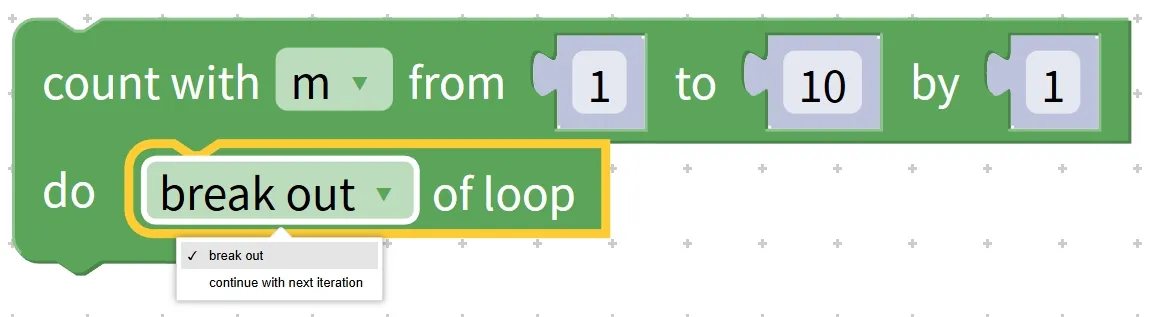
5.1 Break out of loop block (break out of loop) —— The "emergency stop button" for loops
The exit loop block acts as the "emergency stop button" for a loop: while the loop is running, triggering this block will immediately issue a "stop" command to terminate the current loop. Regardless of how many remaining iterations are unexecuted or elements are unprocessed, the program will directly jump to the statements following the loop and resume execution. It is particularly suitable for scenarios where you "stop once the goal is achieved", such as ending a search after finding the specified data, or ceasing repeated operations once an anomaly is detected.
Chinese meaning: jump out of (break out) the currently executing loop (loop), skip the remaining iterations, and execute the code following the loop.
First, let’s look at a real-life example to quickly grasp the logic: when you search for your Chinese textbook in your schoolbag (which means looping through all the books in the bag), once you find the Chinese textbook (the trigger condition is met), you stop searching (exit the loop) and don’t need to go through the remaining books anymore.
Let's take a basic example in programming and break down its execution step by step: in a counting loop from 1 to 10, exit the loop early when the variable i equals 5, and display the current variable value in each iteration.
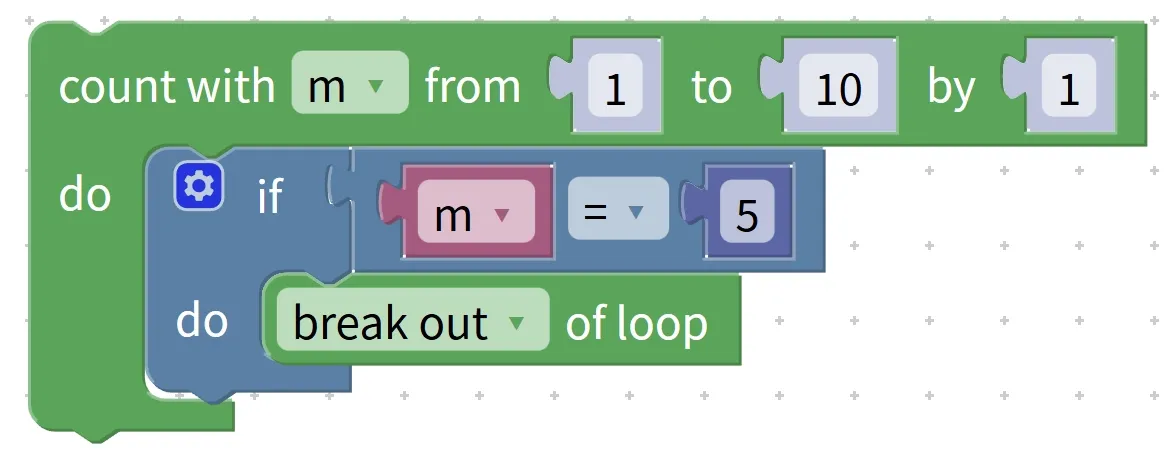
Count variable i from 1 to 10 with a step of 1
If i equals 5
Execute: exit the loop
Execute: display i
Detailed description of the execution process (following the trigger rhythm of the "emergency stop button"):
Iteration 1: i = 1 → display 1
Iteration 2: i = 2 → display 2
Iteration 3: i = 3 → display 3
Iteration 4: i = 4 → display 4
Iteration 5: i = 5 → trigger exit the loop
The loop is terminated early → the remaining i = 6~10 are not executed → the loop ends
Practical Programming Hardware Operation Example: Implement "Iterate through the temperature list [28,32,25,35,29], display each temperature, and immediately stop the iteration when a temperature > 30 is detected"
- Step 1: Create a temperature list [28,32,25,35,29];
- Step 2: Add a list traversal loop block, and set "for each element temp in this list";
- Step 3: First place the "display temp" block in the operation area, then nest a logic block that reads "if temp > 30, execute exit loop";
- Operation logic: Display 28 and 32 in sequence. When 32 (which is greater than 30) is displayed, the loop exit is triggered, the subsequent values 25,35 and 29 will not be displayed, and the loop ends directly. This is suitable for scenarios where monitoring needs to be stopped quickly after an abnormal temperature is detected~
5.2 Skip Current Loop Block (continue with next iteration of loop) —— The "Skip Instruction" for Loops
The "skip current loop" block is different from the "exit loop" block: it does not stop the entire loop, but instead makes the loop "skip the remaining operations of the current iteration and directly proceed to the next iteration". It is just like when people are queuing for inspection: if someone fails to meet the requirements, you ask them to step aside, skip inspecting them, and directly move on to inspect the next person. It is especially suitable for scenarios such as "filtering invalid data", for example, skipping invalid values, ignoring objects that do not meet the requirements, and only processing the parts that satisfy the conditions.
Chinese meaning: End the operation of the current loop round, then proceed to continue with the operation of the next iteration of the loop, without executing the remaining operations in the current round.
First, let’s look at a real-life example to intuitively understand the logic: when a teacher checks students’ homework (which corresponds to looping through the list of students), if they come across a student who hasn’t turned in their homework (the trigger condition), they will skip that student, not check their homework, and move straight on to check the next student.
Looking at another basic programming example, let's break down its execution process: in a counting loop from 1 to 5, when the temporary variable i equals 3, the display operation is skipped, while all other numbers are displayed normally.
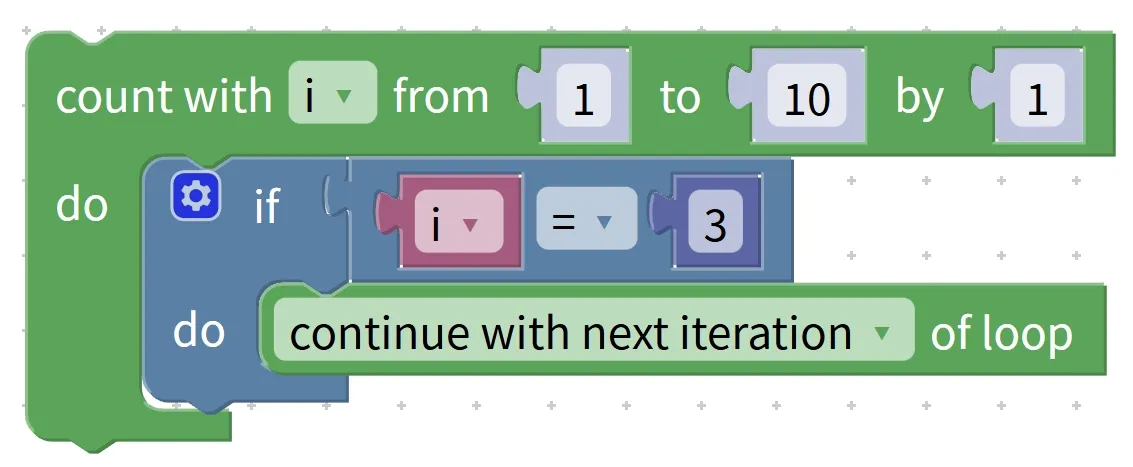
Count variable i from 1 to 5 with a step of 1
If i equals 3
Execute: skip this iteration
Execute: display i
Detailed description of the execution process (follow the rhythm of the "skip instruction"):
Iteration 1: i = 1 → display 1
Iteration 2: i = 2 → display 2
# Iteration 3: i = 3 → skip this iteration → not displayed
Iteration 4: i = 4 → display 4
# Iteration 5: i = 5 → display 5
# Variable reached end value → loop ends
Pro Tip: How to distinguish between break and continue? Just remember these two mnemonics!
Many young makers tend to mix the two up. Here are two super easy-to-remember mnemonics that you’ll get the hang of at a glance:
- break (exit loop): Stops immediately upon trigger, ending the entire program (once triggered, the whole loop terminates directly, no further iterations will be executed);
- continue (skip current iteration): Skips the current iteration and proceeds to the next round (only skips the remaining operations in the current iteration, and will continue with subsequent loop rounds until the loop terminates naturally).
Quick reminder: Loop control blocks cannot be used alone. They must be placed in the operation area of a loop block, and are usually paired with logic judgment blocks (such as "if. .. then. ..") to trigger control instructions based on conditions~
✨ Exclusive Mini Interaction: Loop Control Block Challenge
- Quick Response Quiz 1: Which block can immediately terminate a loop and skip all subsequent iterations? (Answer: the exit loop block /
break!) - Quick Response 2: If you want to skip the current round and directly proceed to the next loop, which block should you use? (Answer: the "Skip Current Loop" block
/continue!) - Consider this: In a program that "counts in a loop from 1 to 6, displays each number, and triggers the corresponding control block when the number equals 4", what will be the respective outcomes of using
breakand usingcontinue? (Hint: Usingbreakwill display 1,2, 3 and then stop; usingcontinuewill display 1,2, 3,5, 6, skipping 4~) - Scenario judgment: You have written a program that "iterates through the list [5,15,25,35,45], displays each number, and exits the loop when a number > 30 is encountered". Question: Which numbers will be displayed? (Answer: 5,15,25,35; the exit is triggered after 35 is displayed, and 45 will not be displayed~)
- Hands-on Association: Try to describe a real-life scenario that uses
breakorcontinue, such as "looking for keys: stop searching once you find them (break)" or "eating fruit: skip the spoiled ones and eat the good ones (continue)", then explain what the corresponding trigger condition and control effect are respectively~
Quick Core Summary: Loop control blocks act as the "smart commander" of loops, and are categorized into break (exit the loop) and continue (skip the current loop iteration) types. break triggers an immediate stop once activated, making it ideal for terminating a loop early once the goal is achieved;continue skips the current iteration and proceeds directly to the next one, which is suitable for filtering invalid data. Both must be placed inside a loop and used in conjunction with logical judgments, making programs more flexible and efficient when handling complex scenarios~