
Contents
- 1. If… Then… Block (if…do…) — the most basic "conditional switch"
- 2. Comparison blocks (=, ≠, >, <, etc. — the "mini balance scale" of programs
- 3. Combined condition blocks (and, or) — the "dual judgment assistant" for programs
- 3.1 and (and) block — only works when "both conditions are met"
- 3.2 OR Block – Execute as long as "one condition is met"
- 4. Negation Block (not) — the "reverse toggle switch" of a program
- 5. Boolean blocks (true, false) — the "fixed judgment result" of the program
- 6. Branch Block (test…if true…/if false…) —— The "Two-Way Junction" of a Program
- 7. Null Block (null) — The "Empty Box Judgment" in Programs
Young creators, do you remember what we mentioned before? Basic blocks enable programs to "think", and logic blocks are the core to realize this function! They are like equipping a program with a "little brain", allowing it to make judgments and choose directions according to different situations — just like the choices we make in daily life: "If it rains, take an umbrella; if it doesn't rain, don't take one". Programs can also do such "thinking" with the help of logic blocks!
All these logic blocks are stored in the logic section of our "Magic Block Box"(the block area), and they come in consistent colors so you can find them super easily. Now let's get to know each of these "thinking tools" one by one and see how they help programs make decisions!
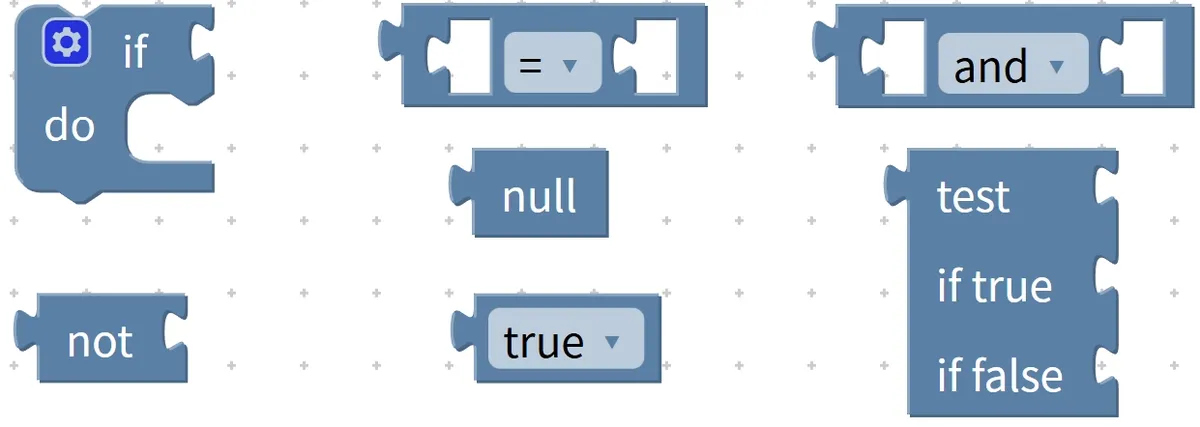
1. If… Then… Block (if…do…) — the most basic "conditional switch"
This is the most commonly used "tiny switch" in logic blocks! Just like the phrase "if. .. then. .." we often say, it works by first checking whether a condition is true: if the condition holds, it executes the corresponding action; if not, it skips directly without performing any operation.
Chinese meaning: If a certain condition is satisfied, perform the subsequent operation.
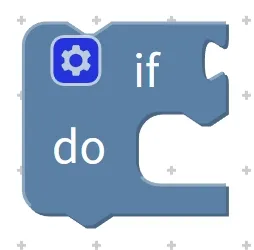
Here’s a super intuitive example: if you want to make it happen that "the LED lights up when the button is pressed", you can easily get it done with this block!
- Condition: The button is pressed
- Operation: Turn on the LED
When building with blocks, simply place the condition block labeled "button pressed" into the conditional slot of the "if. .. then. .." block, then put the action block "turn on LED" into the subsequent operation area, and this logic is all set! When the program runs, it first checks "whether the button is pressed" — if pressed, the LED lights up; if not, it stays off.
Exclusive Mini Interaction: If. .. Then. .. Block Building Challenge
- Quick-response quiz: What in our daily lives is the "if. .. then. .." block similar to? (Answer: A light switch!)
- Think about it: If we want to implement the rule "turn on the night light when it gets dark", what are the "condition" and the "action" here respectively? (Hint: The condition is "it gets dark", and the action is "turn on the night light"~)
- Scenario Judgment: After you assemble the program "press the button to turn on the LED", will the LED light up if you don't press the button? Why? (Answer: No! Since the condition "the button is pressed" is not met, the program will skip the operation~)
- Hands-on Association: Try to come up with an "if. .. then. .." scenario in daily life, such as "if you're hungry, then have a snack", and then talk about what the "condition" and "action" in this scenario are respectively~
2. Comparison blocks (=, ≠, >, <, etc. — the "mini balance scale" of programs
A comparison block is just like the "small balance scale" we use when solving math problems — it’s specifically designed to compare the relationship between two things! Its core function is to determine whether two values or states satisfy relationships such as "equal to, not equal to, greater than, or less than", and there are only two possible judgment results: either the relationship holds, or it does not.
One thing to note in particular: this block is rarely used on its own, and is mostly used in combination with others — you put it in an "if. .. then. .." condition block to help the program determine whether a given condition holds true, essentially acting as a "judgment yardstick" for the "condition switch".
Chinese meaning: Compare two values or states to determine whether they satisfy specific relations such as "equal to (=), not equal to (≠), greater than (>), less than (<)".
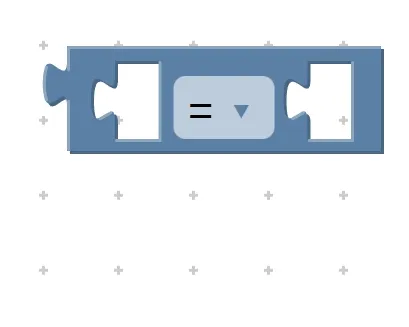
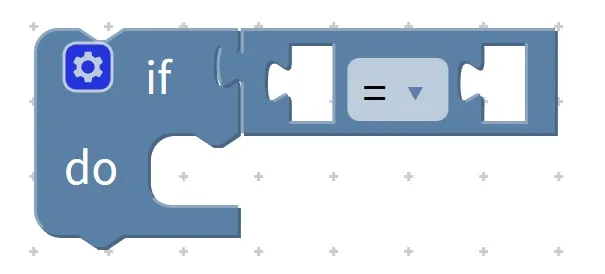
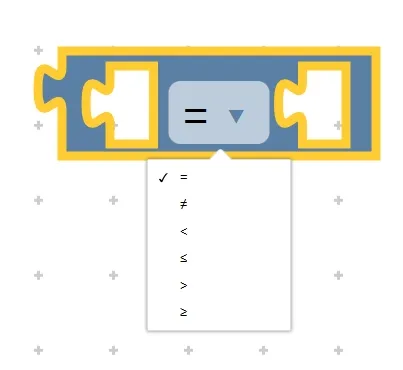
Here are some super practical examples that you'll get right away!
Example 1: Implement the logic of "trigger an alarm if the temperature is greater than 30 degrees Celsius"
- Comparison relationship: Temperature (the first value) > 30 degrees Celsius (the second value)
- Usage example: Put the comparison block "temperature > 30°C" into the condition field of the "if. .. then. .." block, and then place the action block "send an alarm" after it. When the program runs, it will first use the comparison block to check whether the temperature actually exceeds 30°C; if the condition is true, it will trigger an alarm, otherwise it will not.
Example 2: Implement the function "if the button is pressed 5 times, turn on the green light"
- Comparison relationship: the number of times the button is pressed (the first value) = 5 times (the second value)
- Usage guide: Put the comparison block "count = 5 times" into the "if. .. then. .." condition slot, followed by the action block "turn on green light". The green light will only turn on when the count is exactly 5 times~
Pro Tip: These comparison symbols are exactly the same as the ones in our math textbooks! ">" is the greater-than sign, "<" is the less-than sign, and "=" is the equal sign. They’re super easy to remember—just as simple as solving math comparison problems~
✨ Exclusive Mini Activity: Building Block Comparison Challenge
- Quick response quiz: Comparing building blocks is similar to what object in our daily life? (Answer: A small balance scale!)
- Think about it: If we want to implement the function "if the light brightness is < 10(meaning it's dark), then turn on the night light", what comparison operator is used here? Which block should this comparison block be paired with? (Hint: The comparison operator is <; pair it with the "if. ..then. .." block~)
- Scenario Judgment: We have programmed the rule "If the temperature ≠ 25°C, adjust the temperature". Question: When the temperature is 26°C, will the program adjust the temperature? Will it adjust the temperature when the temperature is 25°C? (Answer: It will adjust when the temperature is 26°C, because the condition "≠ 25°C" is satisfied; it will not adjust when the temperature is 25°C, because the condition is not met~)
- Hands-on Association: What kinds of "comparisons" have you made in daily life? For example, "If my height > 120 cm, I can ride a roller coaster". Convert this into programming logic, and talk about which blocks you need to use and what the comparison relationship is~
Comparison blocks work just like the balance scales we use — they are designed specifically to test the relationship between two objects, such as "which is larger, which is smaller, or whether they are equal". They only output two possible results: true or false. Moreover, they are rarely used on their own; most often, they are placed inside "if. .. then. .." condition blocks to help the program determine whether a given condition holds true.
3. Combined condition blocks (and, or) — the "dual judgment assistant" for programs
Young creators, the "if. .. then. .." blocks we learned before can only check one condition at a time, such as "if the temperature > 30°C, trigger an alarm" or "if it gets dark, turn on the light". But in many real-life scenarios, we need to check two conditions at the same time, for example, "you can have ice cream only if it's hot out AND mom says yes" — that's exactly when the combined condition blocks come to the rescue!
Combination condition blocks act as the "double-judgment sidekicks" for programs, specifically designed to "tie two or more conditions together" for evaluation, with the final result still being either "true" or "false". Just like comparison blocks, they are rarely used alone and are always placed in the condition field of "if. .. then. .." blocks for paired use. There are two common types of combination condition blocks: and (AND) block and or (OR) block, let's get to know them one by one!
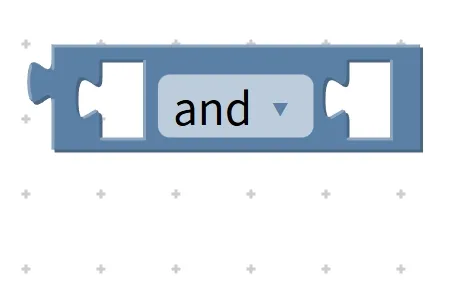
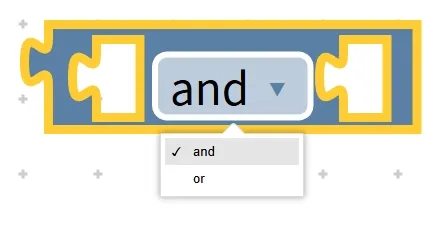
3.1 and (and) block — only works when "both conditions are met"
And and block, which is used to connect two or more conditions with "and", the overall judgment holds true only when all conditions are satisfied. This block is usually placed in the condition part of the "if. .. then. .." block.
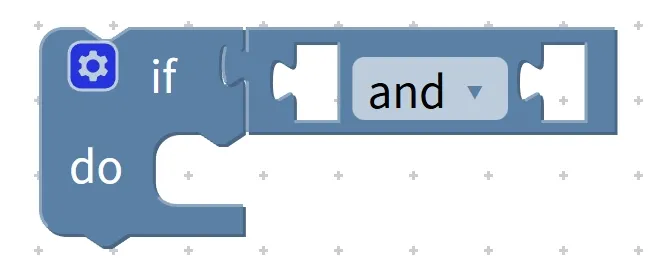
Chinese meaning: If condition 1.. . holds and (and) condition 2.. . also holds, then perform the. .. operation.
First, let's look at a super easy-to-understand example from daily life:
Real-life example: If your score is ≥ 90 and you have completed all the assignments, you will get a reward.
- Case 1: Score is 95 (valid), homework completed (valid) → Overall condition is satisfied, and the reward can be obtained;
- Case 2: The score is 95 (valid), the homework is not completed (invalid) → the overall condition is not satisfied, and the award cannot be obtained;
- Case 3: Score is 80 (not satisfied), assignment completed (satisfied) → Overall condition not satisfied, ineligible for the award.
Let's look at a practical example in programming, combined with our hardware:
Programming Example: Implement the logic "If temperature > 30°C and light level > 50 (indicating daytime), turn on the fan"
- Two conditions: ① Temperature > 30°C; ② Light intensity > 50 (daytime);
- Usage: Connect the two comparison blocks "temperature > 30°C" and "light > 50" with an "and" block, then put them together into the condition box of the "if. .. then. .." block, followed by the action block "turn on the fan";
- Operating logic: The fan will only turn on when both conditions are met: it's hot enough (sufficient temperature) and it's bright enough (sufficient light); if either condition fails to be satisfied (for example, it's hot but dark), the fan will not run at all.
3.2 OR Block – Execute as long as "one condition is met"
Unlike the strict 'and' block, the 'or' block acts like a "lenient little judge" — it connects two conditions with a logical OR, so as long as at least one of the conditions is true, the overall combined condition holds; the entire condition only evaluates to false when none of the individual conditions are satisfied!
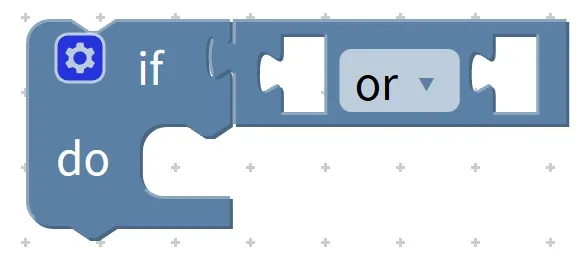
Chinese meaning: If condition 1.. . holds or (or).. . condition 2.. . also holds, then perform the. .. operation.
Let's start with real-life examples, which are easier to remember when compared with and blocks:
Real-life example: If your score is ≥ 90 or you have completed the homework, you will get a reward.
- Case 1: The score is 95 points (valid), the homework is not completed (invalid) → The overall condition is valid, and the reward can be obtained;
- Case 2: Score is 80 (not satisfied), homework completed (satisfied) → The overall condition is satisfied, and the reward can be obtained;
- Case 3: Score is 80 (not satisfied), homework not completed (not satisfied) → The overall condition is not satisfied, and the award cannot be granted.
Let's look at practical programming examples combined with hardware scenarios:
Programming example: Implement the logic "If the button is pressed OR the light level is < 10(indicating dark), turn on the LED"
- Two conditions: ① the button is pressed; ② the light level is less than 10 (dark);
- Usage: Use an "or" block to connect the condition "button pressed" and "light < 10", place the combined block into the condition slot of an "if. ..then. .." block, and attach the "turn on LED" action block afterward;
- Operating logic: Whether the button is pressed (when it is not dark) or it gets dark (when the button is not pressed), as long as one of the two conditions is met, the LED will turn on; the LED will only stay off when neither the button is pressed nor it gets dark.
Tip: How to distinguish between the "and" and "or" blocks?
Can't remember the difference between the two building blocks? Here's a handy mnemonic for you:
AND block: all required (only valid when all conditions are met);
OR Block: One is enough (holds true as long as any one condition is met).
For example: "You can watch TV only after you finish your homework AND finish reading the book"(here "and" means both are mandatory, neither can be omitted); "If you either finish your homework OR finish reading the book, you can watch TV for 10 minutes"(here "or" means just one of the two is enough)~
✨ Exclusive Mini Interaction: Big Challenge of Combined Condition Blocks
- Quick Response 1: Which conditional combination block requires "all conditions to be true before it executes"? (Answer: the and block!)
- Quick Response Quiz 2: "If it rains or it's windy, we don't have to go to the playground for running" — which combined condition block is used here? (Answer: the or block!)
- Think about it: We want to implement the logic "turn on the fan if the temperature > 30°C and the button is pressed". What are the two conditions here? Under only which circumstance will the fan be turned on? (Hint: Condition 1: Temperature > 30°C; Condition 2: The button is pressed; The fan will only be turned on when both conditions are satisfied~)
- Scenario Judgment: You have built a program that says "If light < 10 OR the button is pressed, turn on the LED light". Now answer: ① It's dark(light < 10) and you don't press the button — will the light turn on? ② It's not dark but you press the button — will the light turn on? ③ It's dark AND you press the button — will the light turn on? ④ It's not dark and you don't press the button — will the light turn on? (Answers: ① Yes ② Yes ③ Yes ④ No ~ For an OR block, as long as one condition is met it works; only when neither condition is satisfied does it not hold!)
- Hands-on Association: Try to describe a real-life scenario using the "and" block, then rewrite it into a scenario using the "or" block. For example, "and scenario: You must wear a coat and a hat to go out; or scenario: You can go out by wearing a coat or a hat". Share your scenarios with your deskmate~
Quick Core Summary: The conditional block combinations (and, or) act as "dual-check helpers" that bundle multiple conditions together for evaluation. The "and" block requires all conditions to be satisfied, while the "or" block only needs one condition to hold true. Both must be used in conjunction with the "if. .. then. .." block, placed inside the condition field to function properly. Memorize this simple mnemonic, and you’ll easily tell the usage of these two blocks apart!
4. Negation Block (not) — the "reverse toggle switch" of a program
Earlier, we learned the "if. .. then. .." block for judging a single condition, the "mini balance" comparison block for contrasting conditions, and the and/or combination block for judging multiple conditions. The negation block we're going to learn about today has an even more interesting function — it acts like a "reverse switch" that flips the original result of a condition judgment completely!
Simply put, the core function of the negation block is "inversion": a condition that originally holds will become invalid once it is added; a condition that originally does not hold will become valid once it is added. Just like the previous logic blocks, it is rarely used alone. It is mainly wrapped around other condition blocks, and then placed together into the "if. .. then. .." condition box to help the program realize the logic of "do something if a certain condition is not met".

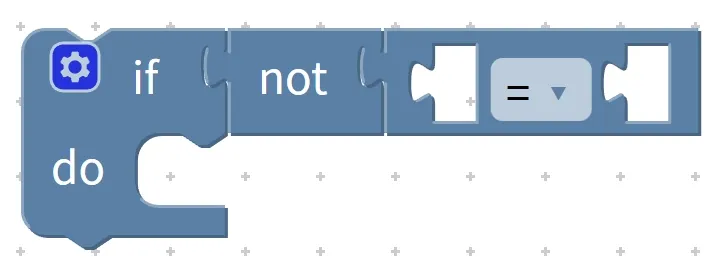
Chinese meaning : If the condition... does not ( not ) hold, the... operation is performed.
Let's start with real-life examples that are super easy to understand at a glance!
Real-life Example 1: If the condition "score ≥ 90 points" is not satisfied, redo the exercises.
- Original condition: Score ≥ 90 points (if met = eligible for reward, if not met = needs to be redone);
- After adding the negation block: If the condition "score ≥ 90 points" is NOT met (i. e., the score is < 90 points), execute "redo the exercise";
- Corresponding scenario: If you score 85 (which does not meet the requirement of ≥90), you have to redo it; if you score 95 (which meets the requirement of ≥90), you don't need to redo it.
Real-life Example 2: If the condition "it is raining outside" is not satisfied, then go to the playground to play.
- After adding the negation block: "not rain" = "it is not raining", and at this point you can go play on the playground; if it rains, you cannot go.
Let's look at a practical example in programming, combined with our hardware devices:
Programming Example 1: Implement the function that "if the condition 'the button is pressed' is not true, keep the LED turned off"
- Operation steps: Place the negation block outside the "button pressed" condition block to form "not button pressed", then put it into the condition box of the "if. .. then. .." block, followed by the "LED off" action block;
- Operation logic: When the button is not pressed (the condition is not satisfied), the LED turns off; when the button is pressed (the condition is satisfied), this operation is skipped, so the LED will not turn off (and will remain on if there are other lighting programs running).
Programming Example 2: Implement the function that "if the condition 'light intensity < 10(dark)' is not satisfied, turn off the night light"
- Operation steps: Use the negation block to wrap around "light < 10" to form "not light < 10"(which means it's dawn), place it into the "if. ..then. .." condition box, and follow it with "turn off the night light";
- Operating logic: As soon as dawn breaks (the darkness condition is not met), the night light turns off automatically; when it gets dark (the condition is satisfied), the night light stays on.
Pro Tip: How to Use the Negation Block? Just Remember This One Step!
Using the negation block is super easy, with only one key step: just wrap the negation block around the original condition block like a "little jacket", and you’ve got yourself a reverse judgment!
For example: if the original condition is "temperature > 30°C", applying a negation block will turn it into "not temperature > 30°C"(i. e., temperature ≤ 30°C); if the original condition is "the button is pressed", applying the block will result in "not the button is pressed"(the button is not pressed).
✨ Exclusive Mini Interaction: Block Negation Challenge
- Quick response quiz: What in our daily lives is the negation block similar to? (Answer: A reverse toggle switch!)
- Think about it: "If the condition 'it' s windy outside' is not true, then go fly a kite" — which block is used here? What is the original condition? After adding the negation block, what is actually being judged? (Hint: a negation block is used; the original condition is "it' s windy outside"; what is actually judged is "it is not windy outside".)
- Scenario Judgment: We have programmed the rule "If NOT (light level < 10, i. e., dark), then turn off the night light". Now answer: ① When it is dawn(light level > 10), will the night light turn off? ② When it is dark (light level < 10), will the night light turn off? (Answer: ① Yes, it will turn off, because the condition "light level < 10" is not satisfied, so its negation holds; ② No, it will not turn off, because the condition "light level < 10" is satisfied, so its negation does not hold~)
- Hands-on Association: Try to describe a "if not. .. then. .." scenario in daily life, for example, "if it doesn't snow, then go to the park to play", then talk about what the original corresponding condition is, and what it becomes after adding the negation block~
Core Quick Summary: The negation block acts as a "reverse toggle switch" for programs, whose core function is to invert the judgment result of the original condition. It is extremely easy to use: simply wrap it around another condition block and pair it with an "if. .. then. .." block. As long as you remember the "wrap it in an outer layer" operation step, you can easily implement the logic of "do something if the condition is not met" with it!
5. Boolean blocks (true, false) — the "fixed judgment result" of the program
Earlier, the logic blocks we learned either check whether a condition holds or invert the result of a condition, and both require a "condition to be judged" in advance. The Boolean value blocks we are going to learn today are quite special — they do not perform any judgment, but directly output a "fixed result", just like we directly tell the program "this statement is true" or "this statement is false", super straightforward!
Boolean blocks have only two "fixed values": true and false. Here, true stands for "the condition is met", and false stands for "the condition is not met" — these are their dedicated meanings and cannot be interchanged! Just like the logic blocks we introduced earlier, they are mainly placed in the condition field of "if. .. then. .." blocks to directly control whether the program executes a specific action or not~
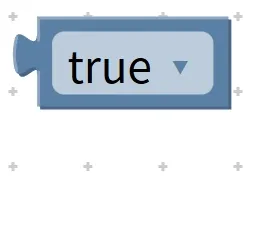
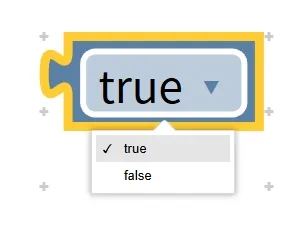
Chinese meaning: If the condition holds (true), execute the following operation; if the condition does not hold (false), do not execute the corresponding operation.
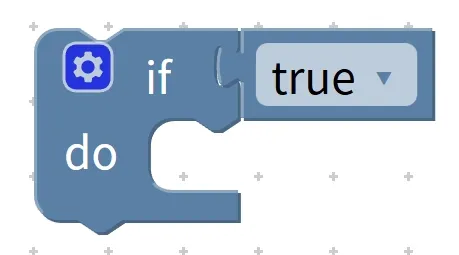
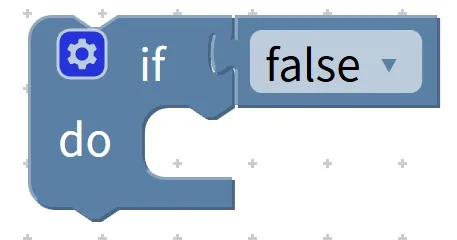
First, get clear on two core terms: true and false! We can use the "check mark" and "cross" in daily life to understand them, and you'll remember them in no time:
- true = check mark (✓) = condition satisfied = operation executable;
- false = cross mark (✗) = condition not satisfied = no operation performed.
First, let’s look at real-life examples to intuitively understand what "fixed outcome" means:
Example in daily life 1: If the "condition holds (true)", display "Welcome".
- There are no processes such as "check the temperature" or "check the button" here; the "condition is satisfied" is directly confirmed, so the program will directly execute the action of "displaying 'Welcome'".
- If you replace the block with false, it will directly confirm that "the condition is not satisfied", and the program will not display "Welcome".
Real-life Example 2: If "I need to go to school today (true)", get up at 7 o'clock; if "I need to go to school today (false)", get up at 8 o'clock.
- Here, true and false directly fix the outcome of "whether you need to go to school today", so there is no need to check the calendar for judgment, and the wake-up time can be decided directly based on this fixed result.
Let's look at a practical example in programming, combined with our hardware devices:
Programming Example 1: Implement the function of "turn on the LED if the condition holds (true)"
- Operation steps: Put the true boolean block directly into the condition box of the "if. .. then. .." block, followed by the "turn on LED" action block;
- Operation logic: Since "true" means "the condition is satisfied", the program will directly execute the lighting operation once it runs, and the LED will light up immediately without waiting for any trigger condition.
Programming Example 2: Implement the function of "trigger an alarm if the condition is false"
- Operation steps: Put the false Boolean block into the condition box of the "if. .. then. .." block, followed by the "sound the alarm" action block;
- Operation logic: Since "false" means "the condition is not satisfied", the program will skip this operation and will not trigger an alarm when running.
Pro Tip: How to Use Boolean Blocks? Keep These 2 Key Points in Mind!
- Remember the specific meanings: true means "valid", false means "invalid" — this is fixed and unchanging, just as 1 stands for one item and 2 stands for two items;
- Directly use the condition slot: You don't need to pair it with other condition blocks. Simply place a 'true' or 'false' block into the condition slot of the 'if. .. then. ..' block to control whether the program executes the corresponding operation.
Quick reminder: Although Boolean blocks are simple, they are not used as frequently as the previous blocks in daily practice. They are mainly used when you need to "force the program to execute / not execute a certain action". For example, when debugging a program and you want to quickly test whether the LED can light up, you can use the true block to turn on the LED directly without assembling complicated conditions~
✨ Exclusive Mini Interaction: Boolean Block Challenge
- Quick Response 1: What are the two fixed outcomes of Boolean blocks? (Answer:
trueandfalse!) - Pop Quiz 2:
truewhat does it mean?falsewhat does that mean? (Answer:true= the condition holds,false= the condition does not hold~) - Think about it: If we put the
trueblock into the condition box of the "if. .. then. .." structure, followed by the action "buzzer beeps for 1 second", what will happen after the program runs? What if we put thefalseblock instead? (Hint: Withtrue, the buzzer will beep for 1 second; withfalse, it won't beep~) - Scenario judgment: We have written two programs: ① "If
true, turn off the night light"; ② "Iffalse, turn off the night light". Question: Will the night light be turned off after program ① runs? Will the night light be turned off after program ② runs? (Answer: ① Yes, becausetruemeans the condition holds; ② No, becausefalsemeans the condition does not hold~) - Hands-on Association: Try to describe a "fixed outcome" scenario in daily life, for example, "If today is Monday (
true), then wear the school uniform", then talk about what the corresponding scenario would be if you replacetruewithfalse~
Quick Core Summary: Boolean blocks are the "fixed judgment results" in a program, with only two states: true (valid) and false (invalid). They do not require evaluating any other conditions — simply place them in the condition field of an "if. .. then. .." block, and they will control whether the program executes the corresponding action. Once you remember their specific meanings, you can easily use them to implement the logic of "forcing an action to execute / not execute"!
6. Branch Block (test…if true…/if false…) —— The "Two-Way Junction" of a Program
The "if. .. then. .." blocks we learned earlier can only implement the logic of "do something when the condition is met, and do nothing when it is not met", which is like a road that ends abruptly and stops directly if the condition is not satisfied. But in many cases in daily life, we need to "choose one out of two": for example, "take an umbrella if it rains, otherwise don't take one", "turn on the fan if it's hot, otherwise turn it off" — that's when the branch blocks come to help!
A branch block acts like a "two-way fork" in a program, allowing the program to choose one of two actions to execute based on whether a condition is met: if the condition holds, it takes the left path (executes Action 1); if not, it takes the right path (executes Action 2). There is never a case where it "does nothing", making the program logic more flexible and comprehensive. Its core structure is "test…if true… / if false… ", let's break it down step by step to get to know it!
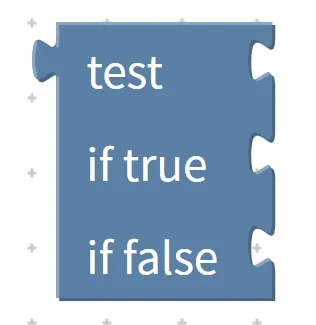
Chinese meaning : Test ( test ) a condition, if the condition... is satisfied, it executes operation 1... ( if true ) ; if the condition is not satisfied, it executes operation 2... ( if false ) .
First, understand the "three key components" of the branch block, just like recognizing the "signpost" and "two paths" at a fork in the road:
- Test (Test Area): Used to place the conditions that need to be judged, such as "temperature > 30°C" and "button pressed". It is equivalent to a "signpost" at a fork in the road, telling the program what to judge;
- if true (true block): Place the operations to be executed when the condition holds, which corresponds to the "left path" at a fork in the road — take this path if the condition is satisfied;
- if false (false block): Place the operations to be executed when the condition is not met here, which is equivalent to the "right path" at a fork in the road — take this path when the condition is not satisfied.
First, let’s look at real-life examples to intuitively understand the logic of “choosing one out of two”:
Real-life Example 1: If the temperature is >30°C, turn on the fan; otherwise, turn off the fan.
- Test (test conditions): Temperature > 30°C;
- if true (established operation): turn on the fan (condition satisfied, take the left path);
- if false (invalid operation): turn off the fan (condition not met, take the right branch);
- Core logic: Regardless of whether the temperature exceeds 30 degrees Celsius, an operation will be executed — either turning on the fan or turning off the fan; there will never be a case where no action is taken.
Real-life Example 2: If you have finished your homework, you can watch TV for 10 minutes; otherwise, keep working on it.
- test (Test Conditions): Assignment Completed;
- if true (execution operation): watch TV for 10 minutes;
- if false (invalid operation): continue doing homework;
- Core logic: Corresponding actions are arranged regardless of whether the assignment is completed or not, so there will never be a situation where "there is nothing to do".
Let's look at a practical example in programming, combined with our hardware devices:
Programming Example 1: Implement an "Automatic Temperature-Controlled Fan" — if the temperature is >30°C, turn on the fan; otherwise, turn it off.
- Operation steps: ① Put the comparison block "temperature > 30°C" into the test area of the branch block; ② Put the action block "turn on the fan" into the if true area; ③ Put the action block "turn off the fan" into the if false area;
- Operation logic: When the program runs, it first tests whether the temperature exceeds 30 degrees Celsius. If it does, the fan-on operation will be executed; if not, the fan-off operation will be executed. The whole process switches automatically without manual control from us.
Programming Example 2: Implement "Button-controlled LED" — If the button is pressed, turn on the LED; otherwise, turn off the LED.
- Operation steps: ① Put the conditional block "button pressed" into the test area; ② Put "turn on LED" into the if true area; ③ Put "turn off LED" into the if false area;
- Operating logic: When the button is pressed, the condition is satisfied and the light turns on; when the button is released, the condition is not satisfied and the light turns off, thus achieving the effect of "turning on when pressed and turning off when released".
Pro Tip: What's the difference between a branch block and an "if-then" block? Just remember this one key point!
Many young makers tend to mix the two up, and here’s a simple way to tell them apart:
- "If. .. then. .." block: one-out-of-one selection (execute if the condition holds, skip if it does not);
- Branch Block: Either-Or (If the condition holds, execute A; if not, execute B. One of the two must be executed).
For example: "Take an umbrella if it rains"(you don’t take one if it doesn’t rain, it’s a one-out-of-one choice); "Take an umbrella if it rains, otherwise take a hat"(you have to take one of the two, it’s a choice between the two) — that’s the core difference between the two!
✨ Exclusive Mini Activity: Branch Building Block Challenge
- Quick Response 1: What in our daily lives are branching blocks similar to? (Answer: A fork in the road with only two options!)
- Quick Response Quiz 2: What are the three key components of a branch block? (Answers: test area, if true execution area, if false execution area~)
- Think about it: We want to implement the logic "If the light level < 10(it's dark), turn on the night light; otherwise, turn off the night light". Which blocks should we place in the corresponding areas of the branch block? (Hint: Put "light level < 10" in the test area, put "turn on the night light" in the if true area, and put "turn off the night light" in the if false area~)
- Scenario judgment: A branch program has been created with the rule: "If the temperature > 25°C, turn on the fan; otherwise, turn off the fan". Question: ① When the temperature is 28°C, will the fan turn on? ② When the temperature is 20°C, will the fan turn off? (Answer: ① Yes, because the condition is satisfied; ② Yes, because the condition is not satisfied~)
- Hands-on Association: Try to come up with an "either-or" scenario in daily life, such as "If it's the morning, I'll eat steamed buns; otherwise, I'll eat noodles", then explain what the corresponding test condition, if true operation and if false operation of this scenario are respectively~
Quick Core Summary: A branch block acts as a "two-way fork" in a program, whose core function is to execute one of two operations based on whether a given condition is met. It consists of test test zone, if true true zone, and if false false zone as its three key components. Unlike the "if-then" block which only executes one optional path, the branch block offers a binary choice. It enables more flexible automatic control logic, such as automatic temperature regulation, automatic lighting control and other similar functions~
7. Null Block (null) — The "Empty Box Judgment" in Programs
All the logic blocks we've learned so far revolve around whether a condition is true or false. The null block we're going to learn about today is very special — it doesn't judge "right or wrong", it only checks "whether something exists or not"! The null block acts like an "empty box detector" in a program, specifically used to check whether a variable or piece of data is "null", meaning it is in a state where "no value has been assigned to it yet".
Simply put, null (null value) means "no value, empty", just like an empty box with nothing inside. It is rarely used alone, and is mainly paired with the "if. .. then. .." block to judge whether a certain variable is an empty box, so as to decide whether the program should perform certain operations (such as displaying a prompt to remind us to put "content" into the variable). But to make it clear first, the null value block needs to be combined with the knowledge of "variables" that we will learn later; for now, we only need to understand its core meaning and basic usage~
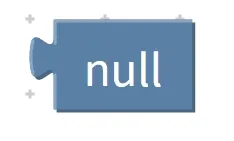
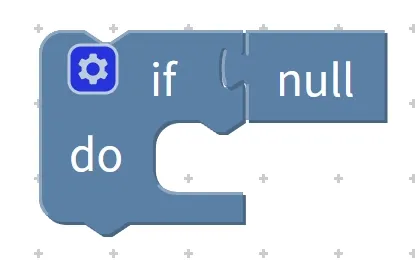
Chinese meaning: It means "no value" or "empty"(null), and is specifically used to determine whether a variable or data is in an empty state.
First, let's start with a real-life example and use the analogy of an "empty box" to help you understand:
Real-life Example 1: If the "snack box" your mom gives you is empty (null), tell her "please fill the box with snacks"; if there are snacks in the box (not null), you can eat them directly.
- The "snack box" here is equivalent to a "variable" in programming;
- An "empty box" corresponds to the null state, and its core logic is as follows: first check whether there is anything in the box; if it is empty, perform the action of "going to mom to get snacks", and if it is not empty, perform the action of "eating snacks".
Real-life Example 2: If the "exercise book in your schoolbag" is empty (null), tell the teacher "I forgot to bring my exercise book"; if there is an exercise book (not null), start doing your homework.
- Core logic: Detect whether the variable "exercise book" is empty, and decide what to do next based on whether it exists or not.
Let’s look at a practical example in programming, combined with the knowledge of variables we will learn later (just get a preliminary impression for now):
Programming Example 1: Implement the logic that "if the variable 'distance' is a null value (null), display the prompt 'Variable not set'"
- Operation steps: ① Combine the null block with the "distance variable" to form "distance == null"(to determine whether the distance variable is empty); ② Put this judgment into the condition box of the "if. .. then. .." statement; ③ Place the action block "display 'variable not set'" into the operation area;
- Operation logic: When the program runs, it first checks whether the "distance" variable is empty. If it is empty, a prompt message will be displayed to remind us to set a specific value (e. g., 20 centimeters) for the "distance" variable; if it is not empty, no prompt will be displayed, and the value of "distance" will be directly used for subsequent operations (e. g., controlling the rotation of the motor according to the distance).
Programming Example 2: Implement the logic that "if the variable 'temperature threshold' is a null value (null), it will be set to 25 degrees by default"
- Operation steps: ① Use a null block to judge whether the "temperature threshold" is
null; ② If the condition is true, execute the operation of "set the temperature threshold to 25 degrees"; ③ If the condition is not true, directly use the existing temperature threshold; - Operation logic: To prevent program errors caused by empty variables, the system will automatically set a default value for empty variables to ensure the program runs normally.
Pro Tip: How to Use the Null Block? Just Keep These 2 Key Points in Mind!
- Remember its specific meaning: null only stands for "empty, no value", it does not represent 0, nor does it mean "error" — it is just the state of an "empty box";
- Used with the "if. .. then. .." block: The null block itself cannot trigger an action. It needs to be used together with the "if. .. then. .." block, with "variable == null" as the condition, and then write the corresponding action.
Quick reminder: Since the null block is closely related to "variables", for now we just need to keep in mind that "null means empty and has no value", and that it is used to "check whether a variable is empty". Once you learn about variables later and come back to practice actual programming with the null block, you'll master it easily!
✨ Exclusive Mini Interaction: Null Block Challenge
- Quick Response Quiz 1: What does the null value block mean? (Answer: It refers to something empty with no value!)
- Quick Response Quiz 2: Which block is usually used together with the null block? (Answer: If. .. then. .. block!)
- Think about it: "If the 'textbooks in the schoolbag' is null, go home to get the textbooks". What real-life scenario does the "null" here correspond to? What operation should be performed when the condition is true? (Hint: It corresponds to "there are no textbooks in the schoolbag"; the operation is "go home to get the textbooks"~)
- Scenario Judgment: We have programmed the logic that "if the 'volume' variable is empty, display 'Please set the volume'". Now answer: ① Will the prompt be displayed when the volume is not set? ② Will the prompt be displayed when the volume has been set to 50? (Answer: ① Yes, the prompt will be displayed because the variable is empty; ② No, the prompt will not be displayed because the variable already has a value~)
- Hands-on Association: Try to describe a "empty box" scenario in daily life, for example, "If the pencil case is empty, go buy some pencils", then explain what the corresponding "variable" and "operation after null value judgment" are for this scenario respectively~
Core Quick Summary: The Null Block is a "null box check" tool for programs, whose core function is to detect whether a variable or data is in the null state of "having no value". It must be used together with the "if. .. then. .." block to determine subsequent operations based on whether the variable "has a value or not". Just remember its specific meaning for now, and you will easily master it after learning about variables and doing practical exercises!
Therefore, logic blocks are the key to making a program "think". Whether it's the basic "if. .. then. ..", the "little balance scale" for comparisons, or the and/or for combining conditions, they all help the program make choices based on given conditions. These blocks must be used together with other functional blocks in the "magic block box" to piece together a logical program~ Remember, the core of logic blocks is to "judge whether a condition holds, then decide what to do"!