
Young makers, today we're going to make an extremely practical smart home gadget — the infrared motion-activated sensor light! Just like the sensor lights in stairwells, it turns on automatically when someone approaches, and turns off after a delay once the person leaves; you can also add a buzzer for alerts. By learning this project, you'll master the core logic of "human detection + delay control + output feedback", and easily replicate sensor devices in daily life~
1. Case Introduction
Modules Used
- Core detection: Infrared pyroelectric human proximity sensor (model L916, responsible for "detecting" the presence of a human body);
- Core output: Piranha LED light module (responsible for the "lighting up" feedback);
- Optional extension: Buzzer module (responsible for "prompt tone" feedback).
Creative Gameplay
Perfectly reproduces the core logic of corridor motion sensor lights, with maximum practicality:
- Someone approaches: The infrared sensor detects a human body → the LED light turns on immediately, and the buzzer (optional) beeps once as a prompt;
- When people leave: The LED light will not turn off immediately; instead, it will switch off after a 5-second delay (customizable) to avoid turning off the light right after people walk away.
- Unoccupied status: The LED light remains off, which is energy-saving and intelligent.
Core Learning Points (Essential for Beginners to Master)
- Level detection logic of the digital input module (infrared sensor);
- Loop Judgment vs. Interrupt Trigger (Two Methods for Human Body Detection);
- Precise control of output devices (LEDs / buzzers);
- Delay-off logic (the key to turning off the lights with a delay after people leave);
- Sensor anti-shake processing (to avoid false triggers).
2. Wiring Instructions
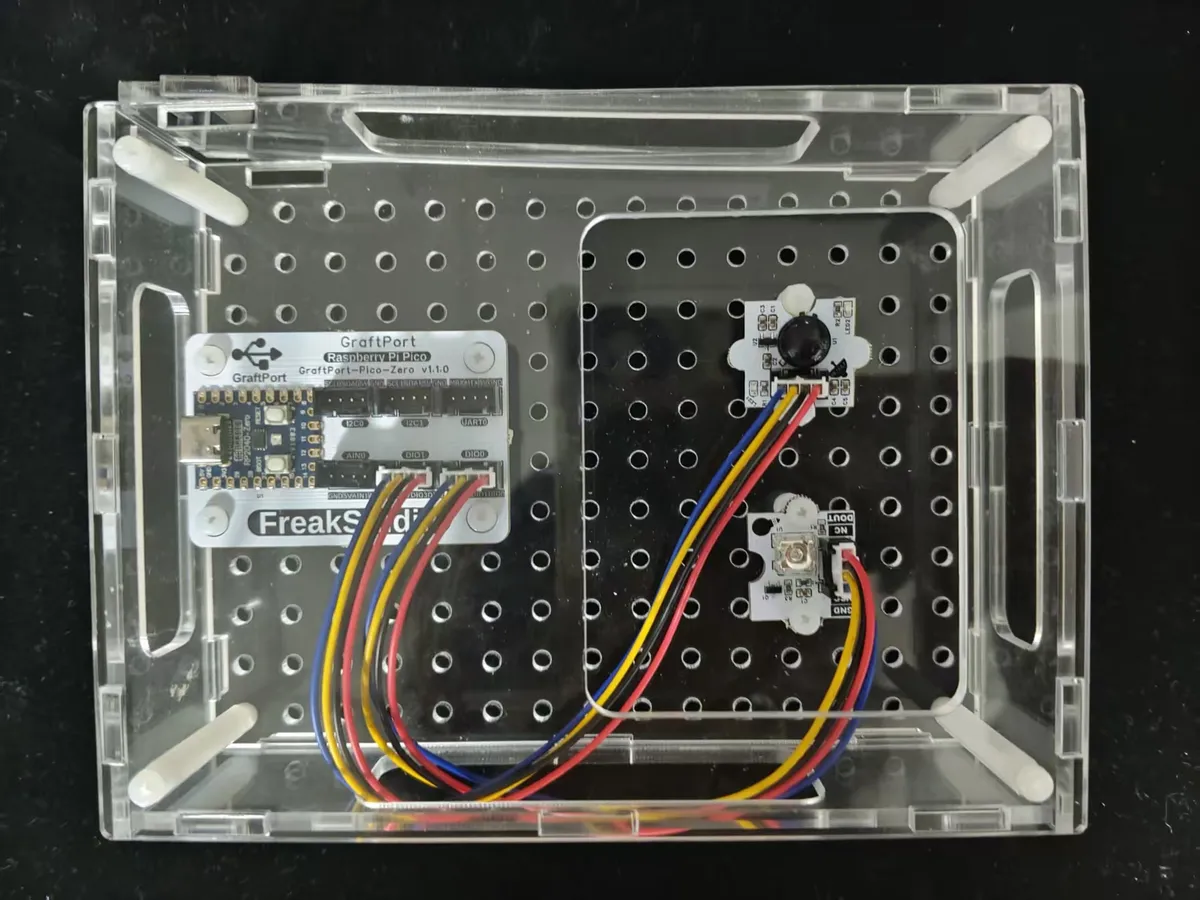
This case requires connecting two core modules. The wiring process is simple — just connect them according to the corresponding relationship below:
- Piranha LED light module (connected to DIO0 interface)
Development Board Pins | Module Pins | Description |
Pin 7 |
| Level output/PWM output pins on MCU |
Pin 8 |
| Do not use |
- PIR Human Proximity Sensor (connected to DIO1 interface)
Development Board Pins | Module Pins | Description |
Pin 9 |
| Level signal input pin |
Pin 10 |
| - |
3. Program Description
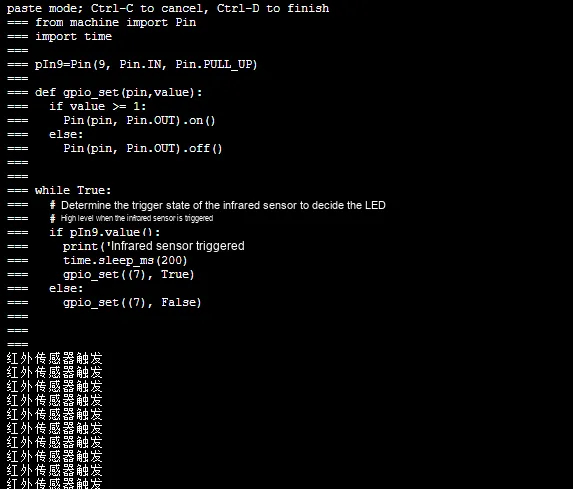
The core of this case is "detect human body → turn on the light + delay → turn off the light with a delay after the person leaves". We will break it down step by step according to the building block logic to make it clear:
- Infinite Loop Module (
repeat while true)- Function: Keeps the program continuously detecting the status of the infrared sensor without stopping.
- Condition Judgment Module (
if read digital input)- Configuration:
pin=Pin 12/GPIO9,Pull-up=true - Logic: Detect the level signal of the infrared sensor (which outputs a high level when triggered) to determine whether there is a human body approaching.
- Configuration:
- Post-trigger action (
within the dobranch)print "Infrared sensor triggered": the terminal prints the prompt "Human body detected";delay 200 milliseconds: debounce delay, which prevents repeated execution caused by signal jitter;Set output pin Pin10/GPIO7 to true: to control the LED to turn on.
- No operation triggered (within the
elsebranch)Set output pin Pin10/GPIO7 to false: Control the LED to turn off when the human body is far away.
After running the program:
- Initial state: the LED is off, and the buzzer is silent;
- Bring your hand close to the infrared sensor (approximately 1-5 meters): the LED lights up immediately, the buzzer beeps once, and the terminal prints "Infrared sensor triggered: human body detected";
- Keep your hand in front of the sensor: the LED will stay on for 5 seconds;
- Hand removed (no person present): After a delay of 5 seconds, the LED turns off, and the terminal prints "No person approaching, LED turned off";
- Zero jitter and no false triggers throughout, exactly the same effect as corridor sensor lights!
A Beginner's Guide to Avoiding Common Pitfalls
- Is the LED not lighting up?
- Check whether the LED pins are connected to GPIO7 and whether the output pins in the program match;
- Confirm that the infrared sensor has indeed detected a human body (which can be judged via terminal printout).
- Sensor false triggering?
- Adjust the sensitivity of the sensor (turn it slightly counterclockwise to reduce the detection distance);
- Keep away from heat sources such as air conditioners and table lamps, as these heat sources may be misidentified as "human bodies";
- Forgot to add the 200ms debounce delay, which causes triggers even with minor signal jitter — make sure to add it!
- Do the lights turn off immediately when people leave?
- Since there is no delay block added in the else branch, according to the advanced optimization logic, just add a 5-second delay in the else clause first, then turn off the light.
✨ Interactive Mini Quiz
- Think about it: If you change "keep the light on for 5 seconds" to 10 seconds, which parameter needs to be modified? (Answer: Change
time.sleep (5)totime.sleep (10)in the code, and set the delay block in the blocks to 10 seconds) - Try it: Add an "LED blinking" effect to the sample — when someone approaches, the LED flashes quickly 3 times then stays on. Can you modify the code/blocks to make it work?
xml files can be directly imported into the building blocks: