The most beginner-friendly Object Oriented programming tutorial on the entire network: 51 Python function methods and interfaces - Implementing interfaces with Zope
In Python, Zope provides a mechanism for defining and implementing interfaces. The Zope Interface module is commonly used to create reusable components and ensure that components adhere to specific interface specifications.
This document mainly introduces how to use Python for Object Oriented programming, and requires readers to have a basic understanding of Python syntax and microcontroller development. Compared with other blogs or books that explain Python Object Oriented programming, this document is more detailed and focuses on embedded host computer applications, taking the common serial port data transmission and reception, data processing, dynamic graph drawing and other functions between the host computer and the slave computer as application examples. Meanwhile, it uses the Sourcetrail code software to visualize the code for reading, so as to facilitate readers' understanding.
The link to obtain the relevant sample code is as follows:
https://github.com/leezisheng/Python-OOP-Demo
Body Text
You can use third-party extension libraries to implement functions similar to those of interfaces, and Zope.interface is a commonly used choice. Developed by Zope, zope.interface is released as an independent Python package. It helps you declare which interfaces exist, which objects provide those interfaces, and how to query this information.
The Zope.interface module can be used to define interfaces, and the @implementer decorator can be used to mark classes that implement the interface, which can explicitly declare the DateProcessClass class that implements the interface. This module also provides the verifyObject and verifyClass function to check whether a class or object conforms to the interface specification.Meanwhile, the verifyObject and verifyClass functions can be used to write test functions, which can be run with pytest, nose or other testing frameworks to verify whether the created objects/concrete classes conform to the interface.
We need to install the relevant extension libraries using the pip method: pip install zope.interface.
The sample code is as follows:
# Import the third-party extension library related to interfaces
from zope.interface import Interface
from zope.interface.declarations import implementer

# Define the interface
class DateProcessInterface(Interface):
    def __init__(self, DateList: List[int], FilterLength: int):
        '''
        Initialization method
        :param DateList: Data list
        :param FilterLength: Number of points to apply data filtering to
        '''
        pass

    def DateFilter(self) -> List:
        '''
        Abstract method, data filtering
        :return: List
        '''
        pass

    def DateCalMax(self) -> int:
        '''
        Abstract method, calculate the maximum value of the data
        :return: int
        '''
        pass

    def DateCalMin(self) -> int:
        '''
        Abstract method, calculate the minimum value
        :return: int
        '''
        pass

# Use a concrete class to inherit the interface
@implementer(DateProcessInterface)
class DateProcessClass():
    def __init__(self, DateList: List[int], FilterLength: int):
        self.DateList = DateList
        self.FilterLength = FilterLength
        self.TempList = [0] * (self.FilterLength)

    def DateFilter(self) -> List:
        # Iterate over DateList
        for index, value in enumerate(self.DateList):
            # Treat each value as a new sensor value being passed in
            NowValue = value
            # Variable representing the sum of the list
            sum = 0
            for i in range(self.FilterLength - 1):
                # Implement the list shift operation
                self.TempList[i] = self.TempList[i + 1]
                # Implement the list sum
                sum += self.TempList[i]
            self.TempList[self.FilterLength - 1] = NowValue
            sum += self.TempList[self.FilterLength - 1]
            # Compute the average
            average = sum / self.FilterLength
            # Replace the original value with the computed average
            self.DateList[index] = average
        # After the computation, reset the elements in TempList to zero
        self.TempList = [0] * (self.FilterLength)
        return self.DateList

    def DateCalMax(self) -> int:
        max_value = max(self.DateList)
        return int(max_value)

    def DateCalMin(self) -> int:
        min_value = min(self.DateList)
        return int(min_value)

print(type(DateProcessInterface))
print(type(DateProcessClass), DateProcessClass.__bases__)


if __name__ == '__main__':
    # Create an index list for l, mainly to provide the x-axis coordinates for the plot function
    index = [x for x in range(0, 100)]
    # Generate a sine sequence
    originalsignal = [math.sin(x) * 10 for x in range(0, 100)]
    # Generate a random number sequence to simulate noise
    noise = [random.uniform(0, 5) for x in range(0, 100)]
    # Add the elements of the two lists
    signal = [x + y for x, y in zip(originalsignal, noise)]
    # Create the DateProcessClass class, passing in signal.copy()
    # Create a copy of the signal sequence so that the original data of l is not changed
    s = DateProcessClass(signal.copy(), 10)
    print(type(s))
    # Perform data filtering
    filtersignal = s.DateFilter()
    # Plot the curve
    plt.plot(index, signal, 'b')
    plt.plot(index, filtersignal, 'r')
    # Display an image
    plt.show()
    # Print the maximum value of the signal
    print("Signal Max value:", s.DateCalMax())
    # Print the minimum value of the signal
    print("Signal Min value:", s.DateCalMin())
    # Print the relationship between the interface and the concrete class
    print(issubclass(DateProcessClass, DateProcessInterface))
    print(isinstance(DateProcessClass, DateProcessInterface))
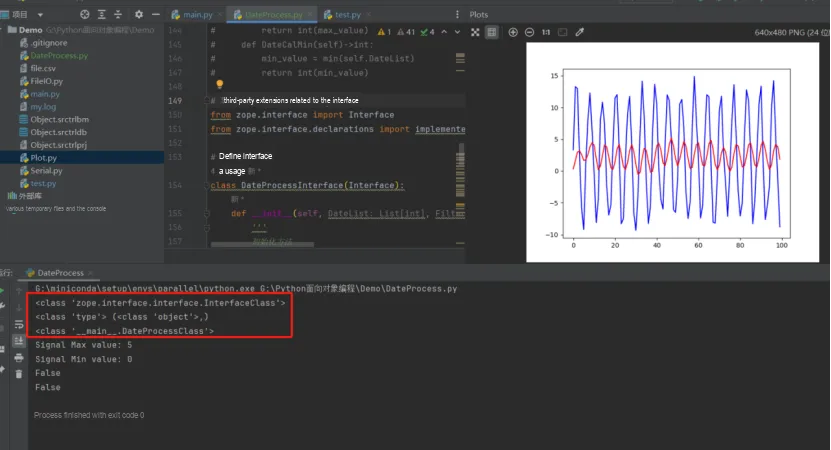
The running results are as follows:
For more detailed usage instructions, please refer to: