
Hello all embedded developers and maker friends 👋
Still struggling with pitfalls while learning LVGL+ MicroPython?
- Are your learning materials scattered and unstructured, making it impossible to learn effectively by piecing them together?
- Are paid tutorials too expensive, leaving students and entry-level engineers hesitant to take the plunge?
- Want to develop an embedded GUI product but can’t find a practical guide that walks you through the entire process from scratch?
Today, I’m bringing you a 100% free, beginner-friendly, and systematic 《LVGL 9.0 Version – MicroPython Tutorial (Based on the Simulator)》, let’s dive right in! 👇
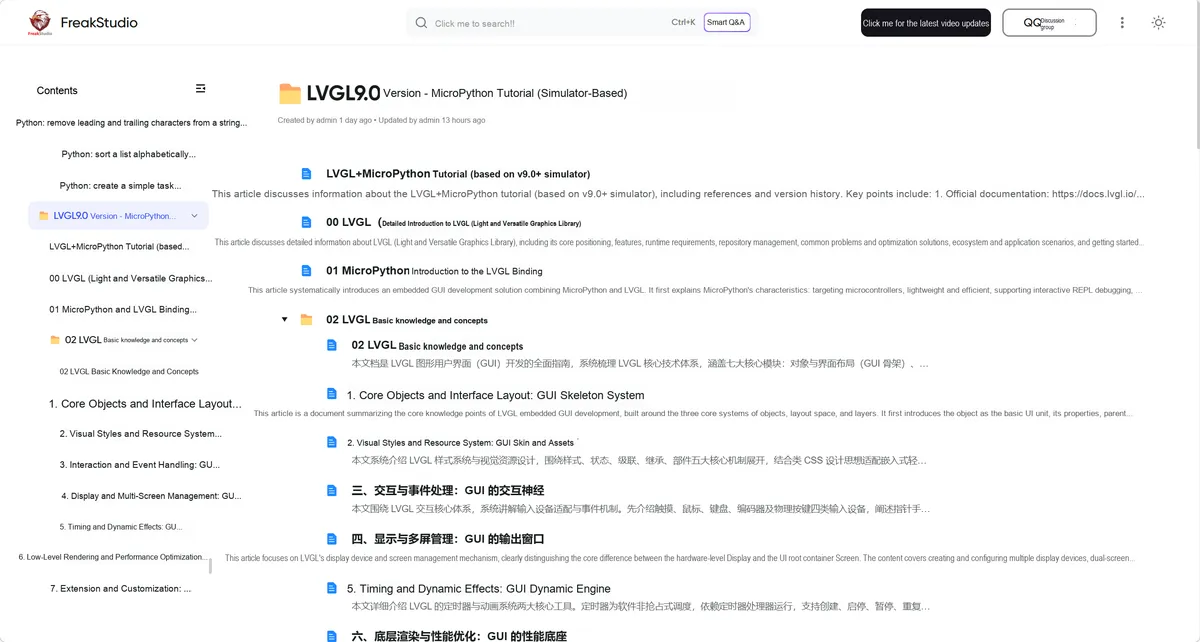
What can this tutorial help you solve?
- ✅ Zero-cost learning: fully open-source and free, no payment required, accessible even for total beginners
- ✅ Systematic content: Covering everything from core LVGL concepts to practical cases, with full coverage of 7 major modules
- ✅ Multi-platform Adaptation: Supports mainstream MCUs such as Raspberry Pi Pico/RP2350, ESP32, and STM32
- ✅ Simulator Practical Training: Based on a Web simulator, you can run through the cases without hardware
- ✅ Engineering mindset: From control development to Performance optimization, cultivate product-level development capabilities
Tutorial Outline
| No. | Core category | Tutorial title | Core learning goal |
|---|---|---|---|
| 1 | Tutorial overview | LVGL + MicroPython tutorial (based on v9.0 + simulator) | Quickly understand the whole tutorial series |
| 2 | Library basics | Detailed introduction to LVGL (Light and Versatile Graphics Library) | Understand LVGL's core positioning and features |
| 3 | Framework binding | Introduction to the MicroPython and LVGL binding | Understand how software and hardware work together |
| 4 | Core fundamentals | LVGL basics and concepts | Build a foundation for LVGL development |
| 5 | Core fundamentals | Core objects and layout: the skeleton of a GUI | Learn the basic structure of a UI |
| 6 | Core fundamentals | Visual styles and resource system: the skin and assets of a GUI | Master UI style design |
| 7 | Core fundamentals | Interaction and event handling: the nervous system of a GUI | Implement widget interaction logic |
| 8 | Core fundamentals | Display and multi-screen management: the output window of a GUI | Adapt to different display devices |
| 9 | Core fundamentals | Timing and dynamic effects: the animation engine of a GUI | Create animations / dynamic UIs |
| 10 | Core fundamentals | Low-level rendering and performance optimization: the performance foundation of a GUI | Optimize the running efficiency of embedded devices |
| 11 | Core fundamentals | Extension and customization: the extension interface of a GUI | Customize LVGL features |
| 12 | Widget practical examples | Quick start examples - widgets (Web simulator + LVGL v9.0) | Get started with basic LVGL widgets from scratch |
| 13 | Widget practical examples | Hands-on with matrix buttons / base objects / labels / switches / LEDs and other widgets | Master all common widget usage |
| 14 | Layout Practical Examples | Quick Start Example - Layout and Space Management | Learn to lay out interfaces properly |
| 15 | Layout Practical Examples | Box model / position and size / translation / transform / scrolling / layer management | Master the full LVGL layout system |
| 16 | Event Handling in Practice | Quick Start Example - Event Callback Mechanism | Implement interaction events such as touch / keys |
| 17 | Timers in Practice | Quick Start Example - Timers | Implement periodic refresh / dynamic features |
| 18 | Extended Build | lvgl-micropython Build Tutorial | Custom firmware build, hardware adaptation |
References
- Official Documentation: https://docs.lvgl.io/9.0/
- Online Simulator: https://sim.lvgl.io/v9.0/micropython/ports/webassembly/index.html
- DFRobot Tutorial: https://wiki.dfrobot.com.cn/ESP32_MicroPython_LVGL_Tutorial
- 100ask Tutorial: https://lvgl.100ask.net/8.1/get-started/micropython.html
- Source Code: https://github.com/lvgl-micropython/lvgl_micropython
MicroPython LVGL API.py 185 KB
Version Record
Version Number | Modifier | Time | Content |
v1.0 | Li Zisheng | 2026/03/13 | Initialize the document. |
v1.1 | Li Zisheng | 2026/03/26 | Add an introduction. |