
A sensor logger can keep saving readings while its settings page stops responding. From the user's point of view, the device is partly broken. From a watchdog fed by the logging loop, everything may still look healthy. Before adding another reset routine to a prototype, decide which functions must keep working, and how the software will notice when one stops.
That question matters for unattended trials, connected exhibits and equipment with a separate control interface. A June 2023 MicroPython discussion describes exactly this: an ESP32 logger's main thread kept feeding its watchdog while an exception could terminate the HTTP thread. The author wanted to detect that loss and attempt a limited recovery. The thread has no posted solution; it is a real problem report, not proof that any particular design solves it.
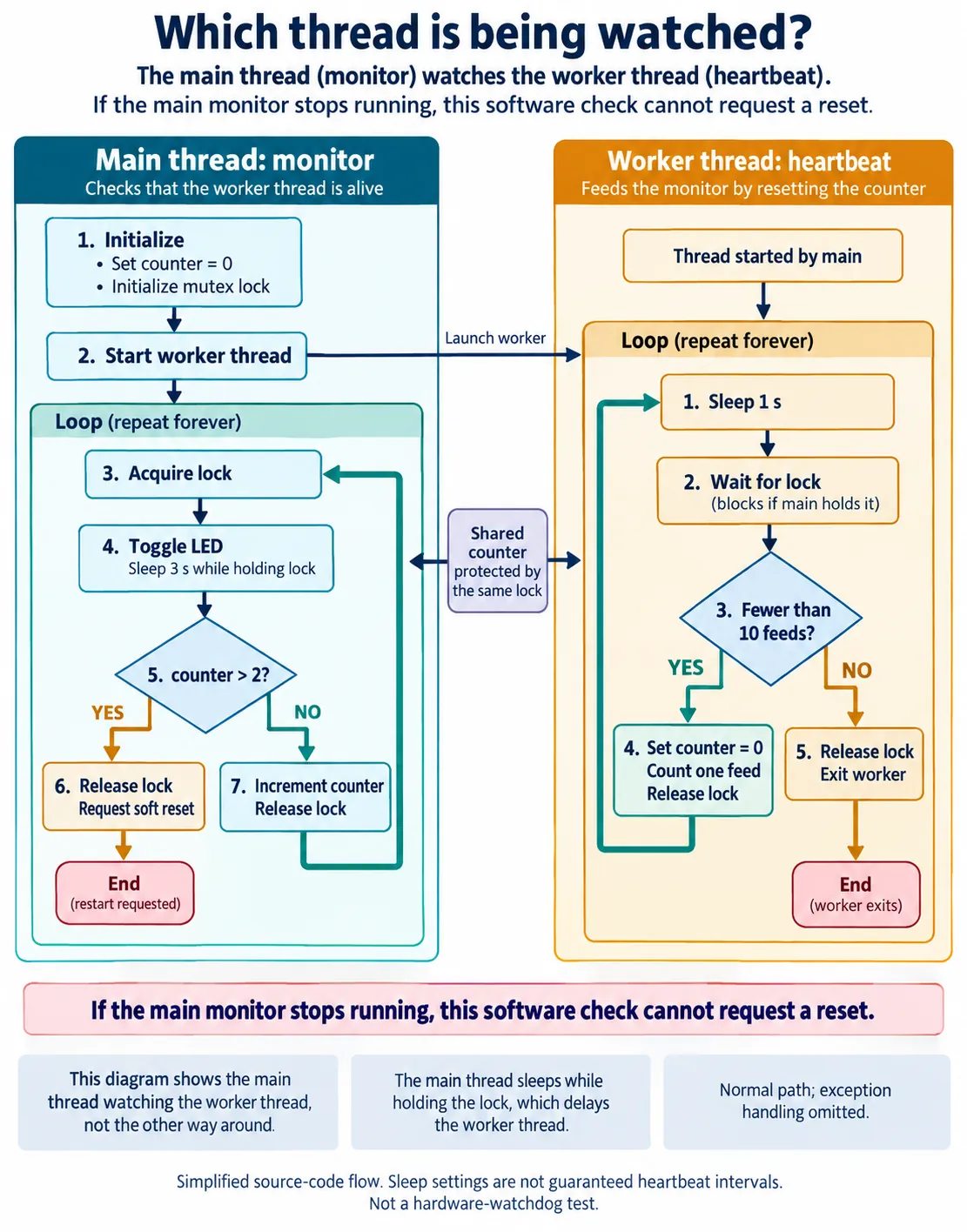
We ran a small two-thread experiment on our bench that makes one part of the problem visible. A worker repeatedly clears a counter, then deliberately stops. The main thread notices and requests a soft reset. The key detail is the direction of supervision: the main thread watches the worker. The experiment does not show the worker rescuing a stopped main thread.
What the two threads actually do
A thread is a separate path of program execution. In our test, the worker has no sensor to read and no web request to handle. It waits, clears a shared counter and prints a message; clearing the counter is the "feed." After ten feeds it prints a stop message and exits, creating a deliberate loss of activity for the main thread to detect.
The main thread toggles an LED, checks the counter and increments it. A lock lets only one thread into the protected section at a time. Once the counter exceeds two, the main thread releases the lock and calls machine.soft_reset(). No machine.WDT object is created: this is a software supervision exercise, not a test of the microcontroller's hardware watchdog.
A sleep setting is not a measured heartbeat interval
The program names four parameters: a maximum counter of two, a check interval of four seconds, a feed interval of one second and a feed count of ten. The names are convenient, but the code decides the actual sequence. The main loop sleeps for WATCHDOG_CHECK_INTERVAL - 1, three seconds, inside the locked section, and checks the threshold before incrementing the counter.
Meanwhile the worker sleeps one second before trying to take that lock. If the main thread still holds it, the worker waits longer. So the run does not demonstrate one feed per second or a precise four-second monitoring cycle, and multiplying the named threshold by the named interval would not give a measured recovery time.
For a real product, define progress in terms of completed work. A logging task might report after a required reading has been saved. A command task might report after it has serviced its queue. An idle web interface needs its own definition of healthy waiting; it should not be declared broken just because nobody has opened the page.
Read the restart evidence carefully
The console showed feed messages one through ten, then the worker's stop message. The main thread kept checking, printed that the feed thread was unresponsive, and ended the program. The console then showed a soft-reboot message and the application's startup banner again. That is evidence of the stop-and-restart sequence we set up.
It answers a narrow question: can this running main loop notice that the worker stopped clearing its counter, and request an interpreter restart? It does not cover every failure. The main loop stayed active throughout, and a worker that exits cleanly is different from a worker stuck while holding the shared lock.
Decide what "recovered" means
The program uses a soft reset. MicroPython's version 1.23 machine documentation describes this as clearing Python objects and resetting the Python heap, while trying to keep the connection to the interactive interpreter. That is not proof that every external device has been reset or that every service has resumed.
In a product trial, the useful follow-up is observable: does the logger save a new valid reading, does the settings page accept a request, and does the user see the current state again? Keep the reset message and the resumed-function result as separate evidence. Our console run shows a restarted program banner, not those product-level outcomes.
Test the real deployment startup path too. MicroPython's reset and boot guide documents differences between ordinary startup and a soft reset started through raw-REPL tooling. That page tracks the development branch, so confirm behavior against the firmware you ship. A run launched from a development tool is not a power-on recovery test.
Watch the work, including the monitor
For a device with several essential functions, start the engineering brief with a small table:
| Function | Evidence of progress | Longest normal quiet period | Response when exceeded |
|---|---|---|---|
| Logging | Valid reading saved | One logging interval plus margin | Retry, then restart |
| Settings page | Request served | No limit while idle | Health check on demand |
The rows are illustrations. The point is that different functions need different limits: waiting for a user command is not the same as missing a scheduled measurement.
Next, ask what happens if the monitor itself stops. In our test, a stalled main thread could not run the counter check or the soft-reset call. If the shared lock were held indefinitely, the monitor might never reach its decision. A hardware watchdog provides an independent timeout, but only if its feeding policy reflects the health of the required work. The MicroPython WDT documentation advises checking that the application is working before feeding it. An unrelated loop that keeps feeding proves little about the other tasks.
None of this requires moving every function into a new thread. We ran MicroPython 1.23.0, whose _thread documentation labels the module experimental. Base the implementation on the threading and scheduling behavior of the actual board and firmware. The experiment is useful as a visible supervision relationship, not as a reliability layer to copy unchanged.
Try failures one at a time before handing over the prototype
Start with the failure we already demonstrated: stop one worker and confirm the monitor notices. Then, separately, stop the monitor, hold the shared lock longer than intended, and make a worker raise an exception. Record which cases are detected, how the device responds, and whether its intended function comes back afterward. Run these as controlled development tests with outputs in a known state. We have not run them yet.
Where a restart is too disruptive, define a limited recovery attempt first, and require evidence that the function actually works again before calling it recovered. The extra question here is coverage: one healthy-looking task should not hide another that has stopped.