
Your prototype finishes a task, but the person using it is looking somewhere else. A light may be missed; a beep says something happened without saying what. A short spoken message such as "measurement complete" or "check the connection" could make the next step clearer.
That does not require a conversational assistant. A small controller can send text to a speech module and let the module drive a speaker. The important choice is whether its language, voice and playback behavior fit your actual prompts. On our bench we wired a GraftSense SNR9816 text-to-speech module to a Raspberry Pi Pico-based GraftPort board and a small speaker, and ran it with Mandarin speech. That shows the wiring and control path; it does not show that the module is ready for an English-speaking product.
Start with the messages people actually need
Write five representative prompts before choosing a module: the shortest instruction, the longest message, a changing number, an unusual name, and the message someone must hear over background noise. For a few fixed phrases, recordings may give you more control over delivery. Text-to-speech earns its place when the wording changes with the device's state or data.
Language support is more specific than "supports text." An August 2026 Anki discussion about offline speech raises voice quality, language choice and playback controls. Those are the right questions for a prototype, not evidence that any particular embedded voice will satisfy your users.
The SNR9816 documentation we had describes Mandarin synthesis plus individual English letters. Its module instructions and our example used UTF-8 text, while another protocol section describes GB2312 encoding. Confirm the exact firmware and encoding together. Neither a familiar chip name nor a successful Mandarin demo guarantees natural English sentences.
Build the speaker path before adding product behavior
Our program used UART0 with controller TX on GP16 and RX on GP17 at 115200 baud, eight data bits, no parity and one stop bit. One introductory description of the module said 9600 baud; match the installed firmware, not a general summary.
Supply and signal levels are separate questions: the module took a 5 V supply and used 3.3 V logic.
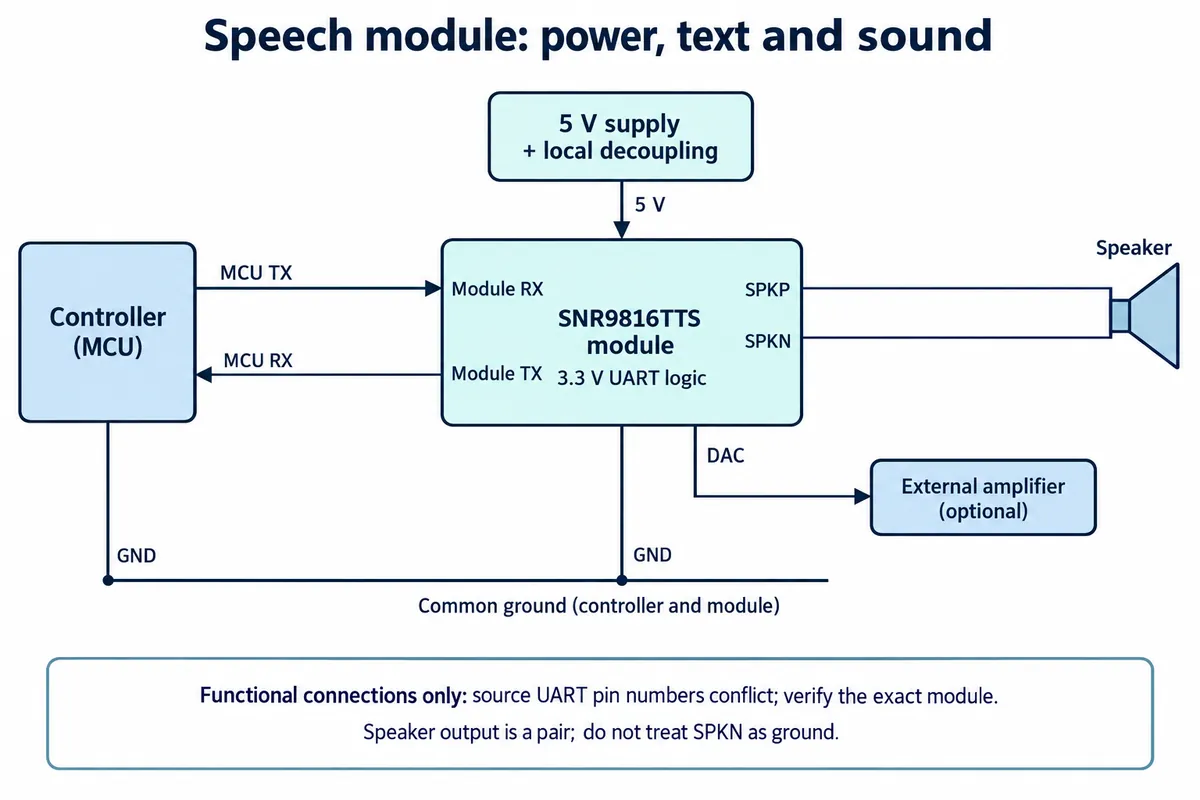
Connect controller TX to module RX, controller RX to module TX, and share a ground. The speaker connects across the two speaker outputs. The module drawing and pin table we had numbered RX and TX in opposite ways, so wire by the functional labels on the actual board revision rather than by pin numbers.
Keep the speaker on the intended amplifier output. The auxiliary 3.3 V output is specified for only a small external load, not as a speaker supply. Choose the speaker and supply against the module specification, then measure voltage during playback; datasheet output-power and current figures are not a substitute for measuring the assembled prototype. The chip-level reference circuit also includes power-sequencing and grounding details that matter if you later make your own PCB. Using the finished module first lets you prove the communication and listening experience before deciding whether a custom board is needed.
Go from a tone to a sentence
Our program initialized the UART driver, selected a voice, and set volume, speaking speed and pitch. Read those settings individually: nine is maximum volume, but in the speed table nine is the slowest speech. A single "high" preset would be misleading.
It then played five ringtones, five message tones and five alert tones before sending a Mandarin sentence that also tested pronunciation controls, including a character with more than one reading. That progression is useful: first prove the audio path works, then test the words the product needs.
For a text command, the driver builds a framed serial message with a header, a length, a synthesis command, an encoding selector and the encoded text bytes. The length must count the encoded bytes, not the visible characters. Mixing a GB2312 example with UTF-8 text can break an otherwise correct UART link.
The program finished by exercising pause, resume and stop. Keep those as separate tests. A message that starts does not prove an interruption works, and stopping a low-priority prompt may be exactly what a user needs when a more important one arrives.
We recorded the bench run on video. We have not run an independent listening test of intelligibility or loudness.
Check what the terminal actually confirms
The terminal log showed the test sequence along with status values of zero and two. In the driver, zero means busy and two means unknown. Treating every non-idle response as "playing" hides the difference between a known state and a reply the program did not recognize.
Command handling has the same gap. The driver's send routine reports that it wrote to the UART, which is not confirmation that the module accepted or spoke the message. Some control routines check a response before sending the new command, so a printed "pause successful" line does not by itself prove the new pause worked.
For a product prototype, wait a bounded time for a recognizable reply, log unknown responses separately, and keep the main application running if the module is disconnected. Verify each control by listening to the actual playback. Those are the next checks this test suggests; we have not yet run them.
Make spoken prompts useful inside the finished object
Once the bench setup works, test the same five prompts with the speaker in its proposed enclosure. Ask someone unfamiliar with the prototype what they heard and what they would do next, at the expected listening distance and with realistic room noise. A clear phrase on an open desk can become hard to understand once the speaker is enclosed. Decoupling, ground layout and short speaker connections on the board also matter, but they do not replace that listening test.
Decide when to stay quiet as well as when to speak. Repeated status updates can build a queue of outdated messages. Let an important new state replace a stale announcement, and provide repeat or mute where it makes sense. Speech can supplement a visible status indicator; nothing here establishes suitability for critical warnings or accessibility certification.
This setup gives you a concrete starting point: a wired module, a progression from tones to text, control commands and observable terminal output. The next decision is whether this voice and language suit your users. If they do not, keep the same prompt list and compare another speech engine or recorded audio before committing the enclosure or PCB. The driver package we used carries a non-commercial license notice, which is one more thing to settle before a product build.