
A sensor display can keep drawing a screen while its network connection has stopped delivering useful data. Restarting the whole device may get it moving again, but it also interrupts everything that was still working. Before handing a prototype to someone else, decide what the device should try to repair, and how it will know the repair worked.
In an M5Stack community discussion about a hanging web request, a developer asks for exactly that: a way to interrupt the request without rebooting the entire device. For a prototype with several jobs, that is the right question. A failed upload should not automatically mean losing the rest of a demonstration.
We built a small software-watchdog experiment on our bench to explore it. It deliberately stops reporting progress, counts missed checks, writes a log, and then takes either a recovery path or a reset path. Its most useful lesson is the difference between calling a recovery function and showing that the product works again.
Start with a failure you can reproduce
The test ran on MicroPython 1.23.0 on a Raspberry Pi Pico (RP2040). It needs no external sensor: the program simply stops calling feed(). Here, "feeding" means setting a flag that tells the monitor some progress was reported. An artificial fault makes the two possible outcomes easy to inspect.
After a three-second startup delay, the program creates a watchdog object from a small class our team wrote. It is not MicroPython's built-in machine.WDT. The settings were a 4,000 ms check period, three allowed consecutive misses, and a 1,000 ms delay before a reset. The class checks the flag every 4,000 ms. After three consecutive misses it tries the registered recovery action. If recovery fails and the reset condition allows it, it schedules a reset 1,000 ms later.
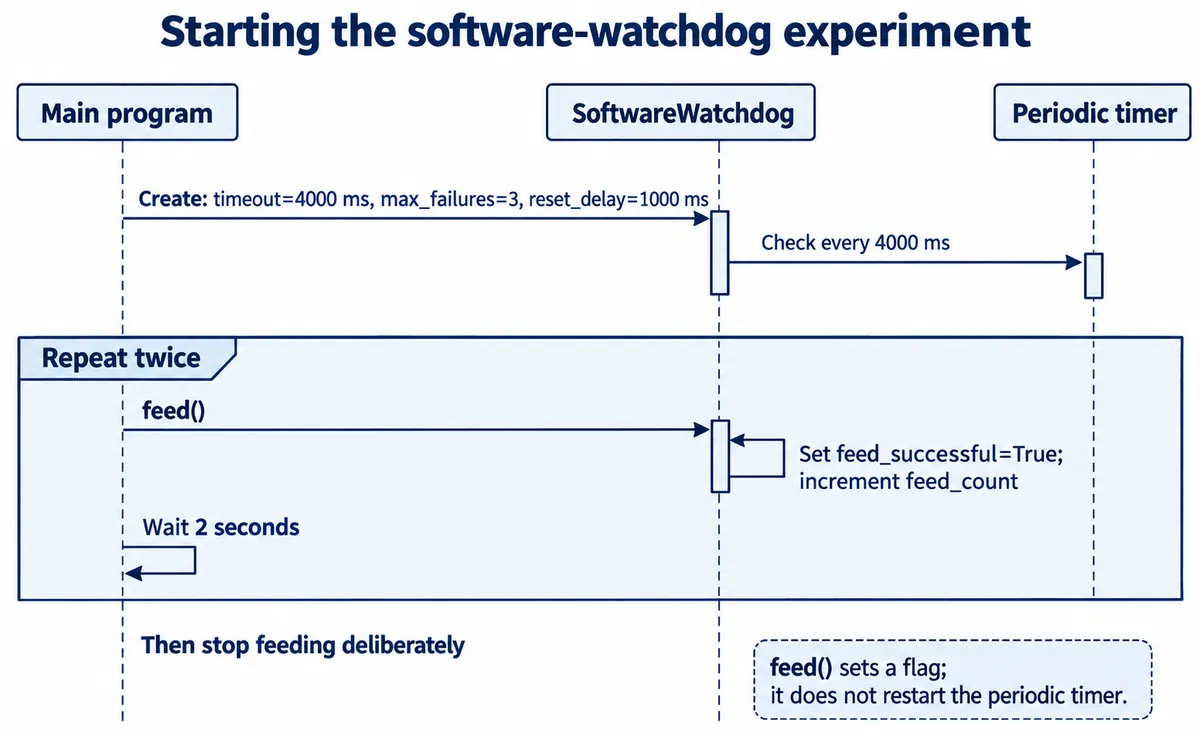
The main program feeds twice, pausing two seconds after each, then stops. (A code comment mentioned ten iterations; the loop runs two.) feed() sets a Boolean flag and does not restart the periodic timer. A check that sees the flag clears it and resets the consecutive-failure count; a check without it records a miss. So the configured period is not a guaranteed four-second deadline measured from the last successful operation.
For a real sensor display, the important design choice comes before this code: what deserves a feed? A fresh valid reading, a completed screen update or an acknowledged upload might each be right, depending on the product. A timer that keeps running by itself proves none of those jobs finished. MicroPython's WDT documentation likewise advises checking that the system is working correctly before feeding a watchdog.
Follow the recovery path all the way through
The class lets the application register three functions: one to record state, one to attempt recovery, and one to decide whether a reset is warranted. That keeps the monitoring logic separate from whatever the product needs to repair. On the third missed check, the class calls the recovery function.
In our test, that function printed a message, did nothing else, and returned True. There was no reconnection or peripheral reinitialization. The "recovery successful" message only means the monitor accepted the return value. It does not show that a network, sensor or application resumed working.
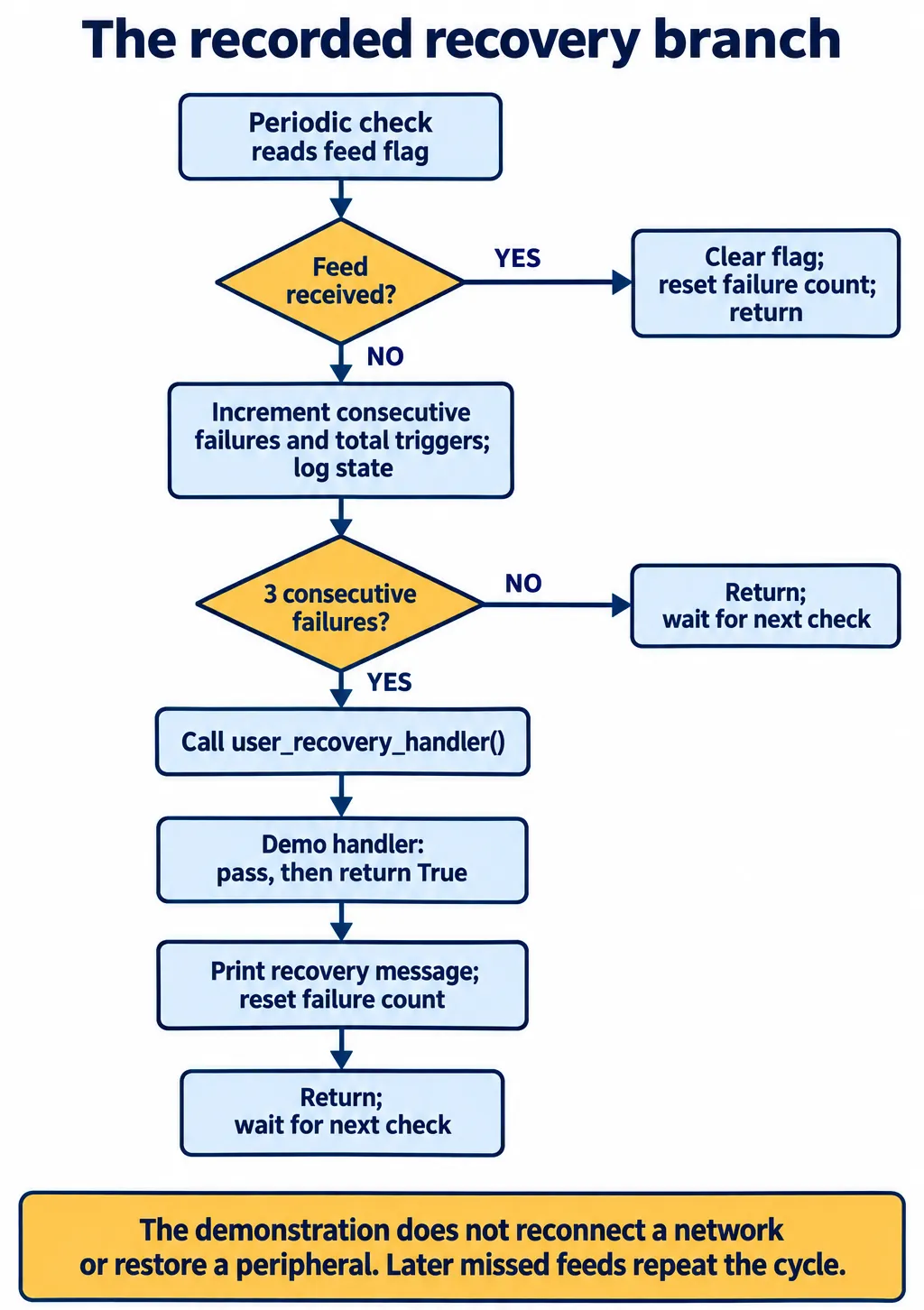
The console shows the consequence. After the first three misses, the failure count went back to zero. Because the main program still did not feed, misses accumulated again and another recovery message appeared, while the total trigger count kept rising. That is a repeatable demonstration of the control flow; the actual repair is still to be written.
To adapt this to a connected prototype, define a small, testable recovery action. For example, reopen a connection and then make a request whose valid response proves the connection is usable. Return success only after that check, and give the attempt a time limit so the recovery function cannot become a new place to hang. We propose these changes; we have not run them yet.
Keep enough evidence to explain the next failure
The state recorder writes one line per missed check: the millisecond tick value, a demonstration value, total triggers and consecutive failures. In this test the value was a constant 12 compared against a threshold of 10, not a sensor reading.
Our log0.txt held ten entries, with ticks from 50493 to 86493 ms in 4,000 ms steps. The total trigger count rose from 1 to 10, while the consecutive-failure count cycled 1, 2, 3 as the recovery function kept returning success. Looking only at the last "success" message would have hidden that pattern.
We read the file with mpremote cat log0.txt and copied it to the computer with mpremote cp :log0.txt ./log0.txt; the colon marks the file on the board. Copy to a separate local destination when you need to keep an earlier log.
For a longer trial, the logger needs a storage policy. It moves to a new numbered file after ten lines but does not limit the number of files, and it uses runtime ticks rather than calendar timestamps. Decide how much history to keep, what happens when storage fills, and what survives a power interruption before relying on the log away from the bench.
Check what happens when recovery is unavailable
For the reset path, we disabled the recovery-function registration. After three misses, the condition function compared the fixed value 12 with 10, permitted a reset, and the class armed a one-shot reset timer. The console showed the reset request after 1,000 ms followed by a serial error on the host. Reconnection and a successful application restart were not captured.
Losing the serial connection is consistent with the requested reset, but it is not the acceptance test for a product. After a reset, does the display obtain fresh data? Does the device restore its settings? Can the user carry on without opening a programming tool? Record that part of the sequence too.
The software monitor has limits of its own. It uses micropython.schedule() to run its check in the Python runtime, and the v1.23.0 documentation source for micropython.schedule describes deferred execution and a finite queue. A software callback cannot protect against every failure of the runtime that must execute it. Choosing and testing a separate hardware watchdog, if needed, is a separate design task.
Turn the demonstration into a useful prototype test
Start with one user-visible job, such as keeping a reading current. Interrupt its input on purpose, check that the fault is logged, and verify that a limited recovery attempt restores a fresh result. Then test a fault the local recovery cannot fix and follow the device through its restart back to working service. Keep these as separate test cases so a reassuring message cannot hide a failed repair.
Test maintenance as well. The class's stop method deinitializes the periodic timer, but it does not cancel an already armed reset timer or queued work. A product needs a deliberate way to stay accessible during diagnosis, before any watchdog can restart it.