
You have a working sound, light or visual effect. Now someone needs to control it without reaching for a laptop. A knob seems obvious, until you try to make a small adjustment while watching the effect instead of the screen.
For a music or interactive-installation prototype, the first useful test is whether a person can reach the setting they want, repeat it and leave it alone without the value drifting. On our bench we started with two GraftSense modules, a slide potentiometer and an RK09L rotary potentiometer, each connected to a GraftPort-Pico controller board. These tests read the controls into MicroPython; they do not yet control a synthesizer, send MIDI or validate a finished panel.
Choose the movement around the task
A slider gives the user a visible position along a line. That can suit a level control or several settings that need to be compared at a glance. A knob can suit a compact panel and a setting adjusted with a twisting motion. Neither choice guarantees precise control: travel, spacing, grip and the software response all affect the result.
This is a real application question. In a September 8, 2026 Allen & Heath community post, a contributor described a six-potentiometer controller combining knobs and faders for a mixer. That supports the application; it does not establish that the modules below work with that mixer.
Start with one action, such as adjusting a light level, and try both movements on a temporary panel. That is the next experiment; our bench tests covered only the analog input stage.
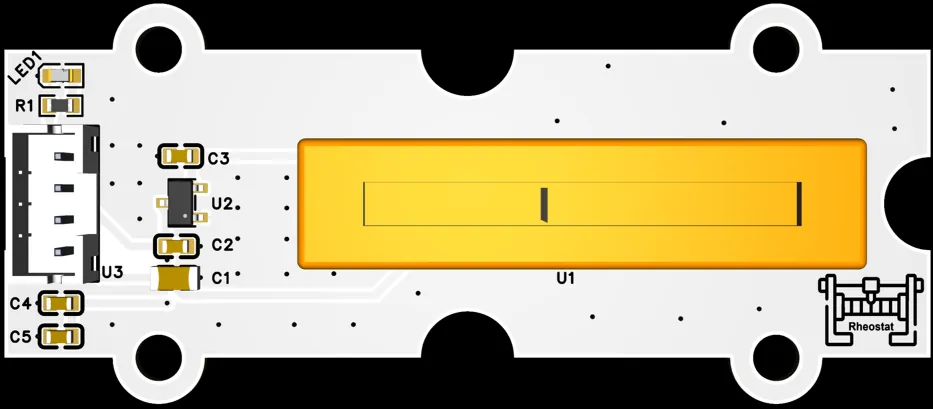
Reproduce the simple input test first
Both modules connect to the controller's AIN0 connector and use GPIO26 as an analog input; the other GPIO at that connector is unused. The same test program served both. After a three-second startup delay, it printed a raw reading, an estimated voltage and a normalized ratio every half-second, using a small potentiometer class from our team's driver library. The underlying read is a standard MicroPython call:
from machine import ADC

adc = ADC(26)
raw = adc.read_u16()
The terminal showed readings close to 2.97 V with a ratio of 1.000. That combination comes from the driver's mapping, not from a calibrated measurement of the control's physical position. The driver assumes a 3.3 V reference and clamps its ratio between 5% and 90% of the full numerical range. In other words, a reading near the upper end already means "100%" to the application. That may be fine, but it should be a choice you make for the product rather than a hidden property inherited from example code.
The slider and knob tests share one recorded terminal capture, so treat it as one data point, not two independent measurements. We also recorded each control being moved by hand. That shows movement produces readable input. It is not a latency test: judging how a performer experiences the input needs a real output and faster observation than a half-second terminal print.
Watch the control, then inspect the mapping
Three details are worth carrying into the next prototype. First, MicroPython's ADC.read_u16() returns a reading scaled to 0 to 65535. The size of that number does not prove 16-bit measurement accuracy. Second, the driver converts it to voltage using its default 3.3 V assumption; it does not measure the reference voltage. Third, the driver's state function obtains the raw value, voltage and ratio through separate reads. They are not three representations of one frozen sample.
For a user-facing control, a clearer implementation would take one sample, map it using the observed usable endpoints, then apply any filtering. That is a proposed improvement we have not yet built. Keep the short test working before changing the application behavior.
Smooth movement needs a deliberate response
Small fluctuations can be harmless in a terminal and distracting when they move a visible parameter. Averaging several readings may calm the output, but too much averaging makes a control feel slow. Sending a new value only after a meaningful change is another option; its threshold should not erase deliberate small adjustments.
The independent Fader3 project by echolevel is a useful reference: its documentation includes configurable smoothing and a new-value threshold for a Pico-based MIDI fader controller. It is third-party work, not something our tests demonstrated, and it gives you an approach to evaluate against your own interaction rather than a universal setting to copy.
Try a slow sweep, a quick movement and a ten-second pause at several positions. Watch the actual light, sound or on-screen value. Record unwanted changes while the control is untouched, the smallest intentional adjustment it accepts and whether a fast movement feels delayed. These are the checks to run next; we do not have their results yet.
Leave room for the part you actually have
Before committing to an enclosure, include the module board, connector, cable bend and the user's fingers. A bare potentiometer drawing does not describe the complete module's mounting requirements.
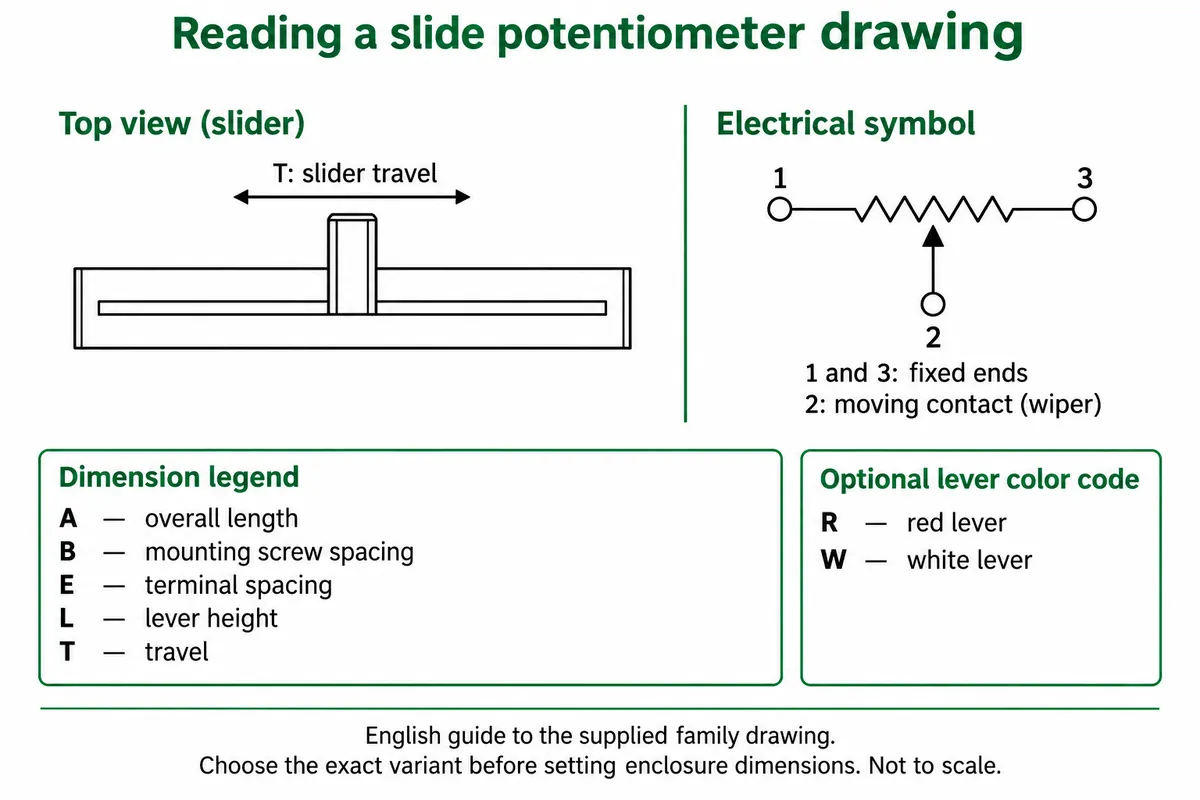
The slider's manufacturer drawing covers a family with several travel lengths, so a nominal module description is not a verified panel-cutout dimension. For the knob, ALPS publishes an outline for a specific RK09L variant. Match the exact fitted part before using its dimensions: shaft geometry and the number of electrical sections both affect the mechanical and electrical design.
Also confirm the signal voltage at the controller. The module schematics contain a mismatch between a regulator part number and its voltage label, so the drawings alone do not settle the fitted supply voltage. Check the actual board revision and its output range against the controller's input limits before wiring a different controller. The program's calculated voltage is not an independent meter measurement.
Make the next prototype answer one question
Build a temporary panel with the chosen control and connect it to one real application parameter. Ask someone unfamiliar with the setup to reach a setting, move away from it and return. If the action is comfortable but the output jumps, investigate the sampling and mapping. If the signal is stable but the action is awkward, change the physical arrangement before investing in the final enclosure.
Our tests give a starting point for reading two forms of input. The useful next result is evidence that the intended user can control the intended effect, not a larger stream of numbers in the terminal.