
A visitor presses a button beneath a photograph and a short recording starts. That sounds like a small feature, until the recording needs replacing, someone presses the button twice, or the exhibit restarts halfway through a clip. For a design or exhibition team adding prerecorded audio to a hardware prototype, those details matter more than how many file formats the player advertises.
The first useful milestone is a repeatable interaction: this input plays this recording, at a suitable volume, with a clear rule for what happens next. On our bench we built that test three ways, with JQ6500, KT403-series and DY-SV19T player modules driven from MicroPython. One of them also delivered a useful reminder: a test script that reaches its last line has not necessarily confirmed every playback operation.
Start with what the visitor should experience
This is a long-standing design problem. In a 2016 American Alliance of Museums discussion, a museum team wanted buttons beneath portraits to play short recordings and was weighing an in-house build against outside help.
Before choosing a board, decide whether a second press restarts the recording, interrupts it with another clip, or is ignored until it finishes. Decide what happens when power returns. An exhibit that waits quietly for a visitor needs different behavior from a player that loops a soundtrack.
For a first trial, one button and one clearly spoken test recording are enough. Then add a second recording with a noticeably different opening, so a wrong selection is obvious before you polish narration or fit a speaker behind a panel. Also confirm that your input actually reaches the application: choosing an audio module does not prove that your button, touchscreen or sensor can trigger it.
Choose how people will update the recordings
All three players take playback commands over UART; the controller does not decode the audio. Their storage and outputs differ:
| Player module | Where the audio lives | Output |
|---|---|---|
| JQ6500 carrier | External SPI flash on the carrier, loaded over USB with a desktop utility | Built-in amplifier and speaker connector |
| KT403-series carrier | microSD card | Left and right DAC audio to a jack; not a speaker amplifier on this revision |
| DY-SV19T carrier | microSD card | Amplified speaker output; its power rating is a manufacturer figure we did not measure |
If recordings change often, decide who updates them and whether they can reach the card or USB port after assembly. If content rarely changes, on-board flash may be fine. Either way, check that each trigger still selects the intended recording after every update.
One ordering note: our KT board was sold as KT403C, while its schematic, datasheet and driver all say KT403A. Do not assume A- and C-labeled boards are interchangeable.
JQ6500: load the files, then address them
We loaded audio into the JQ6500 carrier's flash over Mini-USB with the vendor's desktop utility. The carrier's flash is a separate chip, so the driver's "built-in" source means on-board storage, not storage inside the JQ6500 itself. Labels on firmware folders and boards mixed capacity units across revisions; confirm usable capacity from the fitted part and a successful upload.
Serial control used UART0 at 9600 baud, controller TX on GPIO16 and RX on GPIO17. Follow signal direction: controller TX goes to the player's receive input. Carrier labels such as MTX and MRX may be written from the controller's side, so read the schematic rather than matching printed names.
We used rdagger's micropython-jq6500 driver (MIT). The core of indexed playback from flash is:
player = Player(uart, volume=15)
player.set_source(Player.SRC_BUILTIN)
player.play_by_index(1)
Our full test also changed EQ and loop mode, played and paused, adjusted volume, moved between tracks and queried file information. The terminal reported three files, a playing state, a paused state and volume 16 after adjustment. Those are software responses. Pair each with a listening check: did the expected recording start, was the delay acceptable, did pause actually silence it? Keep a table matching each intended message to its index, and recheck it whenever the flash contents change.
KT403: a useful test includes the unexpected result
The KT board played from a microSD card through its jack to headphones. One render labels that jack "AUDIO INPUT," but the schematic connects it to the DAC outputs; go by the schematic and the actual revision.
Our KT driver expresses volume as a percentage and converts it to the chip's 0 to 30 steps, so 50 here is not comparable with 15 on the JQ6500, and neither number describes loudness.
The test reported four files and showed volume and EQ changes. Then it printed "Status after pause: Not paused" and later "Status after stop: Not stopped," before announcing that the test completed. We have not identified the cause: the command, query timing or response handling could all be involved. Confirm pause and stop one operation at a time before relying on them in an unattended exhibit.
A small trap in the same script: sleep_ms(3) waits three milliseconds, despite a comment saying three seconds. Check actual calls and the module's required delays; the KT403A datasheet, for example, asks for at least 200 ms after changing the playback device. And a 2024 DFRobot forum report on a different player describes inconsistent behavior after re-uploading controller code, so test a controller reset while the audio board stays powered.
DY-SV19T: choose the control mode deliberately
The DY-SV19T supports direct button triggering, combined IO selection, UART, a timed one-wire interface and a standard MP3 button mode. These are alternatives to configure, not features to use all at once.
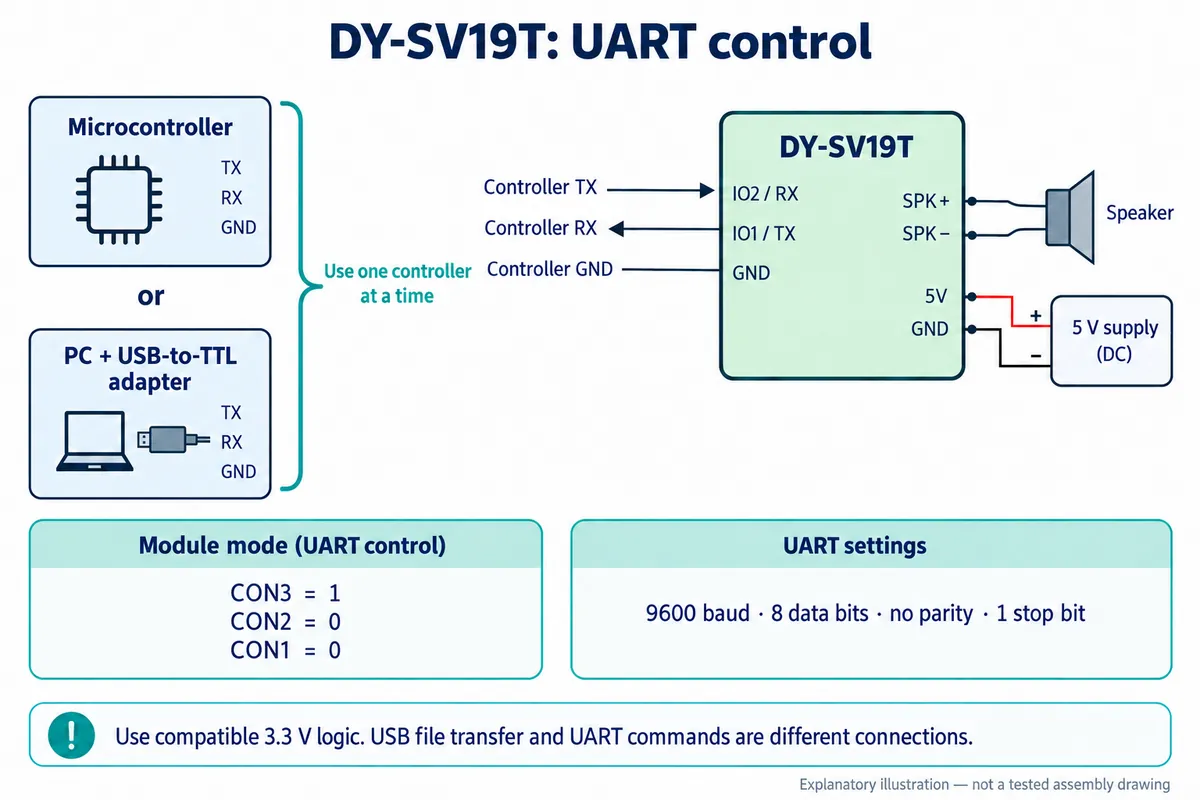
We used our team's MicroPython driver to send volume, EQ, playback-mode and channel commands and to query status and track information. One driver detail matters: constructor defaults are stored in software and not sent to the module, so send the commands explicitly when you need a known hardware state. Our recorded run exercised time reporting and part of the repeat features; several other routines were not run.
"Play file 1" can mean different things
The DY-SV19T manual says ordinary track indices follow storage order, and its path commands use a special format (such as /DY*/00001*MP3), not ordinary file paths. The KT403A likewise distinguishes copy-order commands from numbered-folder commands. So a renamed file and a track index cannot be assumed to mean the same recording.
For a button-only design, the DY-SV19T's independent IO mode maps each input to a numbered file.
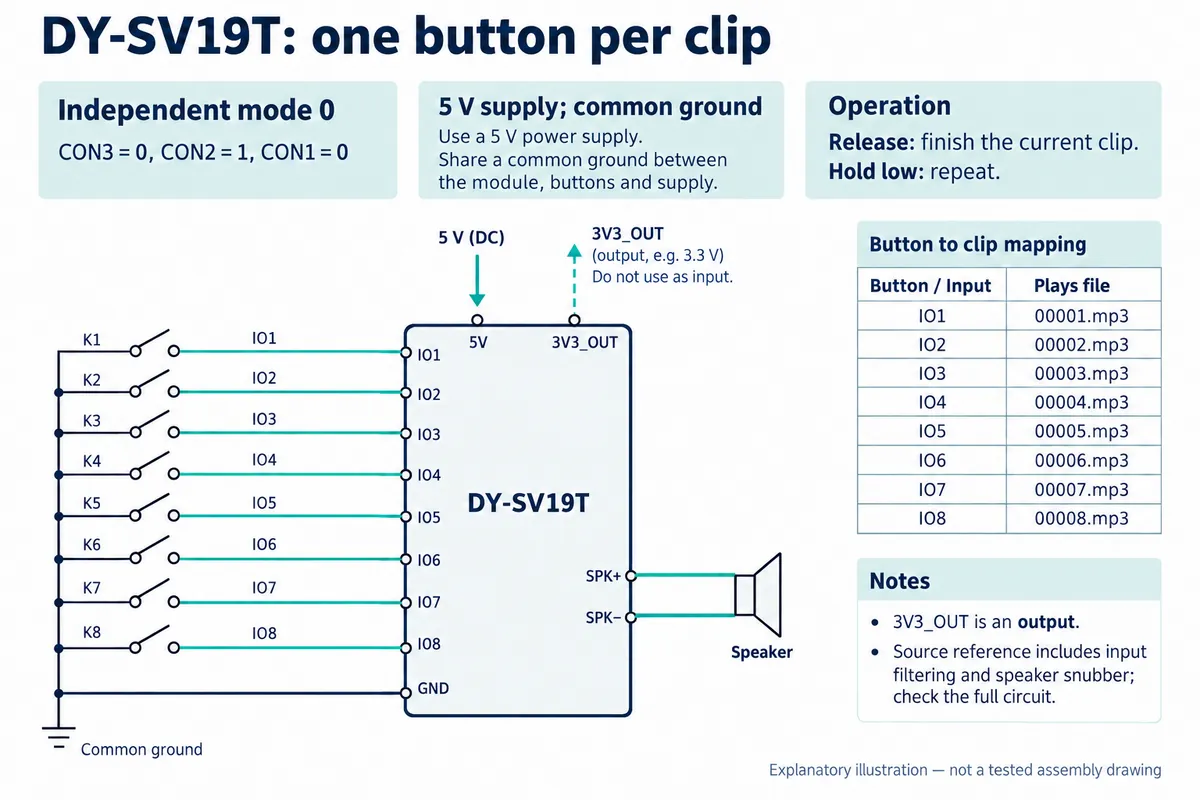
In mode 0, releasing the button lets the clip finish and holding it low repeats; in mode 1, release stops playback. That decides whether a visitor must hold the button for the whole recording.
With several sensors, a screen or rules about interruptions, controller-driven selection is easier to manage. Give each message a meaningful name in your application ("welcome," "object description," "try again") and keep its module-specific index in one place. Test the mapping after every content update, card swap and cold start.
Try the interaction before closing the enclosure
Bring the actual button, speaker, power supply and recordings into the next test. Check a normal press, a held button, rapid repeated presses, a different selection during playback, and a restart, and note what a listener actually hears. Status queries cannot tell you whether the speaker is disconnected or the narration is intelligible in the room.
Check startup volume before the speaker goes near a listener. The DY-SV19T defaults to its maximum level of 30, and our software then set 20; the right level depends on your speaker and enclosure. Once behavior is repeatable, move the setup into the enclosure, secure the wiring, leave a practical route for content updates, and test again. Our bench runs included no acoustic measurements or long-duration operation.