
Imagine a small exhibit that starts when a visitor approaches and stays active while they read, but ignores someone walking past the next display. A motion-triggered demo can look right during a quick walk-through, then go quiet when a visitor stands still. A sensor that sees too far causes the opposite problem: the display keeps running for people outside its area.
So the useful question is whether the device can recognize someone in the right place. Exact visitor counts and detailed movement paths can wait unless the experience needs them.
On our bench we mounted a 60 GHz mmWave radar module on a GraftSense carrier, connected it to a GraftPort-RP2040 controller, and forwarded presence and target-coordinate reports to a phone over Bluetooth serial. This note covers what that showed and what still has to be tested before the approach can run a finished exhibit.
Choose the information the experience needs
In a September 2026 Home Assistant community thread, a user asked why lighting needs an exact person count when it usually only needs to know whether a zone is occupied. That applies to a prototype brief: an extra data field is useful only if it changes what the product does.
| What the display needs to know | What you need to check |
|---|---|
| Someone is nearby | Entry detection, stationary presence, exit delay |
| Someone is in front of this display | Coordinates, mounting direction, the boundary with nearby walkways |
| Two people are taking part together | Simultaneous tracking, separation, what happens when paths cross |
A May 2025 thread on kitchen and dining-room presence makes the boundary problem concrete: the poster wanted lights to respond in one area without reacting to people in the next. Neighboring exhibits have the same problem.
The module reports detections, not camera frames
The carrier is sold as an R60AMP1-based multi-person trajectory module. Its R60AMP1-H documentation describes a 60 GHz radar with one transmit and three receive antennas that processes reflections and reports presence, motion and target coordinates over a serial link. The controller never handles images.
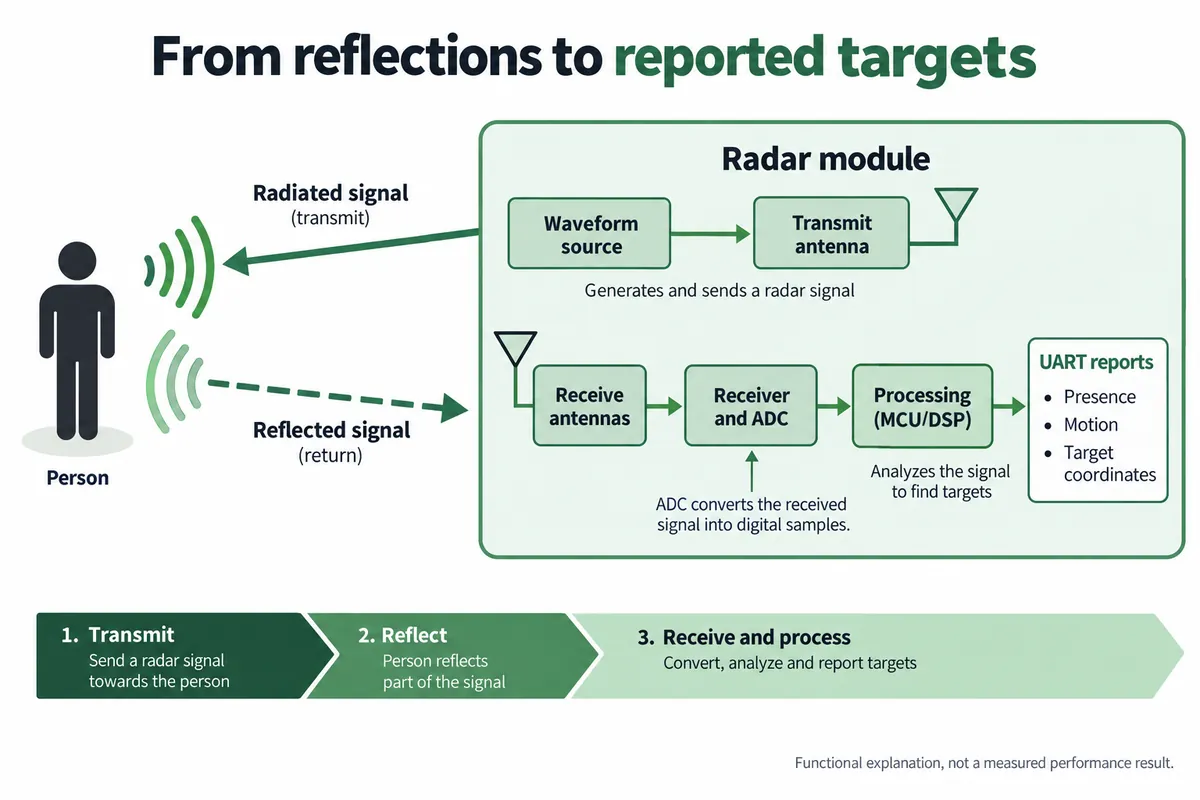
The manufacturer also describes detecting the small movements of a stationary person. That is the reason to try radar for a display whose visitors pause to read, but it has to be tested with the actual module, firmware, mounting and enclosure. Our walking demonstration did not establish how long a still visitor stays detected.
No photographs are collected, but timestamps and movement records can still reveal patterns of use. For a simple display, consider keeping only the current state needed to run the experience rather than a history of individual tracks.
The bench setup
The carrier exposes a UART, a transmit and receive pair. Its MRX and MTX labels use the host's perspective, so follow the carrier schematic and connector orientation instead of joining similarly named pins. The module documentation specifies 3.3 V UART signaling, separate from its nominal 5 V supply.
We fixed the radar to a wall panel facing horizontally, and used an HC-08 Bluetooth serial module so we could watch reports on a phone while walking in front of it. The mounting is part of the experiment, not just a way to hold the board.
Our own records disagreed on wiring. The connection table put the radar on UART1, but the program attached the radar parser to UART0 (TX GP16, RX GP17, 115200 baud) and used UART1 (TX GP8, RX GP9, 9600 baud) for the HC-08. Confirm which connectors your hardware actually uses before powering anything. For a first integration test, a direct serial log is simpler than debugging radar reception and Bluetooth forwarding together.
Read the identity and the result separately
Our identification queries returned R60AHX2 for both product and hardware model, with firmware G60TP1SYV010003, even though the carrier is labeled R60AMP1. We could not resolve the relationship between those names. Anyone reproducing a result needs the actual response, not a tidied-up label.
The program enabled presence reporting, printed stored report values every two seconds, and also sent an active presence query. Those are different paths. A stored property is the last value received; a query response confirms a reply to a request. Reprinting an old property does not make it a new observation.
The terminal showed one target at X = −72 cm, Y = 160 cm, with presence reported as "Someone." That proves a parsed coordinate report. There was no independent ground-truth position, so it says nothing about accuracy. The same capture showed a static motion state next to a target feature printed as moving; read the fields separately. In the protocol and driver, motion status 0 means none, 1 static and 2 active; one of our own notes had called 2 stationary. Leave unknown feature codes unknown until their firmware-specific meaning is confirmed. The phone view showed duplicated, overlapping lines, so use a clean serial capture for analysis.
Check the bytes before building behavior around them
Each report has a header, command fields, payload length, payload, checksum and trailer. The checksum is the low eight bits of a byte sum. It catches a corrupted or incomplete frame; it does not prove the target is a real visitor. This offline check decodes one presence-query reply copied from our log:
def decode_presence_reply(frame):
    if len(frame) < 9 or frame[:2] != b"\x53\x59":
        raise ValueError("Missing frame header")
    payload_len = (frame[4] << 8) | frame[5]
    if len(frame) != payload_len + 9 or frame[-2:] != b"\x54\x43":
        raise ValueError("Incomplete frame or wrong trailer")
    if (sum(frame[:-3]) & 0xFF) != frame[-3]:
        raise ValueError("Checksum mismatch")
    if frame[2:4] != b"\x80\x81" or payload_len != 1:
        raise ValueError("Not a presence-query reply")
    return frame[6]

recorded = bytes.fromhex("53 59 80 81 00 01 01 AF 54 43")
print(decode_presence_reply(recorded))  # 1: presence reported
A live application also needs a stream parser that collects split frames, rejects bad lengths and keeps timestamps. Keep "no person reported" separate from "no valid data": if a cable comes loose, the device should enter an explicit unknown state rather than decide the room is empty. Some status messages arrive only on change, so silence alone does not mean failure; a heartbeat or successful query can serve as a separate communication check.
Let the enclosure take part in the test
The module's v1.3 user manual asks for a flat, non-metallic cover with 2 to 5 mm between the antenna face and the cover, and the radar face standing forward of surrounding components.
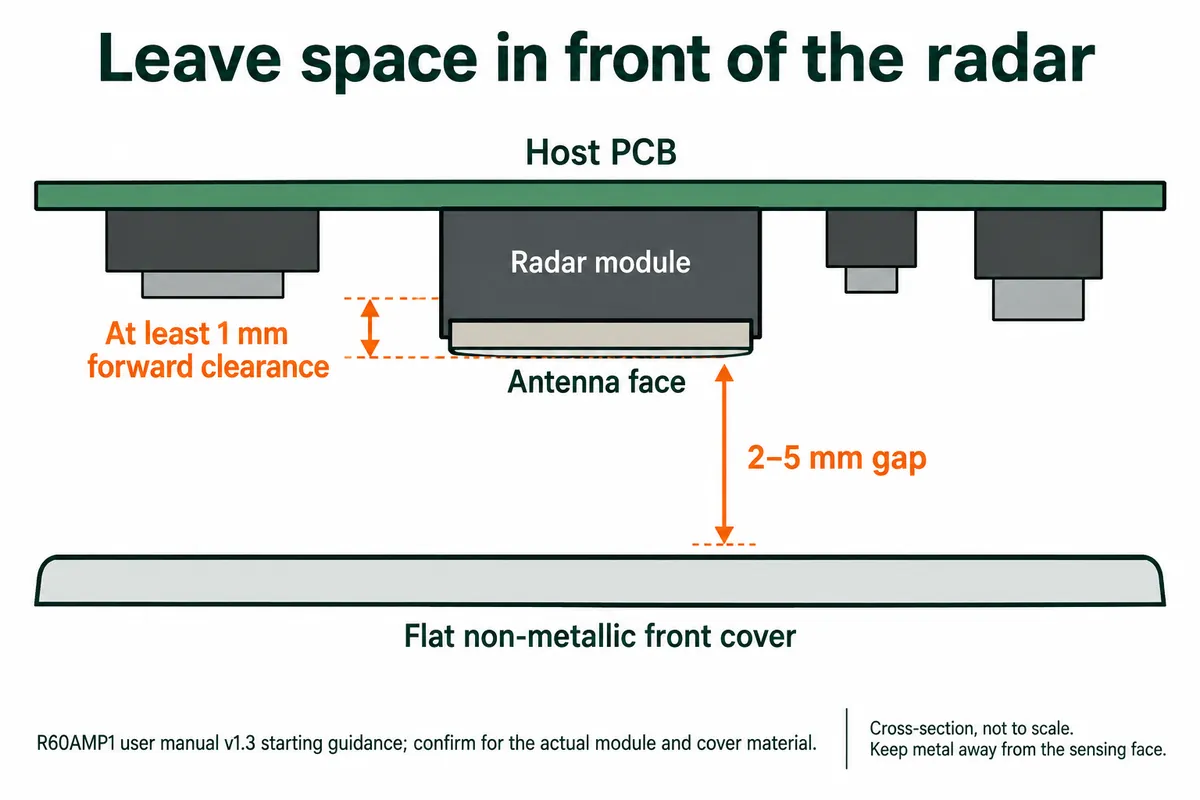
Cover material, thickness and shape affect transmission and field of view. TI's mmWave Radar Radome Design Guide explains why; a radome is the cover in front of the radar. Use it for the principles, not as a substitute for this module's requirements.
Plan a comparison with the cover off and on, at the same mounting position and with marked floor locations. Include any paint, film, fasteners and nearby electronics planned for the product.
The module documents disagree on coverage. An older illustration shows up to 10 m for moving targets and 6 m for stationary ones; the R60AMP1-H v2.0 table lists 5 m and 4 m under its stated conditions, and the vertical angles differ too. None of these was measured in our test. Confirm the exact hardware and firmware, then measure the usable zone instead of picking the most attractive number. Power figures also differ between documents: a regulated 5 V supply sits inside the stated ranges but still needs enough current and low ripple at the module.
Test the boundary that matters to the visitor
Mark the intended interaction area and the adjacent walkway. Record what the product does when one person enters, stops, turns sideways, moves near the boundary and leaves. Repeat with a second person, including one leaving while the other stays. These trials answer the real question better than a maximum-range walk in an empty room.
Keep the sensor rigidly mounted and include realistic nearby activity. Log temperature, mounting and firmware changes during integration trials, and do not treat target index 1 as a persistent identity.
Measure entry and exit delay separately. The v1.3 manual describes a presence-to-empty delay of roughly 30 seconds, and another document version gives different figures. A display that should switch off quickly needs different behavior from lighting that should stay on through a brief missed detection. Put that expectation in the brief and verify it on the intended firmware.
What we have is a working demonstration of reported presence and coordinates. The next useful step is a short log that pairs those reports with what visitors actually did and how the display responded, with the intended cover installed.