
You add wired networking to a data logger so a user can collect recordings without opening the enclosure. The switch reports a 100 Mbps connection, yet downloading a file feels slow. Replacing the cable may change nothing: the file has to pass through the prototype's processor, storage and Ethernet interface before it reaches that cable.
For a small team, the useful question is whether the complete transfer meets the user's waiting time. A ten-megabyte recording needed within five seconds is a different requirement from a few sensor readings sent every minute. Define that job before using the connector's speed as a product promise.
This note uses the WIZnet W5500 Ethernet controller, driven over SPI from a MicroPython host, to show where the gap comes from. It includes calculations and published reference figures; it is not a benchmark of one of our boards.
There is another connection inside the prototype
Ethernet is the connection between the W5500 and the network. SPI is the serial connection between the main processor and the W5500. Application data must cross that internal connection too. A faster network cannot collect bytes that the processor has not yet supplied.
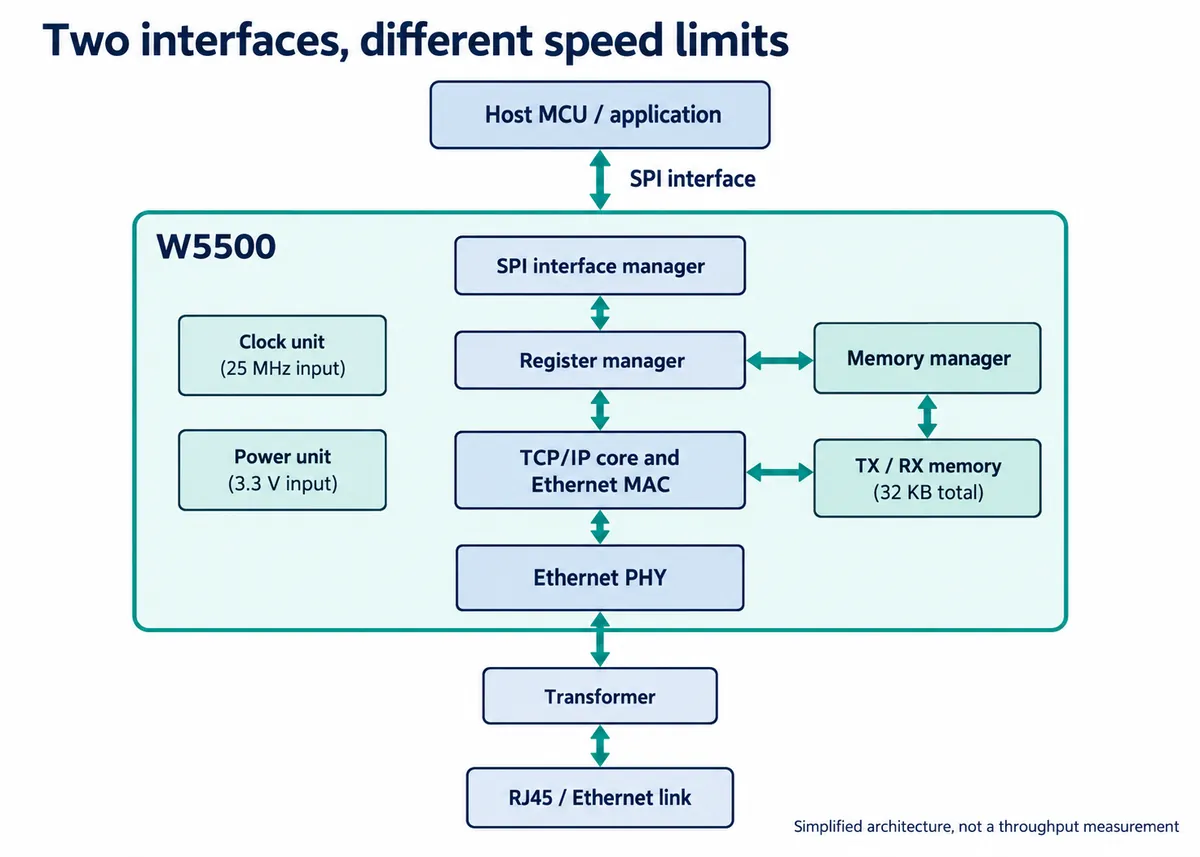
Buffers temporarily hold data between the two interfaces. They help absorb bursts and pauses, but cannot sustain a transfer indefinitely if the application supplies or consumes data too slowly.
Published SPI figures for this part are not always consistent. Use the W5500 datasheet v1.1.0: it describes an 80 MHz design limit, and its timing section qualifies operation with signal-integrity considerations. Do not turn that figure into a recommended clock for jumper wires, or assume that an 80 MHz clock delivers 80 Mbps of application data.
It is also worth checking the clock the driver actually uses. In a MicroPython discussion opened June 17, 2024, a developer observed a different clock during network-library activity from the one expected from a separate SPI test. The thread involved several configuration and hardware issues, so it does not establish one universal fix. It does show why a setting in a script is not a measurement of the active interface.
Small transactions spend more time on instructions
Before each W5500 SPI data transfer, the host sends a two-byte address and a control byte. That tells the chip where the following data belongs and what operation to perform. Repeating that setup for every single byte costs more than transferring several consecutive bytes under one frame.
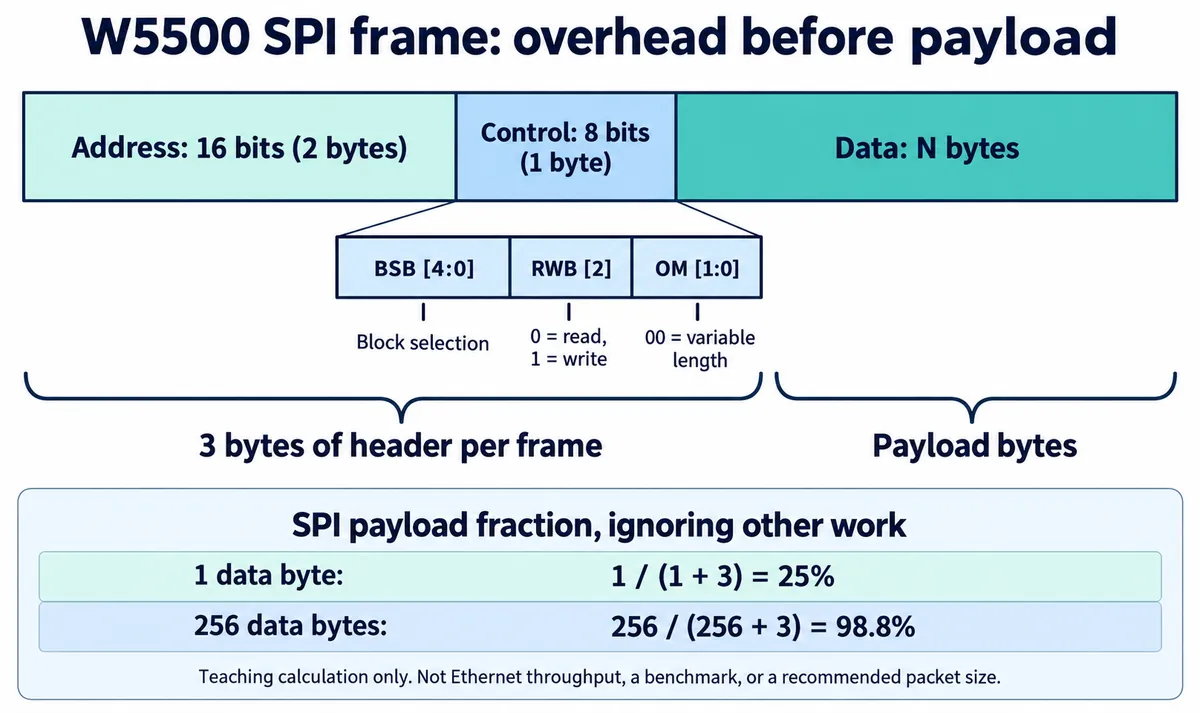
In the control byte, the read/write bit is 0 for read and 1 for write, per the datasheet; check this against any driver comments that say otherwise. The box widths in the diagram are illustrative, not a bit scale: the block-select field occupies control bits 7 through 3. The percentages exclude register operations, software work and network overhead, so they explain overhead but do not predict network speed.
Batching data can therefore be worth investigating when the driver supports it. But waiting for a large batch adds delay, and a larger buffer consumes memory. A logger downloading an existing file may tolerate that tradeoff; a control response that a user expects immediately may not. Keep transfer speed and response time as separate requirements.
There is more work beyond the frame: reading status, managing buffers, running the application, fetching a file from storage and communicating with the receiver. If a display or storage device shares the same SPI bus, its traffic uses time on that bus too. Increasing the clock addresses only part of this path.
Compare tests only when their conditions match
WIZnet's published SPI performance page records a specific STM32F103C8 TCP loopback setup, with named tools, clocks and buffer sizes. In its clock-sweep table, the 4 KB socket-buffer column rises from 2.738 Mbps at 18 MHz SPI to 3.501 Mbps at 36 MHz SPI. Doubling the clock did not double that result. It is a manufacturer test of that setup, not the expected speed of every W5500 prototype, and it does not predict the rate of your MicroPython firmware.
Other published tests separate upload, download, DMA and non-DMA conditions. Those distinctions are useful when planning your own test, but results from different setups are not interchangeable. Avoid collecting the highest number from each page into a specification.
For the proposed ten-megabyte file, a five-second target needs two megabytes per second of completed file delivery, or 16 megabits per second in decimal units, before allowing for pauses. That is a requirement calculation, not a measured capability. It gives the team something concrete to check on its own build.
Measure the job the user is waiting for
Begin with a known file and confirm that the receiver gets the correct contents. Time from the agreed start event to the complete received file, rather than stopping when the application has only queued the last bytes. Record file size, direction, firmware, actual interface settings and what else the prototype was doing.
Then separate the stages:
- Compare sending a known in-memory buffer with reading the same amount from storage and sending it. If the memory test is faster, investigate file access and shared-bus activity before blaming Ethernet.
- If both are slow, inspect transaction sizes, driver behavior and the receiving program.
- Change one condition at a time so the next result explains something.
Finally, repeat with the display, sensors and intended background work active. Look at pauses and correctness as well as the average. A fast transfer that freezes the controls or delivers an incomplete recording does not meet the user need.
If the complete test meets the target, there is no need to chase the link's headline rate. If it does not, compare a driver or transaction change, less data, a different storage path or a different host interface against the measured bottleneck. That is a more useful basis for an integration decision than "the port should be faster."