The Most Beginner-Friendly Object Oriented Programming Tutorial on the Whole Network: 48 Python function Methods and Interfaces - Positional Arguments, Default Arguments, Variable Arguments and Keyword Arguments
In Python, a function can accept multiple types of parameters, including positional parameters, default parameters, variable parameters and keyword parameters. Understanding these parameter types is of great importance for writing flexible and maintainable code.
This document mainly introduces how to use Python for Object Oriented programming, which requires readers to have a basic understanding of Python syntax and microcontroller development. Compared with other blogs or books that explain Python Object Oriented programming, this document is more detailed and focuses on embedded host computer applications, taking the common serial port data transmission and reception, data processing, dynamic graph drawing and other functions between the host computer and the slave computer as application examples. Meanwhile, it uses the Sourcetrail code software to visualize the code for reading to facilitate readers' understanding.
The link to obtain the relevant sample code is as follows:
https://github.com/leezisheng/Python-OOP-Demo
Body Text
Positional Arguments
Positional arguments are the most common type of parameter, whose values are determined by the position when calling a function. The order of parameters in a function definition determines their corresponding relationship during function calls. For example:
def greet(name, age):
    print(f"Hello {name}, you are {age} years old.")

greet("Alice", 30)
# Output: Hello Alice, you are 30 years old.
In this example, name and age are positional parameters. When the greet function is called, "Alice" corresponds to name, and 30 corresponds to age.
Keyword Arguments
Keyword arguments allow you to explicitly specify the name of an argument when calling a function. They can be mixed with positional arguments, but keyword arguments must be provided after positional arguments.
def greet(name, age):
    print(f"Hello {name}, you are {age} years old.")

greet(name="David", age=28)
# Output: Hello David, you are 28 years old.
In this example, name and age are passed as keyword arguments. This improves code readability and allows you to specify arguments in any order when calling a function.
Default Arguments
Default parameters allow you to provide default values for parameters when defining a function. If these parameters are not passed when calling the function, the default values will be used. For example:
def greet(name, age=25):
    print(f"Hello {name}, you are {age} years old.")

greet("Bob")
# Output: Hello Bob, you are 25 years old.

greet("Charlie", 40)
# Output: Hello Charlie, you are 40 years old.
In this example, age parameter has a default value of 25. If you call the greet function without providing a value for age, it will use this default value.
variadic parameter
In Python, in addition to the traditional positional arguments, keyword arguments and default arguments, there are also two methods: variable-length arguments and variable-length keyword arguments, which will be explained next. In the following example, we define a function that can print the two strings passed into the function:
If you call it with one argument, like print_str ("hello"), an exception will definitely be thrown. If we are not sure about the number of strings to pass in advance, we can use Python variable arguments to implement it. Variable arguments refer to parameters that can accept any number of arguments. In Python, variable arguments can be defined by adding an asterisk * before the parameter name, so that the function can accept any number of positional arguments.
When defining a function, variable arguments are usually accepted with *args, where the * is mandatory, and args can be replaced with other names, but it is customary to use args for representation. After being passed into the function, variable arguments are encapsulated into a tuple for use. Therefore, inside the function, we can manipulate the arguments by operating on the tuple. The sample code is as follows:
def print_str(first_str, *args):
    print(type(args))
    print(args)
    print(first_str)
    for n in args:
        print(n)

print_str("hello", "world","i","am","coming")
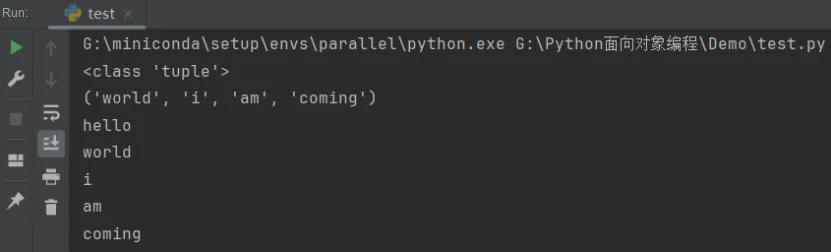
The following are the operation results:
If a list or tuple has already been defined outside a function and you want to call it with variable arguments, you can also use the * + variable name form for invocation (this usage is somewhat similar to pointers in the C language). At this point, when the function is called, the passed tuple parameter will be unpacked, with each element automatically serving as a positional argument of the function. An example is as follows:
def print_str(first_str, *args):
    print(type(args))
    print(args)
    print(first_str)
    for n in args:
        print(n)

l=["world","i","am","coming"]
print_str("hello",*l)
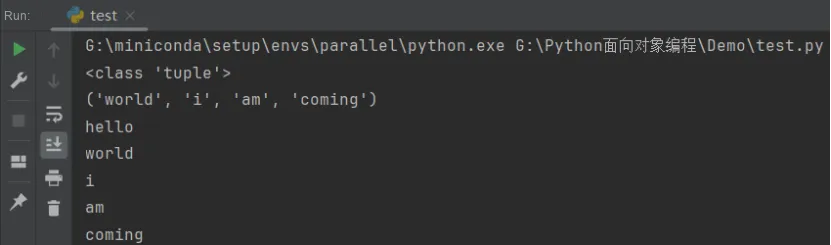
The running results are as follows:
Variable arguments allow you to pass zero or any number of arguments, which are automatically assembled into a tuple when the function is called, while variable keyword arguments allow you to pass zero or any number of arguments with parameter names, which are automatically assembled into a dict inside the function.
Variable keyword arguments are identified by kwargs, which are used to extend the functionality of a function. For example, when we want to implement user registration, there are required fields and optional fields, and these optional fields can be accepted using variable keyword arguments.
The sample code is as follows:
def register(name, email, **kwargs):
    print("name: {}, age: {}, others: {}".format(name, email, kwargs))
    for i in kwargs:
        print(str(i)+":"+kwargs[i])

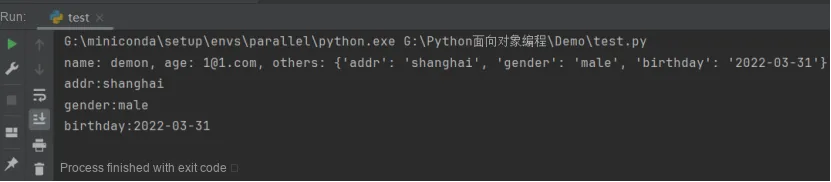
register("demon", "1@1.com", addr="shanghai",gender="male", birthday="2022-03-31")
The running results are as follows:
For keyword arguments, the caller of a function can pass any number of unrestricted keyword arguments. As for which ones are actually passed, it is necessary to check them via kwargs inside the function. If you want to restrict the names of keyword arguments, you can use named keyword arguments, for example, only accepting addr and gender as keyword arguments. A function defined in this way is as follows:
Different from the keyword argument **kw, named keyword arguments require a special separator, and the arguments following the separator are regarded as named keyword arguments. Named keyword arguments must be passed with their argument names, which is different from positional arguments. When defining a function, the order of parameters must be: required (positional) parameters -> default parameters -> variable positional parameters -> variable keyword parameters.