
You turn a knob on an interactive prototype and the response feels immediate. Then you add a feature that remembers the setting after power-off. Now the display hesitates when you press Save, or the device stops responding altogether. The new feature writes only a few bytes, so why does it affect the rest of the product?
On an RP2040 design, the flash chip that keeps settings may also supply the program's instructions. Updating that shared storage needs more coordination than changing a variable in working memory. If your team is preparing a music controller, exhibit or other responsive device for user tests, decide when a setting becomes permanent before promising that saving will be invisible.
The underlying problem is well documented. In a February 7, 2025 Pico SDK issue, a developer assigned sensor work to one core and flash writes to the other, but the safe-write call returned an error. A second core did not remove their shared dependency. The chip's memory architecture explains why.
The program can be reading the same chip you want to update
Execute in place, usually shortened to XIP, lets the processor fetch instructions from external flash without first copying the whole program into RAM. A cache keeps recently read contents so many accesses finish quickly. That makes the flash more than a place for saved settings: it can be part of the device's normal execution path. The RP2040 datasheet shows this block in its Figure 14. This note is about RP2040; do not carry its registers or numbers into a Pico 2 (RP2350) design without checking that chip's documentation.
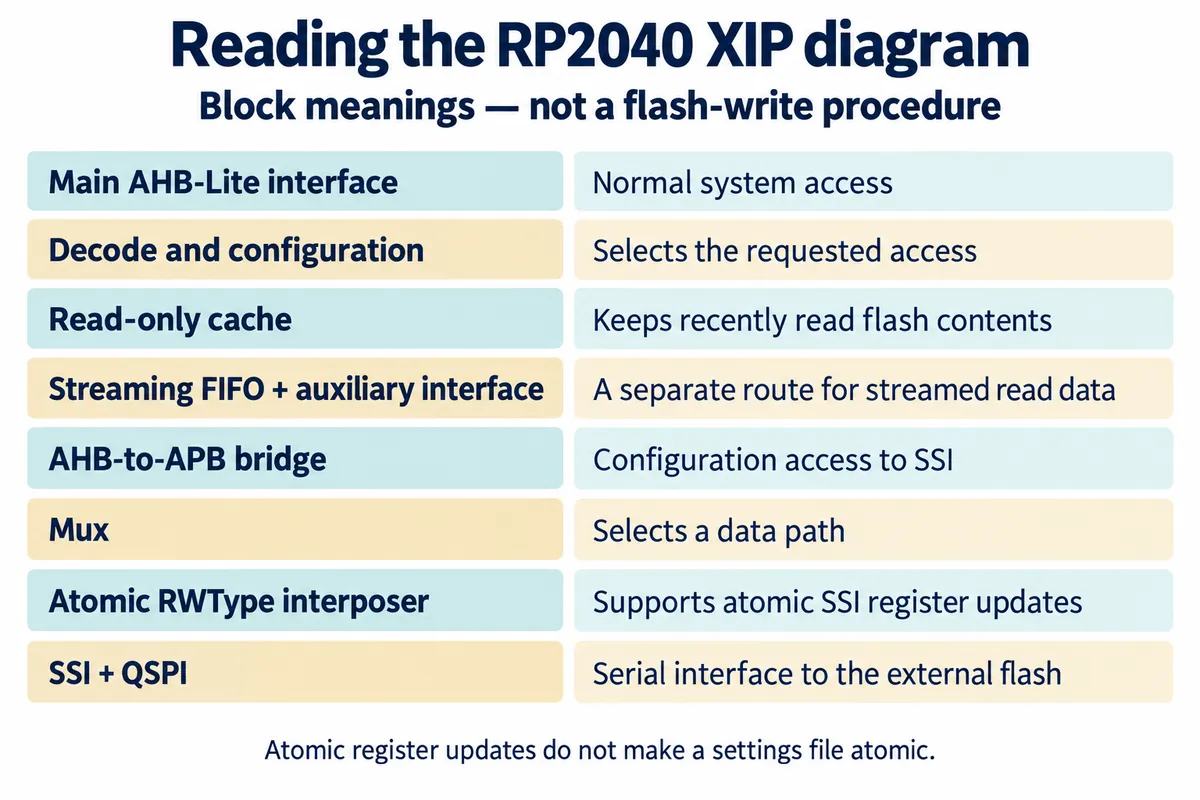
A read can be served from cache or may need the external chip. The separate streaming path handles read data; it is not a second flash chip that lets the rest of the program ignore an erase or write.
The word "atomic" in the block list is easy to misread. It refers to a mechanism for changing SSI control registers. It does not mean that an entire settings file survives an interrupted update. Program-access coordination and saved-data recovery are different engineering jobs.
A small save can require a wider pause
The Pico SDK flash API explains that erasing or programming flash takes it out of XIP mode. During that interval, code and data must not be fetched from the affected flash address space. Interrupt handlers and another running core can create accesses that the saving function itself does not make.
The SDK provides flash_safe_execute to coordinate a suitable execution window in supported environments. Its setup depends on how the other core is managed. This is C/C++ SDK behavior, not a MicroPython function to paste into a script. For a MicroPython application, establish how the actual firmware and storage driver handle writes before adding lower-level code around them.
There are two different symptoms to investigate. A controlled pause may be the expected cost of a correctly coordinated write. A crash, a rejected operation or an indefinite hang points to another problem. Record which one occurs; increasing a timeout or bypassing a safety check does not show that the underlying flash access is safe.
In the 2025 issue, a maintainer pointed out both core initialization and a conflict between the application's FIFO use and the lockout mechanism. Those details belong to that SDK arrangement. The broader lesson for a product team is that moving Save to a background worker is not proof that the foreground stays independent.
Choose what Save means to the person using the device
Suppose a musician changes a control while a sequence is playing. The live setting can change in RAM immediately, while a permanent save waits for a deliberate action or a suitable idle moment. That separates interaction from persistence. The tradeoff is equally clear: changes still waiting in RAM can be lost when power goes away.
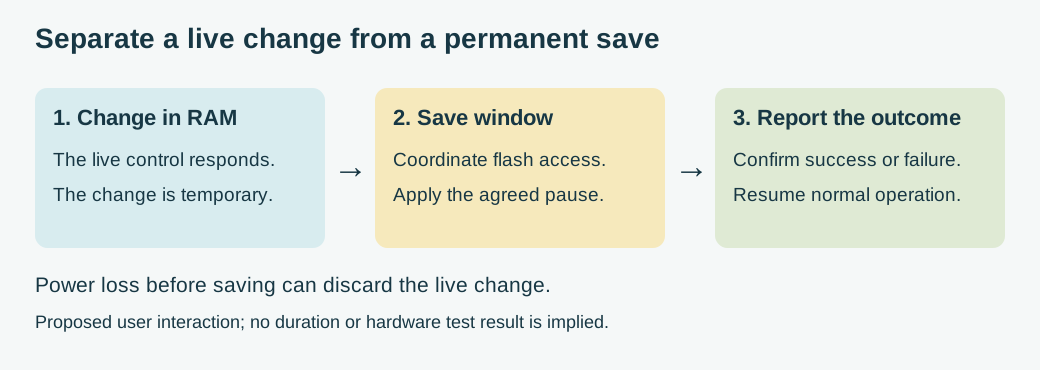
A recent product example shows why this matters for usability. Infinite Digits' Pikocore article, updated September 18, 2026, describes moving sample replacement from rebuilding firmware to a separate browser-managed bank. It is a useful example of designing the storage workflow around a musician's task. It does not establish uninterrupted playback during a flash update, and we do not assume it does.
For your prototype, agree on a visible contract:
- Is a changed setting temporary until Save is pressed?
- Does Save briefly put the device into a maintenance state?
- When does the screen say "Saved," and what does it show if a write fails?
Those choices should match the implementation. Do not show completion just because the request entered a queue.
Give the engineer the whole running scenario
Ask for a small reproduction that saves the intended data while the normal display, inputs and communications are active. Include the board, firmware or SDK version, the flash device where known, and how the second core is used. Capture the exact return code or fault as well as what the user sees. A test with the rest of the application removed may show basic storage access while missing the integration problem.
For custom SDK code, the version 2.2.0 low-level flash header explicitly warns about concurrent flash execution and flash-resident interrupt handlers. Review the supported coordination path and the reserved storage region before experimenting. A raw write to an arbitrary offset can damage the program or another stored object; it is not a useful first diagnostic for a product prototype.
If the product must keep a time-sensitive output running during saving, demonstrate that requirement on the actual build. Possible approaches include a planned pause, buffering with a defined limit, or a different storage arrangement. Each changes the design and needs its own test, and none can be chosen, or given a worst-case pause duration, from a block diagram alone.
Test the interruption, then test the saved result
First measure the live effect: response time, missed input events, interrupted output and communication recovery during repeated saves. Then restart normally and confirm that the intended setting returns. Power loss during the update is a separate recovery test, using expendable data and an agreed fallback state. A successful uninterrupted save does not answer all three questions.
We have not run a Save-button timing or power-interruption test for this note. The architecture gives a reason to investigate the shared flash path, not a diagnosis for every hesitation. Keep the first test focused on your actual symptom, then use its result to choose a storage and interaction policy the team can explain to a tester.