
A live display and a push-button command do not need the same behavior from a network. If a display misses one sensor update, the next reading may be more useful than the old one. If a button asks a device to perform an action, silently losing the message, or performing it twice, can leave the user confused.
Before choosing how to handle either case, make a small exchange visible. On our bench, a W5500 Ethernet board running MicroPython received a UDP message, printed it and sent the same bytes back to the sender. That is a useful starting test for a wired prototype, provided you keep the next decision separate: what should happen when an expected update or reply is missing?
An Arduino forum question from December 2013 makes the distinction concrete. The developer could tolerate some missing streamed data but wanted late packets discarded and ordering handled. That is a product requirement, not something the choice of UDP supplies automatically.
Make the first round trip easy to inspect
We configured the board as 192.168.1.20, listening on UDP port 8000. A network test tool on the computer (NetAssist) used local address 192.168.1.6 and local port 8080, then sent to the board's address and port. The ports identify the two application endpoints; they do not need to be the same.
These addresses belong to our test network. Use the actual board and computer configuration for a new test, and match the settings to the active interface rather than treating copied numbers as defaults. This was a local test; it does not establish remote access across a router or firewall.
On the board, WIZNET5K runs over SPI0 using GPIO19/16/18 for MOSI/MISO/clock, GPIO17 for chip select and GPIO20 for reset, on MicroPython 1.23.0. Keep those board-specific assignments with the firmware record; they are not universal wiring instructions for every W5500 carrier.
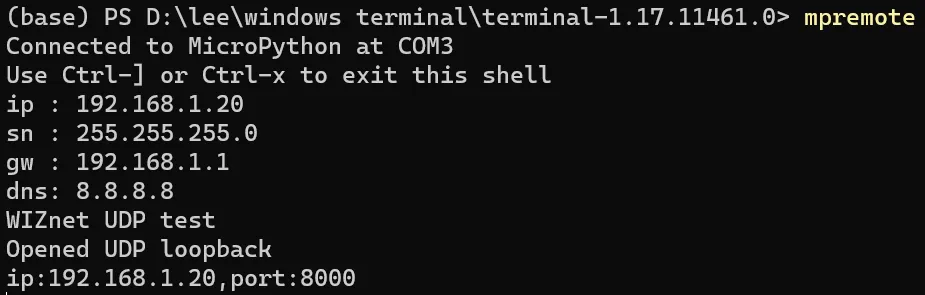
If the computer sends to a different port, an otherwise working cable and address configuration will not make this listener receive the message. Once the settings agree, send one short, recognizable piece of text before trying a stream of updates.
Follow what the echo code actually does
After network initialization, the essential loop is small:
from usocket import socket, AF_INET, SOCK_DGRAM

s = socket(AF_INET, SOCK_DGRAM)
s.bind((nic.ifconfig()[0], 8000))
while True:
    data, sender = s.recvfrom(2048)
    print("Received:", data, "from:", sender)
    s.sendto(data, sender)
recvfrom() provides both the received bytes and the sender's address. The program replies to that sender rather than to a fixed computer address, and it does not need to establish a TCP-style connection first. The MicroPython socket reference documents these calls and their returned values.
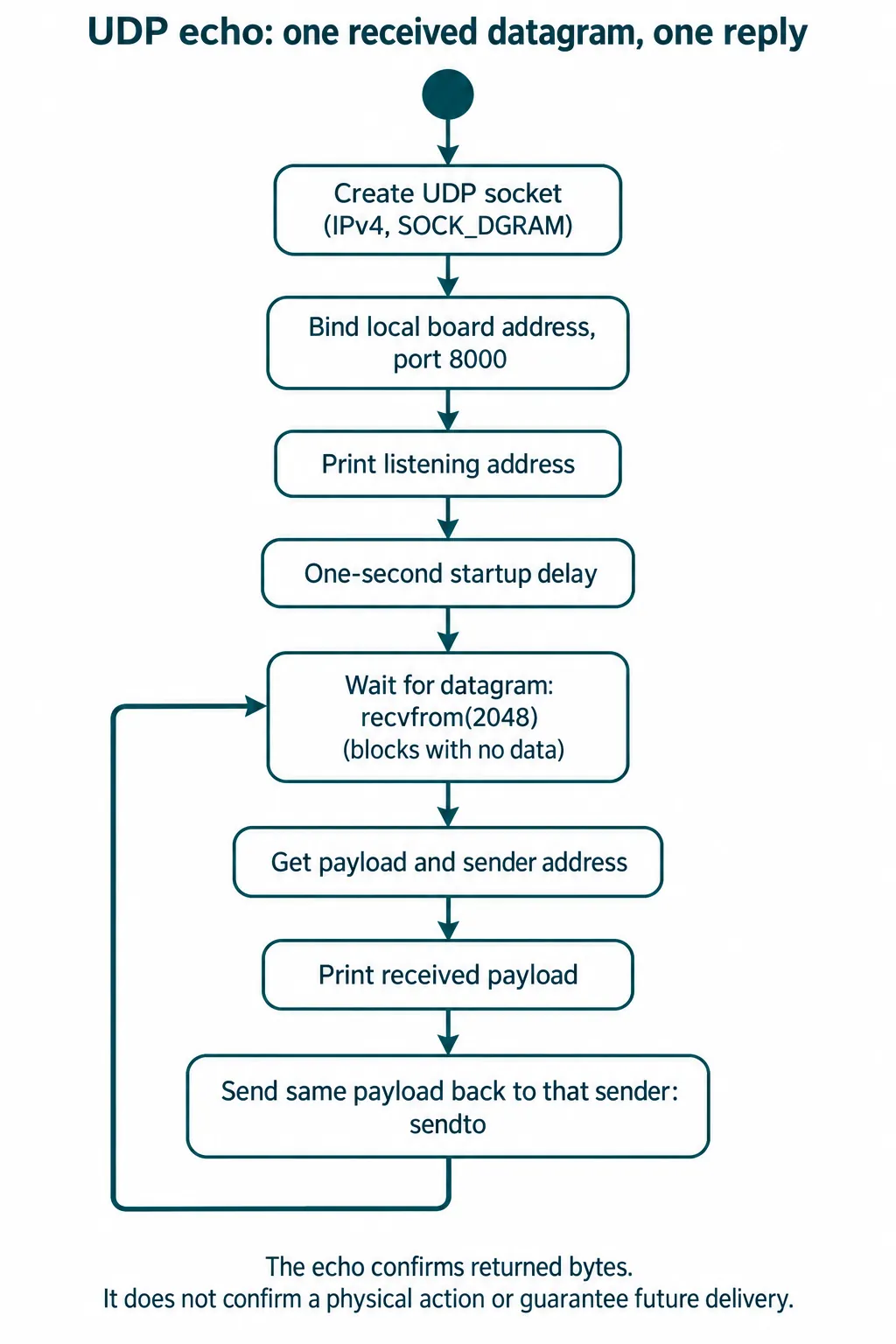
The program waits in recvfrom() when no data arrives. For an integrated prototype, decide whether that wait can share the main loop with buttons, screen updates or other work; the echo example is not a complete responsive application.
In our run, three short strings were received by the board, logged with the sender 192.168.1.6:8080, and returned to the computer. That confirms those observed exchanges. It does not measure a loss rate, establish a maximum update frequency or prove that a connected output moved.
A second run began with a serial exception from mpremote on the computer before the later receive output appeared. That exception concerns the computer's serial-monitor connection; it is not evidence of a dropped UDP datagram. Separate these observations when diagnosing the system so a terminal problem does not become a supposed network failure.
Decide whether a message is a state or an event
For a display that shows the latest reading, define how long a value can remain unchanged before it should be marked stale. A late reading should not quietly overwrite a newer one. For a command that starts an action, define what a successful reply means: bytes received, command accepted, or action completed. Those are different points in the device's work.
An echo only returns the payload. If you change the program to send commands, give each request an identifier and decide how the device handles a repeated request. "Set the brightness to 30%" and "increase the brightness by 10%" illustrate the difference: repeating the latter changes the result again. These are design choices for your application, not functions present in the echo program.
UDP itself does not restore missing messages or guarantee their order. RFC 8085, section 3.3 describes these application responsibilities. If your design requires reliable, ordered delivery, compare a standard transport that provides it before building a retry mechanism. Retries still need limits and rate control; sending faster after a failure can make congestion worse.
Turn the echo into a useful acceptance test
Keep the small-message test, but put a sequence number in each test payload and log it at both ends. For example, reading,101,24.6 might identify a test reading without claiming that a real sensor produced it. A gap tells you an expected number was not observed; it does not, by itself, locate the loss or distinguish it from delay.
Try a short numbered series, then deliberately send a duplicate, an older number and a pause longer than your freshness limit. Observe the user-facing result, not just the terminal. The display should follow your chosen stale-data policy, and an action should follow your chosen duplicate policy. We have not run these failure-injection tests yet; they are the next step after the echo.
Keep test datagrams small and define an application payload limit. The 2048 argument is a receive-buffer request, not proof that every payload of that size will travel without fragmentation or be handled as intended. Log unexpected sizes rather than letting a truncated or malformed message look like a valid command.
You now have a clearer milestone than "UDP works": one known exchange is demonstrated, and the next test has an explicit rule for missing, late and repeated messages.