
The first unit works. The second works too, until you switch them on together. Now the dashboard updates from one, then the other, and the connection indicators keep changing. Before replacing cables or increasing retry counts, check whether both devices introduce themselves to the MQTT broker with the same Client ID.
This is an easy mistake when a working example becomes the firmware for several trial units. A topic name describes where messages go; a Client ID identifies the MQTT connection and its session. Giving each unit a different topic does not fix a duplicated Client ID.
A Home Assistant discussion from February 2026 makes the distinction concrete. Two Raspberry Pi monitoring units worked separately, but only the most recently started one updated. Their topics were already different. The author reported success after changing the duplicated Client IDs. It is one resolved case, not evidence that every connection failure has this cause.
Change the identity used to connect, not just a label
Our one-board MQTT test program used a fixed string as the board's Client ID and also put that string in a JSON field named clientid. The matching strings look like one setting, but they are used in different places. Only the value passed into the MQTT client connection identifies that connection to the broker.
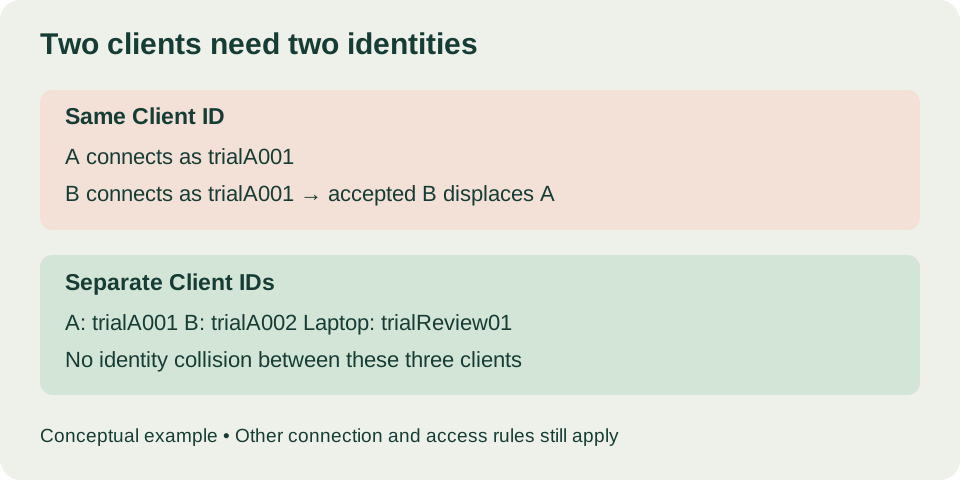
In MQTT 3.1.1, once a new connection passes validation, the broker must disconnect an existing client with the same Client ID. This is specified in section 3.1.4 of the OASIS standard. If both programs reconnect automatically with the same identity, each keeps displacing the other. Faster retries do not remove the conflict.
For a small trial, give each client an assigned identity and keep a simple record. An illustrative pair might use trialA001 and trialA002, while the laptop inspecting them uses trialReview01. These are labels, not credentials, and your service may impose its own naming and authorization rules.
It helps to keep five settings apart when copying a prototype:
- MQTT Client ID identifies the session. It must differ between independent clients connected at the same time.
- Topic routes application messages. It must match the intended publisher and subscriber.
- A device field in the JSON payload tells a reader which unit produced the data. It does not affect the connection.
- A desktop client's connection name, for example a saved MQTTX profile, is only a label. Renaming it may leave its Client ID unchanged.
- IP address locates the device on its network. Copied units must not share a static address.
Keep the successful one-board run as your baseline
On our bench, a W5500 Ethernet interface on a MicroPython board connected to a broker and attempted ten publishes of a fixed JSON object at QoS 0, waiting three seconds after each successful call, then disconnected. A short run like that is a useful baseline before introducing a second board.
That program used SPI0 at a requested 2 MHz, with GP19 as MOSI, GP16 as MISO, GP18 as SCK, GP17 as chip select and GP20 as reset. It tried DHCP first, then fell back to the static address 192.168.1.20. If every copied unit takes that same fallback, there is a second conflict at the IP layer that a new Client ID will not repair. Check each unit's actual network settings too.
The program also ran a timer that pinged the broker periodically. Keepalive handles idle connections; it does not reserve an identity against another client using the same ID. And because the test deliberately ended after ten iterations, a disconnect at that point is different from an unexpected takeover. The local "Message Published" print only says the call returned; seeing the payload arrive at a subscriber is a separate checkpoint.
For the two-unit check, keep the working library and network setup and change only the identity passed into the constructor. A configuration excerpt, using the MQTTClient class from micropython-lib's umqtt.simple, with a different unit_id loaded on each device:
unit_id = "trialA001"  # trialA002 on the second unit
topic = "trial/" + unit_id + "/status"

# This value identifies the connection.
client = MQTTClient(unit_id, broker_host, broker_port, keepalive=60)
Update the payload's device field too, so a person can attribute each message, but do not mistake that edit for changing the connection. A shared topic can be an intentional design; per-unit topics just make this test easier to inspect.
Check the receiving side before adding the second unit
In a desktop client such as MQTTX, connect with the desktop client's own identity, then subscribe to trial/trialA001/status and trial/trialA002/status. A JSON display mode makes payloads easier to read but changes nothing about their source or the connection.
Start unit A alone and keep its connection settings and log. Then start unit B without stopping A. Check whether A stays connected and whether messages from both units arrive. If one disappears at the moment the other connects, inspect the broker's client list or connection log for a repeated Client ID. Record the identities the broker actually received, not just the values you meant to configure.
A desktop client's own log shows its subscriptions and arrivals. It is not the broker's log, and it may not explain why another client's connection was closed. AWS's guidance on conflicting Client IDs likewise points to connection identities and disconnect times when investigating this condition.
Our single-board run showed ten arrivals from one publisher. It is a baseline, not evidence that a two-unit configuration passes. Save a separate trace for the pair showing each unit's connection, identity and messages.
One physical device can also create two competing clients
If the problem remains with only one board powered, check the software around it. A desktop diagnostic tool may have copied the board's ID. A reconnect path may create another MQTT client while an earlier connection is still alive. Two competing clients do not necessarily mean two physical boards.
In a September 2020 Node-RED discussion, imported flows led to connection oscillation, and duplicated client identities were identified in the discussion. Treat it as a diagnostic lead, not a confirmed repair for your setup.
For an intended persistent session, keep the assigned identity stable across reconnects and make sure only one active connection owns it. Generating a new random ID after every error can hide competing connections and stops the ID from identifying the same stored session. Session settings and cleanup behavior need their own deliberate design.
Test the pair before making more copies
A useful handover check is small: run A, add B, then restart A while B continues. Keep the desktop subscriber connected with its own ID, and watch both units' messages and the broker's connection records throughout. These are checks to run on your prototype; we have not run the two-unit sequence ourselves.
When that works, write down how each new unit receives its identity and how a replacement unit takes over an old one. Keep credentials separate from labels and screenshots. Use a broker and permissions suited to the trial; a public, unencrypted demonstration broker is not a private deployment.