
A ring on a small screen might show how much of a resource is left. A similar-looking ring might let someone turn up a lamp. Before choosing the shape, decide which job the screen is doing: reporting a state or accepting a command. A user should not have to touch it to find out.
That distinction matters for a team moving from a screen mockup to a working device. A September 2026 LVGL forum post shows an ESP32 desk display whose rings present usage limits received from a computer: a read-only gauge. That is someone else's project, and it does not tell you whether a ring is the right input for yours.
We explored the other side, changing an on-screen value and seeing a response, using LVGL's slider, arc and LED widgets with MicroPython in the LVGL browser simulator. The results show interface behavior only. They say nothing about physical lamp brightness, motor movement or use on a real touchscreen.
Start with what the number means
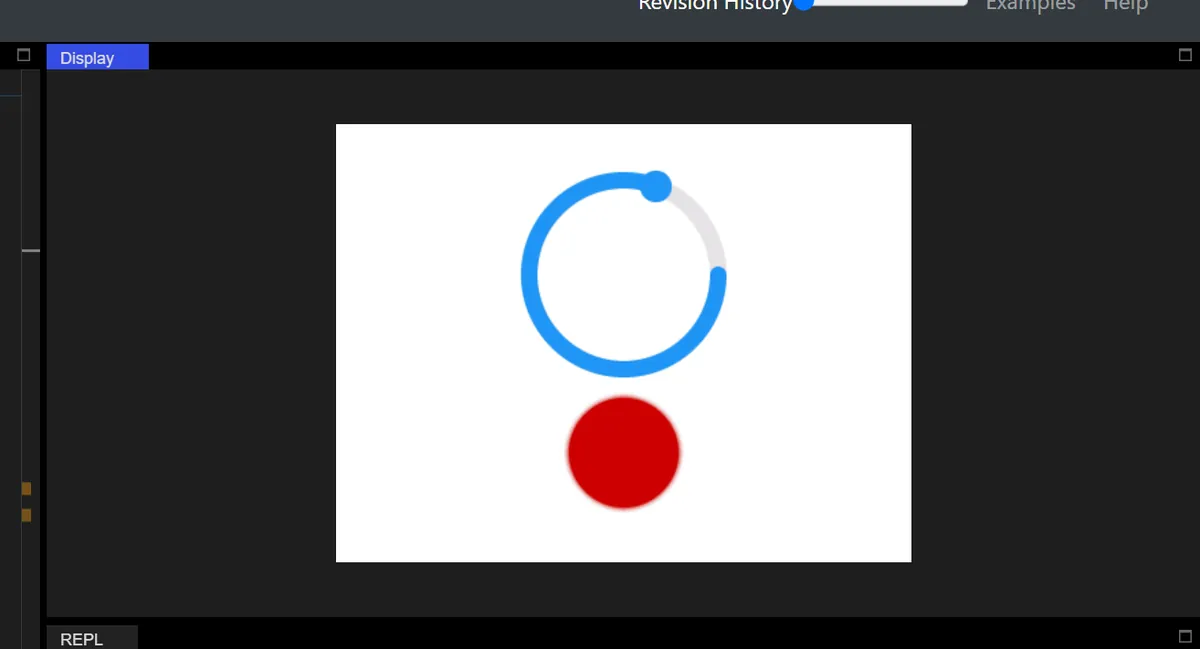
Our arc test linked a circular control with a 0 to 255 range to a red circle drawn with lv.led. The arc's value-change callback passed the value to the LED's set_brightness method, which gives quick visual feedback without any hardware.
Keep the boundary clear. That LED is a drawing. Changing it does not set a backlight pin or send a command to an external light. A real lamp controller needs another layer that turns the requested level into a hardware command and handles whether it succeeded.
Choose a user-facing unit before building that layer. "Brightness 60%" can describe a requested setting if the application defines the scale; it does not mean 60% of measured light output. A control ranging from 0 to 360 is not automatically a measured shaft angle either.
Try a straight control before choosing a dial
Our first slider was 300 by 50 pixels with a 0 to 100 range and a callback that updated a numeric label. That is a simple way to check whether people understand the direction of adjustment and can pick a useful value.
Two handles help when the user really needs an interval. In RANGE mode the slider has a left value and a main value for the two endpoints, and in one test we set them to 18 and 71. The test also exposed a discovery problem.
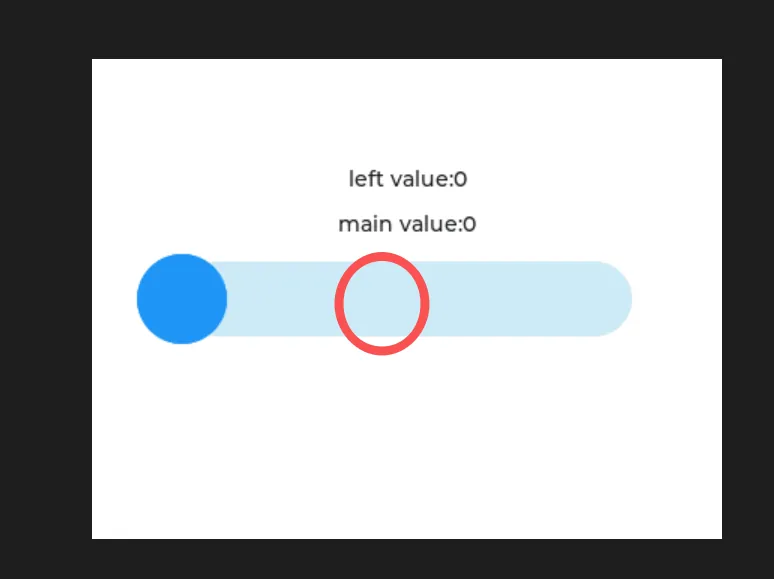
When both handles start together, nothing shows that there are two. Ask a new tester to set both limits without coaching. If the second handle keeps being missed, two numeric fields or clearer labels may work better. A control its author can demonstrate is not necessarily one a first-time user can operate.
A signed version, with a range of -50 to 50 in SYMMETRICAL mode, can represent an adjustment around a neutral setting. A leftover "left value" label from the previous test made it look as if there were a second adjustment when there was not; stale labels mislead quickly. Our attempt at a vertical slider did not work in this LVGL 9.0 environment, so check the API your firmware and binding actually support.
A circular scale needs a clear starting point
We sized arcs at 150 by 150 pixels with a 0 to 100 range, and at 200 by 200 with a 0 to 360 range. Three settings interact: the background arc defines the available sweep, rotation moves that sweep around the screen, and the value sits somewhere within it. Those matter when someone expects the minimum at the bottom left, or assumes a full turn means a full operating cycle.
We also compared reverse and symmetrical modes, a 0 to 270 degree background sweep, and a 90-degree rotation. Use comparisons like these to check that the direction is predictable, and label the unit and endpoints so users are not guessing from a decorative ring.
Pick one way to drive the indicator. The LVGL 9.0 arc documentation warns against mixing direct indicator angles with value-based control, and our LED test set both, so simplify that before reuse. A read-only gauge also needs input disabled; hiding the knob alone is not enough.
Decide when an adjustment takes effect
One drag on a slider can fire many updates. That is fine for a local preview, but it is not automatically the moment to write a settings file or send every intermediate value over a network. A 2021 LVGL forum discussion raises exactly this: a developer wanted to save a setting without treating every movement as a separate save.
In one test we separated the number from the interaction state. The value-change callback updated the number, while a timer set to 50 ms polled is_dragged() and switched a status label between "Dragging" and "Not dragging." That is screen feedback, not confirmation from a device.
For a brightness control you might preview during the drag and store the preference when the user lets go. For a setting that could surprise someone, an explicit Apply action is clearer. The LVGL 9.0 slider reference distinguishes value changes from release, but the application still has to define confirmation, persistence and keyboard behavior.
Show the result honestly. If an external device has not yet confirmed a command, show it as pending rather than presenting the requested number as fact, and keep the last confirmed state visible when a command fails.
Make indicators tell the truth from startup
We also ran four drawn LEDs in sequence. A timer set to 100 ms stepped a shared brightness value by five and moved to the next LED on each tick, so the lamps did not fade one after another as you might expect from a glance.
A switch-and-LED pair showed dark and bright states as expected after interaction. But our code set the LED to full brightness before the switch callback ever ran, so at startup an unchecked switch could sit next to a lit indicator. Initialize both from the same application state before anyone tests the screen.
Then repeat the interaction on the target display. A mouse in a simulator cannot show touch accuracy or release behavior. In a December 2022 LVGL forum report, a developer traced a control jumping on release to the touch driver reporting a pressed position at zero. That was one integration fault, not a universal slider fix, but it shows why screen appearance alone is not enough.
Review one complete adjustment
Before a user test, walk through one setting from startup to completion. What is its current confirmed value? What can the user change? When is the change applied, and what appears if the device cannot apply it? Test the minimum and maximum, a quick tap, a slow drag, a release outside the control, and reopening the screen, and record what actually happens on the intended hardware.