
You have an idea for a device with a small screen, and you want someone to try its controls. The final board is not ready. The display size may still change. Do you have to wait before finding out whether the interface makes sense?
For many interface questions, you can start on a computer. LVGL, an embedded graphics library, runs in a PC simulator as well as on a device. That lets a team try real interface behavior while the hardware is still taking shape. The important decision is what this early prototype should prove, and what you will still need to check on the actual device.
Give the first prototype one job
Imagine a small controller where someone chooses a mode, adjusts a setting and starts an operation. Before building every menu, make that sequence work. Give it a believable starting state, a visible response and a way to cancel. You can learn whether the words and choices make sense without connecting a real sensor or motor.
A simulator helps because it runs LVGL application code instead of only showing a picture of the design. LVGL's PC simulator documentation describes desktop projects for developing and debugging interfaces without a development board. That does not mean a computer reproduces the final device's speed, memory limits or touch behavior.
A recent example: in October 2026 a builder shared a DIY welding-positioner controller on the LVGL forum and described using a Windows simulator to check dialogs, state changes and settings before flashing the hardware. The author was still asking for feedback on navigation, redraws and memory use. It is one development account, not evidence that simulation completes hardware validation.
A sensible learning route
The route LVGL's own getting-started material suggests is reasonable: look at a demo, learn the basic concepts, set up a simulator, try small examples, then work toward the target board. Treat any suggested learning times as rough guidance, not a schedule. An existing simulator project that matches your chosen library version is a more concrete starting point than a blank folder.
You also need to choose how the interface is written. The library is written in C; a MicroPython binding lets supported builds expose LVGL to Python. If you follow MicroPython examples, use a build that includes the binding and the right display support. A script that works in one teaching simulator does not guarantee that a given board's standard firmware can run it. See the LVGL MicroPython integration documentation.
For a founder who is not writing the code, the first handoff to a developer can be simple: describe the one task, the screen's approximate size and resolution, and whether the person will use touch, a knob or buttons. Ask for a runnable version of that task, including its error and cancel paths. That gives the developer something testable while the rest of the product is still being defined.
Keep the software versions together
Example code, a visual editor, the simulator and the device firmware all need to agree on the LVGL version. Older introductory material often describes version 9.0 as still in development; the official release page lists later releases. Keep the specific version a working example used, rather than assuming the newest download accepts every old call.
A practical project record names the library version, the simulator project, the MicroPython binding or C toolchain, the screen dimensions, and the fonts and images the interface loads. Save the files needed to run it, not just screenshots. When you change versions, repeat the same short task so an upgrade does not quietly change behavior you already reviewed.
The same applies to visual editors. Drawing the screen in an editor and getting the exported interface built and running on the board are separate steps, each tied to a specific library version and screen resolution.
Do one small memory calculation early
LVGL is often described as lightweight. That is not a memory budget for your product. Screen resolution and color format alone make a large difference, before you add interface objects, fonts, application data or a Python runtime.
For example, a 320 × 240 image in RGB565 uses two bytes per pixel:
320 × 240 × 2 = 153,600 bytes (150 KiB for one full image buffer)
That is an illustrative calculation, not a measurement, and not a claim that every LVGL application needs a full-screen buffer.
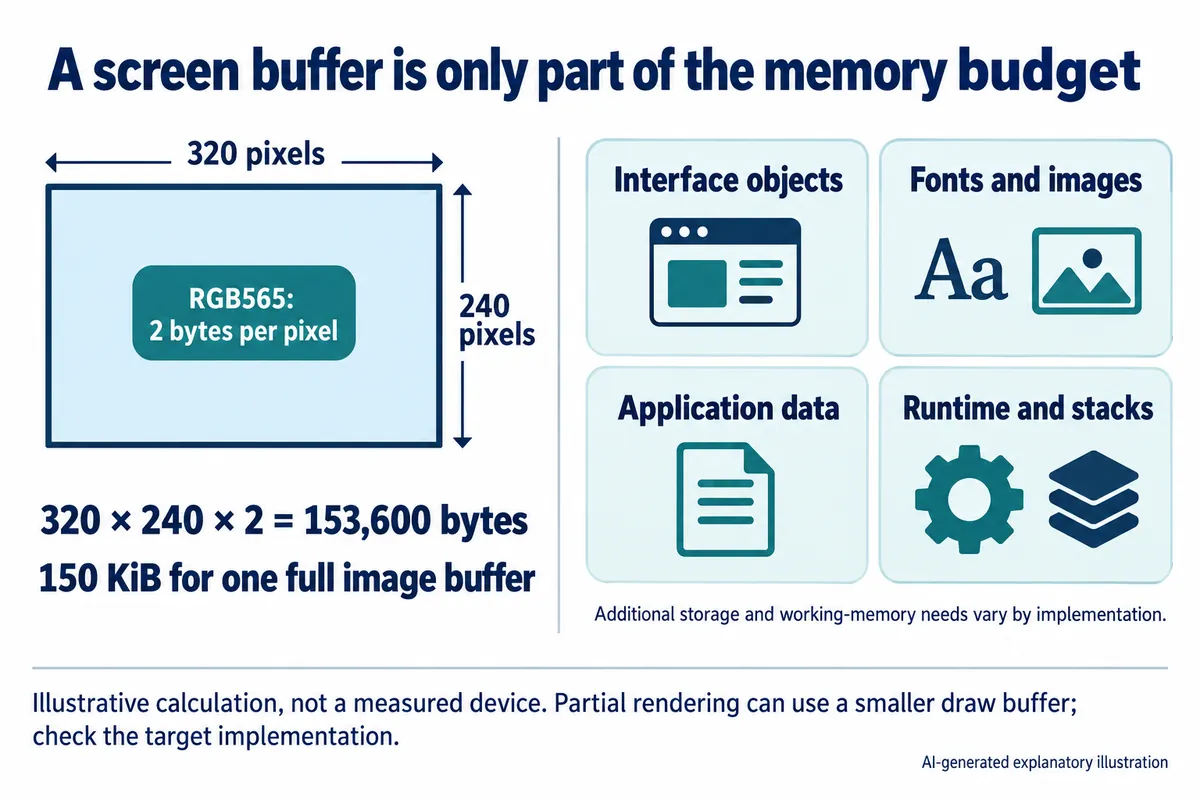
LVGL can render smaller areas and send them to the display in pieces. Its display documentation distinguishes partial rendering from modes that need screen-sized buffers. The right arrangement depends on the display interface and the target. Have the developer make that choice alongside the screen design, then measure the actual build; a memory reading on the desktop is not the device budget.
Move to the device with a question to answer
Once the main task works on the computer, take the same task to the candidate display and controller. This first hardware check does not need a finished enclosure. It does need the real input method and enough of the device's behavior to expose delays and interruptions. Split each question between the two places:
- Can someone finish the task? On the computer, walk through the choices, messages and recovery paths. On the device, try the real controls at the intended physical size.
- Does the interface stay responsive? On the computer, repeat actions and simulate state changes. On the device, run it alongside real sensing, communication and other work.
- Does the design fit? On the computer, use the intended pixel dimensions and real text. On the device, check viewing distance, touch accuracy and the front-panel opening.
- Can the team reproduce it? On the computer, open and run the saved project on another development setup. On the device, record the board, firmware, assets and build configuration that work together.
Keep simulated values clearly marked during development. If a desktop demo always gets an immediate "done" response, it hides an important part of the product: what the person sees while waiting, after a failed operation or when a connection drops. Decide those states before you attach the real device, then check that real events drive the same behavior.
The output of this stage is a running interface, its source files and a short record of what has actually been tried. That is much easier to review than a set of attractive screens, and it shows where more interface work helps and where the next answer has to come from hardware.