
The device works from your laptop. Its setup page opens, readings appear and commands get through. Then a colleague opens the same page while a dashboard is connected. Part of the page stops loading, or one person's commands wait behind the other's. Before promising that several people can use the prototype, decide which connections it has to handle at the same time.
For a small team building a connected instrument or a local control box, this is a product decision as well as a firmware task. Two people viewing a temperature is different from two people trying to control the same motor. Both create network connections, but the application should not necessarily let both act.
This note uses the WIZnet W5500 Ethernet controller, its socket registers and its packet memory to explain the limits worth investigating. It is a planning note; we have not run a multi-user load test for it.
Count conversations, not Ethernet connectors
A socket is a software endpoint for network communication, not the RJ45 connector on the board. With TCP, several connections can share one server port; opening more numbered ports is not the same as making a server handle more clients.
One person does not necessarily mean one connection either. A page can request separate HTML, style and script files. A device might keep a cloud connection open while accepting a local maintenance tool. The exact overlap depends on the application, browser and libraries, so a useful first list describes activities rather than assuming a fixed number of sockets per person.
That shows up in a December 2023 to February 2024 Arduino discussion. The author reported that a W5500 web server loaded its HTML and first external file but refused later requests. Their proposed fix used several server instances; other participants disputed the explanation and asked for a reproducing example. The thread shows a real integration problem, not a general instruction to create eight servers.
First identify which network stack your firmware uses
The host microcontroller sits above the W5500 and talks to it over SPI. Inside the chip are the hardware TCP/IP core, packet memory and Ethernet interface. The host still runs the application and decides when to read requests, send responses and release resources.
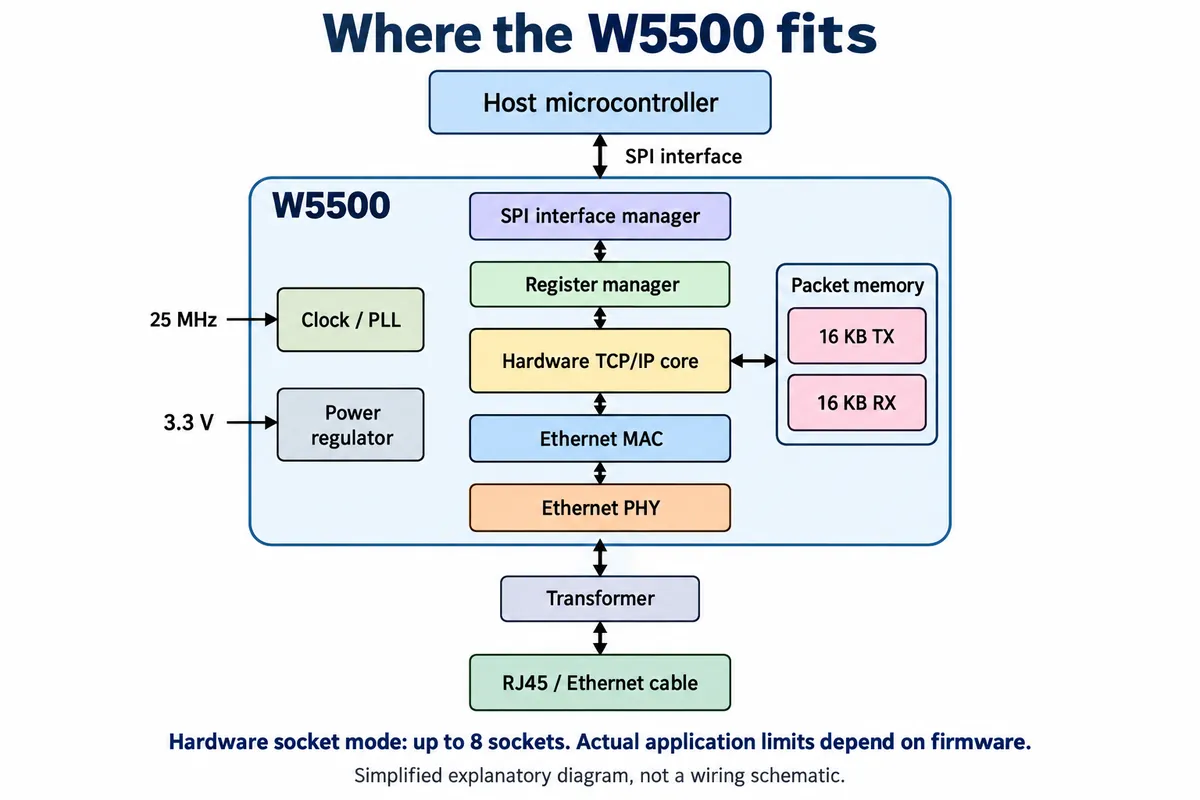
In hardware socket mode the chip provides up to eight independent sockets. That is useful, but it is not a guarantee of eight usable clients for every application. The driver may expose fewer, other services may need some of them, and the program still has to service the active connections.
Check one more thing before doing that arithmetic. MicroPython v1.23.0's WIZnet driver has separate compile-time paths: one uses the controller's TCP stack; the other runs lwIP on the microcontroller with the chip in MACRAW mode. In the second path the driver opens hardware socket 0 for raw Ethernet frames. Application TCP connections then belong to the software stack and do not each consume one of the eight hardware sockets. Their limits still depend on software configuration and available memory.
Ask whoever built the firmware to record the board, firmware version, Ethernet driver and selected stack. A chip name or an import network line does not answer that question.
Understand what the buffer allocation buys you
In hardware socket mode, the W5500 has separate transmit and receive memory pools of 16 KB each. The initial allocation is 2 KB per socket in each pool, and firmware can change it within each pool's limit. These are packet buffers, not an unlimited waiting room for application requests.
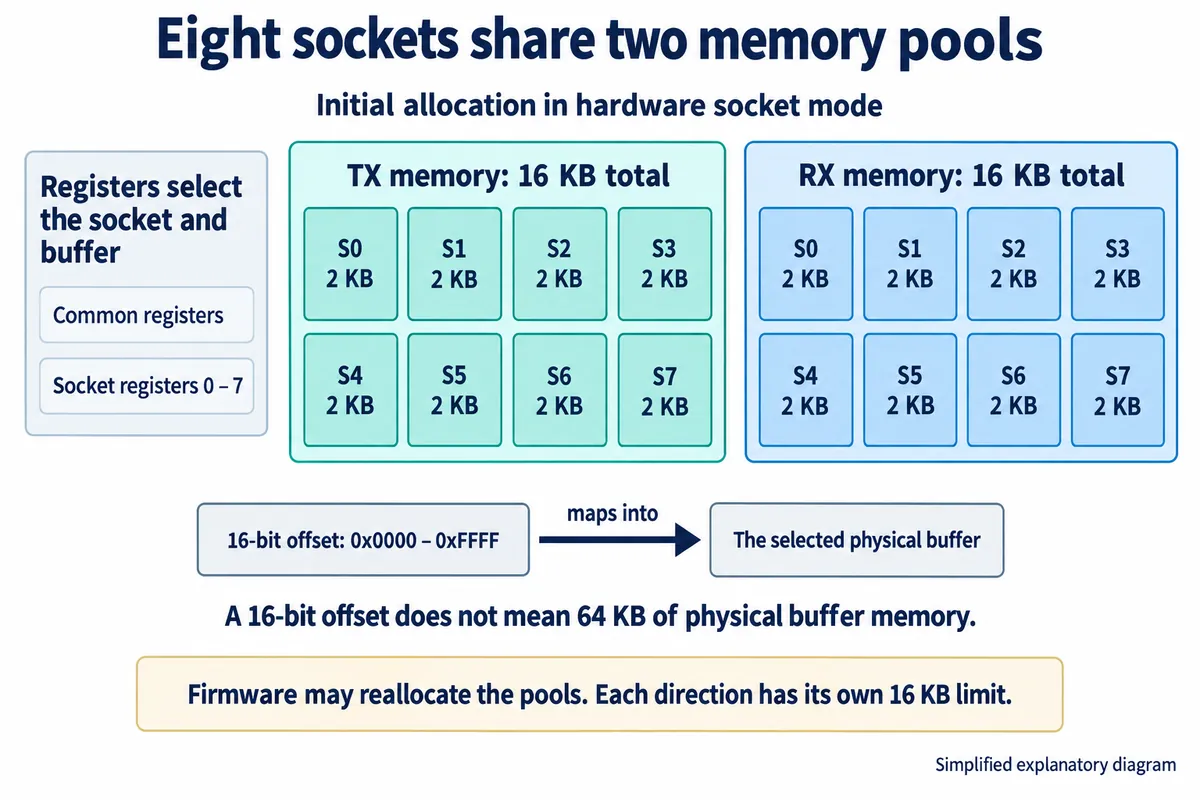
Assigning 8 KB of receive memory to one socket leaves 8 KB of that pool for everything else. That is an illustration, not a recommended configuration. A larger buffer can hold more queued data, but it does not make a blocked request handler run sooner, and it does not decide who may control the product. The 16-bit buffer offset is an addressing mechanism, not a sign of 64 KB of physical buffer per socket.
The W5500 datasheet, section 3.3, defines this memory organization. Plan from the actual driver's configuration. Do not assume the initial allocation survives every library's initialization, especially in the MACRAW arrangement.
Decide what an extra client is allowed to do
A connection policy is a short description of the experience you want. A shared monitor might allow several viewers but only one settings editor. A serial gateway might give one client exclusive control. A maintenance session might need to coexist with ordinary monitoring. Choose the behavior before treating every extra connection as a fault.
In a September 2023 Arduino forum thread, a developer building an RS422-to-Ethernet converter wanted one client per server. A second client could connect, but its messages only came through after the first disconnected. The author later reported that accepting and then stopping unwanted clients appeared to meet the requirement, while still questioning the effect on serial handling. It is an example of a control policy that needed explicit implementation, not a universal fix.
The W5500 socket registers expose mode, command, status, received-data size and buffer pointers, which are good places for an engineer to look at what the hardware is doing. A connected state alone does not mean the application has accepted a command, finished an action or given control to that client.
For an early prototype, write the expected behavior in plain language: "A second viewer can read the current value. Only the active operator can change it. A disconnected operator loses control after the defined timeout." The rule depends on the product. The implementation has to distinguish disconnecting a client, rejecting an action and preventing stale commands from taking effect later.
Test the combination people will actually use
Before the next demonstration, list the activities with the firmware engineer and settle one question for each:
- One local browser: does the complete page load, including its external resources?
- A second browser or device: is it another viewer, another controller, or deliberately refused?
- The normal cloud connection: does it stay responsive during local access?
- A maintenance tool: can it connect without disrupting the operator?
- A client that disappears: when are its resources and control permission released?
Then run the agreed combination on the intended firmware. Record request failures, response time, free memory and the stack-specific connection state. Close and reopen clients repeatedly, and disconnect one unexpectedly. Check that failed requests get a clear outcome and that delayed commands cannot surprise the next operator. These are proposed integration tests; we have no results from them yet.
If the combination fails, the evidence points to a specific change: simplify the page, fix resource cleanup, change the service policy, adjust memory allocation or reconsider the stack. Replacing the Ethernet chip before finding the constraint may leave the same application problem in place.