
A prototype can look convincing while it is connected to your laptop. You can watch every reading scroll past and restart the program when something goes wrong. Hand it to someone for an afternoon, though, and you need a way to find out what happened after they bring it back. A removable memory card is one option, but the useful result is a readable record of that session, not a message saying the card started.
An OpenMV forum discussion from December 2025 makes the distinction concrete. A developer reported files that could not be read after saving, along with corrupted images. The discussion moved from a large application to a smaller example, and then to how writing was stopped before power was removed. The hardware differs from ours, but the question applies to any team hoping to bring back useful trial data.
On our bench we started with a smaller milestone on a WIZnet Pico-format board running MicroPython: mount a microSD card, write a file, read it back and inspect the directory. Here is what that test covered and the checks it leaves for a prototype that also has networking or other peripherals.
How the card connects
The card sat in a socket on an expansion board. The program selected hardware SPI controller 1 and assigned GP10 to the clock, GP11 to outgoing data, GP12 to incoming data and GP13 to chip select. Those assignments belong to this setup; they are not a universal pinout for every Pico-shaped board.
SPI is the link that moves commands and data between the controller and the card. The controller supplies the clock. MOSI carries data toward the card and MISO carries data back. Chip select tells a peripheral when a transaction is meant for it. Analog Devices' SPI introduction describes the same directions.
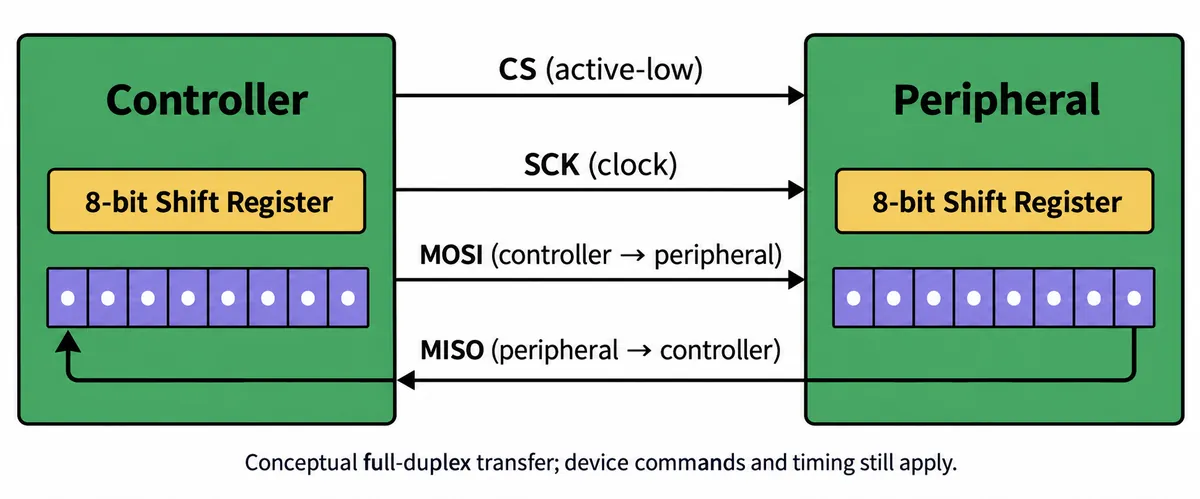
"It has an SPI connector" is only the start. You still need the right pins, signal levels, clock settings and device commands. Our SPI constructor requested 4 MHz, eight-bit transfers, most-significant bit first and mode 0: a clock that rests low and samples on its first edge.
Do not read the requested 4 MHz as a measured transfer rate. The MicroPython SPI card driver initializes the card at a low clock rate and configures the bus itself, so the driver revision and its options matter as much as the line that creates the SPI object.
From a connected card to a readable file
The WIZnet firmware we used did not include the sdcard module, so we supplied it separately. That module handles card commands. A FAT filesystem then provides ordinary file operations, and mounting the card at /sd makes those files reachable under that directory.
The test sequence was:
- Create the SPI object and pass it, with the chip-select pin, to
sdcard.SDCard. - Mount the FAT filesystem at
/sd, then list the root directory. - Write a short message to
/sd/test.txt, close the file, reopen it and print its contents. - Check the file size, create a subdirectory and a file inside it, then rename the first file.
- List the final directory so the names can be checked against the operations.
These steps answer different questions. Mounting shows that the software can reach a filesystem. Reading back the message checks the stored contents in that run. Renaming and listing check path and directory handling. Together they are a better starting point than a lone "initialized" message.
The console reported the mount, the write and readback, the directory operations, the rename and a 76-byte test file. Two other details in that output need explaining. The displayed date, 2026-05-01, came from a literal string in the test script; it is not evidence that the board kept time. The very large capacity figure came from multiplying the block size twice. The file operations succeeded even though that summary was wrong.
MicroPython documents the filesystem size as a count of fragments and the fragment size in bytes; multiplying them once gives total bytes. We confirmed the extra multiplication by reading the code, not by testing the card. For a trial logger, verify storage space and timestamps separately rather than accepting them because they appear beside a successful write.
What changes when you add networking?
The same firmware includes a WIZnet network-initialization helper that takes different paths for different boards: some use a built-in configuration, while W55RP20 and W6300 boards use WIZnet-specific PIO SPI interfaces. We ran it as separate code. We did not record the card and Ethernet working at the same time.
That matters if you want a device to save measurements locally and send them over the network. First map which peripheral owns which SPI controller and pins on the actual board. If devices share one bus, their drivers must coordinate access and use the settings each device expects. Separate chip-select wires are necessary on a shared bus, but they do not by themselves stop two pieces of software from interfering.
The network helper also waits until a connection is available. Put a call like that ahead of your logging loop and a disconnected cable can keep the program from ever reaching the code that records data. Decide whether your prototype should keep recording offline, then test that behavior on purpose.
A first integration test can stay easy to interpret: run the card-only check, then record sample numbers locally while enabling the network activity you expect. Check the saved sequence for gaps and measure pauses in recording. These are the next tests, not results we have already shown.
Make it obvious when a tester can remove the card
Before a user trial, define how recording starts and stops. A button, screen message or indicator should tell the tester when the current file has been closed and writing has finished. They should not have to guess from a blinking light that also means something else.
Power loss needs its own test. MicroPython's filesystem guidance explains that an interruption during a FAT write can corrupt the filesystem. Closing files before a planned shutdown helps in normal use; it does not make arbitrary power loss harmless. Choose the storage and power arrangement around how much missing data your trial can tolerate.
A useful first acceptance check is modest: record a known sequence, stop through the intended user control, retrieve the card and confirm the sequence on a computer. Repeat after a restart, with a missing card, with the network unavailable and with storage nearly full. Keep deliberate interruption tests on expendable data. A script that opens a fixed filename in write mode, as ours did, also needs a different file-naming or append policy before it can keep more than one session.
Our test established basic file access on one board. Turning that into a dependable trial record means deciding what to save, how to identify each session and what the device should do when it cannot save.