
You want to put an existing instrument's reading on a small display, add a local energy dashboard, or collect machine status without replacing the equipment. The device has an Ethernet socket and its manual says "Modbus TCP." That is a useful starting point. To get a meaningful reading, you also need to know exactly what to ask for and how to interpret the answer.
This note works through the decision a small team faces before building an interface around such a device: can we obtain one documented value and check it against the device itself? It is protocol groundwork, not a recorded measurement on a particular instrument.
A recent BLUETTI community integration discussion makes the distinction concrete. In September 2026, contributors described checking register values against owners' devices. Their 27 September update still listed two model profiles that existed from documentation but had not been confirmed on real units. A plausible configuration and an observed reading are different milestones.
Start with the device's data map
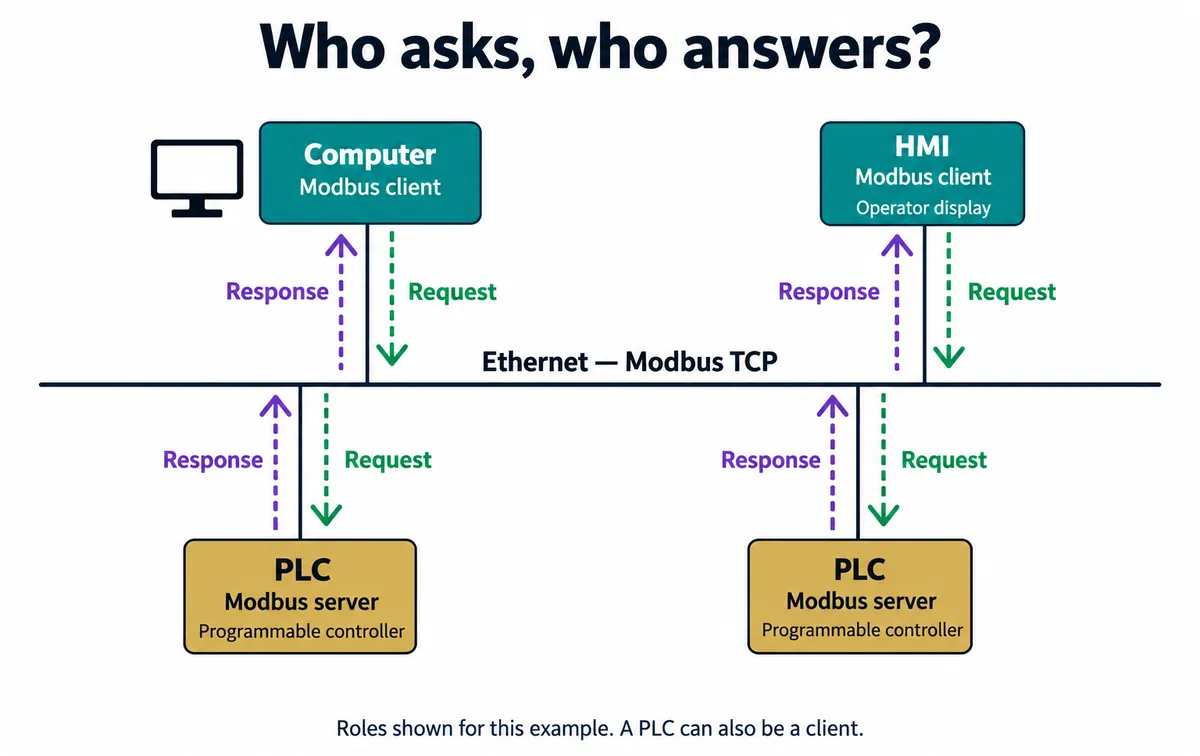
A Modbus client asks for information; a server answers. For a monitoring prototype, your computer or display controller would usually be the client, and the existing instrument would provide the data. "Server" does not imply a cloud service. The exchange can stay on a local network.
The client reads numbered locations called registers. The register map is the device's table of contents: it tells you where a value is stored and what that value means. The Ethernet address gets you to the device. The register map gets you to the particular measurement.
Before commissioning a custom board, obtain the map for the exact model and firmware. Pick one readable value you can compare with the instrument's own display or another documented reference. If the map is missing, ask the supplier for it. An IP address and a successful connection do not tell an engineer where the temperature or operating state is stored.
Ask for the right kind of value
Modbus function codes separate bit-sized states from 16-bit registers, and reading from writing: 01 reads coils, 02 discrete inputs, 03 holding registers and 04 input registers, while 05, 06, 0F and 10 write. For a first monitoring test, the useful distinction is between function 03 and function 04. A measurement can sit in either area, according to the device's map. Its physical meaning does not determine the function code.
Keep the operation with the address in your notes. "Read address 10" is incomplete if nobody knows which area it belongs to. A holding-register entry is also not an invitation to write to it; follow the access rules for that entry. Start with the documented read operation and leave configuration changes out of the first test.
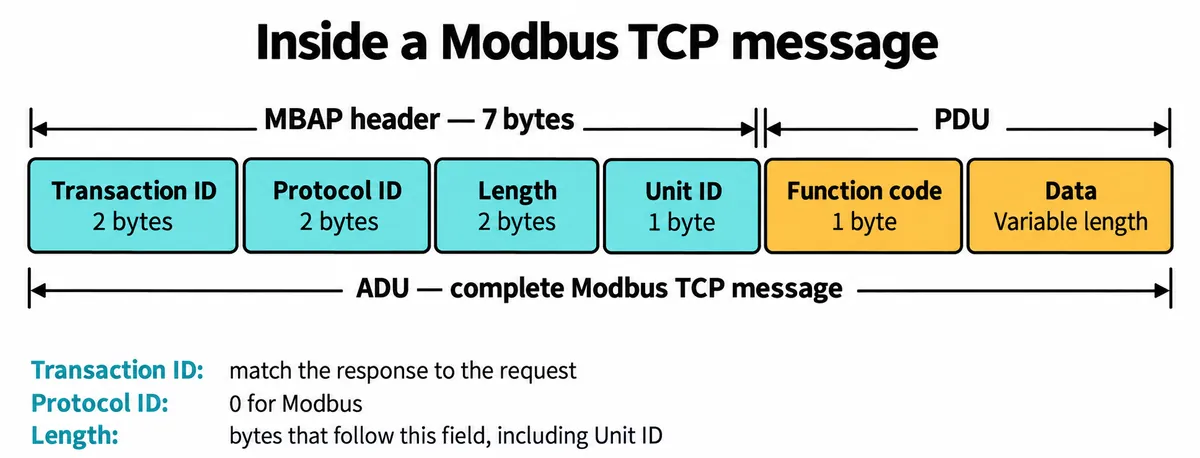
You do not need to write a Modbus library, but recognizing these fields helps you give an engineer a useful failure report. In the Modbus TCP implementation guide, pages 4 to 6, the header is seven bytes, with a length field that counts the Unit ID and the protocol data that follow. The Unit ID matters most when a gateway reaches several devices behind one network address; take it from the equipment's documentation.
Native Modbus TCP and serial Modbus RTU bytes carried over a TCP connection are different formats. Match the client to the gateway's actual mode. In a May 2026 Home Assistant discussion, a user could read an electricity meter over USB but not through an Ethernet adapter. Their follow-up reported success after matching the adapter's Modbus TCP mode with the client's TCP setting, replacing an RTU-over-TCP selection. That is a reported fix for that setup, not a setting to copy to every adapter.
Resolve the address before adjusting the number
One detail can make a correct-looking request read the wrong location. Some manuals label the first holding register 40001, while the address carried in the protocol for that location is zero. Other manuals already give the zero-based address, and client tools accept different notations.
If a manual uses the conventional 40001 notation, its entry 40011 corresponds to protocol offset 10. That is a notation example, not an address for your device. Check both the manual and the client's input convention before subtracting anything, and write down the convention, not just the number that eventually worked.
Turn the returned words into a measurement
A register holds 16 bits. That does not say whether the bits are a signed number, an unsigned number, part of a larger value or a set of status flags. The map has to supply that meaning, with the unit and any scaling. A 32-bit quantity occupies two registers, and the order of those words must match the device's definition.
Suppose a documented temperature entry uses one unsigned register in tenths of a degree Celsius. A raw value of 253 then means 25.3 °C. That is arithmetic, not a captured reading; the same raw value would mean something else if the map defined hundredths or a bitfield.
Record the decoding choices together, filled in from the real manual and test:
- Device identity: exact model, firmware and register-map revision.
- Connection: network address, port, protocol mode and Unit ID.
- Value requested: function code, documented address, address convention and number of registers.
- Interpretation: data type, multi-register order, scale, unit and unavailable-value code.
- Comparison: raw response, decoded value, reference value and observation time.
Home Assistant's Modbus sensor documentation shows these as independent settings: data type, register area, byte or word swapping, scale and offset. Changing the displayed unit to °C does not turn an arbitrary register into a temperature.
If a number looks wrong, keep the raw response and check the map before changing several settings at once. A wrong address can return a plausible value from the next field. Swapping words until a number looks reasonable is not a substitute for knowing which value was requested.
Make one reading useful before adding twenty more
For the first bench test, request the chosen value at an interval suited to the device. Compare it with the reference in more than one ordinary operating state, record whether both move in the expected direction, and allow for different update times. Then interrupt the connection and check what your display shows when no new reading arrives.
An unavailable reading should stay distinguishable from a genuine zero. If the application keeps the last value on screen, show its age or a connection indicator so a user can tell it is old.
Once that works, you have a known device, a documented request and a checked interpretation. Adding more fields means repeating that work for each field, rather than assuming every register shares a type or unit. Any later control function needs its own behavior and failure checks. The Modbus Organization's specifications page separates the application protocol, the TCP messaging guide and the security protocol. Keep the first test on its intended local network; remote access is a separate design requirement, not something TCP gives you for free.