
You can open Settings, change a value and return to the main screen. The demonstration looks finished. Later, someone repeats that sequence while readings are arriving, and the interface freezes, or comes back showing an old value and two copies of the same update message.
For a team preparing a touchscreen prototype for user trials, this is a different problem from designing a clearer menu. The software has to manage what is created, kept and removed every time someone enters or leaves a page, and the parts that keep running in the background need the same attention as the visible controls.
This note uses LVGL's object model (parent and child objects, dynamic creation and deletion, top-level screens) to plan a focused review. It draws on the official LVGL references and developers' reports, not on repeated-use measurements of our own.
Write down what opening a page actually creates
Start with one page and a simple inventory: its screen or container, child widgets, periodic refresh task, pending requests and any resources loaded just for it. Then mark which of those are shared with other pages. A label that belongs to Settings and a font used across the interface should not get the same cleanup policy by default.
LVGL's version 9.0 object reference distinguishes deleting an object and its children from cleaning an object's children while keeping the parent. Loading another screen is a separate operation again. A cleanup function with a reassuring name does not tell you which of these the application actually did.
Choose a policy on purpose. A small interface may keep a few screens and reuse them; a larger one may create a page when needed and remove it afterwards. Kept screens keep using resources, and rebuilt screens need consistent setup and cleanup. Whichever you pick, check the return trip:
- Keep and reuse the page: values refresh correctly, and entry code does not add another copy of its widgets or refresh task.
- Rebuild the page on each visit: the previous widgets and page-owned work are retired, and the new page gets valid references.
- Keep shared resources but rebuild widgets: shared fonts or data stay available until their last user has finished with them.
Stop updates from reaching objects that no longer exist
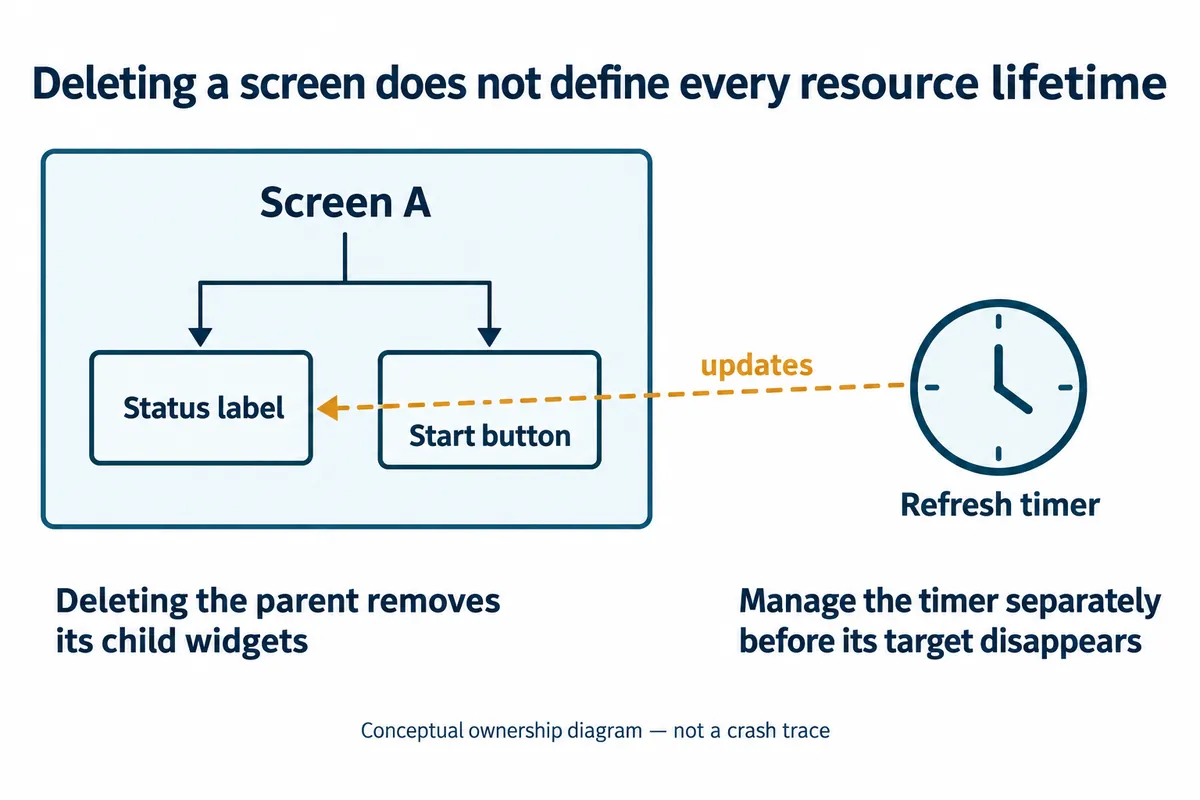
Suppose the main screen has a label refreshed by a periodic callback. Leaving the screen removes the label, but a refresh timer still holds a reference to it, and the next callback tries to update a deleted object. That is a failure scenario to investigate, not a diagnosis of every screen crash.
LVGL manages timers separately. Its 9.0 timer API provides create, pause, resume and delete operations. The application should decide who owns each page-specific timer and what happens to it before its target disappears. Pausing keeps the timer; deleting retires it. Clearing a variable is not a substitute for either.
Work already queued needs the same care. The timer and asynchronous-call documentation explains that deferred calls keep a data pointer, not a private copy of what it points to. That data must stay valid until the callback finishes, or the request has to be cancelled. Delaying screen deletion by an arbitrary amount does not prove every pending user of the old page is done.
Treat the transition as one managed operation
During an animated transition, the old and new screens may both be in use. When enabled, LVGL's automatic deletion of the old screen happens at the end of that transition. Do not add an independent deletion path that can retire the same screen a second time, and do not remove the active screen before its replacement is ready. Use the transition behavior of your actual version and binding.
If a network connection or another task can request navigation, route that request through the application's established UI execution path. Decide what happens when another request arrives mid-transition: ignore it, queue it or replace the pending destination. That is a design decision to implement and test; the page animation does not settle it.
Reproduce the route before choosing a fix
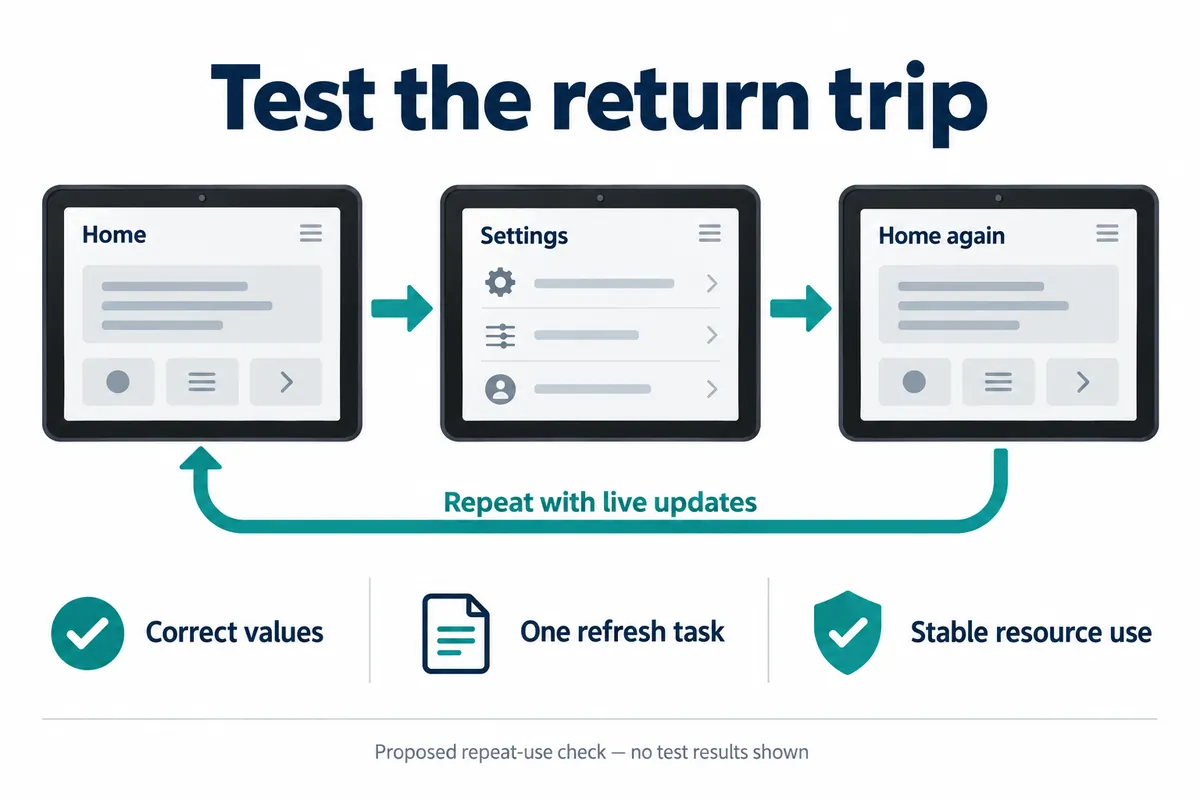
Keep a short sequence someone else can repeat: open the page, wait for a live update, change a setting, go back, and enter again. Record the firmware build, the input method and whether the data source stayed connected. Repeat at a normal pace and with requests arriving close together. The second visit can run code the first visit never reached.
Look for both resource growth and wrong behavior. A rising allocation count points to one kind of problem; stable memory with a callback aimed at an old object points to another. One memory reading cannot establish either. Capture the failing operation and the relevant logs rather than concluding that every delayed crash is a leak.
A July 2023 LVGL forum discussion shows why. The author first reported success after a suggested change, then reported that the problem remained, and the public exchange ended with further investigation. Its version 8 code is background, not a drop-in repair for a version 9 MicroPython project.
Define the result you need for the user trial
For the chosen route, agree that repeated visits show current values, keep intended settings and do not accumulate duplicate controls or background work. Track page creation and cleanup alongside resource readings so any drift can be explained. If the application deliberately keeps a cache, document that policy rather than calling all retained memory a leak.
These are proposed checks, not reliability tests we have completed. A clean simulator run is a useful early result, but the target display, firmware and connected peripherals still need the same interaction exercised together. Set the duration and number of repetitions around the intended trial, not around an arbitrary number of taps treated as a guarantee.