
A sensor demo answers your laptop immediately. Then you add a display, logging and a few delays, and commands start arriving late or seem to vanish. For a team preparing a prototype for user testing, this is an integration problem: several features that each work alone now have to share one device.
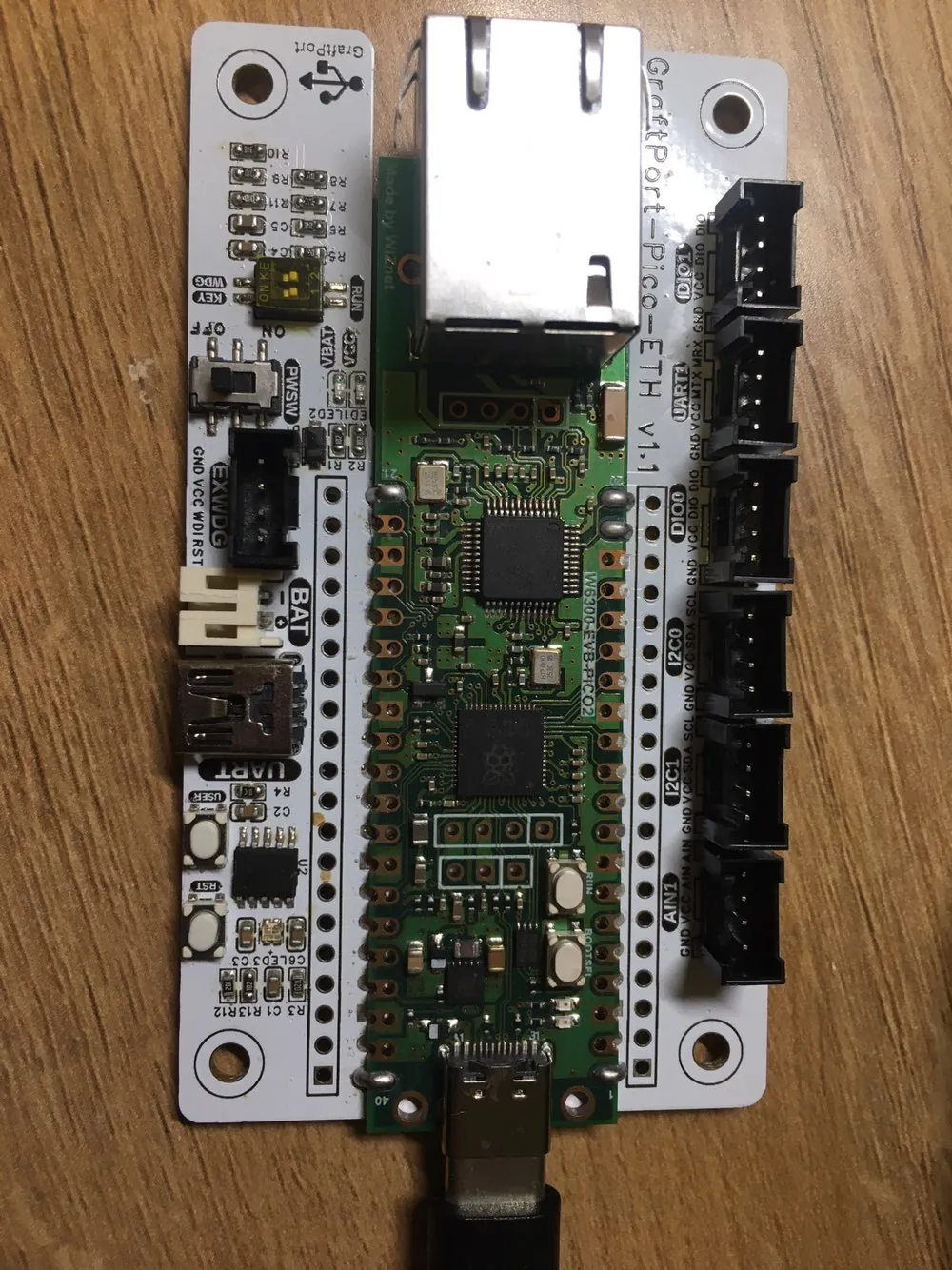
The useful next experiment keeps a background task running while the computer asks for information. On our bench we ran two MicroPython serial experiments on a WIZnet RP2350 Ethernet board mounted on a GraftPort carrier: one receiving commands while the main loop kept working, and one sending batches of log records.
Give incoming data a way to get your attention
Polling means repeatedly asking whether something has happened. It works when the checks are frequent enough. If the program spends too long elsewhere, incoming data waits in a buffer, and buffers are finite.
An interrupt is an event notification: it can arrange for a handler to run when a peripheral needs attention. It does not make the processor infinitely fast, and a Python callback has no universal response time. The real question is still how long your program can leave incoming data waiting.
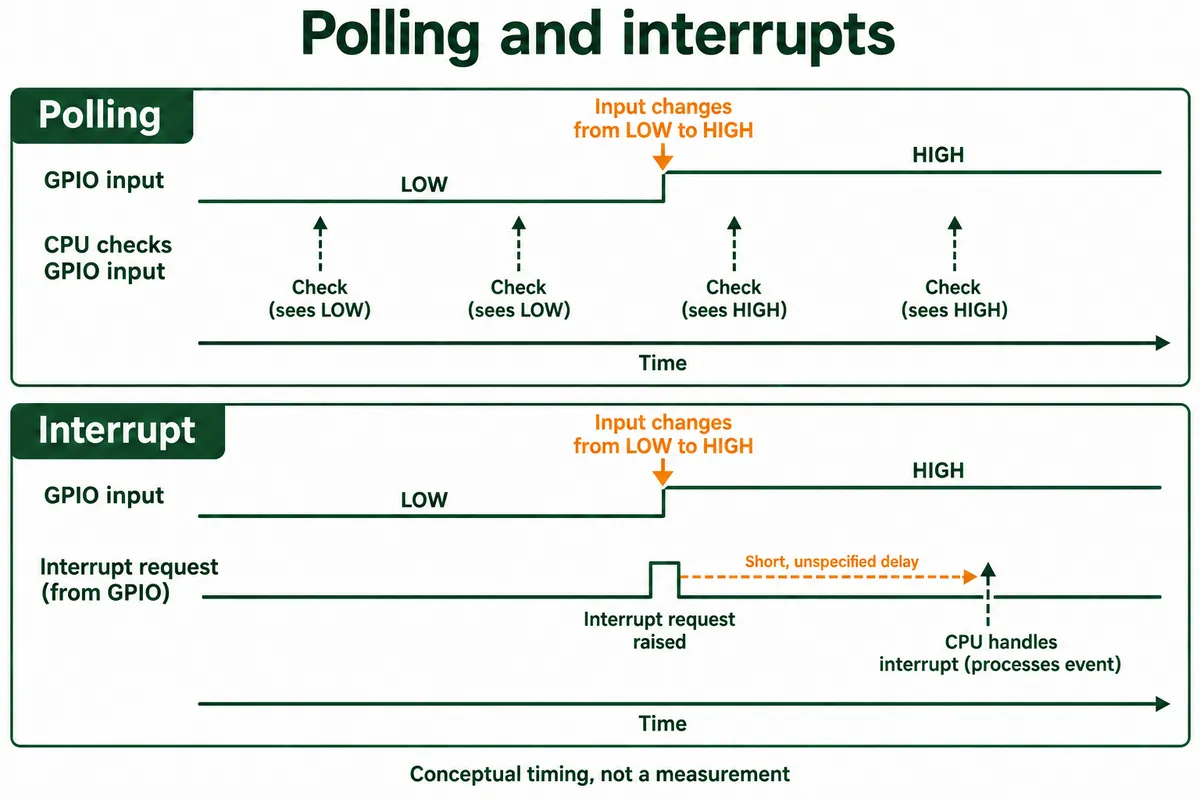
Delays can also come from layers below your code, such as a module's own buffering that releases bytes in large groups. Test when data actually reaches the application instead of assuming a callback's name describes the whole path.
Set up the connection before changing the code
Our program used UART0 on GPIO0 (transmit) and GPIO1 (receive). The computer-side serial tool talks through the carrier's CH340 USB-to-serial bridge, and the MicroPython console is a separate USB connection. Pick the console port by mistake and correct code looks dead.
We set the terminal to 115200 baud, 8 data bits, no parity, 1 stop bit (115200 8N1). Both ends must match, and COM port numbers differ between computers. The test was to send exactly GET_ENV_DATA, then an unrecognized command, while the main program kept running.
Ask for data while the main task continues
The first program kept cached temperature and humidity values, generated with random.uniform, printed them and blinked an LED. These were simulated values to exercise communication; nothing measured temperature or humidity. The receive callback was registered like this:
uart0.irq(
    handler=uart_rxidle_handler,
    trigger=UART.IRQ_RXIDLE,
    hard=False,
)
When the receive line went idle after data arrived, the callback read up to 128 bytes, decoded the text and compared it with the command. A match returned the cached values; anything else got an unknown-command reply. The terminal showed simulated readings on the console side and, on the serial side, both data replies and unknown-command replies. So commands were exchanged while the main loop ran. (Our startup banner said IRQ_RX; the code actually used IRQ_RXIDLE.)
A pause between bytes is not the end of a command
Suppose the computer sends GET_, pauses, then sends ENV_DATA. Our callback treats each idle-separated piece as a full command, and neither piece matches. Two commands arriving together cause the opposite problem: the pair is treated as one unknown command.
We checked this offline by feeding the parsing function through a fake serial object. One complete command returned the cached values; a split command produced two unknown-command replies; two combined commands failed the comparison. That tests the parsing logic, not the board's interrupt timing.
For a product protocol, define how a message ends: a newline for simple text, or a length field for binary. Keep incomplete bytes for the next read and pull out every complete message that has arrived. Decide what happens when the maximum length is exceeded or bytes cannot be decoded. Our demo did none of this; these are the next additions.
Keep the handler short as the application grows. Move real parsing, display work and file operations into the main application, with a buffer or flag between them. Switching our soft callback to hard=True would not make its string-building code safe in a hard interrupt; MicroPython's guide to writing interrupt handlers explains the memory-allocation and shared-data rules.
Interrupts are not the only option. A June 2024 MicroPython discussion about a serial-driven device also considered waiting for data with asyncio. Choose based on what else the device has to do, then measure response under that load.
Check the outgoing path too
The second program generated simulated temperature and pressure logs. After three records it switched from IDLE to SENDING, wrote the batch, and waited with flush(). A transmit callback set a flag, and the main code then printed a status line and returned to IDLE.
The MicroPython v1.27 UART documentation matters here: on RP2, IRQ_TXIDLE fires, for messages longer than five characters, while five characters are still left to send. It is not permission to switch off a transmitter. flush() is the blocking call that waits for completion, and a while uart.flush() construct should not be read as a polling loop with a fixed interval.
The terminal showed batches arriving, each ending with a LOG BATCH END marker. Three records was the example's batch size, not a safe limit for every UART, and a single write() does not make a serial stream an atomic message. Our status LED also changed after the send function had already returned to IDLE, so it did not mark the sending interval. If users need a visible busy signal, set it at the real state transitions and test it.
Test the combined prototype, not a quiet bench demo
Before handing the unit to someone else, send commands while the display redraws and logs are being written. Send one message in pieces, several messages at once, and one longer than the allowed limit. Check that every valid request gets exactly one reply and that bad input does not block later requests.
For outgoing logs, compare record identifiers at both ends over a long run. Measure the response delay that matters to the user, and agree what is acceptable. Our two demos show the mechanisms working; they do not give a loss rate or a worst-case response time for an integrated product.