
The button works. The light fades. The knob changes a value. Then you add a sound or a display update, and the same prototype starts missing presses or feeling slow. For a team building an interactive object, this is the point where several working demos have to become one usable experience.
The useful question is not whether the board has a timer. It is which jobs need attention, how often, and how long each one keeps the program busy. A reminder that a job is due does not make the job finish instantly.
On our bench we ran a set of MicroPython timer experiments on GraftPort carrier boards: button recognition, a small task scheduler, a rotary knob, a fading light and buzzer notes. They were separate experiments. They are not evidence that all five functions have been integrated and tested together, and that gap is the point of this note.
Give each job a small, clear responsibility
A timer can tell the application to check something again without sitting in a counting loop. That check might advance a button's state, mark a sensor read as due, or update a light's brightness. The timer callback is the function called when the timer event is handled.
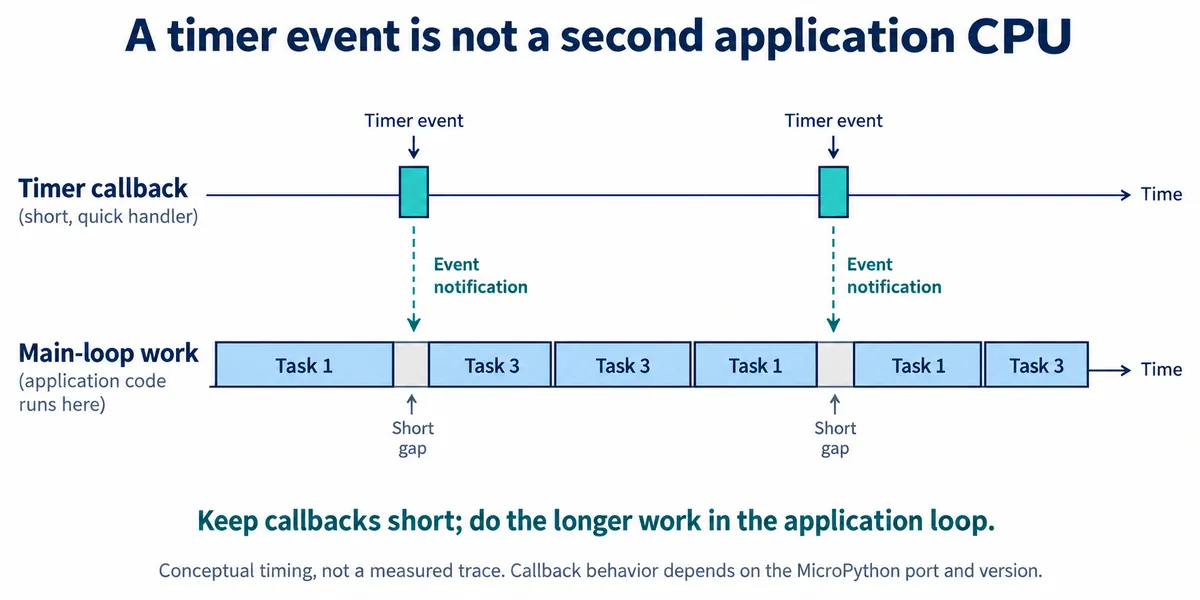
There is a real problem behind this. In an August to September 2026 MicroPython discussion, a developer working with PIO and USB-MIDI reported scheduled callbacks being delayed around garbage collection. It does not give a delay figure for every board, but it shows why a control that works in a small example needs another timing check once communication and other background work are running. A September 2026 Melbourne MicroPython meetup also discussed a separate branch that spreads garbage collection into smaller steps. Do not assume that is in stock firmware; measure the combined program.
The scheduler experiment
Our scheduler was adapted from the open-source micropython-simple-scheduler project, which offers timer-based and asyncio versions. Each task holds a function, its arguments, a requested interval and a running or paused state. The scheduler keeps the task list and supports adding, deleting, pausing and resuming.
The test created one task at 500 ms and another at 1,000 ms, on a 100 ms timer tick. The timer callback only increments each running task's tick count. The main loop runs a task when its count reaches the threshold, then resets it. Tasks execute one after another, so this is a cooperative scheduler: a task must return before the next can run.
The program also changed its own task list. At five callbacks it paused task 2, added task 3 and deleted task 1; at eight it resumed task 2. The console recorded that sequence, with the first task calls at about 2,002.68 ms. The first tasks appear together because the timer had started while the foreground program was still in its startup wait, so this is not a clean measurement of intervals from time zero.
Three details matter before adopting a scheduler like this:
- Tick thresholds use integer division. With a 100 ms tick, a requested 250 ms interval becomes two ticks, not 250 ms, and an interval under one tick needs special handling.
- The "idle" function runs after every pass over the task list, not only when all tasks are paused. Work placed there still costs time.
- The sample error handler prints an error in an endless loop. A prototype people will use needs a deliberate recovery or stop behavior.
None of this makes the idea unusable; it lists what to change before it becomes the control program for an object people operate.
Make a press mean one thing
A single click cannot be confirmed immediately if the same button also supports a double click; the program has to wait to see whether a second press is coming. That wait is part of how the control feels.
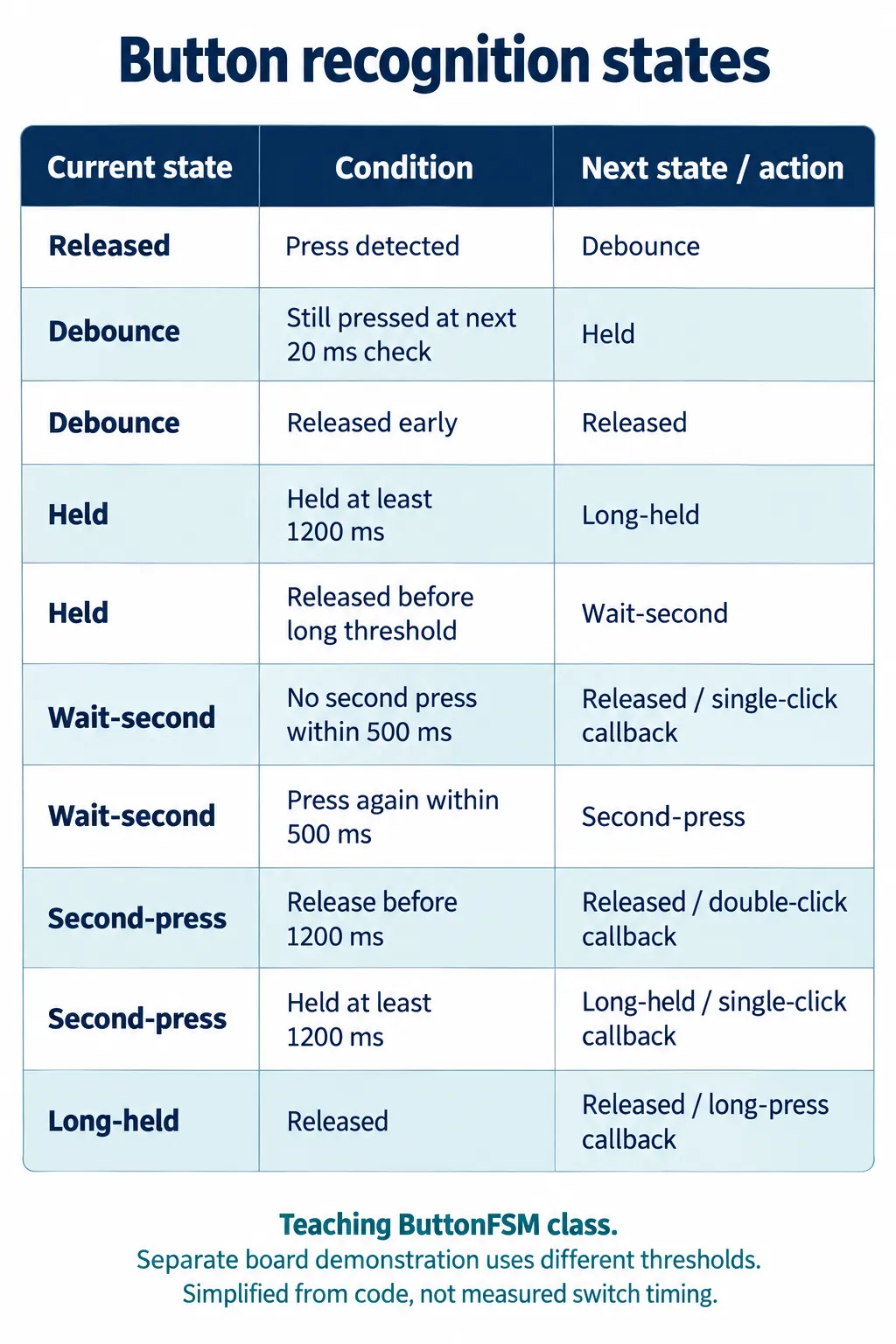
The first button class checks every 20 ms, with a 1,200 ms long-press threshold and a 500 ms double-click window. A later board demonstration used a different implementation: 10 ms checks, 1,000 ms long press and 300 ms double click, driving the board LED on GP25 from a button on GP26. Keep those settings separate when reproducing either. The later example also declares a debounce constant without using it, so test short taps, contact bounce and a press held through the light sequence before treating it as a finished driver. Decide first whether the action happens on press, on release or after the double-click wait.
For a product with one primary action, dropping double-click recognition may make the response easier to understand. If several gestures are really needed, try them with people who have not seen the code.
Read a knob without making the display do the work
The rotary experiment connected an EC11 encoder module to a GraftPort board. An edge on channel A starts a one-shot timer that checks the signal 1 ms later, and channel B sets the count direction. The running code used GP6 and GP7 for rotation; it also named GP28 as the push-button input, which our two-wire connection did not establish.
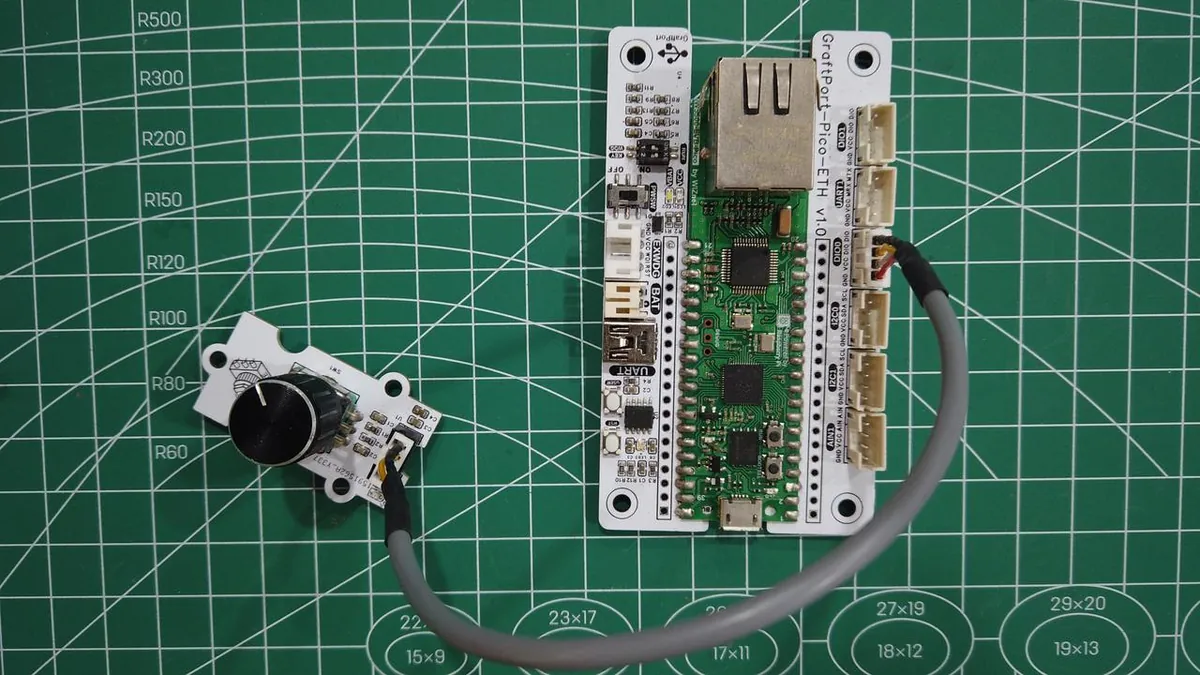
The foreground loop reads the count and draws a progress bar, the same separation as the scheduler: recognize the input, store it, let presentation code consume it. Counting improved after a debounce change, but we did not measure the fastest rotation that can be followed without missed steps. Test slow adjustments and a fast turn with the real screen or communication task running; a debounce delay that hides a false edge can also hide a wanted one.
Keep output timing separate from application timing
The fading-light example has two rates. Hardware PWM runs at 100 Hz on GP25, and a software timer changes the duty setting every 100 ms. The fast waveform and the slow brightness update are different jobs. The duty values cycle through 64 steps with a maximum of 32,000 out of 65,535, about 48.8% duty, so it is not a full 0 to 100% sweep even though the light changes visibly.
The buzzer works the same way: PWM supplies the waveform while software picks each note's frequency and duration from a table. Despite some "MIDI" wording in our notes, the code neither receives MIDI messages nor parses MIDI files. It also drives the buzzer from GP6, a pin the encoder experiment uses, so a combined build needs a new pin plan.
The bigger integration issue is that the tone function sleeps for the note's duration before silencing the buzzer. Called as a scheduler task, it blocks every other foreground task until the note ends. Timer callbacks may still fire, but foreground jobs do not run together. A combined prototype should remember the current note and its end time, then advance it in a short update that returns quickly. We have not built that version yet.
Try the whole interaction before adding more features
Start with a small, observable sequence: turn the knob while the light fades, press the button during a sound, and repeat with the normal display or communication update active. Record when each input was detected and when its visible response occurred, and record the longest task execution you see, not only the average.
The MicroPython rp2 quick reference notes that default soft timer callbacks can be delayed by garbage collection; hard callbacks carry extra restrictions. Match the documentation to your installed firmware (we used MicroPython 1.23.0). Use ticks_diff for elapsed time so counter wraparound does not corrupt a long test. For a precise waveform or sampling cadence, use the right peripheral and verify it separately from interface responsiveness.
The milestone is a prototype whose features stay usable together. These experiments supply the pieces and a way to investigate their timing; they do not yet show a combined controller meeting a response-time requirement.