
A sensor or another controller sends a short message to your prototype. The message eventually appears in the terminal, so the connection seems to work. But while the program waits, a button stops responding or the next screen update never happens. Receiving bytes and keeping the rest of a product responsive are two different jobs.
We ran a MicroPython PIO UART receiver on an RP2040 board to see where that gap arises. The terminal output contained the messages hi and hello, together with a byte-read call that took about 11 seconds. That long call is not an 11-second transmission time: the function also waits for data to arrive.
For a team integrating a serial sensor, a control panel or a second board, this gives a useful debugging order: check the electrical connection, confirm the message ending, then decide how the application behaves when nothing arrives. Our test was a PC-to-board text exchange, not a validated sensor product.
First, agree on what a complete message looks like
UART moves a sequence of bytes. It does not automatically tell your application that a command such as hello is complete. That rule comes from the protocol you choose: perhaps a fixed length, a length field, or a particular ending character.
Our receiver was configured for 115200 baud, eight data bits, no parity and one stop bit, often written as 115200 8N1. The receive function waited for the carriage-return character, \r. A line feed, \n, is a different byte. A terminal program's "send new line" setting may send one or both, so confirm the transmitted bytes rather than relying on the label alone.
For a controlled test, send a known short ASCII message ending in a single carriage return, then repeat without that ending. The second test reveals whether your application can escape an incomplete message instead of waiting indefinitely.
We used a GraftSense CH340K USB-to-TTL module as the PC interface. Our setup notes named GPIO8/9, while the receive code explicitly selected GPIO5. Resolve that kind of mismatch against the actual wiring before running anything. For our code, the adapter's TX signal goes to the board's GPIO5 input, with a shared ground and compatible logic voltage. A USB connector alone does not establish the voltage at a TTL pin.
A MicroPython discussion from April 3, 2024 records a similar beginner problem: two Pico boards could not establish PIO UART reception, and the first reply asked about crossing TX and RX. That is a useful first check, not a diagnosis of every failed link.
Separate receiving a byte from reading a message
The PIO program handles the bit timing. It waits for the low start bit, samples eight data bits, checks the stop bit, and puts the result into a receive queue. Python then takes bytes from that queue and assembles the text.
A frame has one start bit, eight data bits sent least-significant bit first, and one stop bit. These bit positions are distinct from a message-ending character: \r is itself transmitted as a byte in a frame.
The program sets the PIO clock to eight times the baud rate because its sampling loop uses eight PIO cycles per data bit. That multiplier belongs to this program; it is not a universal UART setting. With its right-shifting receive arrangement, the Python helper extracts the byte from the upper end of the received word:
received_data = sm.get()
received_byte = received_data >> 24
The key behavior is the first line. As documented in MicroPython 1.23's StateMachine API, get() waits when the receive FIFO is empty. A FIFO is simply a small queue; adding PIO does not make every Python read non-blocking.
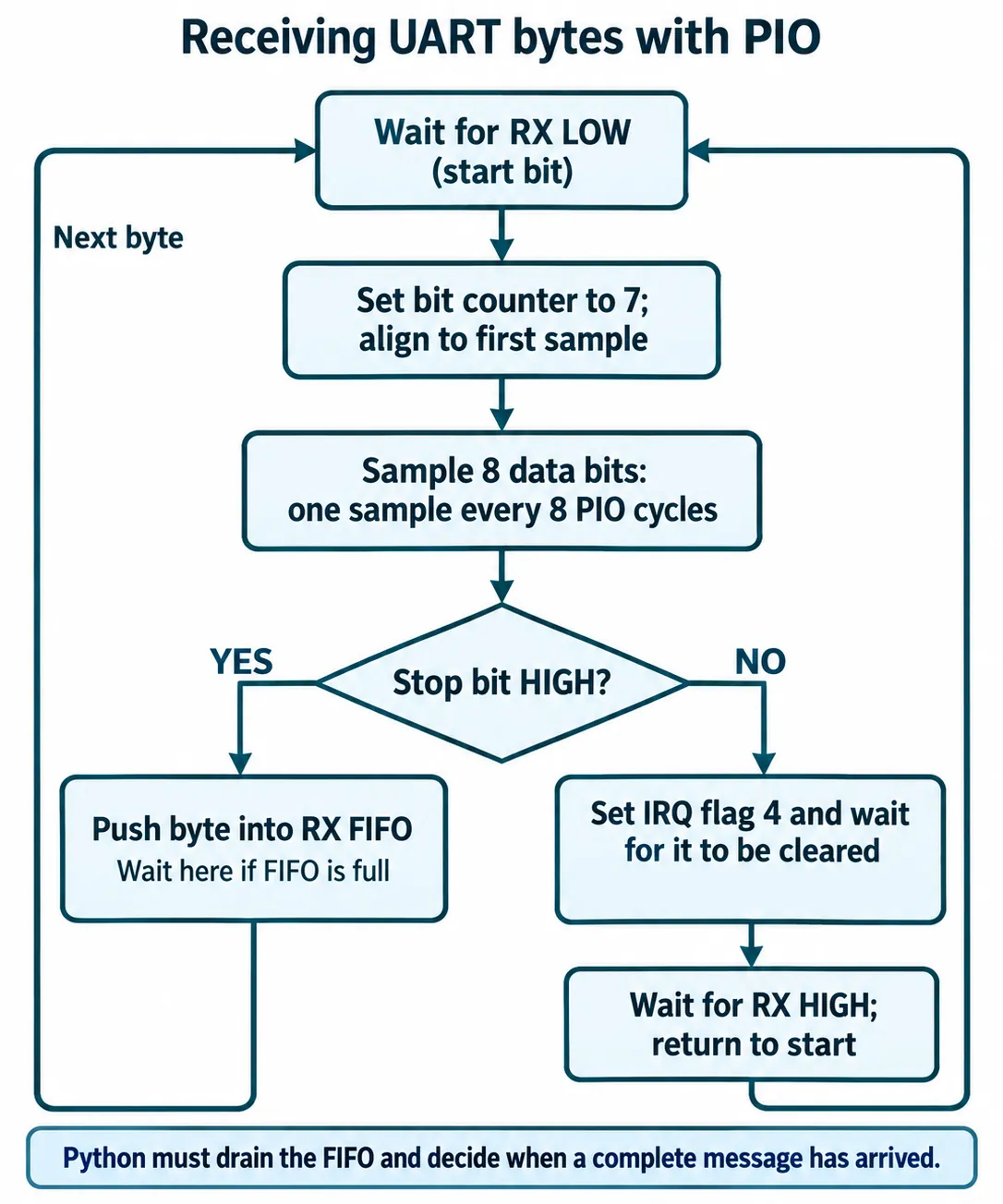
The receiver also has a framing-error branch using irq(block, 4), which waits until the flag is cleared. Our successful messages do not prove that the flag is cleared correctly or that reception recovers after a bad stop bit. Treat that recovery path as work to verify, not as a finished feature.
A maximum message length is not a timeout
Our receive code limited a string to 128 characters. That can limit how much text it accumulates, but it cannot make an empty sm.get() return. If the sender stops after three characters and never sends the expected carriage return, the next byte read can still wait indefinitely.
That explains why a function-duration printout must be read carefully. Our capture included waits of about 11,018 ms and 4,177 ms, as well as much shorter calls. These measurements include waiting for incoming data. They do not measure only the cost of decoding a byte, and they do not establish a sustained receive rate.
For an interactive prototype, a better contract is: "Check for available bytes, retain a partial message, and return control promptly." The small example below illustrates that contract for this byte layout. We have not run it on the test hardware. It assumes this code is the only reader of the FIFO and deliberately caps work per call.
pending = bytearray()

def poll_message(sm, limit=128):
    # Call regularly from the main loop; do other work between calls.
    for _ in range(4):
        if not sm.rx_fifo():
            return None, "waiting"
        byte = (sm.get() >> 24) & 0xff
        if byte == 13:                  # carriage return
            message = bytes(pending)
            pending.clear()
            return message, "complete"
        pending.append(byte)
        if len(pending) >= limit:
            pending.clear()
            return None, "too-long"
    return None, "waiting"
This removes an unconditional empty-queue read from the main loop. It does not finish the protocol design. You still need a deadline for discarding an abandoned partial message, an explicit CR/LF policy, and a way to report overflow or malformed input. Returning waiting must not cause the screen to display an old sensor value as a fresh one.
Test the silence as well as the successful message
Start with one short message and record exactly what the receiver prints. Then try no message, a message without its ending, an oversized message, and two messages close together. Check that the rest of the prototype remains responsive and that each failure has a visible outcome.
Finally, run the same checks while the display, logging and other real features are active. The PIO queue is finite, and our receiver used a blocking push when it was full. If Python drains it too slowly, continuous input can be lost while the receiver is stalled. Printing a timing line for every byte also changes the workload; it is not a neutral performance measurement.
Choose PIO when it solves an actual interface constraint, such as the need for another serial receiver. If an ordinary hardware UART is available, compare its buffering and timeout controls before adding a custom receiver. Either way, define what happens when the other device stops talking. That behavior matters to the person using the product as much as the successful hello.