
A visitor presses the button on your prototype to change a scene. Sometimes it advances twice. Adding a delay seems to help, but now the screen feels slow, or the rest of the program stops while the visitor holds the button down. A control that looked simple in the first demonstration has become part of the product's behavior.
For an interactive object, a music controller or an educational device, start by defining the action: one change for each press, no repeated changes while held, and another change only after release and a new press. That is a different question from whether the electrical input is currently high or low.
On our bench we toggled a board LED from a push button three ways: polling, an interrupt callback, and MicroPython's Signal wrapper. The board was a WIZnet W5100S-EVB-Pico on a GraftPort-Pico-ETH carrier, with the user button on GP26 and the LED driven through GP25. This note covers what each method contributed, and what still needs attention when the button shares a program with a screen or a network connection.
Separate a physical press from the edges on the wire
Our examples treated a pressed button as a low input. That mapping belongs to this carrier and board combination; a different board needs its own pin and idle-level check.
A mechanical contact can open and close briefly as it settles. Software may therefore see several electrical transitions during what a person considers one press. Debouncing is the decision about which transitions to accept. It is separate from deciding what a long hold or a second press should do.
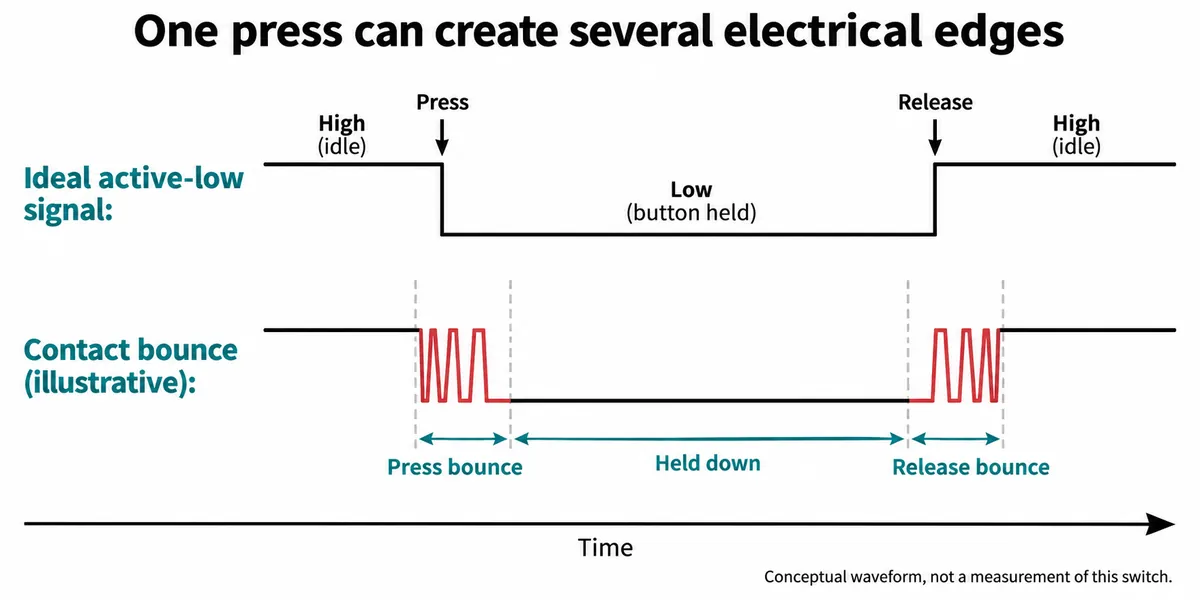
There is no universal settling time. Our polling example waited 50 ms, but that number is a design choice, not a measured value for this switch. The useful point is the sequence: a changing contact, a stable held state, and another changing contact at release. Choose and test the timing with the real control and the intended interaction.
This matters beyond a bare LED. In a public embedded-development discussion, a builder of a small TFT game interface reported incorrect selection updates and tried delays inside an interrupt handler. The thread contains competing suggestions, not a verified diagnosis. It raises a useful question for a prototype review: is the problem repeated input events, delayed screen work, or both?
First method: wait, toggle, then wait for release
The polling version repeatedly reads GP26. When it sees a low level, it waits 50 ms and checks again. If the input is still low, it reverses the saved LED state and prints "The LED is ON" or "The LED is OFF." The console showed those two messages alternating as we pressed the button.
After toggling, the program sits in a small loop until the button is released:
while key.value() == 0:
    pass
That is why holding the button does not repeat the action. It also shows the limitation: any foreground work placed after this loop cannot run until the user lets go. Waiting for release is part of the control logic, but it does not have to mean keeping the program inside a waiting loop.
Watching a hand operate the button shows the physical control and the board response. It does not measure contact bounce, response latency or behavior while another task is busy. Those become separate checks when the demonstration grows.
Second method: an interrupt changes how a press is noticed
In the next version we enabled a pull-up on GP26 and registered Pin.IRQ_FALLING. A falling edge, the input moving from high to low, requests a call to the handler. The foreground loop printed a waiting message once a second rather than testing the button itself.
This is a different detection method, but our handler still waited 50 ms, read the pin, changed the LED and printed. Moving those operations into a callback does not make the combined application responsive. For a larger program, keep the callback brief and let ordinary application code handle the accepted event, display update and logging. That follows MicroPython's interrupt-handler guidance.
One detail is worth being precise about: the example does not request hard=True. The machine.Pin documentation defaults to hard=False, so it would be inaccurate to call this a hard-interrupt routine. Callback constraints and timing still need checking on the actual firmware, and a console of waiting messages is not a latency test.
Third method: make "pressed" mean the same thing in the code
The Signal version makes the low-active button easier to reason about. It wraps the pin with inversion, so a logical value of one means the button is active. On this board the LED is wrapped without inversion:
from machine import Pin, Signal

button = Signal(Pin(26, Pin.IN, Pin.PULL_UP), invert=True)
led = Signal(Pin(25, Pin.OUT), invert=False)
This is a naming and polarity convenience, not a filter. As the machine.Signal documentation explains, inversion maps the physical level to the active state. It does not decide whether a bouncing contact represents a new press.
The program then compared the current logical state with the previous one and toggled the LED only on the transition from inactive to active. It also slept 50 ms on every pass. That sampling interval can miss a short press, and comparing two states alone is not a complete debounce guarantee.
The console alternated ON and OFF, which shows the intended toggle in that run. It does not tell us how many physical presses occurred, how quickly they were made or whether any were missed. Logging the physical action and the software event count together would answer those questions in the next test.
Test the button with the rest of the prototype running
For the next version, keep three decisions separate: what physical level means pressed, when a change is accepted as stable, and what action follows an accepted press. Let the main program revisit that state rather than wait indefinitely for release. If the application uses a cooperative event loop, the input check must return or yield so other work can proceed.
Then try the behaviors a visitor will actually produce:
- a quick tap and a normal press;
- a long hold;
- release followed immediately by another press;
- presses while the screen is updating or the network is responding slowly.
Record accepted events as well as visible output. A single event flag can merge several presses while the application is busy; decide whether that is acceptable or whether each event must be kept.
These three methods are a starting point, not a reason to pick the most elaborate implementation. Keep the simplest approach that meets the required behavior under the combined workload. If a long hold is supposed to repeat, treat that as an explicit interaction feature with its own timing, rather than an accidental side effect of repeatedly reading a low pin.