
A prototype that sends information to a laptop is a useful first step toward a remote monitor. A small team can watch a device without keeping its serial cable attached, and a designer can start exploring how that information should appear. But once the device stops sending, what does the person watching see: an honest indication of missing data, or a reassuring value left over from the last successful update?
That distinction matters before a dashboard becomes part of a user trial. A July 2022 Home Assistant discussion describes exactly this problem: an MQTT value displayed correctly, but remained visible when the sensor stopped publishing.
On our bench, a W5500-connected board running MicroPython published fixed JSON messages and the MQTTX client on a computer received them. Here is what that first successful exchange establishes, and what a useful monitor still needs.
Connect the two clients to the same broker
MQTT sends messages through a broker. In our test the board was the publisher and MQTTX the subscriber. Both connected to the public broker broker.emqx.io on port 1883 with MQTT 3.1.1; MQTTX had Auto Reconnect and Clean Session enabled and subscribed to the board's publish topic. The computer never connects directly to the board's Ethernet address.
Give each simultaneously connected client its own client ID, and use a topic namespace specific to your test so another example using a common name does not confuse the result. An unusual topic name helps avoid collisions; it does not make a public broker private.
EMQ's public-broker page identifies port 1883 as unencrypted and states that other users can see the messages. That is fine for a harmless test payload, not for user data. A real trial needs an agreed broker, access controls and transport settings.
A green "connected" state in MQTTX only means the computer has its own connection. It says nothing yet about whether the board is publishing, whether the topic matches, or whether a receiving application is saving data.
Keep the board program small enough to inspect
The board ran MicroPython v1.23.0 with a W5500 through network.WIZNET5K, on SPI0 at 2 MHz with GP19 for MOSI, GP16 for MISO, GP18 for clock, GP17 for chip select and GP20 for reset. Another board needs its own checked pin and firmware configuration.
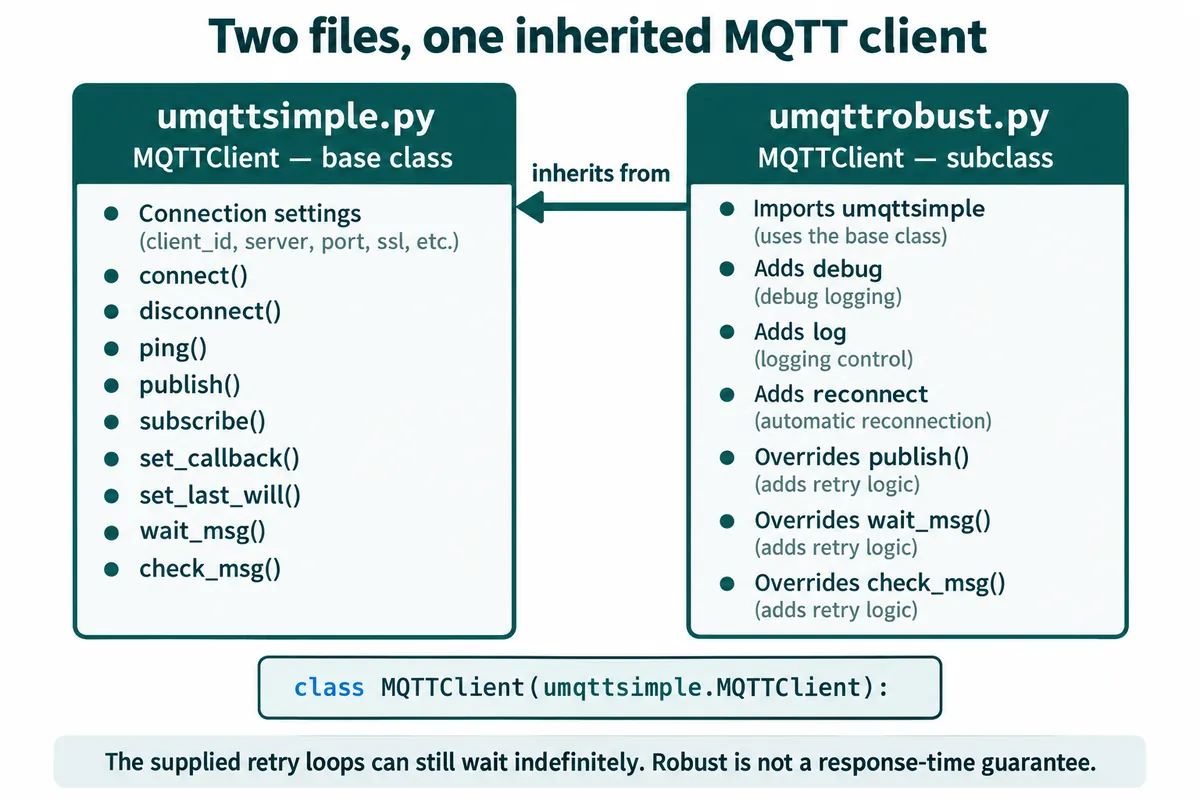
The MQTT client came from two local files, umqttsimple.py and a modified umqttrobust.py, named after the umqtt clients in micropython-lib. The second inherits the basic client's methods and adds logging and retry behavior. Keep those exact files and versions with the project: installing a package with a similar name later is not proof that it matches what you tested.
The published payload contained a client ID, a protocol-version string, a device description and a fixed test name. It contained no temperature, pressure or other measured value.
After connecting with a 60-second keepalive, the program published that payload ten times at QoS 0 without the retain flag, printing "Message Published" and waiting three seconds after each call that returned without an exception. A one-second timer counted callbacks and called client.ping() every thirty, and was stopped after the loop and disconnect. Reconnect waits inside a library call can extend that run; this is a demonstration structure, not a tested scheduling design.
Subscribe before judging what arrived
In MQTTX we subscribed to the same topic at QoS 0 and chose JSON as the display format. That makes the payload easier to read; it does not add a sensor schema or validate that a field came from physical hardware.
The board's "Message Published" line is printed after the library call returns. That is useful local evidence. With QoS 0, however, there is no publish acknowledgement from the receiver, so seeing the message in the subscribing client is a separate observation. MQTT 3.1.1, section 4.3.1 defines that delivery behavior.
The MQTTX log gave the receiving-side record: ten arrival entries on August 10, 2024, from 22:17:50 through 22:18:17, roughly three seconds apart. That supports a short demonstration. It does not measure loss under load, recovery after an outage or whether another application stored every payload. A second recorded run, with different DHCP-assigned network settings, showed the same flow.
Decide whether you need a current value or a history
For a room-status display, the newest usable reading may be enough. For an experiment log, losing any sample may matter. Those two products need different handling, even if both use MQTT.
A retained message gives a new subscriber the broker's last retained value for a topic. It is not a complete history. Our test published without retention and used a clean session, so a later subscriber would not recover those earlier messages. If the product requires offline delivery or historical storage, specify and test that path explicitly; MQTT session state and an application's stored history are not interchangeable. The same MQTT 3.1.1 specification defines retained messages and session behavior separately.
Freshness is another decision. A retained value can be old, and a live connection can exist while the sensing task has stopped. For a monitoring prototype, define when a value becomes stale, what time or sequence information accompanies it, and what the user sees after updates stop. The fixed JSON test does not implement any of this.
If Home Assistant is the receiving interface, its MQTT sensor documentation provides expire_after and availability settings. It also warns that replaying a retained state on restart can revive an expired value. That is an integration-specific behavior to test, not a reason to enable retention on every topic.
Test disconnection without trusting a library name
The modified client contains retry loops, and some can wait indefinitely for reconnection. Its initial connection error path also tries to use the global client after the connecting function may have failed before returning it. So our test is not a demonstrated, bounded recovery policy, even though the recorded exchange succeeded.
The timer also calls network code while the main program uses the same client. Before extending this to a longer-running device, review how callbacks execute on the selected MicroPython port. A practical direction is to have the timer only signal, and let one main task handle all MQTT traffic. MicroPython's interrupt-handler guidance recommends short handlers and deferring work that does not need to happen immediately.
For the next trial, agree on the outcome of four checks:
| Trial | What should the user or receiving application observe? |
|---|---|
| Stop publishing but leave the connection open | The reading becomes stale after the agreed interval |
| Disconnect and restart the subscriber | It receives the intended current state, history, or an explicit "no data" state |
| Remove and restore the device's network connection | Local functions stay usable and recovery follows a defined policy |
| Run two prototypes together | Their identities and topics remain distinguishable |
We have not run these yet. The bench run answered the first question: can this board send a known payload through a broker to another client? A user trial adds the question that matters when nobody is watching the terminal: can someone tell whether the information is still trustworthy?