
The first prototype often runs from a folder on its creator's laptop. The problem appears when another developer needs to assemble the second one: which files belong on the board, which version worked, and what should happen after installation? A driver is ready to hand over when those questions have clear answers.
Our team went through this transition with a MicroPython driver for serial bus servos. We moved repeated communication code into a packaged class, added formatting checks, installed it onto a board and published a package page. The most useful lesson came from an imperfect result: the installer reported a missing dependency, and yet the class could be imported afterward.
Give the next builder a clear starting point
The starting complaint was practical. Similar transmit-and-receive logic appeared in several methods, and serial settings were fixed inside the driver. That makes a library hard to adapt when a second board uses another UART or needs different timeout behavior.
The revised interface accepts a UART object created by the application, and a SerialServo class handles commands and queries. This keeps board-specific choices close to the application instead of requiring a developer to edit the driver every time the wiring changes.
A useful handover also identifies the supported board and firmware, the wiring, the expected response and known limitations. A long list of methods helps an experienced developer, but a new team member needs one small example with a recognizable result first.
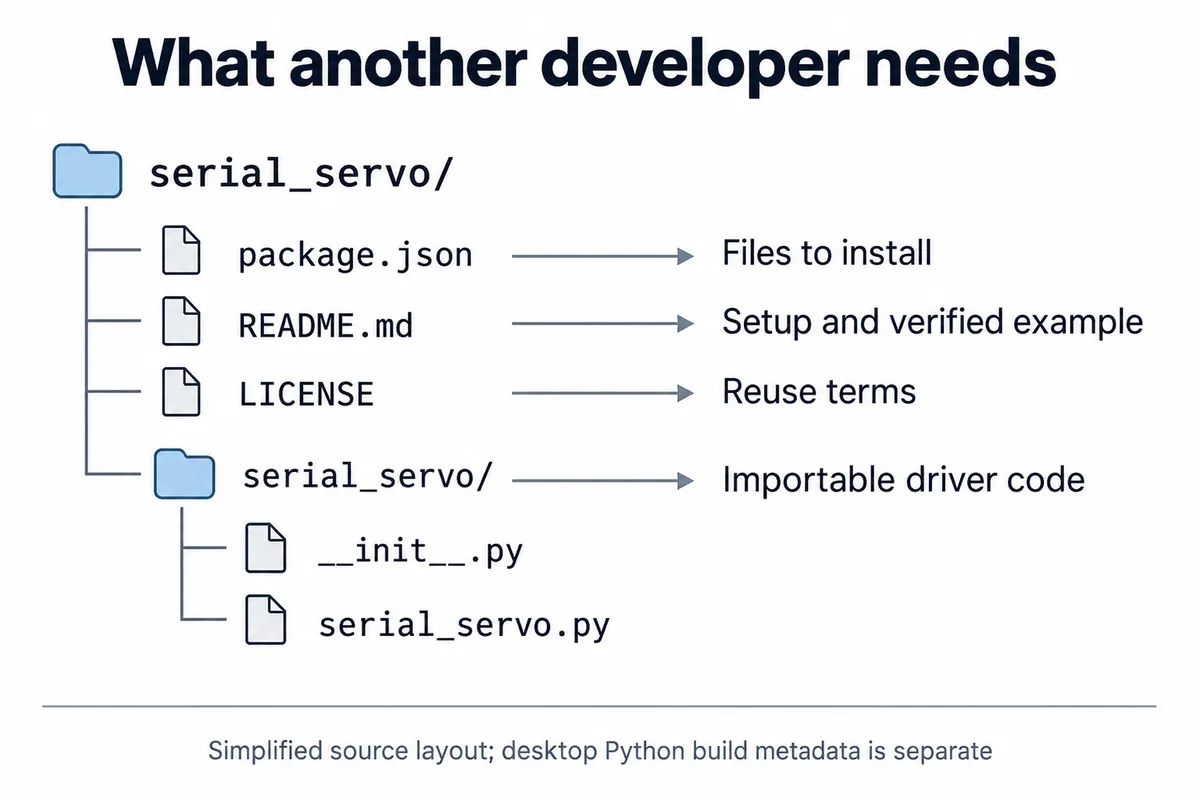
The layout holds an importable package, documentation, a license and installation metadata. Desktop build files are left out of this simplified tree because installing a MicroPython driver onto a board and building a desktop Python distribution are different operations.
Choose where the code will actually run
A command run on the laptop can install files either onto the laptop or onto a connected board, depending on the tool. That distinction is easy to miss when every instruction begins with "install the package."
MicroPython's package documentation distinguishes mip, which uses the MicroPython package ecosystem, from desktop Python's pip and PyPI. mpremote mip install lets the computer fetch a package and transfer it to a connected MicroPython device. Publishing a PyPI page does not by itself make a hardware driver run under desktop Python.
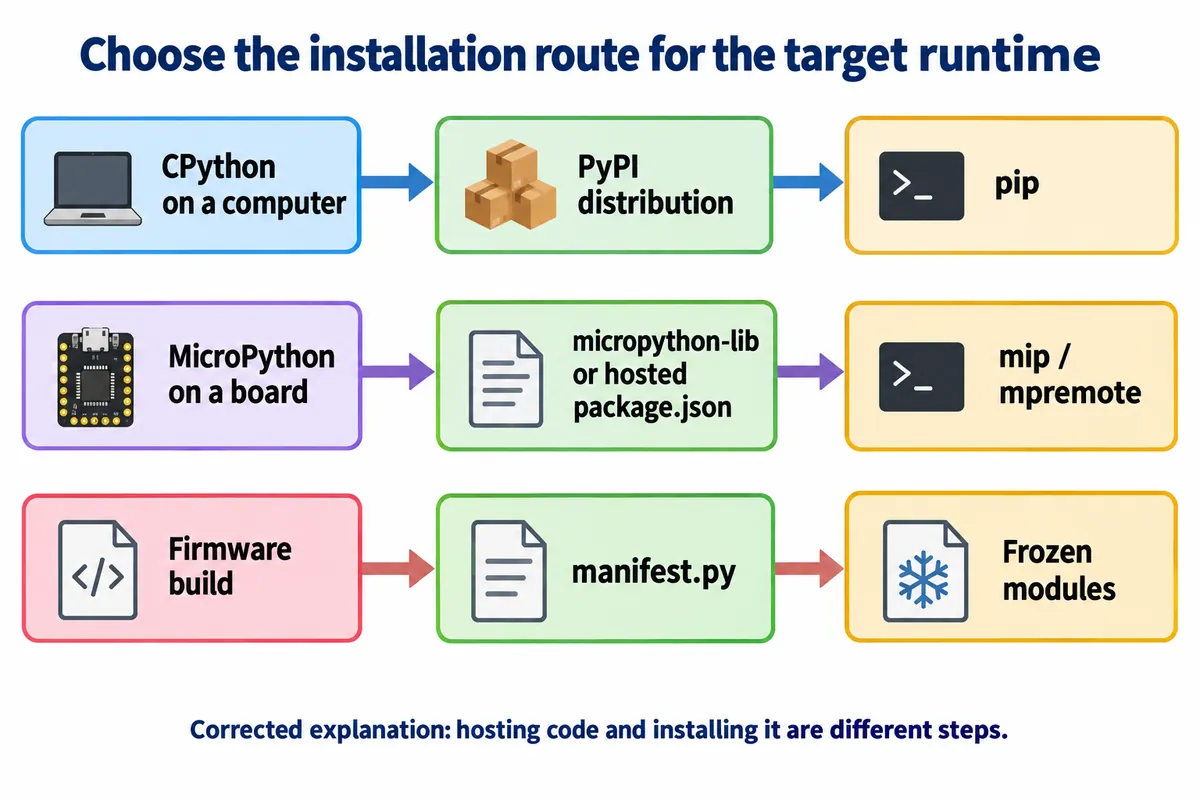
This confusion shows up in real support requests. In a February 2024 MicroPython discussion, a user moved from a network error to a package-not-found error while trying to install sensor. Replies had to clarify both which package was meant and whether a command belonged at the computer's prompt or the board's prompt.
For a prototype handover, write the runtime and destination explicitly: "run this on the computer; these files will be installed under /lib on the board." Then record the tested firmware and package revision, so a familiar installation command cannot hide an unfamiliar target.
A successful import can follow a failed installation
In our log, the installer copied serial_servo/__init__.py and serial_servo/serial_servo.py, then tried to fetch micropython-machine. That dependency was not found, and the tool warned that the package might be partially installed. The later successful import showed that usable files were present. It did not turn the earlier operation into a clean installation.
The cause was in our metadata: it listed machine and time as external dependencies, although the MicroPython firmware provides them as built-in modules. Those entries need to match what the target firmware already includes. Do not solve a runtime mismatch by adding similarly named desktop packages.
A minimal file map for the two driver files has this shape. It illustrates the structure; it is not a newly tested release:
{
  "urls": [
    ["serial_servo/__init__.py", "serial_servo/__init__.py"],
    ["serial_servo/serial_servo.py", "serial_servo/serial_servo.py"]
  ],
  "version": "example-version"
}
Add real external dependencies only when the driver needs them. For a reproducible build, identify the repository revision as well as the version text: a label in JSON does not stop files on a moving branch from changing.
Then test that package on a spare board, or a backed-up one, with no previous copy of the driver. Check the full installer output, reboot, import the class and run the documented hardware example. That is the acceptance test we propose; we have not yet repeated the installation with corrected metadata.
Keep the useful checks, but know what they prove
We ran Black to format the code and reviewed the changes in Git's diff view. Flake8 then raised line-length findings, and we adjusted its configuration. Those steps make changes easier to review, but a clean style report does not verify a servo reply or an electrical connection.
The stronger part of the workflow was a deliberate failure test. After installing pre-commit hooks, we introduced invalid code and attempted a commit. Both the formatting and syntax checks failed. After correction, a later run reported both checks passed.
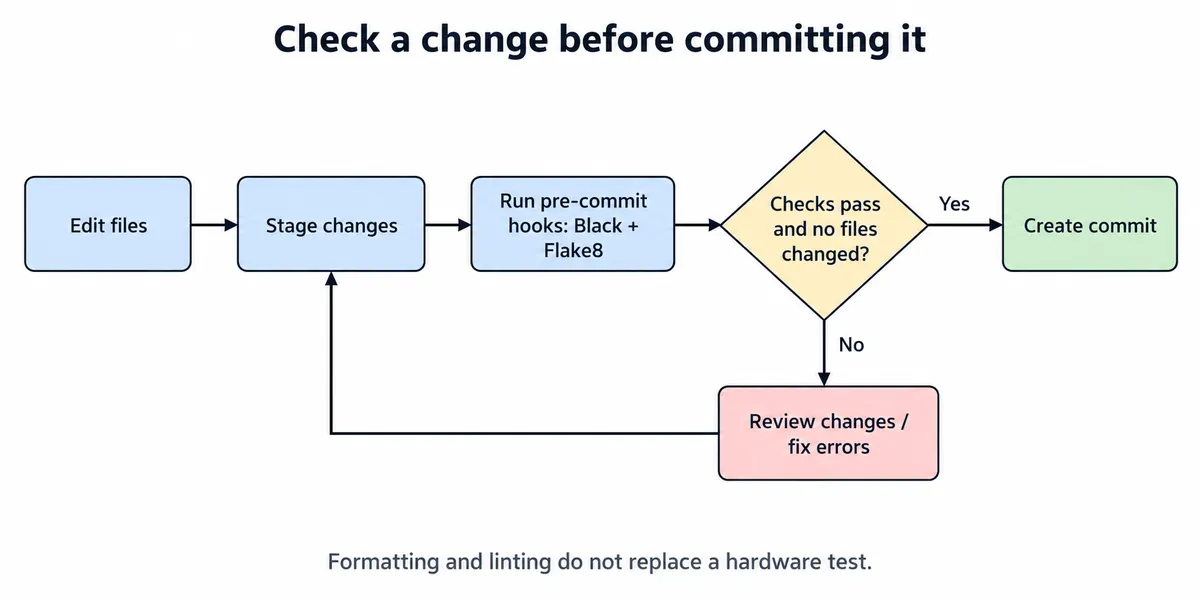
For a team, that is a repeatable habit: review formatter changes, correct the error, stage the intended files and run the checks again. Git's hook documentation defines when hooks run.
Keep the first hardware acceptance test close to this process. For the servo driver, that could be the documented query on the specified hardware with a recorded response. A timeout or a disconnected device should be distinguishable from a valid response, rather than appearing as a plausible default value.
Release the intended files, not whatever happens to be in a folder
We built a wheel and a source archive, and one upload was rejected because that version's file already existed. Our final desktop installation check also referred to an already installed 1.0.4 package while the project page showed 1.0.5. Both show why a package page and an install command are not enough to identify the code in use.
For a desktop Python component, follow the current Python Packaging User Guide for build configuration and archive generation. For the MicroPython device driver, keep its device-installation route explicit. A firmware manifest.py is a further, separate route for including modules in a firmware build; it is not interchangeable with a hosted package.json.
Before handing over a release, inspect the exact archive or file list, keep its revision and test the installation instructions from that artifact. Check the license terms too: this particular driver carries a non-commercial notice, so it cannot simply be dropped into a commercial product. If a prototype currently works only on its first developer's setup, the board version, driver revision and current install steps are what define the handover task.