
Your designer replaces a background image on the prototype. The transfer finishes, the filename is right, and the buttons still respond, but the screen keeps showing the previous artwork. Restarting the device may make the change appear, which is awkward when you are trying to compare designs during a user session.
For a branded controller, a configurable instrument or an exhibit with changing content, treat updating an image as one complete operation with several steps: delivering the new file, replacing the decoded image held in memory, and repainting the screen. Check them separately before changing the display hardware.
LVGL 9.0 keeps an image cache so it does not have to read and decode the same resource repeatedly. That helps reuse, but a stored result can go stale when the underlying image changes. This note is based on the library's behavior; we have not recorded a live-update experiment for it.
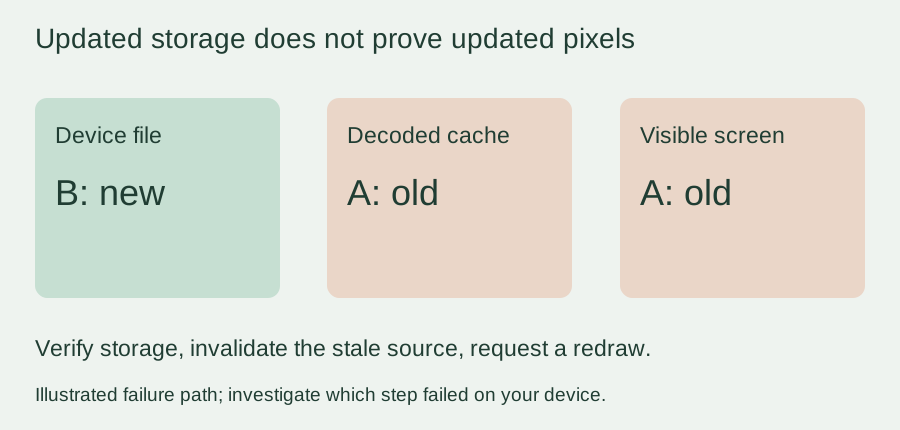
First make sure the device received the new file
Use two unmistakably different test images, labeled A and B, with the same dimensions and format. Show A first, then replace it with B. Read back the actual device file, or compare its checksum with B, before investigating rendering. A copy on the developer's computer says nothing about which bytes the device opens.
Also record the full resource path the widget uses. If an LVGL filesystem adapter maps a prefix such as S: to a storage directory, replacing a similarly named file elsewhere will not update that resource. For a built-in image, the resource is the compiled descriptor and its data; copying a PNG to a card will not replace it.
Keeping the first comparison the same size removes another variable. A later test should change dimensions too, but first answer the simpler question: can this running device switch from known content A to known content B?
A redraw may reuse the same old decoded image
An image widget can be scheduled to redraw while its decoder still supplies cached pixels. Redraw and cache invalidation solve different problems: one asks for painting, the other discards a reusable result that is no longer valid.
In a July 2021 LVGL forum thread, a developer reported that foreground buttons refreshed but the background did not. After a cache-invalidation suggestion, the author confirmed it worked. That is a clear example of the distinction, but its older API should not be copied into an LVGL 9 application.
For LVGL 9.0.0, the image-cache header exposes lv_image_cache_drop(src). Its implementation takes the image source, identifies the cache key and drops that entry. The widget's lv_image_set_src() reads image information and invalidates the widget for redraw. See the version-pinned cache implementation and image-widget implementation.
/* LVGL 9.0.0. Run in the application's LVGL context, after the new
 * file is complete and no rendering operation uses the old source. */
const char *path = "S:images/background.png";
lv_image_cache_drop(path);
lv_image_set_src(image_widget, path);
This is a proposed integration step, not a hardware-tested repair. It assumes a configured filesystem, decoder and image widget. A MicroPython binding may expose a different set of calls. Use the headers and binding shipped with your firmware; even the 9.0.0 prose documentation contains cache examples that differ from the released source API.
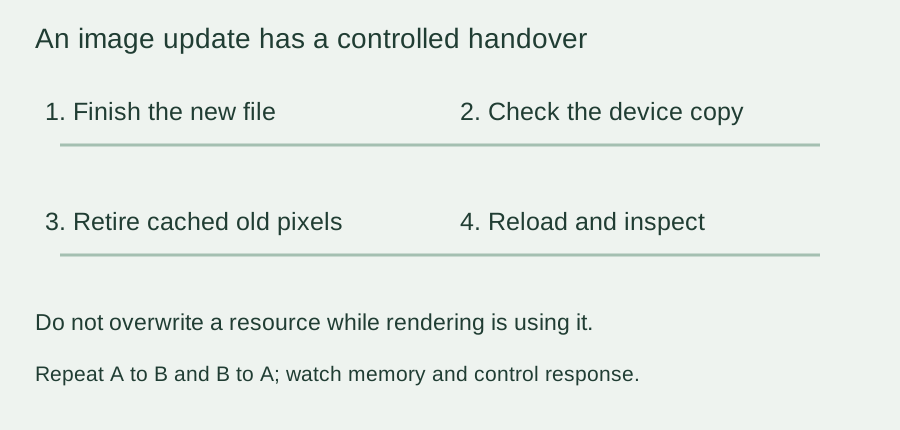
Do not rewrite an image while another task is reading it
For a simple prototype, pause use of the image, finish and close the replacement file, then perform the cache and widget update through the application's normal LVGL execution context. The application must also wait for any in-flight renderer or transfer still using the resource. This is a coordination requirement; a cache call alone does not make concurrent file replacement safe.
Another option is to give each asset revision a new filename and switch only after the new file is complete, keeping the previous resource until nothing uses it. That makes the revision visible during testing, but you still need to release unused resources and handle a failed decode. Choose the approach around the storage and renderer you actually have.
Do not respond to a stale image by clearing every cache every frame. Caching trades memory against repeated decoding work, and throwing it away indiscriminately can bring back the decode delays it was meant to avoid.
Repeat the update, then inspect memory as well as pixels
A successful A-to-B change is the first check. Continue with B-to-A, repeated updates and the largest intended asset. Watch for failed decodes, rising memory use and stalled controls. Show the displayed revision visibly during the trial so an old image cannot pass unnoticed.
This matters beyond appearance. A March 2024 LVGL 9.0.0 issue describes an instrument interface receiving PNG images over serial: early updates worked, then decoding ran out of memory. The author changed to a fixed buffer and a different image-transfer approach. That does not prove every repeated-image failure is a leak, or that the workaround suits your product; it shows why one successful update is not enough.
Keep the decoder, image dimensions, firmware version and update sequence with the test results. If live artwork changes are part of the intended experience, put that behavior in the integration brief rather than leaving it as an informal file-copy step. A small, repeatable A/B test with the asset pair and reproduction steps gives an engineering review a clear starting point.