
Your sensor logger works with the card on your desk. Before a field trial, someone replaces it with a larger card so it can record for longer. The card fits, a laptop can read it, but the prototype stops at "mount failed." Buying still more storage will not answer the first question: which part of the connection failed?
For a small team preparing devices for other people, the SD card is part of the tested configuration. The board must communicate with the card, the firmware must understand its file system, and the application must actually save and recover the intended data. Those are three separate steps.
We ran a small MicroPython storage experiment on a board with a microSD slot on its expansion board. It is a useful base for planning a card-replacement check. It does not establish that every larger card will work.
The size printed on the card is only one clue
A microSD card's shape tells you whether it fits the slot. The capacity family tells you something different. Moving from a 16 GB card to a 64 GB card crosses from SDHC to SDXC, whose standard file system is exFAT rather than FAT32. That matters if the prototype firmware only supports FAT32. The SD Association's capacity overview defines these categories.
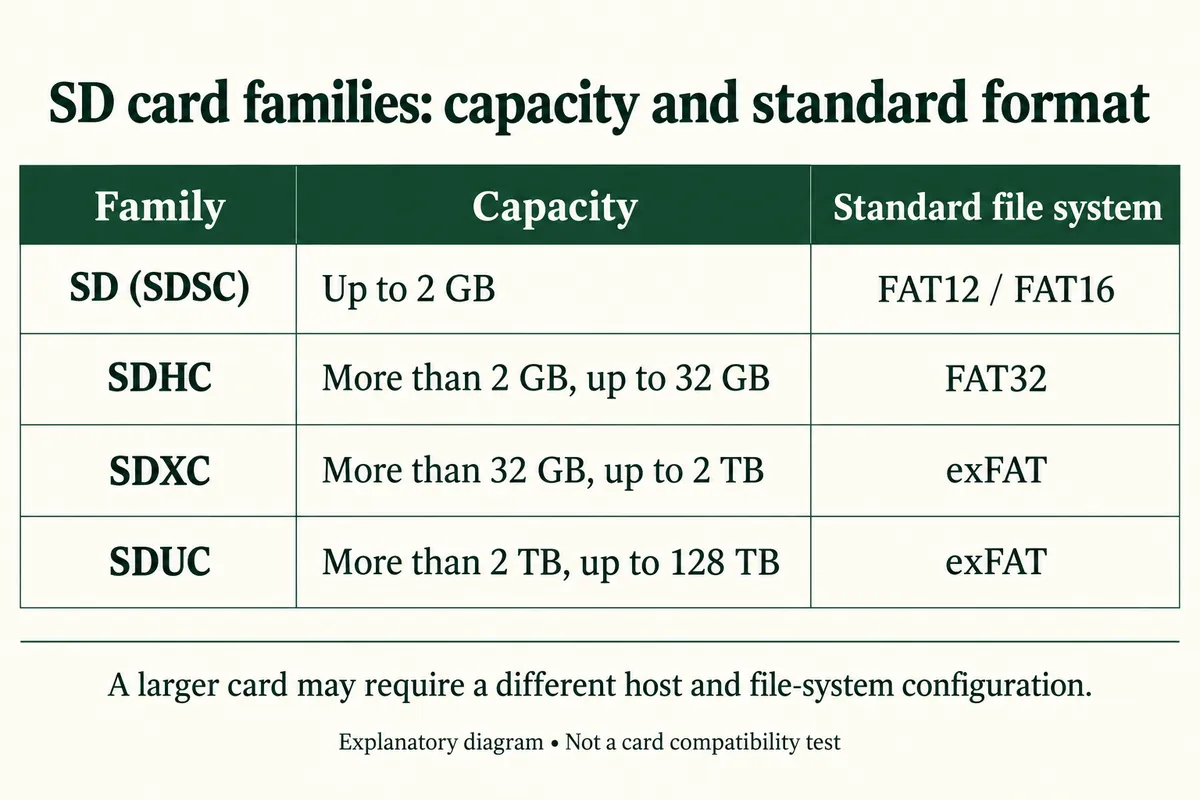
Look at the exact card and how it has been prepared. A card may have been reformatted since it left the factory, so the logo does not tell you its current file system. Changing the file system, in turn, does not change the card family or guarantee that the host can use it.
For a first trial, keep a known-working card with the device and record its identity alongside the firmware version. If longer recording is needed, calculate the expected data volume first. A larger card is useful only after the actual replacement has passed the same checks as the card you started with.
Find the failed step before changing the format
In MicroPython, sdcard.SDCard(spi, cs) creates a block device: software that transfers chunks of data to and from the card. VfsFat and mounting then make its files available under /sd. Ordinary file calls read and write those files. Saving the full traceback helps separate an initialization problem from a file-system problem.
This distinction shows up in real support questions. A MicroPython issue opened in October 2021 describes reinitialization trouble and changes intended to help some 1 GB cards. It is a historical report, not a driver recommendation, but it shows why capacity alone is a poor diagnosis.
On the software side, MicroPython's v1.29.0 FatFs configuration makes exFAT support a build option, disabled unless that option is supplied. Check the firmware you actually installed. Neither "MicroPython supports SD cards" nor "this is a FAT driver" confirms exFAT support in that build.
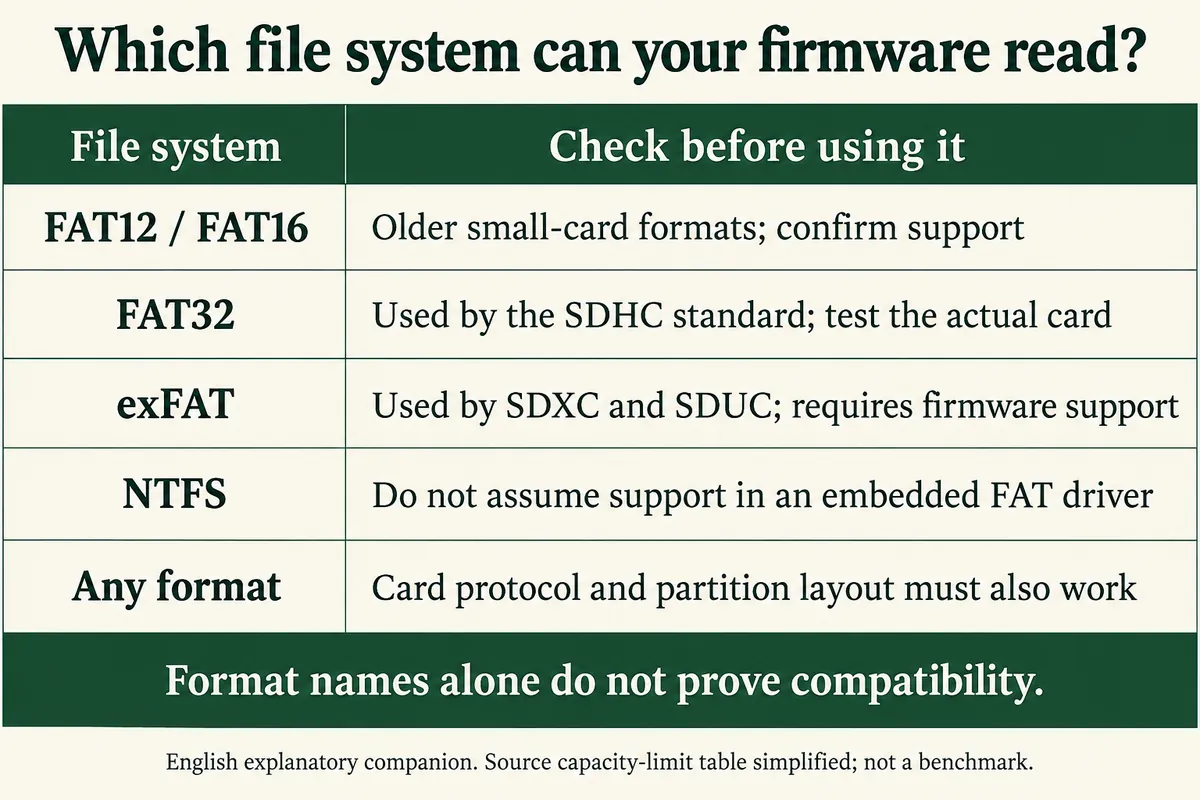
Start by recording the board, firmware, driver revision, card model and capacity, partition layout, file system and the exact failing call. Then repeat the check with the known-working card on the same hardware. If both fail, look at what changed in the board or software. If only the replacement fails, you have a narrower compatibility problem.
Do not format a card automatically after any mount error. Formatting destroys the existing contents and can hide the evidence you need. If changing the format becomes a deliberate test, back up needed data, use a disposable test card and confirm the target first. Keep that operation out of normal startup code.
Reproduce the small experiment before recording a whole trial
On our board the slot is wired to SPI1: SCK on GP10, MOSI on GP11, MISO on GP12 and chip select on GP13. These are GPIO labels, not header-pin numbers or card contact numbers, and they apply only to that board. A different board needs its own schematic check, including how pull-ups are handled.
The WIZnet MicroPython firmware build we used did not include the sdcard module, so we added the micropython-lib SD card driver. Keep the driver revision with the experiment, since a later download can behave differently. A shortened setup, using the legacy uos name, looks like this; it assumes the same pin mapping, a FAT-formatted test card and no existing /sd mount:
from machine import SPI, Pin
import uos as os
import sdcard

spi = SPI(1, baudrate=4_000_000, polarity=0, phase=0,
          sck=Pin(10), mosi=Pin(11), miso=Pin(12))
sd = sdcard.SDCard(spi, Pin(13))
os.mount(os.VfsFat(sd), "/sd")
print(os.listdir("/sd"))
Run those stages separately while investigating a failure. The requested SPI rate is not a measured throughput, and the driver can reconfigure the bus during initialization. A successful directory listing is the point at which a file operation makes sense.
Our run mounted /sd, wrote test.txt and read it back, created a directory with a file inside it, and renamed the first file. Note that write mode overwrites an existing file of the same name. On a disposable test card, use a fresh filename each run, compare what you read with what you meant to write, and record failures rather than turning every exception into a success message.
The capacity line our test printed was wrong. The code multiplied the block count by the block size, then multiplied by the block size again when converting to kilobytes. The MicroPython statvfs documentation defines the size in fragment-size units, so a corrected calculation is:
v = os.statvfs("/sd")
print("Total MiB:", v[1] * v[2] / 2**20)
print("Free MiB:", v[1] * v[3] / 2**20)
That reports the mounted file system's size and free space. It is not a full-card write verification or proof of genuine capacity, and our run is a small file-operation demonstration, not a card qualification result.
Give trial users a tested choice
Once the simple experiment works, run the logger's real workload on the replacement card. Close and synchronize files, shut down cleanly, then check that the saved records open on the intended computer. Repeat the device's normal cold startup. If users will swap cards, test that sequence explicitly rather than assuming a bench mount covers it.
The trial instructions can then say which card and preparation were tested, how to stop recording before removal, and what the device shows when storage is unavailable. If those checks are not complete, supply the known-working card and describe replacement cards as unverified. When asking for help, bring the board and firmware versions, the working and failing card details, and the first error from startup.