
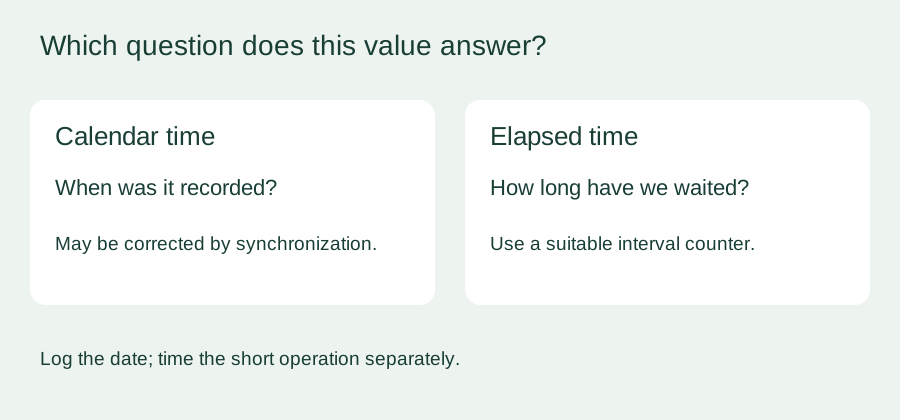
A connected prototype needs the correct date for its logs and a five-second timeout while it waits for a response. It is tempting to use the same clock for both. That becomes a problem if a network update or a settings screen adjusts the clock halfway through the wait.
Imagine a user starting a short measurement on a desk instrument. Correcting the displayed time should not make the measurement finish immediately or leave the user waiting an extra minute. The practical design choice is to separate calendar time from elapsed time.
We checked how the real-time clock behaves on a Raspberry Pi Pico running WIZnet's MicroPython build, then worked out a separate timeout approach. The timeout and clock-change checks below are proposed tests; we have not run them on hardware yet.
What the RTC actually gives you
machine.RTC() creates the clock object, and its datetime() method does two jobs. Called without a value, it reads the calendar; given the appropriate tuple, it sets the calendar. On our MicroPython 1.23.0 Pico build, listing the class showed datetime as the only public method.

Several generic RTC methods, including alarms, are not available on that build. Do not infer a working alarm or wake-up feature from a generic method table. The listing shows which names exist, not accuracy, battery backup or scheduled-operation behavior.
For the timeout question, the important point is that calendar time is adjustable. In the RP2 port, time.time() reads the calendar time, and setting RTC.datetime() changes that time. A program that subtracts calendar timestamps to measure a short wait inherits those adjustments.
A correct clock adjustment can produce a wrong duration
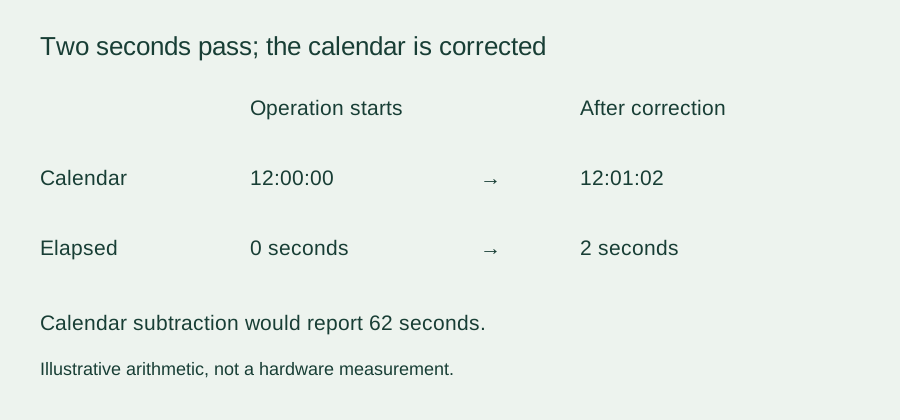
Suppose the device records a calendar timestamp at the start of an operation. Two seconds later, a correction moves the clock forward by a minute. A simple subtraction now says 62 seconds have passed. Move the clock back instead, and the calculated interval can be negative.
The distinction is longstanding. In a May 2020 MicroPython design discussion, developers separated short-interval ticks from system time adjusted by synchronization. That discussion is context, not a guarantee about every firmware port; the current RP2 code is the implementation check.
RP2's ticks_ms() source uses the underlying elapsed-time counter rather than the settable calendar. That is the right starting point for a short interval within a running session. It does not turn a Python loop into a precision hardware timer, or into a clock that survives every sleep and reset mode unchanged.
Express the wait as an elapsed-time deadline
MicroPython tick counters wrap around. Use ticks_add() to create a deadline and ticks_diff() to compare it with the current tick value, rather than ordinary subtraction or a direct comparison of raw ticks. The MicroPython time reference explains the wrap-aware operations and their bounded comparison interval.
This small demonstration, not yet run on hardware, waits about five seconds while yielding between checks. It does not set the RTC, query a network server or drive hardware; a real application would also test its response condition on each pass.
from time import ticks_ms, ticks_add, ticks_diff, sleep_ms

started = ticks_ms()
deadline = ticks_add(started, 5000)

while ticks_diff(deadline, ticks_ms()) > 0:
    sleep_ms(10)

print("Elapsed milliseconds:", ticks_diff(ticks_ms(), started))
The loop may finish later than the nominal deadline if other work delays it. If the same task blocks in a network call, it cannot check its deadline until that call returns. Give the I/O operation its own timeout or use a nonblocking design; changing the clock function does not remove blocking work.
Keep both arguments to a tick comparison in the same unit and time base, and never pass time.time() values to ticks_diff(). Keep comparisons within less than half the counter's wrap period, which is port-dependent. For long-running totals, take frequent bounded differences and accumulate them, rather than subtracting two raw readings days apart. The tick helper implementation shows the modular arithmetic.
Keep calendar timestamps in the records
A sensor record still needs a date and time another person can interpret. Store that calendar timestamp alongside a sequence number and a flag showing whether the clock has been synchronized. An elapsed-time value can describe how long a step took; it should not be presented as a date. If calendar timestamps jump backward, the sequence numbers still show acquisition order, so a reviewer can tell "the clock was corrected" from "acquisition stopped."
Before a user trial, run the countdown while adjusting the calendar forward and backward on an isolated test setup. Compare its duration against an independent timer and record whether controls stay responsive. Then test the real network synchronization path, which may add waiting even when the timeout uses the right time base.
Finally, decide what should happen after sleep or restart. Should an interrupted measurement be cancelled, resumed or started again? Tick values are not persistent timestamps, and sleep behavior depends on the port and mode. A short running-session example does not answer those product decisions.