
You copy the main program to a second board, ready for someone else to try the prototype. Instead of starting, it reports that a module is missing. The first board still works because an earlier experiment left the required helper file on it. The code you handed over was only part of the working setup.
For a small team preparing several demonstration units, this is worth solving before adding more features. A dependency is simply another piece of code your program needs. Recording that relationship lets an installer bring the files together, and a small functional check tells you whether they actually work together.
We tested this on our bench with two deliberately simple MicroPython packages: one performs arithmetic, and the other calls it. With no sensor readings to interpret, we could follow the dependency from its declaration to its use.
Make the relationship visible
The first package, math_utils, contains a MathUtils class with addition, multiplication and result-formatting methods. It is the helper, and it has no hardware code at all. The second package, test_core, imports that class and uses it in two tests.
That is a small version of a common prototype arrangement: the main application uses a sensor driver, and the driver may use another utility. Copying the application does not necessarily copy everything it imports.
The main package begins with from math_utils import MathUtils. Its constructor creates the helper, and its test methods return formatted answers. If math_utils.py is absent from the board's import path, that first import fails. The calculation is not the point. The point is proving that the package you ask to install brings the code it needs, rather than relying on files left on your development board.
Tell the installer about the helper
Each package has a package.json beside its code directory. For test_core, the important parts are the file mapping and the dependency declaration:
{
  "version": "1.0.4",
  "urls": [
    ["test_core.py", "code/test_core.py"]
  ],
  "deps": [
    ["https://upypi.net/pkgs/math_utils/1.0.1", "latest"]
  ]
}
Descriptive metadata is omitted here. The urls entry tells the installer where to obtain the file and what to call it on the device. The deps entry points to the helper package. MicroPython's package-management documentation describes these two lists and the automatic installation of declared dependencies. It also distinguishes mip from desktop Python's pip: their default package indexes are different.
The helper's URL explicitly contains version 1.0.1. The adjacent latest value should not be read as a promise to keep the application updated or to resolve every version conflict. Record the complete dependency specification you tested.
A package website is one way to host these files, not a requirement. A March 2026 MicroPython community discussion about uPyPi includes both the reasons for offering such a service and a reminder that mpremote mip can already install packages hosted on GitHub. Choose a source your team can access and identify consistently.
Separate downloading the code from testing it
In our board-side run, the W5500 network setup came first. It configured SPI0 with GP19 for MOSI, GP16 for MISO, GP18 for the clock, GP17 for chip select and GP20 for reset. Only after the connection check succeeded did it call:
import mip
mip.install("https://upypi.net/pkgs/test_core/1.0.4")
Those network settings belong to that board; they are not generic settings for another Ethernet module. Our written example also used a static address of 192.168.1.20, while the recorded run reported 192.168.10.124, so the code and the log do not describe an identical network configuration.
Read the installation lines before any success message. The log showed test_core.py copied to /lib, then a request for the math_utils manifest and a copy of math_utils.py. The program then printed 30 for addition and 200 for multiplication, using inputs 10 and 20. Those are the useful observations: both files arrived, the import worked, and the main package called the helper.
The run does not show a sensor working, a long chain of nested dependencies, or recovery from an interrupted installation. The two-package result demonstrates the basic mechanism and nothing more.
The board does not have to download its own packages
During bench preparation, it can be simpler for the computer to download the package and transfer it over the board's serial connection. The mpremote reference provides mip install for this:
mpremote mip install https://upypi.net/pkgs/test_core/1.0.4
This is an alternative preparation step; we did not run it for this note. Select the intended board when several serial devices are connected. Installing from the computer removes the need for the board's own network path, but not the need for compatible firmware and enough device storage.
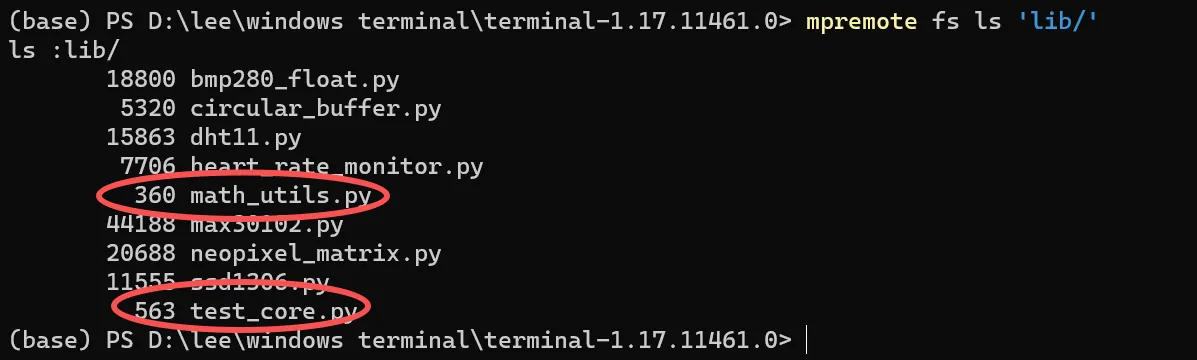
The file listing confirms both modules are in lib/. It also contains several unrelated drivers. That is a record of one development board's history, not proof that a clean second board needs only these two files. A listing shows presence, not that each module works.
So follow installation with a small call that crosses the dependency boundary:
from test_core import TestCore

check = TestCore()
print(check.test_add(10, 20))
print(check.test_multiply(10, 20))
For these versions, the expected results contain 30 and 200. For a real sensor package, choose an equally explicit first check: importing the driver, reading a device identifier, or running a documented self-test. A successful import is not yet a calibrated measurement or a complete application test.
Make the second build reproducible
The runtime is part of the record too. In a September 2026 MicroPython discussion, a Unix Docker image unexpectedly lacked mip after its build variant changed; the maintainer reported it resolved on September 10. That was a desktop test-image issue, not a board fault, but it shows why "MicroPython installed" is less useful than recording the precise runtime.
For each prototype build, keep these together:
- the board and firmware identity;
- the main package version and every dependency location;
- a short check with its expected result.
Prepare another board from that record, starting from a clean filesystem, and test it again after a restart. That is the acceptance step we recommend; our run did not include a clean-board rebuild or a restart test.
Keep installation deliberate while the prototype is being assembled. Downloading files successfully is different from safely updating a device already in use. An unattended update would also need a defined response to missing downloads, incompatible files and interrupted power, which this simple setup does not attempt.