
Your prototype reads a sensor correctly on the bench. Now another engineer needs to rebuild it, or a collaborator wants to add it to a different device. Sending a folder called "latest" leaves several questions open: which files belong on the board, which version was used, and what should the recipient test after installation?
Those questions come up before hardware even enters the picture. In a MicroPython packaging discussion started in November 2022, a developer who had packaged a project for desktop Python was unsure how to distribute it for MicroPython. The eventual package.json approach gave the recipient a shorter installation command and an explicit list of files.
We walked a BMP280 driver through that kind of handover on our bench, from a package page to a board, and looked at two ways of publishing a package. The exercise also shows why a successful download is only one part of handing over a working sensor module.
Record what you are asking someone to install
We installed bmp280_driver version 1.0.0 from the uPyPi package index. Its page offers one installation command for the computer and another for a network-connected board. The version is part of the URL, so the recipient can identify the intended release without guessing which download the sender used.
The file installed on the board is bmp280_float.py. That matters: a package name and a Python module name need not match. Installing bmp280_driver does not mean the application should contain import bmp280_driver.
The package manifest we retrieved on October 10, 2026 maps code/bmp280_float.py to bmp280_float.py and reports package version 1.0.0. The driver file itself declares __version__ = "0.1.0". Record both instead of treating them as one identifier, and keep the exact files with the manifest so the handover can be investigated later.
Attribution needs the same care. The manifest names robert-hh; the driver header credits its adapter and a BME280 driver it was based on; the bundled LICENSE carries its own copyright notice. Keep the notices with the files. An installer account or a new package wrapper does not make the underlying driver your own work.
Follow the installation through to the board
The first route uses the computer's connection to fetch the package and copy it to the board over USB, so the microcontroller needs no Wi-Fi:
mpremote mip install https://upypi.net/pkgs/bmp280_driver/1.0.0
The terminal reported installation into /lib, named bmp280_float.py, and finished with Done. We then listed the board's files:
mpremote fs ls
mpremote fs ls lib/
bmp280_float.py appeared in lib, alongside files already on the board from earlier work. That check answers a narrow question, whether the expected file arrived in the expected place. It does not test the sensor connection, and with other files present it is not a clean-board installation test.
The second route runs on a connected board: import mip followed by mip.install() with the same versioned URL in the MicroPython shell. On a Pico 2 W running MicroPython 1.27.0, the driver then appeared inside lib.
MicroPython's package-management documentation explains both routes, and also supports packages hosted directly in a repository or on a web server. A package index is one distribution option, not a prerequisite. Check the documentation for the recipient's actual firmware and mpremote version when choosing a method.
Give the recipient a hardware check as well
A BMP280 module can answer at 0x76 or 0x77, depending on its ADDR setting. That is exactly the kind of detail a package name does not carry.
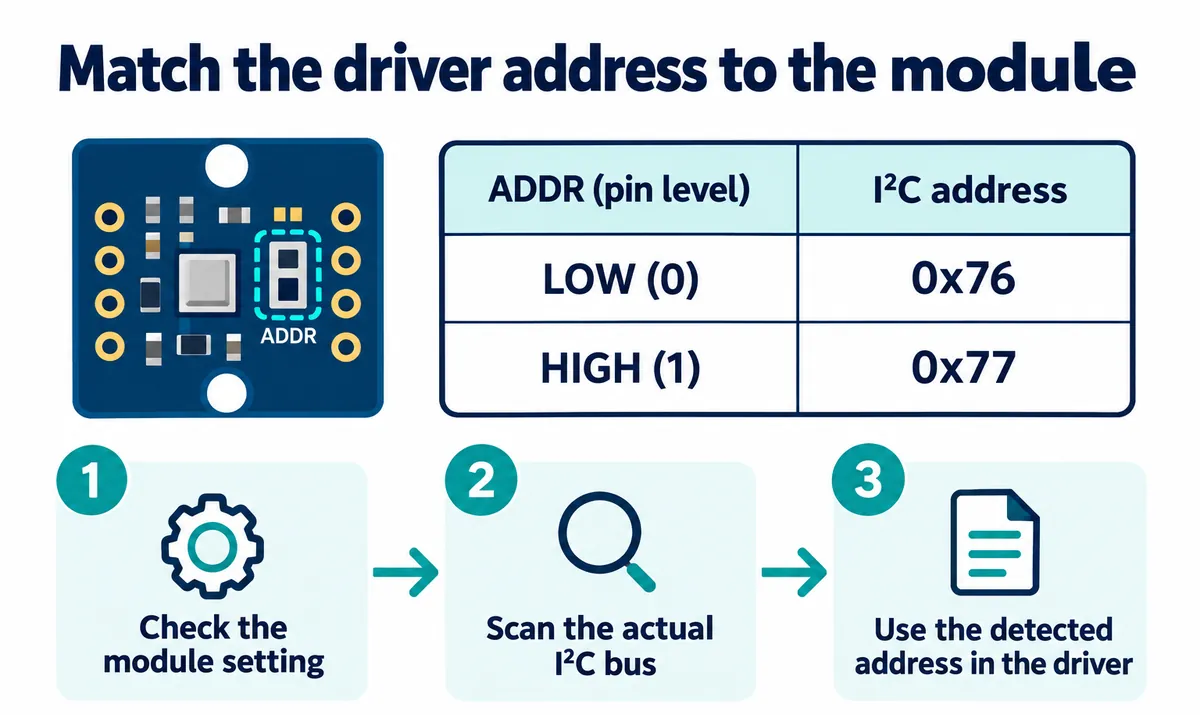
So the handover has to go beyond a package name. State the tested module revision, bus pins, selected address, firmware version, and a small example that exercises the intended measurement. Then a recipient can tell whether a failure is a missing file, a communication problem or an unexpected reading.
Our installation run did not include a sensor measurement. Treat an installed file as installation evidence, then test the exact driver with the intended hardware. Tie any measurement claim to the experiment that supports it, not to a package description.
Make the package contents explicit
The package folder held package.json, README.md, LICENSE and a code folder containing the driver and an example program. The manifest decides which of those the installer actually copies. The core mapping is:
{
  "name": "bmp280_driver",
  "version": "1.0.0",
  "urls": [
    ["bmp280_float.py", "code/bmp280_float.py"]
  ]
}
Read each pair as destination first, source second. This mapping installs the driver only, not every file in the folder. If you supply an example program, explain how to run it without overwriting the recipient's existing startup program. If the driver needs another module, declare that dependency and verify it installs.
The README should make the first test easy to repeat: what hardware to connect, which import to use, what the example does, and what output to expect. Package metadata organizes files; it does not replace those instructions.
Two ways to publish a package
We also tried two upload routes with other packages. The first uploads a ZIP archive; we used a BH1750 package for it. The manifest must sit at the archive root, not inside an accidental extra folder, and the form required a package.json with a name and version.
The second route points the service at a Git repository, with a URL, a branch and target directories. A moving branch such as main says where to fetch code at that moment. For a reproducible handover, also record the exact commit the release was made from.
Hosting the package directly for mip installation is a third option, as the MicroPython documentation describes. Pick the route your collaborators can reach and maintain. In a March 2026 MicroPython community discussion about uPyPi, developers weighed the same choice, including existing repository-based installation and the purpose of a separate upload service. The decision that matters is how your team will find and preserve the release.
Name the next release, and test it again
One of our uploads was rejected because bmp280_driver version 1.0.0 already existed. That is a useful guard: a new release and another copy of an old one are different things. If the code changes, document the change, give it a new version, and keep the earlier files that existing prototypes depend on.
Before sending the handover, ask someone to follow the instructions on a spare board or a documented test setup. Check installation, import, communication with the actual module, and the expected reading. Save the firmware identification and the result with that release. That full rebuild is the acceptance step we recommend; our runs covered installation and upload, not the complete rebuild.