
The screen works in a small example. Add the network connection and the rest of the interface, and it stops with a memory allocation error. For a team building a desk display or handheld controller, that can look like a reason to buy a larger board. First ask a more useful question: how much memory does this operation need in one piece?
A MicroPython developer ran into this with a Pico W and a Waveshare display in an October 2023 discussion. The driver requested a 153,600-byte buffer. The author first blamed a firmware update, then reproduced the problem with the earlier version. Replies investigated the buffer size and available working memory; the suggested alternative driver still needed adaptation. There was no confirmed drop-in repair.
The starting distinction is simple: storage for files and memory used while a program runs serve different purposes. The examples below explain how we would investigate a prototype like this; they are not a new hardware measurement.
Count the allocation that failed
A frame buffer holds pixels while software prepares an image for the display. With tightly packed RGB565 pixels, each pixel takes two bytes. A 240 × 240 buffer therefore needs 115,200 bytes for pixel data alone, excluding other objects, communication buffers and runtime overhead. The MicroPython framebuf documentation explains the relationship between dimensions, format, stride and backing storage.
The file containing a logo might be much smaller. That file size does not tell you the size of the display's drawing buffer or the decoder's workspace. Nor does a flash-capacity figure tell you how much Python working memory remains after startup. Identify the allocation in the exception before changing the artwork or the hardware.
The same distinction appears outside MicroPython. In a public ESP32 display-library discussion, accessed October 10, 2026, the author reported about 330 KB free overall but a largest block of only 110,580 bytes, too small for the requested 115,200 bytes. That Arduino report illustrates the diagnostic question; its numbers and the replies' proposed fixes are not limits for a Pico or for every ESP32 build.
Free space may be split into smaller pieces
MicroPython allocates Python objects from a memory pool called the heap. As objects are created and released, gaps can remain between objects still in use. An allocation can fail when none of those gaps is large enough, even if their total looks sufficient. The MicroPython memory guide describes this fragmentation and recommends allocating large, persistent buffers early.
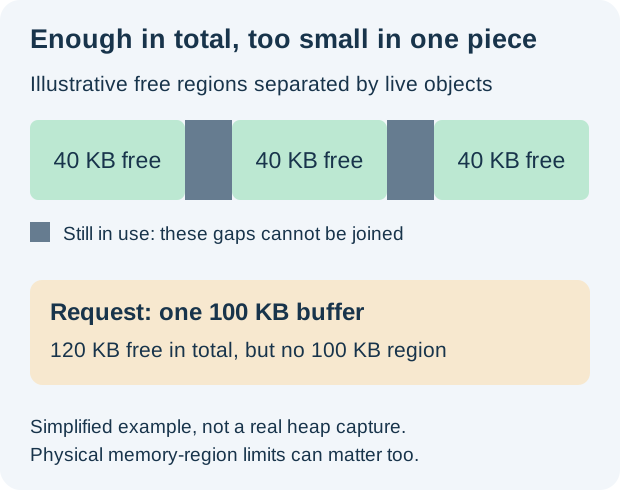
The sizes above are made up to show the shape of the problem, not measured on a particular board. Separate hardware memory regions can impose additional constraints, so fragmentation is not the only possible cause.
Garbage collection reclaims objects that are no longer reachable. It does not promise to rearrange everything still in use into a more convenient layout, so calling it repeatedly is not a guaranteed repair for a large-buffer failure. Reusing an existing buffer can be more useful than repeatedly creating a new one, provided the previous operation has finished with it.
Compare the same operation at meaningful checkpoints
For a MicroPython build, this small diagnostic fragment reports Python heap usage. Run it at controlled points in the program, such as before display setup and after the network has started:
import gc
gc.collect()
print("Free:", gc.mem_free())
print("Allocated:", gc.mem_alloc())
These are Python heap figures, not a report of every allocation made by every native driver, and they do not state the largest available block. Record the exact firmware, the failing request size and the operation order alongside them.
Compare a clean start with the real sequence a user follows: connect, open the main screen, visit another page and return. If the buffer fits only at startup, investigate allocation order and resource lifetime. If it never fits, compare the request against the actual usable memory and the driver's requirements. Keep those two investigations separate.
Choose a change the display path can support
Possible changes include:
- keeping one reusable buffer allocated early;
- reducing the drawing area;
- using a smaller color representation;
- a driver that supports partial updates, so it can work with strips of pixels instead of a whole-screen buffer.
Each option changes how rendering works. Simply shortening a bytearray without adapting the driver can create a different failure.
Before changing boards, agree on a small comparison: the same screens, assets, network activity and repeated navigation, with one memory strategy changed. Keep both the successful and failing logs. More external RAM helps only if the chosen hardware and firmware expose it in a way the required operation can use.
The decision is whether the intended interface fits with usable headroom throughout its actual workflow, not whether a single screen draws once after a clean boot.