
Your Ethernet board answers a ping, but the desktop application still cannot control it. At this stage, stop asking whether "the network works" and test a smaller interaction: send a known piece of text, show what the board received, and check the reply on the computer.
For a team building a connected exhibit, a bench instrument or a local controller, this gives hardware and application developers a shared checkpoint. You agree which side starts the connection, where it connects, and what a valid reply looks like before adding the real command.
On our bench we ran two complementary tests on a W5500-based board running MicroPython: first the board connects to a computer, then the roles are reversed. Both are short-message echo tests. An echo is a returned copy of the data, not confirmation that a physical action happened.
Agree who starts the connection
In TCP, the client starts a connection and the server waits at an address and port. These names describe roles in one connection. They do not mean only the client sends data, or that the server has to be a large computer.
| Test | Board role | Computer role | Connection destination |
|---|---|---|---|
| First | TCP client | TCP server | Computer at 192.168.1.6, port 8080 |
| Second | TCP server | TCP client | Board at 192.168.1.20, port 8000 |
Use addresses that fit your own network; the two ports belong to two separate tests.
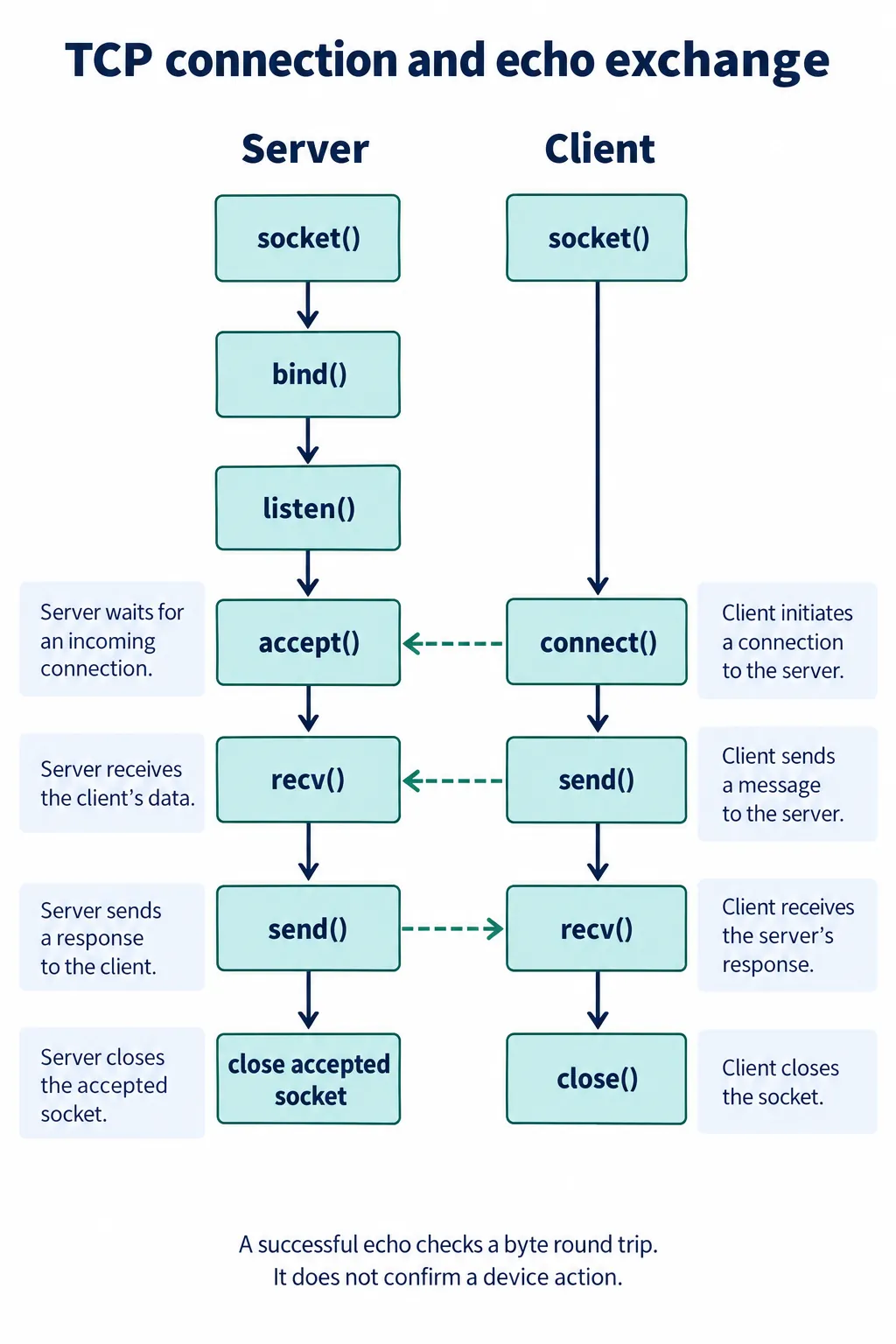
The diagram shows application calls, not the packets of the TCP handshake. accept() gives the server a new connected socket for one peer, and communication uses that socket. If the board is not yet reachable at its address, sort out the local network and ping first.
Let the board connect to a computer first
We used NetAssist on Windows as the test server: choose TCP Server, select the computer's active local address, set the port to match the board program, and open the listener before expecting the board to connect.
Pick the address from the active network interface, not from notes. Our own notes contained a 198.168... typo for 192.168..., which is an easy way to lose an hour. A server listening on a different adapter can be fully functional and still unreachable from the board.
The board initializes the WIZNET5K interface over SPI. In our setup that was GPIO19, 16 and 18 for MOSI, MISO and clock, GPIO17 for chip select and GPIO20 for reset. These assignments are board-specific. The MicroPython WIZNET5K reference describes the interface; it does not replace checking your own hardware and firmware support.
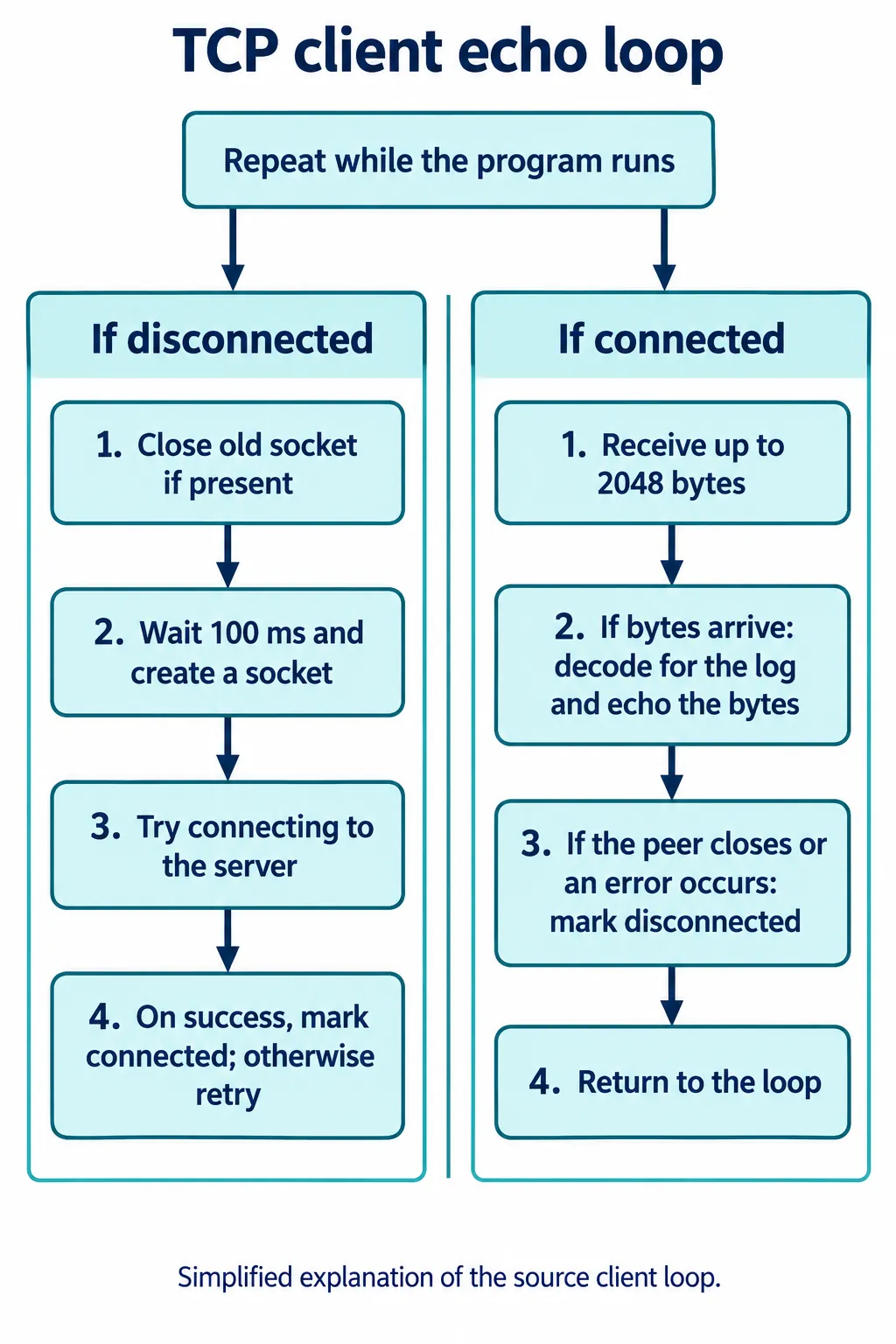
The core of the client loop is small:
data = s.recv(2048)
if data:
    print(data.decode('utf-8'))
    s.send(data)
else:
    conn_flag = False
Send a short ASCII string from the computer. Compare three things: the computer's transmit log, the board's receive log and the returned text. Keep the exact payload in the record rather than writing only "connected successfully." Our recordings show the echo working for a short message; they are not a sustained connection test.
Reverse the roles when the application connects to the device
If the desktop application will find or address a local device, run the second test. The board creates a listening socket, binds its address and port, and waits in accept(). The computer is now the client, so NetAssist's destination is the board, not the computer.
s = socket()
s.bind(('192.168.1.20', 8000))
s.listen(5)
conn, addr = s.accept()
The 5 is the pending-connection backlog. It does not make the loop serve five active clients; our program handled one accepted connection at a time.
After connecting, the computer reported success and the board printed the peer address and port. The peer port in the board's log can differ from the board's listening port; it identifies the computer's end of the connection. A short test string came back to the computer. That supports the exchange; it does not establish reconnection endurance or reliable handling of every message size.
Add message rules before replacing the echo with a command
An echo is a good milestone because it separates basic transport from application behavior. The next step is defining what the bytes mean. TCP carries an ordered byte stream; one recv(2048) call does not promise one complete application message.
A command ending in a newline can arrive in two reads, or two commands can arrive together. Keep incomplete bytes until your chosen boundary is present, cap the maximum accepted message size, and parse only complete messages. Decode text after assembling it, so a split multi-byte character is not mistaken for corrupt input. The Python socket HOWTO explains why an application needs its own message boundaries.
For a first local controller you might define a request such as SET_LEVEL 25 and a reply describing the accepted value. That is a proposal, not something we implemented. Decide what "accepted" means and whether you also need a later report of the actual output state. If a repeated command could cause a repeated action, define how retries are identified before resending anything automatically.
Our server-side loop has gaps to fix before it carries commands. It compared the decoded text with the literal string NULL, which is not how a closed connection is detected; an empty receive result is. It also passed decoded text to a send call that expects bytes. Check the count returned by send(), or use a complete-write approach suited to your blocking mode, because a call can send fewer bytes than requested. Close abandoned sockets explicitly. The MicroPython socket documentation covers the byte interface, short writes, cleanup and timeouts, which can vary by port.
Pull the cable before calling the connection finished
Disconnection is part of the user experience. An Electric Imp forum report from 2017 describes a transmit timeout that never reached the caller in one W5500 library. Reports like that motivate failure testing; their fixes do not automatically apply to a MicroPython build.
Try a normal disconnect, a cable removal, a restart of the computer application and an unavailable server. Record what each side reports and how long it takes before another exchange succeeds. Add a bounded wait and a clear stale or offline state. Our retry loop is a starting point, but its blocking calls and broad exception handlers need work before they share a device with buttons, a screen or time-sensitive tasks.
Keep the first tests on a controlled local network. The echo programs have no authentication, no encryption and no rule about who may send a control command. Those are product requirements to settle before the interface goes beyond the bench.
Once you can show the request, the reply and the behavior when the link drops, the hardware and application teams have something concrete to integrate. Keep the network arrangement, the firmware version and a short log of one successful and one failed exchange with that result.