
Your sensor prototype has reached the useful stage: it displays readings, saves a log and responds to a button. Occasionally, though, the saved row and the screen disagree. Before replacing the sensor, check whether the software assembled that row from one complete update, or picked up part of it just as the next update arrived.
This matters when a team moves from a single-value demonstration to a device people will use to compare results. A reading may need to travel with its timestamp, channel or measurement number. Each field can look reasonable on its own while the combination describes something the device never recorded.
The practical question is simple: which values must stay together? Decide that before adding filters, extra decimal places or a faster display. Those changes cannot repair a record assembled from mismatched updates.
How a believable record goes wrong
Imagine that a measurement handler stores two fields: a sequence number and a value. The main program reads the sequence number first. Before it reads the value, the handler runs and replaces both fields. The main program resumes and takes the new value. Nothing has to crash for the result to be wrong.
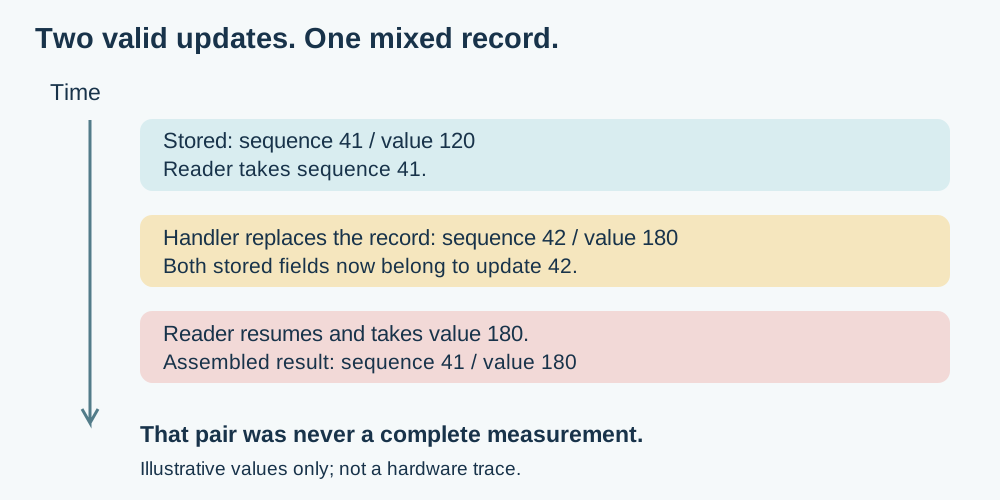
This is one form of race condition: the result depends on when two pieces of work overlap. It is different from a noisy sensor. Averaging mismatched records may make a graph smoother while hiding the software problem. It is also different from a stale reading: an older, complete record can be internally consistent, while a newly displayed record may not be.
A classic MicroPython example has a Pyboard timer appending generated values to an array while the main program processes the array and resets its count. The pairing of the data and the count is the useful lesson. That example uses pyb calls, so it is not a drop-in Pico program, and it is not a sensor measurement.
Hand over a record before formatting it
Start by describing the smallest complete record your product needs. For a single sensor, that might be a value, an acquisition timestamp and a sequence number. For multiple sensors, document whether the values were acquired together or at separate times. Protecting software access does not make separately sampled sensors physically simultaneous.
Then give the writer and reader an explicit handoff. The writer prepares data; the reader takes a consistent snapshot into storage the writer will not change while it is in use. Only after that handoff should the reader format text, update the display or save a file. The exact mechanism depends on which execution contexts can access the data.
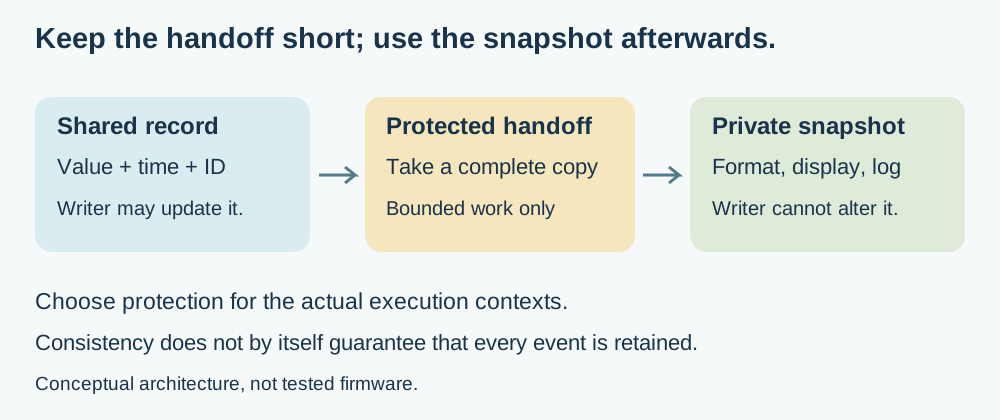
The MicroPython interrupt-handler guidance describes short critical sections that stop an interrupt from changing shared data during access. It also warns that delaying interrupts can disrupt timely servicing of devices. Teaching examples sometimes print inside the protected region; in a product, keep slow output outside it and use a short, bounded copy or ownership transfer instead. "Protected" here means a mechanism verified for the actual writer and reader, not an instruction to disable every interrupt.
Check what can still change the data
Identify the writer precisely. Is it a hardware interrupt handler, a scheduled Python callback, a second processor core or a peripheral transferring data directly into memory? These are different situations, and a protection method chosen for one should not be assumed to stop the others.
An official MicroPython discussion opened September 3, 2023 shows the confusion. The author asked whether events were preserved while interrupts were disabled. A maintainer's September 13 explanation separated the hardware event, the low-level handler and the later Python callback, and explained why repeated events are not necessarily preserved as separate occurrences.
For the product, two promises need separate checks: that a record stays consistent, and that required events are not lost. A live display may only need the newest complete sample. A logger meant to retain every measurement needs sufficient buffering, an overflow policy and evidence that the writer cannot silently outrun the reader. Increasing a buffer without measuring the workload only postpones that question.
Make the failure visible before testing real measurements
Use a deliberately recognizable test pattern in software. For example, have the producer emit records whose second field is always ten times their sequence number. The consumer can then flag any pair that breaks that relationship. This is a proposed diagnostic, not a claim that a particular board has passed it.
Run the pattern while the display redraws, logging runs and other intended features are active:
- keep the sequence numbers, so the test can tell an inconsistent pair from a skipped record;
- count rejected records and buffer overflows instead of hiding them behind a screen that only shows the latest value;
- avoid adding slow debug printing inside the handoff being measured.
Record the board, firmware version, event rate and enabled features with the result. A clean run supports the tested arrangement and conditions; it does not prove every timing combination is safe. Pair the test with a review of ownership and synchronization, especially if a later change adds a second core, a different callback mechanism or direct memory transfers.
What to ask for before the next user trial
You do not need to become an interrupt specialist to set a useful acceptance requirement. Ask for a clear definition of a complete record, an explanation of who may change it, and a test showing that the display and log use the same complete data. If the product intentionally skips intermediate readings, that should be stated, not mistaken for a fault or hidden as a success.
The result is a more meaningful demonstration: not just a screen that keeps updating, but a data path whose records have a defined meaning. That makes later comparisons, calibration work and user feedback easier to interpret.