
A browser can be a convenient first interface for a hardware prototype: open a local page, press a button and watch the device respond. For a designer testing an interactive exhibit, or a small team building a setup tool, that may be enough to start learning from users. The next question is what happens when someone presses another button before the first action finishes.
We built a small Ethernet web server in MicroPython to make that question concrete. Its page offers ON, OFF and BLINK buttons for an LED. The page and terminal log show the controls working; the code also contains a pause during which it cannot handle the next request. Here is what a browser-controlled prototype needs before its first user trial.
Trace one click from the page to the board
The test ran MicroPython v1.23.0 with a W5500 Ethernet interface on SPI0 at 2 MHz, with GP19 for MOSI, GP16 for MISO, GP18 for clock, GP17 for chip select and GP20 for reset. GPIO25 is the LED output. These are our bench connections, not a universal wiring prescription for every Pico-family board.
The program assigns 192.168.1.20 and listens on port 80. On our local network, entering that address in a browser opens the control page. A later prototype needs an address suitable for its own network, but address setup is only the beginning.
The buttons are links. ON requests /?led=on; OFF and BLINK use the corresponding values. The board accepts the connection, reads up to 1,024 bytes of the request, changes the output, builds an HTML page and sends it back. That round trip gives the tester visible feedback without installing a separate app.
The request handling in this test was deliberately minimal. It converted the received bytes to a string and checked whether /?led=on appeared at character position 6, which is where it lands after the b'GET prefix of a printed bytes object. That is a shortcut, not an HTTP parser: a different request shape breaks it. For a more capable interface, parse the request method and target explicitly.
The terminal log recorded a GET request for ON and the program's LED ON message. It then showed a separate request for /favicon.ico, the browser's page icon. Opening a page does not necessarily produce exactly one request, and your handler should expect that.
The pause is inside the action
The BLINK handler turns the LED on and off three times, waiting 0.2 seconds at each step:
for i in range(3):
    led.value(1)
    time.sleep(0.2)
    led.value(0)
    time.sleep(0.2)
Those six waits add up to 1.2 seconds, before other processing and network time. That figure is calculated from the code, not a measured latency. Only after the loop does the program build and send the page response. While it is blinking, the handler cannot return to accept the next connection, so other button presses are not handled during that interval.
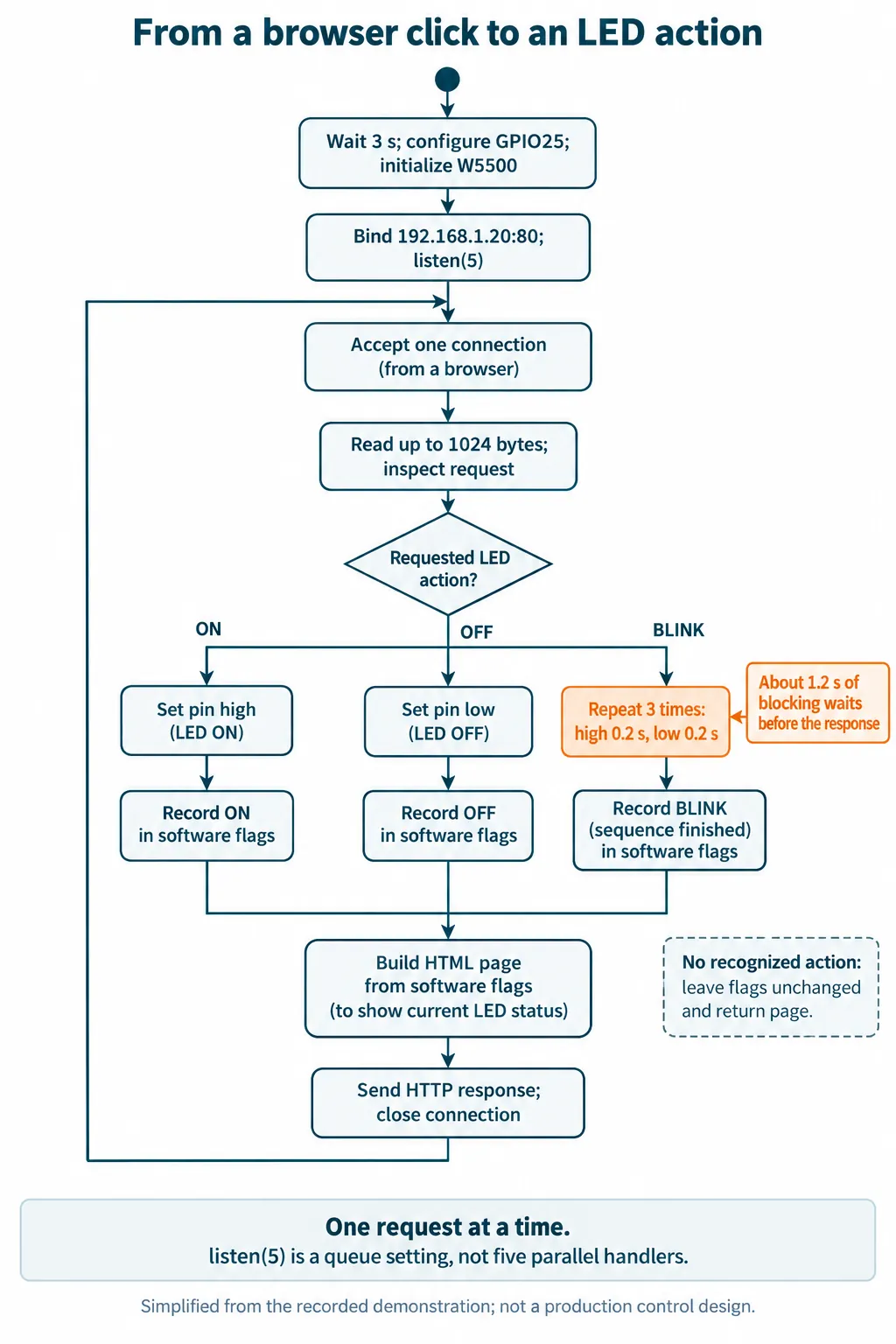
The queue setting does not change that behavior. listen(5) allows pending connections; it does not create five independent handlers. The MicroPython v1.23 socket documentation distinguishes the listening backlog from accepting a connection. This program processes one accepted connection through to closure before returning for another.
For a brief LED demonstration, waiting may be acceptable. For a calibration sequence, a timed lighting effect or another longer operation, the team needs to choose what a second click means: queue it, reject it with a clear busy message, or interrupt the current action. Those are design choices, not capabilities we have demonstrated.
Do not assume every slow page has this same cause. In an Arduino Forum thread from August 2021, a developer saw variable response delays and eventually reported that testing from another computer removed the problem. That report supports testing the whole path. In our example, the blocking wait is directly visible in the code.
Make the status text tell the truth
After the three flashes, the program sets a blink flag. The generated page then says BLINK, although the sequence has already finished and the final pin write was low. At startup, all three flags are zero, but the page's fallback also selects the word BLINK. The label is derived from software flags; it is not a live measurement of the LED.
The terminal messages for OFF and BLINK establish that the corresponding code paths were reached. They do not measure optical output or provide independent feedback from an attached product.
For a user trial, labels such as "Last action: blink completed" and "Output command: off" would be more precise for this implementation. If the product really needs to report that a mechanism reached a position, it needs evidence of that position. Changing the page text alone cannot provide it.
Decide what a repeated request should do
An ON command describes a desired state. A BLINK command starts a sequence. Repeating them has different consequences: requesting ON again leaves the output high, while requesting BLINK again runs another sequence. A tester refreshing the action URL can therefore repeat an operation.
Before adapting this pattern beyond a demonstration, separate reading status from asking the device to act. HTTP defines GET as a read-oriented method; RFC 9110, section 9.2.1 explains why actions should not be triggered by safe retrieval methods. Use an appropriate action request and decide how repeated submissions are handled. Switching to POST alone does not prevent duplicates or verify who is allowed to control the device.
There are also ordinary server details to resolve: read complete requests within a defined limit, handle incomplete clients with timeouts, and check that responses are fully sent. Our test read once, searched a string and wrote the response in several calls. The same socket reference notes that send may return after sending fewer bytes than requested.
Give the first tester a predictable experience
The useful next milestone is not a prettier button. It is a tester knowing whether the device accepted an action, whether it is still busy, and whether trying again will repeat the action. Agree on those behaviors before extending the LED example to your own hardware.
| Trial | Question to settle |
|---|---|
| Press BLINK, then OFF immediately | Does OFF wait, get rejected, or interrupt? Is that visible? |
| Refresh the action page | Does the operation repeat? Is that intended? |
| Open the interface in a second tab | Do both views describe the same current state? |
| Disconnect during an operation | What continues on the device, and what does reconnecting show? |
| Restart the board | Does the first status message describe a known startup state? |
We have not run these checks yet. Start with the LED before connecting an output whose repeated or delayed action would matter. If the interface will leave a controlled bench network, access control and the network design also need explicit decisions; this example has neither authentication nor encrypted HTTP.