
Your developer sends a compiled module for the next prototype. The upload finishes and the file appears on the board, but the application stops with incompatible .mpy file. Repeating the copy may not help: the device can store a file that its runtime cannot load.
This is a practical handoff problem when a small team changes a board, updates firmware or receives a library from another developer. The package needs to identify what it was built for, and the test needs to show that the intended file actually runs. A successful transfer establishes neither on its own.
A Quectel forum question opened October 1, 2026 shows the issue is current. An EC200U user reported rejected compiled files despite attempts to match the reported MicroPython version. On October 8, the vendor asked about its QPYcom workflow and linked documentation; the visible exchange contains no confirmed resolution. That platform needs its own answer, but the broader handoff question applies to any compiled-module delivery.
What our install, compile and copy sequence showed
On a Windows workstation we installed mpy-cross, the tool that prepares code for MicroPython, with pip install mpy-cross; pip reported package version 1.27.0.post2. That identifies the compiler we installed. It says nothing about which firmware runs on the eventual target.
We then compiled main.py and microMLP.py. The .mpy outputs appeared beside their .py sources, with smaller file sizes. A compiled file packages code in a form the runtime can load without compiling the source on the board. It is different from a desktop Python .pyc file, and changing an extension does not convert one format into the other. The smaller size says nothing about target compatibility or runtime performance.
The intended benefit is avoiding the board's source-compilation work during import. A copied .mpy file is also different from code frozen into a firmware build, and neither technique removes the memory needed for the application's live objects. The more immediate question is whether this target can load this particular output.
Finally, we used mpremote to copy main.mpy and list the files on the device. The command reported the copy as up to date, and the listing contained both main.mpy at 800 bytes and main.py at 1401 bytes. That sequence did not include a compiled import or a power-on run. It records a useful transfer step, not a completed deployment test.
Match the compiled format to the runtime
The MicroPython .mpy reference describes compatibility checks beyond the filename: the file-format version, the supported small-integer width, and additional requirements when native machine code is present. Native code also brings architecture and sub-version considerations. An ordinary bytecode module and a native-code module should not be treated as identical packages.
Record the target's implementation information before choosing a rebuild. On a MicroPython target, the following prints that information without changing files or configuration:
import sys

print(sys.implementation)
print(getattr(sys.implementation, "_mpy", None))
print(sys.path)
Keep the full implementation output, especially for a manufacturer's fork, and do not assume every fork exposes the same fields or uses the upstream encoding unchanged.
On the computer, record the actual compiler executable and its version, together with the build command and source revision. Two terminals can resolve the same command name to different installed tools. Conversely, different MicroPython release labels do not automatically mean incompatible bytecode: use the format's documented compatibility requirements and the target's platform guidance.
Confirm which file the test is loading
Our device listing shows another trap: source and compiled versions can coexist. The upstream import rules check for foo.py before foo.mpy within a directory while searching the module path. A test that imports foo successfully may therefore have loaded the source file, not the compiled candidate.
Use an isolated test module name or a controlled test directory to remove that ambiguity, while keeping the source and a recovery copy. Start a fresh interpreter session when repeating the test, so a previously imported module does not stand in for a new load. Keep the startup entry point separate from the library being checked, and follow the actual port's boot rules.
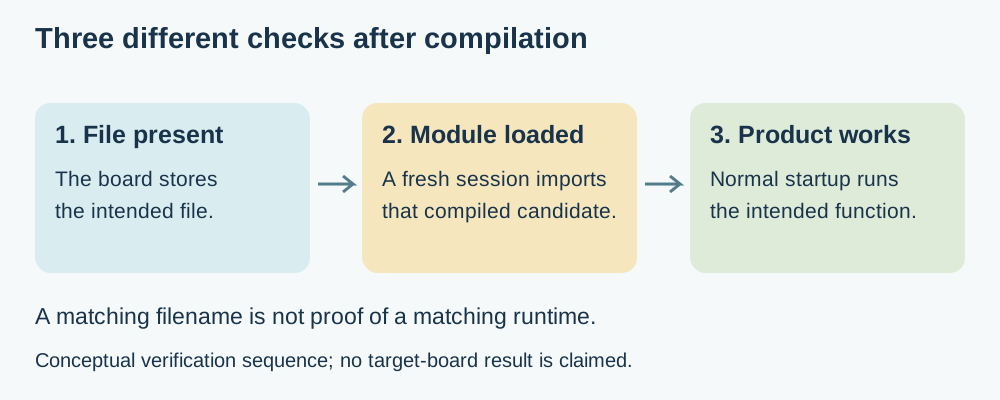
If a minimal compiled module is rejected, investigate its build format and target support first. If it imports but the application fails later, keep the new traceback: a missing dependency, unsupported API or application error needs a different investigation. Do not describe every post-upload failure as a compiler mismatch.
Keep vendor packaging distinct from ordinary compilation
The EC200U thread also shows why a familiar extension can mislead. Quectel documents its own firmware-and-script packaging workflow, including an encryption option that produces .mpy files. That is platform-specific behavior, not evidence that ordinary upstream mpy-cross provides the same packaging or code protection.
For a module supplied by a vendor, request the matching firmware requirements and the supported build or packaging method. If source is available, keep it with the build record. If only a binary is supplied, establish how a compatible replacement binary will be obtained before making an unplanned firmware change.
Make the handoff test small and repeatable
- Verify a harmless minimal module compiled with the intended toolchain on the intended firmware.
- Test the real module's imports and a representative function.
- Start the complete application using the product's normal power and entry sequence, without relying on the development computer.
Keep those outcomes with the firmware identifier, source revision and compiler settings, so the next person can reproduce the working combination rather than guess which download produced it. The install, compile and copy sequence remains useful; the load and startup checks turn it into a dependable handoff. We have not yet run those load and startup checks on a target board for this note.