
A screen update feels slow, so someone adds a line to make the processor run faster. Or a battery-powered prototype gets a lower clock setting in the hope of saving energy. The program still starts, but the next test shows a display problem or unreliable serial communication. Before replacing the hardware, check exactly which clocks the change affected.
This matters when a small team combines code from several demonstrations. One driver may initialize its interface before the clock change and another afterward. The CPU frequency printed in the console tells you about the processor; it does not establish the signal timing at every connector or the speed of the complete operation.
On RP2040 and RP2350 boards the system, peripheral and USB clocks have separate roles. That distinction is useful even if you never edit a clock register yourself. Make the clock configuration part of the recorded working setup, alongside the board revision, firmware and drivers.
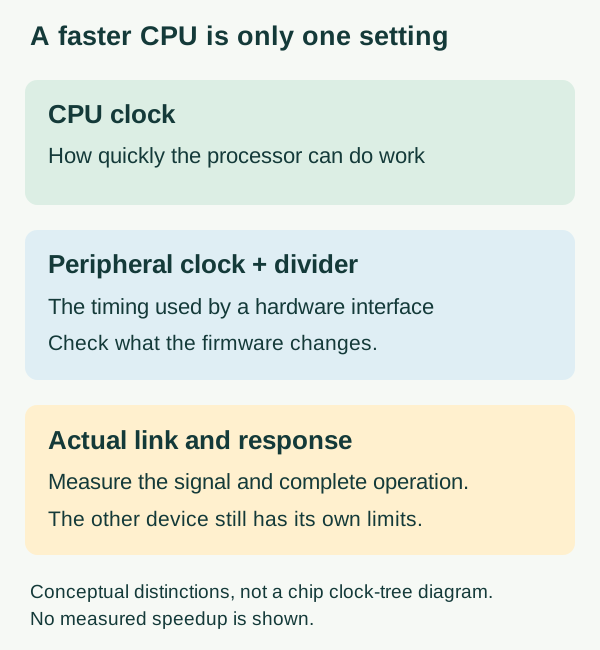
Find out what the clock-setting call changes
In MicroPython's RP2 port, machine.freq() can control both processor frequency and the clock used by UART and SPI. The version 1.29.0 RP2 reference describes the optional peripheral-frequency argument and warns that changing that clock changes the baud rate of existing UART and SPI instances, which may need reconfiguration. This is platform-specific behavior to check, not a rule that every CPU frequency change breaks communication.
The useful distinction is between the clock feeding an interface and the divider that turns it into the requested signal rate. If the input clock changes while a divider stays the same, the output rate changes too. A configuration value saved earlier in the program is therefore not evidence of what is appearing on the pin now.
Make the intended startup order explicit. Establish the supported clock configuration, then initialize the interfaces that depend on it. If the product must change clocks during operation, the firmware needs to handle active transfers and any necessary reconfiguration as part of that transition. A register write copied from an old display example is not a portable fix across boards and firmware versions.
Check the driver before assuming the link got faster
A December 24, 2023 MicroPython issue gives a practical example. A developer building Pico video playback reported slow SD-card reads after trying higher processor and SPI settings. In a follow-up, they found that the SD-card driver's own initialization accepted a baud-rate setting. The reported improvement still did not scale directly with that rate, and the issue remained open with a request for more information when we reviewed it on October 10, 2026.
That account does not establish a maximum speed for your card or display. It shows why the driver belongs in the investigation: a driver may set up or change the bus itself. Ask which configuration is actually in force during the transfer, then measure the operation that matters, such as reading a frame and displaying it, rather than timing only a short calculation.
Changing the CPU clock also cannot shorten every part of that operation. Waiting for a device, moving data and preparing the next update are different stages. Keep the intended data and output unchanged when comparing configurations; otherwise a faster result may simply reflect doing less work.
A responsive console is a first check, not a stability result
Hobby experiments with RP2040 clock and regulator settings, sometimes on modified firmware, often use continued console responsiveness as their sign of success. Careful authors say plainly that this is not a proper stability test. That limitation is the point: a frequency reached in an experiment is not a qualified operating point for another unit or a small production batch.
For a product prototype, stay within the operating conditions established for the actual hardware unless a separate engineering investigation justifies otherwise. A software API accepting a number does not establish the chip, memory and board's behavior at that setting. This note does not recommend overclocking values or voltage changes.
Likewise, a lower CPU frequency is not a measured battery-life improvement. Check energy over the actual duty cycle and confirm that the slower work still finishes when required. The display, radio, sensor and time spent active all remain part of the product. Treat any energy benefit as a result to measure, not an assumption carried into a customer promise.
Keep or reject the change using the whole prototype
Run a controlled comparison:
- Save a known-working configuration. Record the reason for the change, the firmware and driver versions, the clock settings and the expected response.
- Make one controlled change and review the peripheral settings it affects.
- Repeat the same workload with the real display, storage and communication tasks enabled. Measure relevant signal rates and keep error counts as well as response times.
- Check a cold start and any clock transition the application actually uses.
If the new setting introduces intermittent errors, return to the baseline to see whether they follow the change. That comparison is more useful than adding further timing changes until a short demonstration happens to work. We have not run such a comparison for this note; it is the procedure we would use.
The decision is whether the configuration improves the required interaction while preserving correct operation, not whether the processor accepts a higher number.