
If you are prototyping a shared calendar for a home or a small studio, a colored date has to answer a question. Does it mean today, an appointment, or the day someone just touched? A neat month grid can still leave people unsure what they are looking at.
Public projects show why the distinction matters. In a family-calendar build shared on Reddit, the author describes replacing vague activity dots with event counts and using a bar for an event that spans several days. The useful idea is the meaning given to each mark, not the novelty of the screen.
We used LVGL's calendar widget with MicroPython in the LVGL browser simulator to review that meaning before building any synchronization or reminders. First we marked a fixed "today," then added two highlighted dates.
Separate today from the month on screen
Our first test created a centered 250 by 250 pixel calendar, set March 16, 2026 as today and March 2026 as the month to show. Those are separate settings, and they should stay separate: browsing another month must not change the device's idea of the current date.
calendar = lv.calendar(scr)
calendar.set_size(250, 250)
calendar.center()
calendar.set_today_date(2026, 3, 16)
calendar.set_showed_date(2026, 3)
The result outlined the 16th but showed no month or year heading. For a device someone glances at from across a room, add enough context that a date number cannot be mistaken for the same day in another month. Also decide how "today" gets updated. This test used a fixed date, not a running clock.
Give highlighted days a meaning
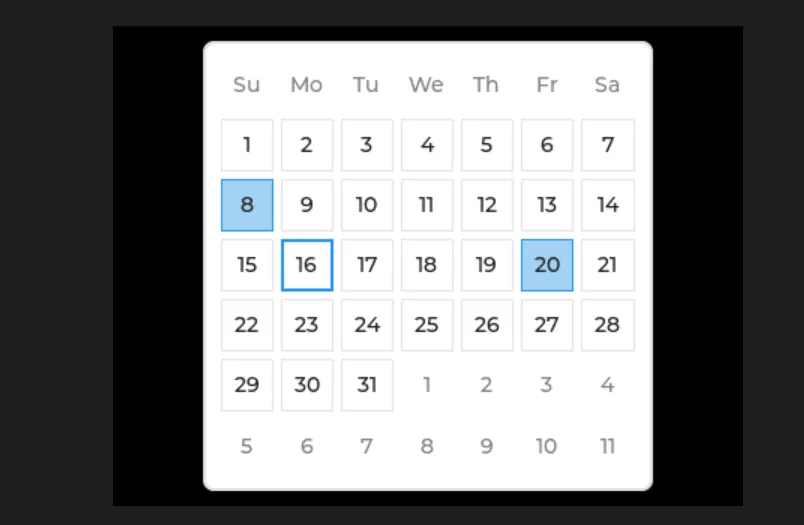
The second test enlarged the calendar to 300 by 300 pixels and passed two dates, March 8 and March 20, to set_highlighted_dates. Both were filled while the 16th kept its outline.
To us those were "important dates." A viewer sees only two blue squares. For a studio booking display, add the booking name or a short legend. For a family planner, decide how people tell whose event it is. A highlighted day alone cannot explain two different events on the same date.
The LVGL 9.0 calendar API keeps the current date, the shown month and the highlighted-date array separate. Keep your event records separately as well, rather than treating the visual highlights as a schedule database.
Decide where real dates will come from
These tests settle presentation. The next decision is the information source. A manually configured display, a synchronized shared calendar and a device that triggers an action on a date are three different projects; pick the smallest one that tests the intended use.
As an example of what a connected calendar needs, the Paperlesspaper CalDAV integration exposes separate settings for the calendar collection, time zone, date locale and visible range. It is a third-party product, unrelated to our test, but it shows how much information sits behind a month grid.
Agree on what the device shows before its clock is valid and after a failed synchronization. A "last updated" label helps distinguish a cached schedule from fresh information. None of that exists in our simulator tests; they establish no network access, saved appointments or alarms.
Test the display with a real schedule
Before adding features, give a tester a small, realistic set of dates. Ask them to identify today, the next relevant event and what a highlight means. Include a month boundary and more than one event on the same day. If they need an explanation, improve the labels or switch to a short agenda view instead of packing more meaning into color.
Then test the chosen data path on the target hardware: the date change at midnight, a restart, an outdated cached schedule and a failed refresh. On a touch screen, selecting a date needs its own event handling, which we did not build here. Those tests turn a readable calendar mockup into a clear specification for the next engineering step.