
A bedside device that displays breathing or sleep information needs to explain more than a number. After a restart, while someone changes position, or when a report stops arriving, the user needs to know whether the device is still measuring. Leaving the last value on screen can make a disconnected or unready prototype look reassuringly normal.
On our bench we integrated a GraftSense R60ABD1 millimeter-wave radar module with a GraftPort-RP2040 board running MicroPython. Alongside the connection itself, we recorded firmware-dependent reporting failures and the steps that recovered them. The strongest evidence is about integration and communication. It is not an overnight validation of sleep or physiological measurements.
What the bench demonstration actually did
We connected the radar carrier to UART0 and held it in front of the chest, about 20 cm away. That makes a convenient communication check. It differs from the supplier's installation guidance, which specifies a greater distance for breathing and heartbeat detection.
The code used 115200 baud, with GP16 transmitting and GP17 receiving. The carrier labels can be confusing: MTX is named from the host's perspective and connects to the radar's receive signal internally. So GP16 goes to MTX and GP17 goes to MRX. Crossing them again at this carrier would undo the intended connection.
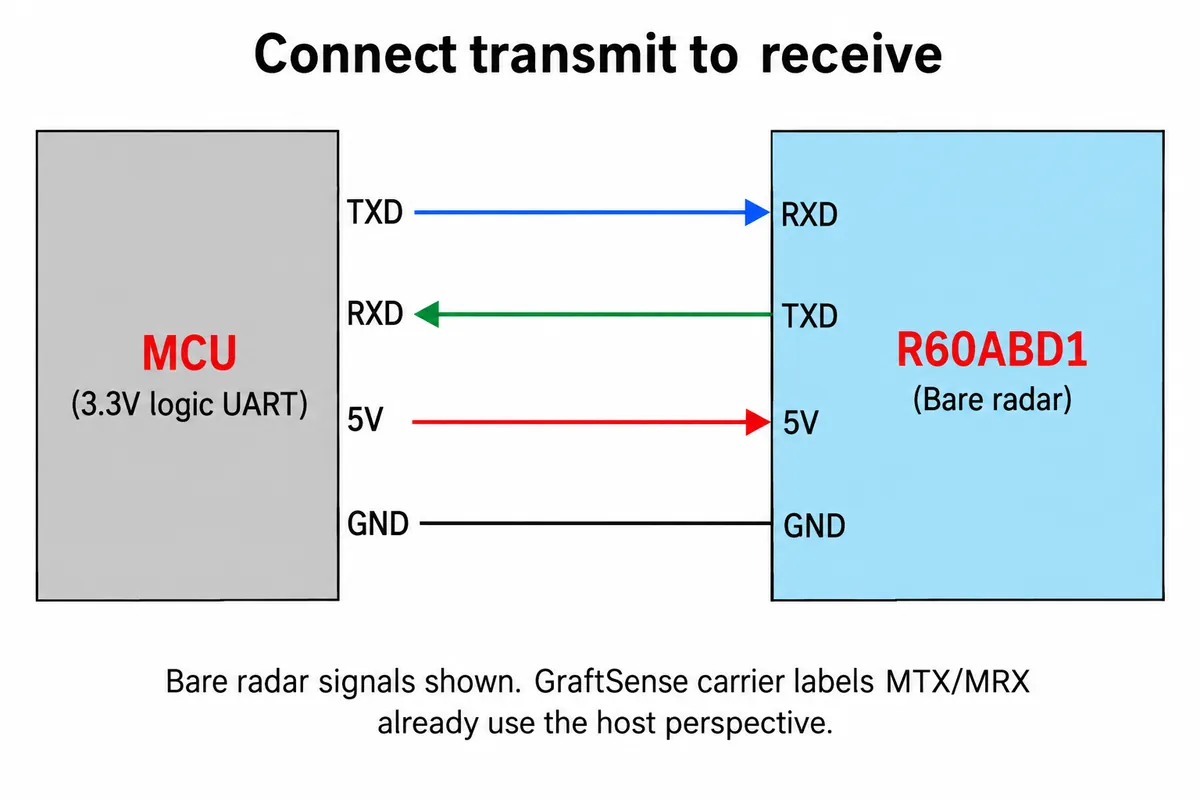
At the bare radar level, transmit still connects to receive, as the diagram shows. Power and logic levels must follow the actual board revision. The driver setup then identifies the module and firmware and checks initialization and feature switches. That order matters: a module name printed on the board does not tell you which reporting behavior its installed firmware implements.
A normal communication heartbeat is not a normal human heartbeat
The final application repeatedly printed Presence Status: Someone and Heartbeat Status: Normal. In this program, the second line comes from query_heartbeat(), a protocol health query. It is not a measured heart rate or a conclusion about the person in front of the module.
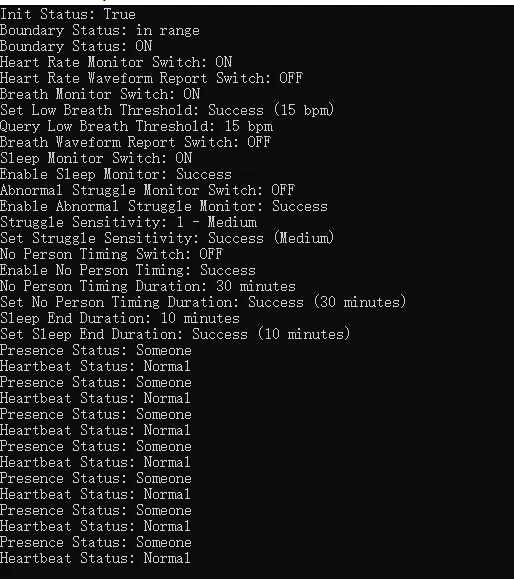
The code defined a broader function to print physiological reports, but its call was commented out in the final loop. What the log establishes is configuration responses and repeated presence and communication status. It does not show a breathing-rate trace, a validated heart-rate estimate or a night's sleep record.
For a customer-facing prototype, use separate labels for these separate states. "Radar connected" can describe communication. "Waiting for measurement" can describe a reporting delay. A physiological value needs its own validity and freshness rules. Those labels are proposed interface behavior, not features this log demonstrates.
Reboot behavior belongs in the prototype test
We compared firmware G60SM1SYv010107 with G60SM1SYv010309 on hardware identified as R60A, with a reported product model of R60ASM1. Keep identifiers like these in your test log rather than assuming every module with the same label behaves the same way.
On the newer firmware, we disabled presence, heart-rate, breathing and sleep reports, then removed and restored power. Enabling an individual function afterward did not restore the expected stream. Enabling all the functions without an additional power cycle did not help either.
The recovery that worked was to enable all four functions and power-cycle again. After that, individual switches behaved as expected within that power session. The older firmware did not show the same failure sequence. This is a version-specific observation, not proof of the internal cause; stored flags or a stuck state machine remain hypotheses.
That finding changes a product test plan. Test cold starts as well as software restarts, and repeat them after saving each configuration you intend to expose to a user. A demo that works after the developer's setup sequence may behave differently when a customer unplugs it overnight.
Replies and live reports share the same wire
We also saw an extra frame when enabling the no-person timer: a frame carrying the timer duration arrived before the expected acknowledgement. In another sequence, querying the sleep-end duration produced the expected reply followed by an additional sensitivity reply.
A receiver that treats "the next message" as the answer to its last command can therefore mix up data. The host should assemble complete frames, check their length and checksum, and route them by control and command fields. Command acknowledgements and live measurements need separate handling. Keep unexpected frames in a diagnostic log while checking their meaning against the actual firmware.
This is a recognizable integration problem beyond one module. In a December 2023 MR60BHA1 issue, a developer reported unstable breathing and heart-rate broadcasts while following the supplied example. It concerns another module and does not establish the same bug, but it supports checking reporting behavior before relying on a tidy display.
The enclosure and bed position are another experiment
The supplier's reference places the radar above the head of the bed, aimed toward the chest. Those dimensions are an installation example, not the geometry of our hand-held bench check. Test the intended bed, position and enclosure together before freezing the mechanical design.
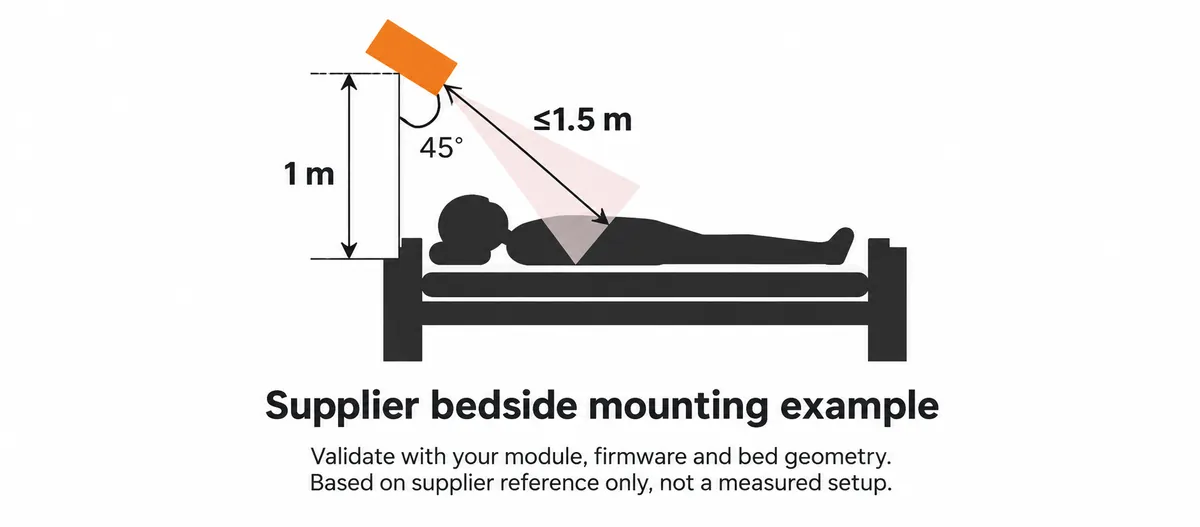
The supplier guidance also calls for more than 1 mm clearance to nearby components and 2 to 5 mm between the antenna and a non-metal cover. A cover that fits mechanically can still change the sensing arrangement. Current product documentation lists some values that differ from older manuals, so obtain documentation matched to your hardware and firmware rather than combining whichever numbers look best.
For the next prototype, record the installed firmware version, startup sequence, enabled reports and the time of each received measurement. Exercise normal placement, movement, an empty bed and a power interruption. Decide when the interface should replace an old value with an explicit "unavailable" state, and set those limits from the selected report's documented behavior and your observed tests, not a timeout copied from another sensor.
That gives a team a useful first milestone: a device that tells the truth about whether it has current information. Demonstrating that behavior is separate from validating sleep classification or medical accuracy, and nothing here supports using this prototype as a medical alarm.